扩展 OpenAPI
在某些情况下,你可能需要修改生成的 OpenAPI 架构(schema)。
本节将介绍如何实现。
常规流程
常规(默认)流程如下。
FastAPI 应用(实例)有一个 .openapi() 方法,预期返回 OpenAPI 架构。
在创建应用对象时,会注册一个用于 /openapi.json(或你在 openapi_url 中设置的路径)的路径操作。
它只会返回一个 JSON 响应,内容是应用 .openapi() 方法的结果。
默认情况下,.openapi() 方法会检查属性 .openapi_schema 是否已有内容,若有则直接返回。
如果没有,则使用 fastapi.openapi.utils.get_openapi 工具函数生成。
该 get_openapi() 函数接收以下参数:
title:OpenAPI 标题,显示在文档中。version:你的 API 版本,例如2.5.0。openapi_version:使用的 OpenAPI 规范版本。默认是最新的3.1.0。summary:API 的简短摘要。description:API 的描述,可包含 Markdown,并会展示在文档中。routes:应用的路由,来自app.routes。FastAPI 使用它们来收集已注册的路径操作,包括来自已包含路由器的那些。
技术细节
app.routes 是一个更底层的路由树。它可能包含 FastAPI 在内部用于包含的路由器的候选路由,而不仅仅是最终的 APIRoute 对象。
你仍然可以把 app.routes 传给 get_openapi()。FastAPI 会遍历这棵路由树来收集实际生效的路径操作。
注意
参数 summary 仅在 OpenAPI 3.1.0 及更高版本中可用,FastAPI 0.99.0 及以上版本支持。
覆盖默认值
基于以上信息,你可以用同一个工具函数生成 OpenAPI 架构,并按需覆盖其中的各个部分。
例如,让我们添加 ReDoc 的 OpenAPI 扩展以包含自定义 Logo。
常规 FastAPI
首先,像平常一样编写你的 FastAPI 应用:
from fastapi import FastAPI
from fastapi.openapi.utils import get_openapi

app = FastAPI()


@app.get("/items/")
async def read_items():
    return [{"name": "Foo"}]


def custom_openapi():
    if app.openapi_schema:
        return app.openapi_schema
    openapi_schema = get_openapi(
        title="Custom title",
        version="2.5.0",
        summary="This is a very custom OpenAPI schema",
        description="Here's a longer description of the custom **OpenAPI** schema",
        routes=app.routes,
    )
    openapi_schema["info"]["x-logo"] = {
        "url": "https://fastapi.tiangolo.com/img/logo-margin/logo-teal.png"
    }
    app.openapi_schema = openapi_schema
    return app.openapi_schema


app.openapi = custom_openapi
生成 OpenAPI 架构
然后,在一个 custom_openapi() 函数中使用同一个工具函数生成 OpenAPI 架构:
from fastapi import FastAPI
from fastapi.openapi.utils import get_openapi

app = FastAPI()


@app.get("/items/")
async def read_items():
    return [{"name": "Foo"}]


def custom_openapi():
    if app.openapi_schema:
        return app.openapi_schema
    openapi_schema = get_openapi(
        title="Custom title",
        version="2.5.0",
        summary="This is a very custom OpenAPI schema",
        description="Here's a longer description of the custom **OpenAPI** schema",
        routes=app.routes,
    )
    openapi_schema["info"]["x-logo"] = {
        "url": "https://fastapi.tiangolo.com/img/logo-margin/logo-teal.png"
    }
    app.openapi_schema = openapi_schema
    return app.openapi_schema


app.openapi = custom_openapi
修改 OpenAPI 架构
现在你可以添加 ReDoc 扩展,在 OpenAPI 架构的 info “对象”中加入自定义 x-logo:
from fastapi import FastAPI
from fastapi.openapi.utils import get_openapi

app = FastAPI()


@app.get("/items/")
async def read_items():
    return [{"name": "Foo"}]


def custom_openapi():
    if app.openapi_schema:
        return app.openapi_schema
    openapi_schema = get_openapi(
        title="Custom title",
        version="2.5.0",
        summary="This is a very custom OpenAPI schema",
        description="Here's a longer description of the custom **OpenAPI** schema",
        routes=app.routes,
    )
    openapi_schema["info"]["x-logo"] = {
        "url": "https://fastapi.tiangolo.com/img/logo-margin/logo-teal.png"
    }
    app.openapi_schema = openapi_schema
    return app.openapi_schema


app.openapi = custom_openapi
缓存 OpenAPI 架构
你可以把 .openapi_schema 属性当作“缓存”,用来存储已生成的架构。
这样一来,应用每次打开 API 文档时就不必重新生成架构。
它只会生成一次,后续请求都会使用同一份缓存的架构。
from fastapi import FastAPI
from fastapi.openapi.utils import get_openapi

app = FastAPI()


@app.get("/items/")
async def read_items():
    return [{"name": "Foo"}]


def custom_openapi():
    if app.openapi_schema:
        return app.openapi_schema
    openapi_schema = get_openapi(
        title="Custom title",
        version="2.5.0",
        summary="This is a very custom OpenAPI schema",
        description="Here's a longer description of the custom **OpenAPI** schema",
        routes=app.routes,
    )
    openapi_schema["info"]["x-logo"] = {
        "url": "https://fastapi.tiangolo.com/img/logo-margin/logo-teal.png"
    }
    app.openapi_schema = openapi_schema
    return app.openapi_schema


app.openapi = custom_openapi
覆盖方法
现在你可以用你的新函数替换 .openapi() 方法。
from fastapi import FastAPI
from fastapi.openapi.utils import get_openapi

app = FastAPI()


@app.get("/items/")
async def read_items():
    return [{"name": "Foo"}]


def custom_openapi():
    if app.openapi_schema:
        return app.openapi_schema
    openapi_schema = get_openapi(
        title="Custom title",
        version="2.5.0",
        summary="This is a very custom OpenAPI schema",
        description="Here's a longer description of the custom **OpenAPI** schema",
        routes=app.routes,
    )
    openapi_schema["info"]["x-logo"] = {
        "url": "https://fastapi.tiangolo.com/img/logo-margin/logo-teal.png"
    }
    app.openapi_schema = openapi_schema
    return app.openapi_schema


app.openapi = custom_openapi
验证
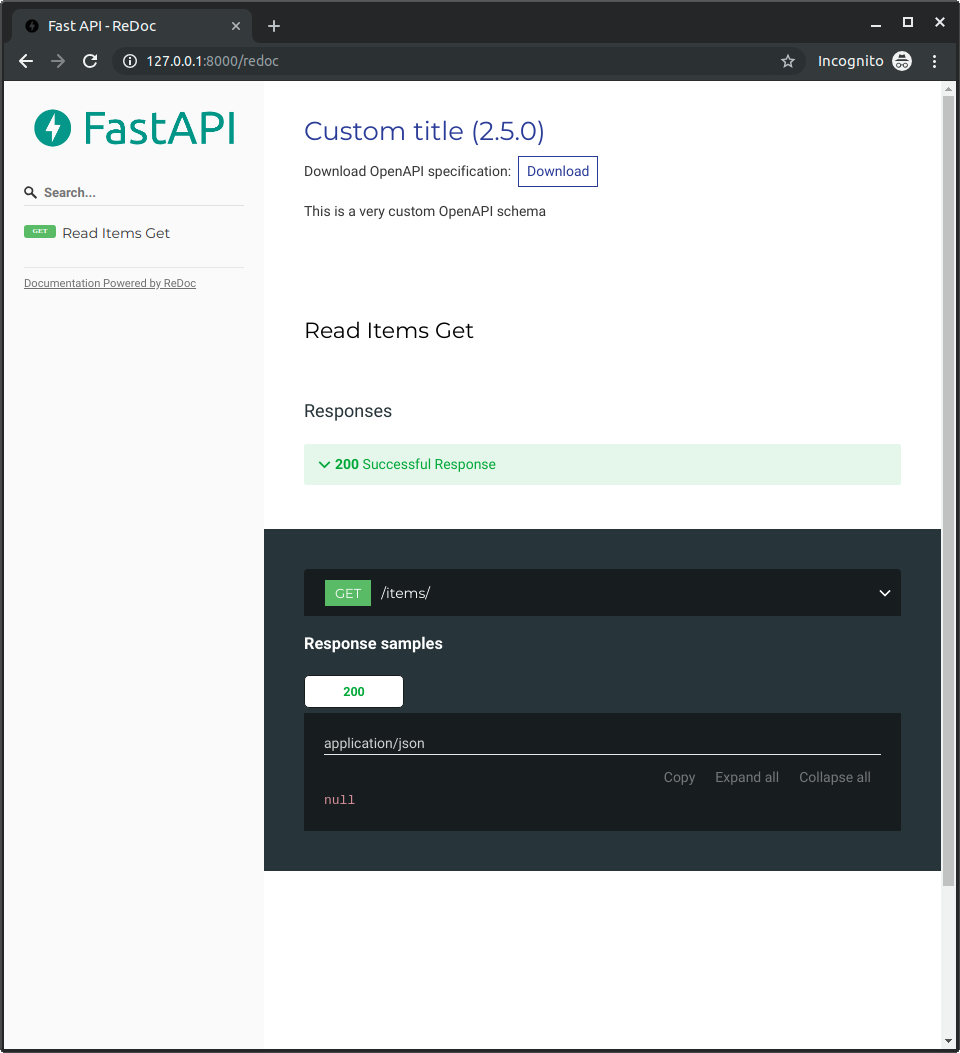
当你访问 http://127.0.0.1:8000/redoc 时,你会看到已使用你的自定义 Logo(本例中为 FastAPI 的 Logo):