擴充 OpenAPI
有些情況你可能需要修改自動產生的 OpenAPI 結構(schema)。
本章將示範如何做。
一般流程
一般(預設)的流程如下。
FastAPI 應用程式(實例)有一個 .openapi() 方法,會回傳 OpenAPI 結構。
在建立應用物件時,會同時註冊一個 /openapi.json(或你在 openapi_url 設定的路徑)的路徑操作(path operation)。
這個路徑只會回傳一個 JSON 回應,內容就是應用的 .openapi() 方法結果。
預設情況下,.openapi() 會先檢查 .openapi_schema 屬性是否已有內容,有的話就直接回傳。
若沒有,則會呼叫 fastapi.openapi.utils.get_openapi 這個工具函式來產生。
get_openapi() 函式會接收以下參數:
title:OpenAPI 的標題,會顯示在文件中。version:你的 API 版本,例如2.5.0。openapi_version:所使用的 OpenAPI 規格版本。預設為最新版本:3.1.0。summary:API 的簡短摘要。description:API 的描述,可包含 Markdown,會顯示在文件中。routes:路由列表,來源為app.routes。FastAPI 會用它們彙整已註冊的路徑操作,包含來自被包含的 routers。
技術細節
app.routes 是較低階的路由樹。它可能包含 FastAPI 內部用於被包含的 routers 的候選路由,不僅僅是最終的 APIRoute 物件。
你仍然可以把 app.routes 傳給 get_openapi()。FastAPI 會遍歷那棵路由樹以收集實際生效的路徑操作。
注意
summary 參數在 OpenAPI 3.1.0 以上可用,且需 FastAPI 0.99.0 以上版本支援。
覆寫預設行為
基於上述資訊,你可以用相同的工具函式來產生 OpenAPI 結構,並覆寫你需要客製的部分。
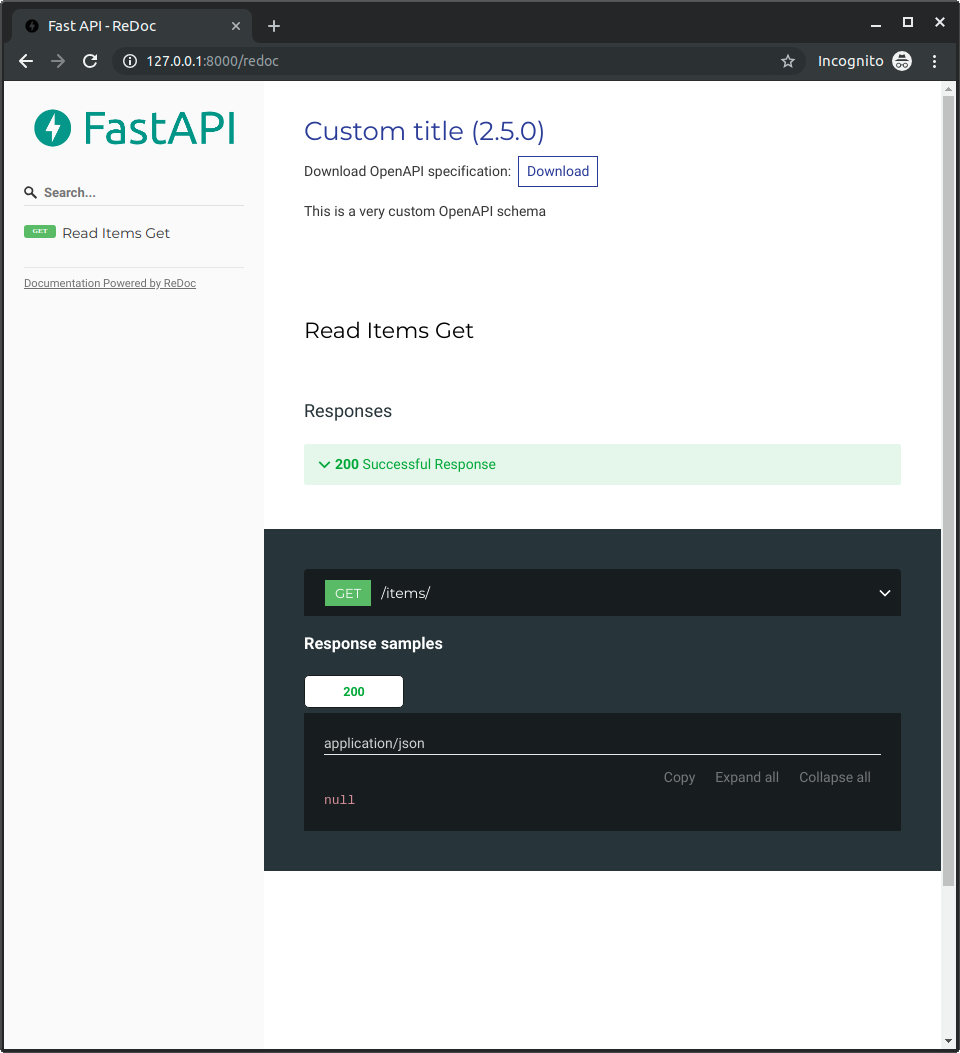
例如,我們要加入 ReDoc 的 OpenAPI 擴充,插入自訂 logo。
一般的 FastAPI
先照常撰寫你的 FastAPI 應用:
from fastapi import FastAPI
from fastapi.openapi.utils import get_openapi

app = FastAPI()


@app.get("/items/")
async def read_items():
    return [{"name": "Foo"}]


def custom_openapi():
    if app.openapi_schema:
        return app.openapi_schema
    openapi_schema = get_openapi(
        title="Custom title",
        version="2.5.0",
        summary="This is a very custom OpenAPI schema",
        description="Here's a longer description of the custom **OpenAPI** schema",
        routes=app.routes,
    )
    openapi_schema["info"]["x-logo"] = {
        "url": "https://fastapi.tiangolo.com/img/logo-margin/logo-teal.png"
    }
    app.openapi_schema = openapi_schema
    return app.openapi_schema


app.openapi = custom_openapi
產生 OpenAPI 結構
接著,在 custom_openapi() 函式內,使用相同的工具函式來產生 OpenAPI 結構:
from fastapi import FastAPI
from fastapi.openapi.utils import get_openapi

app = FastAPI()


@app.get("/items/")
async def read_items():
    return [{"name": "Foo"}]


def custom_openapi():
    if app.openapi_schema:
        return app.openapi_schema
    openapi_schema = get_openapi(
        title="Custom title",
        version="2.5.0",
        summary="This is a very custom OpenAPI schema",
        description="Here's a longer description of the custom **OpenAPI** schema",
        routes=app.routes,
    )
    openapi_schema["info"]["x-logo"] = {
        "url": "https://fastapi.tiangolo.com/img/logo-margin/logo-teal.png"
    }
    app.openapi_schema = openapi_schema
    return app.openapi_schema


app.openapi = custom_openapi
修改 OpenAPI 結構
現在可以加入 ReDoc 擴充,在 OpenAPI 結構的 info「物件」中新增自訂的 x-logo:
from fastapi import FastAPI
from fastapi.openapi.utils import get_openapi

app = FastAPI()


@app.get("/items/")
async def read_items():
    return [{"name": "Foo"}]


def custom_openapi():
    if app.openapi_schema:
        return app.openapi_schema
    openapi_schema = get_openapi(
        title="Custom title",
        version="2.5.0",
        summary="This is a very custom OpenAPI schema",
        description="Here's a longer description of the custom **OpenAPI** schema",
        routes=app.routes,
    )
    openapi_schema["info"]["x-logo"] = {
        "url": "https://fastapi.tiangolo.com/img/logo-margin/logo-teal.png"
    }
    app.openapi_schema = openapi_schema
    return app.openapi_schema


app.openapi = custom_openapi
快取 OpenAPI 結構
你可以把 .openapi_schema 屬性當作「快取」來儲存已產生的結構。
這樣使用者每次開啟 API 文件時,應用就不必重複產生結構。
結構只會產生一次,之後的請求都會使用相同的快取結果。
from fastapi import FastAPI
from fastapi.openapi.utils import get_openapi

app = FastAPI()


@app.get("/items/")
async def read_items():
    return [{"name": "Foo"}]


def custom_openapi():
    if app.openapi_schema:
        return app.openapi_schema
    openapi_schema = get_openapi(
        title="Custom title",
        version="2.5.0",
        summary="This is a very custom OpenAPI schema",
        description="Here's a longer description of the custom **OpenAPI** schema",
        routes=app.routes,
    )
    openapi_schema["info"]["x-logo"] = {
        "url": "https://fastapi.tiangolo.com/img/logo-margin/logo-teal.png"
    }
    app.openapi_schema = openapi_schema
    return app.openapi_schema


app.openapi = custom_openapi
覆寫方法
現在你可以用新的函式取代 .openapi() 方法。
from fastapi import FastAPI
from fastapi.openapi.utils import get_openapi

app = FastAPI()


@app.get("/items/")
async def read_items():
    return [{"name": "Foo"}]


def custom_openapi():
    if app.openapi_schema:
        return app.openapi_schema
    openapi_schema = get_openapi(
        title="Custom title",
        version="2.5.0",
        summary="This is a very custom OpenAPI schema",
        description="Here's a longer description of the custom **OpenAPI** schema",
        routes=app.routes,
    )
    openapi_schema["info"]["x-logo"] = {
        "url": "https://fastapi.tiangolo.com/img/logo-margin/logo-teal.png"
    }
    app.openapi_schema = openapi_schema
    return app.openapi_schema


app.openapi = custom_openapi
檢查看看
造訪 http://127.0.0.1:8000/redoc 後,你會看到自訂的 logo(此例為 FastAPI 的 logo):