OpenAPI'yi Genişletme
🌐 Yapay Zekâ ve İnsanlar Tarafından Çeviri
Bu çeviri, insanlar tarafından yönlendirilen bir yapay zekâ ile oluşturuldu. 🤝
Orijinal anlamın yanlış anlaşılması ya da kulağa doğal gelmeme gibi hatalar içerebilir. 🤖
Yapay zekâ LLM'ini daha iyi yönlendirmemize yardımcı olarak bu çeviriyi iyileştirebilirsiniz.
Oluşturulan OpenAPI şemasını değiştirmeniz gereken bazı durumlar olabilir.
Bu bölümde bunun nasıl yapılacağını göreceksiniz.
Normal Süreç
Normal (varsayılan) süreç şöyledir.
Bir FastAPI uygulamasının (instance) OpenAPI şemasını döndürmesi beklenen bir .openapi() metodu vardır.
Uygulama nesnesi oluşturulurken, /openapi.json (ya da openapi_url için ne ayarladıysanız o) için bir path operation kaydedilir.
Bu path operation, uygulamanın .openapi() metodunun sonucunu içeren bir JSON response döndürür.
Varsayılan olarak .openapi() metodunun yaptığı şey, .openapi_schema özelliğinde içerik olup olmadığını kontrol etmek ve varsa onu döndürmektir.
Eğer yoksa, fastapi.openapi.utils.get_openapi konumundaki yardımcı (utility) fonksiyonu kullanarak şemayı üretir.
Ve get_openapi() fonksiyonu şu parametreleri alır:
title: Dokümanlarda gösterilen OpenAPI başlığı.version: API'nizin sürümü, örn.2.5.0.openapi_version: Kullanılan OpenAPI specification sürümü. Varsayılan olarak en günceli:3.1.0.summary: API'nin kısa özeti.description: API'nizin açıklaması; markdown içerebilir ve dokümanlarda gösterilir.routes: Uygulamadan gelen route'lar;app.routesiçinden alınır. FastAPI, kayıtlı path operations'ları toplamak için bunları kullanır; eklenen router'lardan gelenler de dahildir.
Teknik Detaylar
app.routes daha alt seviyede bir route ağacıdır. Yalnızca son APIRoute objelerini değil, FastAPI'nin dahili olarak eklenen router'lar için kullandığı aday route'ları da içerebilir.
Yine de app.routes'i get_openapi()'ye geçebilirsiniz. FastAPI, etkili path operation'ları toplamak için bu route ağacını gezecektir.
Not
summary parametresi OpenAPI 3.1.0 ve üzeri sürümlerde vardır; FastAPI 0.99.0 ve üzeri tarafından desteklenmektedir.
Varsayılanları Ezme
Yukarıdaki bilgileri kullanarak aynı yardımcı fonksiyonla OpenAPI şemasını üretebilir ve ihtiyacınız olan her parçayı override edebilirsiniz.
Örneğin, özel bir logo eklemek için ReDoc'un OpenAPI extension'ını ekleyelim.
Normal FastAPI
Önce, tüm FastAPI uygulamanızı her zamanki gibi yazın:
from fastapi import FastAPI
from fastapi.openapi.utils import get_openapi

app = FastAPI()


@app.get("/items/")
async def read_items():
    return [{"name": "Foo"}]


def custom_openapi():
    if app.openapi_schema:
        return app.openapi_schema
    openapi_schema = get_openapi(
        title="Custom title",
        version="2.5.0",
        summary="This is a very custom OpenAPI schema",
        description="Here's a longer description of the custom **OpenAPI** schema",
        routes=app.routes,
    )
    openapi_schema["info"]["x-logo"] = {
        "url": "https://fastapi.tiangolo.com/img/logo-margin/logo-teal.png"
    }
    app.openapi_schema = openapi_schema
    return app.openapi_schema


app.openapi = custom_openapi
OpenAPI Şemasını Üretme
Ardından, bir custom_openapi() fonksiyonunun içinde aynı yardımcı fonksiyonu kullanarak OpenAPI şemasını üretin:
from fastapi import FastAPI
from fastapi.openapi.utils import get_openapi

app = FastAPI()


@app.get("/items/")
async def read_items():
    return [{"name": "Foo"}]


def custom_openapi():
    if app.openapi_schema:
        return app.openapi_schema
    openapi_schema = get_openapi(
        title="Custom title",
        version="2.5.0",
        summary="This is a very custom OpenAPI schema",
        description="Here's a longer description of the custom **OpenAPI** schema",
        routes=app.routes,
    )
    openapi_schema["info"]["x-logo"] = {
        "url": "https://fastapi.tiangolo.com/img/logo-margin/logo-teal.png"
    }
    app.openapi_schema = openapi_schema
    return app.openapi_schema


app.openapi = custom_openapi
OpenAPI Şemasını Değiştirme
Artık OpenAPI şemasındaki info "object"'ine özel bir x-logo ekleyerek ReDoc extension'ını ekleyebilirsiniz:
from fastapi import FastAPI
from fastapi.openapi.utils import get_openapi

app = FastAPI()


@app.get("/items/")
async def read_items():
    return [{"name": "Foo"}]


def custom_openapi():
    if app.openapi_schema:
        return app.openapi_schema
    openapi_schema = get_openapi(
        title="Custom title",
        version="2.5.0",
        summary="This is a very custom OpenAPI schema",
        description="Here's a longer description of the custom **OpenAPI** schema",
        routes=app.routes,
    )
    openapi_schema["info"]["x-logo"] = {
        "url": "https://fastapi.tiangolo.com/img/logo-margin/logo-teal.png"
    }
    app.openapi_schema = openapi_schema
    return app.openapi_schema


app.openapi = custom_openapi
OpenAPI Şemasını Cache'leme
Ürettiğiniz şemayı saklamak için .openapi_schema özelliğini bir "cache" gibi kullanabilirsiniz.
Böylece bir kullanıcı API docs'larınızı her açtığında uygulamanız şemayı tekrar tekrar üretmek zorunda kalmaz.
Şema yalnızca bir kez üretilecektir; sonraki request'ler için de aynı cache'lenmiş şema kullanılacaktır.
from fastapi import FastAPI
from fastapi.openapi.utils import get_openapi

app = FastAPI()


@app.get("/items/")
async def read_items():
    return [{"name": "Foo"}]


def custom_openapi():
    if app.openapi_schema:
        return app.openapi_schema
    openapi_schema = get_openapi(
        title="Custom title",
        version="2.5.0",
        summary="This is a very custom OpenAPI schema",
        description="Here's a longer description of the custom **OpenAPI** schema",
        routes=app.routes,
    )
    openapi_schema["info"]["x-logo"] = {
        "url": "https://fastapi.tiangolo.com/img/logo-margin/logo-teal.png"
    }
    app.openapi_schema = openapi_schema
    return app.openapi_schema


app.openapi = custom_openapi
Metodu Override Etme
Şimdi .openapi() metodunu yeni fonksiyonunuzla değiştirebilirsiniz.
from fastapi import FastAPI
from fastapi.openapi.utils import get_openapi

app = FastAPI()


@app.get("/items/")
async def read_items():
    return [{"name": "Foo"}]


def custom_openapi():
    if app.openapi_schema:
        return app.openapi_schema
    openapi_schema = get_openapi(
        title="Custom title",
        version="2.5.0",
        summary="This is a very custom OpenAPI schema",
        description="Here's a longer description of the custom **OpenAPI** schema",
        routes=app.routes,
    )
    openapi_schema["info"]["x-logo"] = {
        "url": "https://fastapi.tiangolo.com/img/logo-margin/logo-teal.png"
    }
    app.openapi_schema = openapi_schema
    return app.openapi_schema


app.openapi = custom_openapi
Kontrol Edin
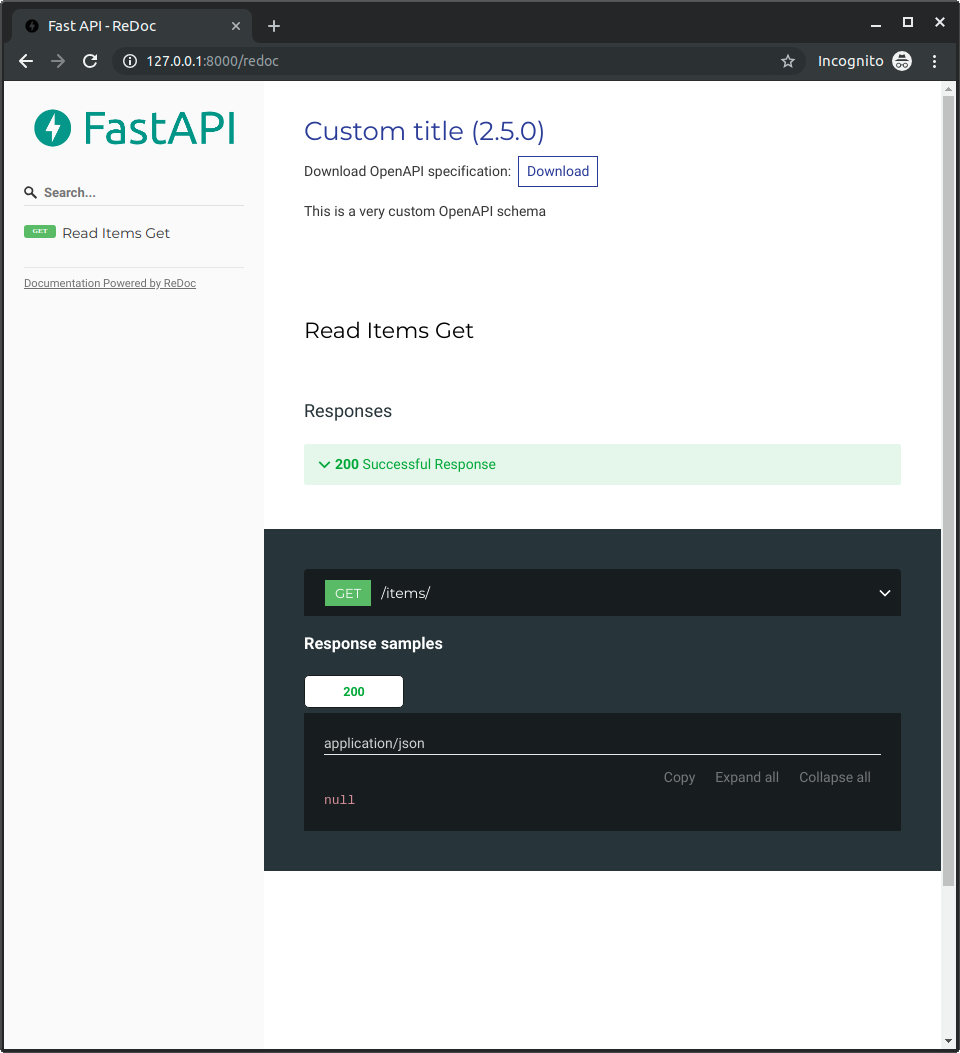
http://127.0.0.1:8000/redoc adresine gittiğinizde, özel logonuzu kullandığınızı göreceksiniz (bu örnekte FastAPI'nin logosu):