Python Types Intro
Python has support for optional "type hints" (also called "type annotations").
These "type hints" or annotations are a special syntax that allows declaring the type of a variable.
By declaring types for your variables, editors and tools can give you better support.
This is just a quick tutorial / refresher about Python type hints. It covers only the minimum necessary to use them with FastAPI... which is actually very little.
FastAPI is all based on these type hints, they give it many advantages and benefits.
But even if you never use FastAPI, you would benefit from learning a bit about them.
Note
If you are a Python expert, and you already know everything about type hints, skip to the next chapter.
Motivation
Let's start with a simple example:
def get_full_name(first_name, last_name):
    full_name = first_name.title() + " " + last_name.title()
    return full_name


print(get_full_name("john", "doe"))
Calling this program outputs:
John Doe
The function does the following:
- Takes a
first_nameandlast_name. - Converts the first letter of each one to upper case with
title(). - Concatenates them with a space in the middle.
def get_full_name(first_name, last_name):
    full_name = first_name.title() + " " + last_name.title()
    return full_name


print(get_full_name("john", "doe"))
Edit it
It's a very simple program.
But now imagine that you were writing it from scratch.
At some point you start defining the function, and you have the parameters ready...
But then you have to call "that method that converts the first letter to upper case".
Was it upper? Was it uppercase? first_uppercase? capitalize?
Then, you try with the old programmer's friend, editor autocompletion.
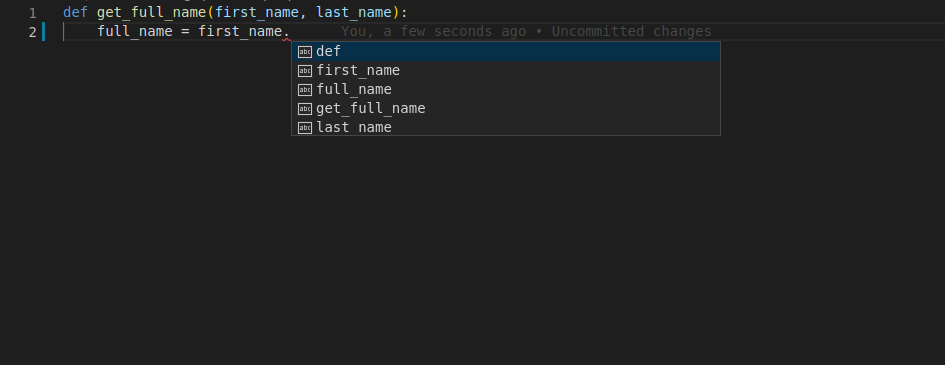
You type the first parameter of the function, first_name, then a dot (.) and then hit Ctrl+Space to trigger the completion.
But, sadly, you get nothing useful:
Add types
Let's modify a single line from the previous version.
We will change exactly this fragment, the parameters of the function, from:
first_name, last_name
to:
first_name: str, last_name: str
That's it.
Those are the "type hints":
def get_full_name(first_name: str, last_name: str):
    full_name = first_name.title() + " " + last_name.title()
    return full_name


print(get_full_name("john", "doe"))
That is not the same as declaring default values like it would be with:
first_name="john", last_name="doe"
It's a different thing.
We are using colons (:), not equals (=).
And adding type hints normally doesn't change what happens from what would happen without them.
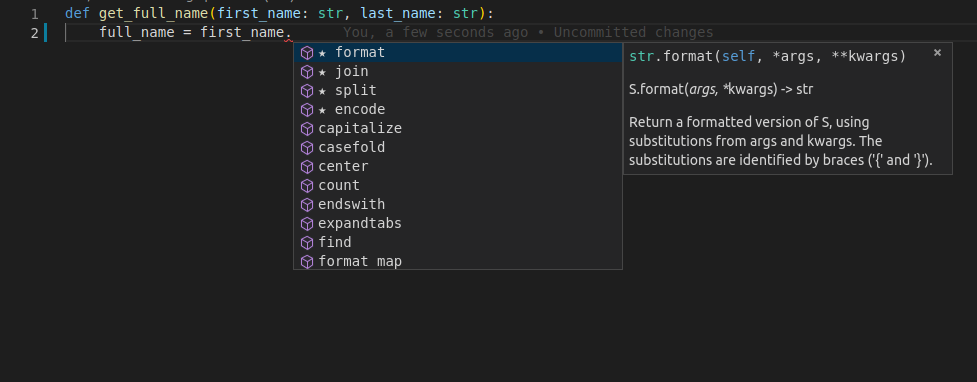
But now, imagine you are again in the middle of creating that function, but with type hints.
At the same point, you try to trigger the autocomplete with Ctrl+Space and you see:
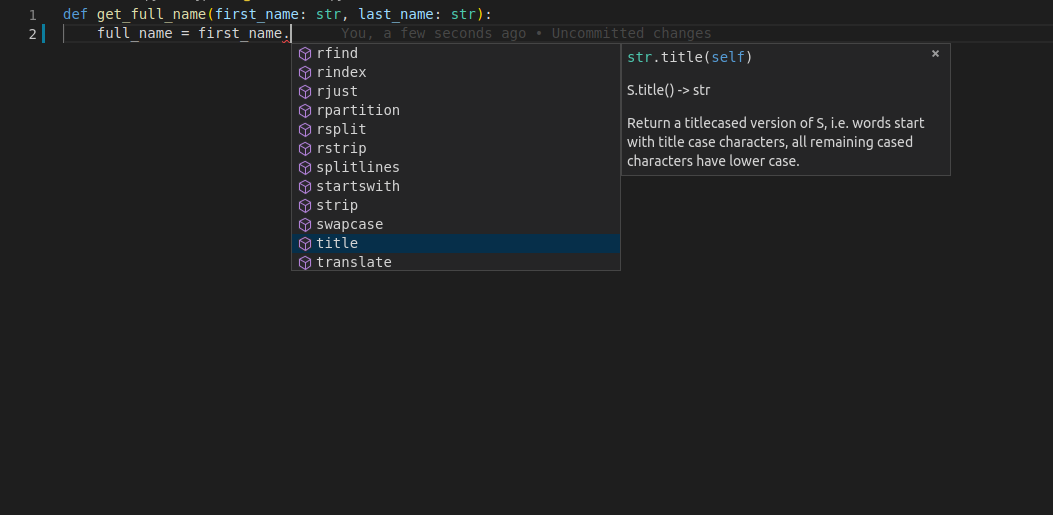
With that, you can scroll, seeing the options, until you find the one that "rings a bell":
More motivation
Check this function, it already has type hints:
def get_name_with_age(name: str, age: int):
    name_with_age = name + " is this old: " + age
    return name_with_age
Because the editor knows the types of the variables, you don't only get completion, you also get error checks:
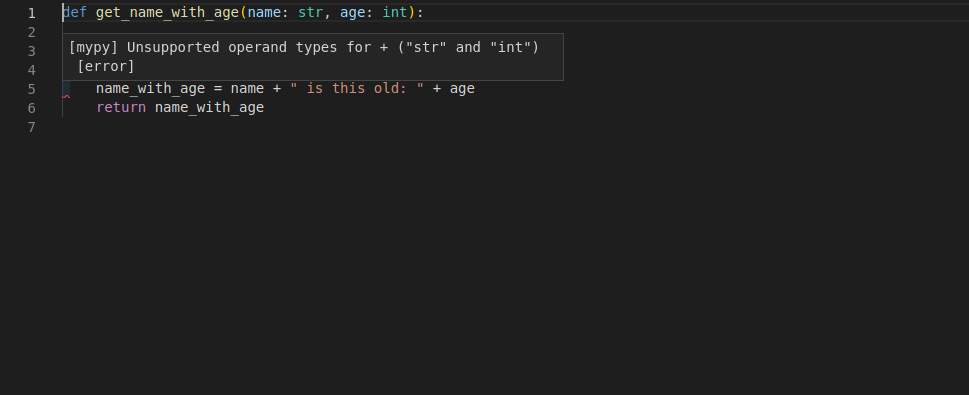
Now you know that you have to fix it, convert age to a string with str(age):
def get_name_with_age(name: str, age: int):
    name_with_age = name + " is this old: " + str(age)
    return name_with_age
Declaring types
You just saw the main place to declare type hints. As function parameters.
This is also the main place you would use them with FastAPI.
Simple types
You can declare all the standard Python types, not only str.
You can use, for example:
intfloatboolbytes
def get_items(item_a: str, item_b: int, item_c: float, item_d: bool, item_e: bytes):
    return item_a, item_b, item_c, item_d, item_e
typing module
For some additional use cases, you might need to import some things from the standard library typing module, for example when you want to declare that something has "any type", you can use Any from typing:
from typing import Any


def some_function(data: Any):
    print(data)
Generic types
Some types can take "type parameters" in square brackets, to define their internal types, for example a "list of strings" would be declared list[str].
These types that can take type parameters are called Generic types or Generics.
You can use the same builtin types as generics (with square brackets and types inside):
listtuplesetdict
List
For example, let's define a variable to be a list of str.
Declare the variable, with the same colon (:) syntax.
As the type, put list.
As the list is a type that contains some internal types, you put them in square brackets:
def process_items(items: list[str]):
    for item in items:
        print(item)
Note
Those internal types in the square brackets are called "type parameters".
In this case, str is the type parameter passed to list.
That means: "the variable items is a list, and each of the items in this list is a str".
By doing that, your editor can provide support even while processing items from the list:
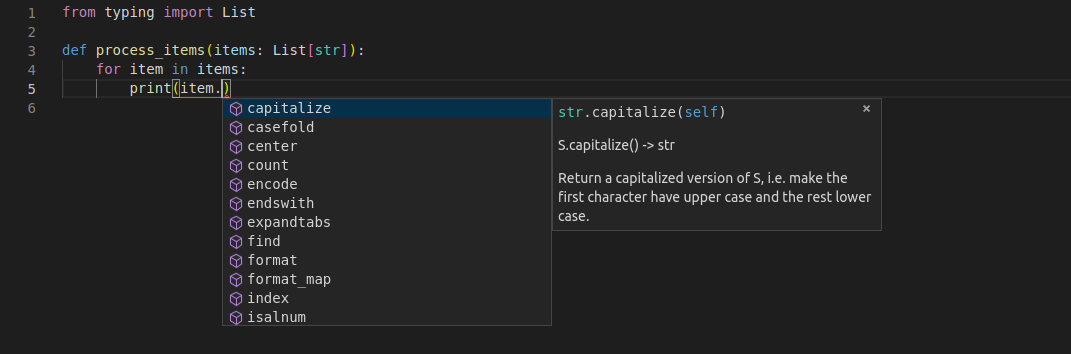
Without types, that's almost impossible to achieve.
Notice that the variable item is one of the elements in the list items.
And still, the editor knows it is a str, and provides support for that.
Tuple and Set
You would do the same to declare tuples and sets:
def process_items(items_t: tuple[int, int, str], items_s: set[bytes]):
    return items_t, items_s
This means:
- The variable
items_tis atuplewith 3 items, anint, anotherint, and astr. - The variable
items_sis aset, and each of its items is of typebytes.
Dict
To define a dict, you pass 2 type parameters, separated by commas.
The first type parameter is for the keys of the dict.
The second type parameter is for the values of the dict:
def process_items(prices: dict[str, float]):
    for item_name, item_price in prices.items():
        print(item_name)
        print(item_price)
This means:
- The variable
pricesis adict:- The keys of this
dictare of typestr(let's say, the name of each item). - The values of this
dictare of typefloat(let's say, the price of each item).
- The keys of this
Union
You can declare that a variable can be any of several types, for example, an int or a str.
To define it you use the vertical bar (|) to separate both types.
This is called a "union", because the variable can be anything in the union of those two sets of types.
def process_item(item: int | str):
    print(item)
This means that item could be an int or a str.
Possibly None
You can declare that a value could have a type, like str, but that it could also be None.
def say_hi(name: str | None = None):
    if name is not None:
        print(f"Hey {name}!")
    else:
        print("Hello World")
Using str | None instead of just str will let the editor help you detect errors where you could be assuming that a value is always a str, when it could actually be None too.
Classes as types
You can also declare a class as the type of a variable.
Let's say you have a class Person, with a name:
class Person:
    def __init__(self, name: str):
        self.name = name


def get_person_name(one_person: Person):
    return one_person.name
Then you can declare a variable to be of type Person:
class Person:
    def __init__(self, name: str):
        self.name = name


def get_person_name(one_person: Person):
    return one_person.name
And then, again, you get all the editor support:
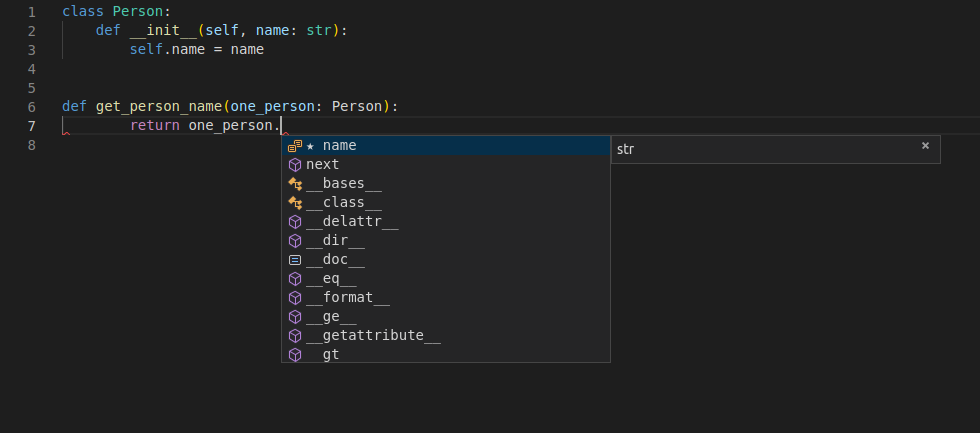
Notice that this means "one_person is an instance of the class Person".
It doesn't mean "one_person is the class called Person".
Pydantic models
Pydantic is a Python library to perform data validation.
You declare the "shape" of the data as classes with attributes.
And each attribute has a type.
Then you create an instance of that class with some values and it will validate the values, convert them to the appropriate type (if that's the case) and give you an object with all the data.
And you get all the editor support with that resulting object.
An example from the official Pydantic docs:
from datetime import datetime

from pydantic import BaseModel


class User(BaseModel):
    id: int
    name: str = "John Doe"
    signup_ts: datetime | None = None
    friends: list[int] = []


external_data = {
    "id": "123",
    "signup_ts": "2017-06-01 12:22",
    "friends": [1, "2", b"3"],
}
user = User(**external_data)
print(user)
# > User id=123 name='John Doe' signup_ts=datetime.datetime(2017, 6, 1, 12, 22) friends=[1, 2, 3]
print(user.id)
# > 123
Note
To learn more about Pydantic, check its docs.
FastAPI is all based on Pydantic.
You will see a lot more of all this in practice in the Tutorial - User Guide.
Type Hints with Metadata Annotations
Python also has a feature that allows putting additional metadata in these type hints using Annotated.
You can import Annotated from typing.
from typing import Annotated


def say_hello(name: Annotated[str, "this is just metadata"]) -> str:
    return f"Hello {name}"
Python itself doesn't do anything with this Annotated. And for editors and other tools, the type is still str.
But you can use this space in Annotated to provide FastAPI with additional metadata about how you want your application to behave.
The important thing to remember is that the first type parameter you pass to Annotated is the actual type. The rest, is just metadata for other tools.
For now, you just need to know that Annotated exists, and that it's standard Python. 😎
Later you will see how powerful it can be.
Tip
The fact that this is standard Python means that you will still get the best possible developer experience in your editor, with the tools you use to analyze and refactor your code, etc. ✨
And also that your code will be very compatible with many other Python tools and libraries. 🚀
Type hints in FastAPI
FastAPI takes advantage of these type hints to do several things.
With FastAPI you declare parameters with type hints and you get:
- Editor support.
- Type checks.
...and FastAPI uses the same declarations to:
- Define requirements: from request path parameters, query parameters, headers, bodies, dependencies, etc.
- Convert data: from the request to the required type.
- Validate data: coming from each request:
- Generating automatic errors returned to the client when the data is invalid.
- Document the API using OpenAPI:
- which is then used by the automatic interactive documentation user interfaces.
This might all sound abstract. Don't worry. You'll see all this in action in the Tutorial - User Guide.
The important thing is that by using standard Python types, in a single place (instead of adding more classes, decorators, etc), FastAPI will do a lot of the work for you.
Note
If you already went through all the tutorial and came back to see more about types, a good resource is the "cheat sheet" from mypy.