OpenAPI 확장하기
🌐 AI와 사람이 함께한 번역
이 번역은 사람의 안내를 받아 AI가 만들었습니다. 🤝
원문의 의미를 오해하거나 부자연스러워 보이는 등 오류가 있을 수 있습니다. 🤖
생성된 OpenAPI 스키마를 수정해야 하는 경우가 있습니다.
이 섹션에서 그 방법을 살펴보겠습니다.
일반적인 과정
일반적인(기본) 과정은 다음과 같습니다.
FastAPI 애플리케이션(인스턴스)에는 OpenAPI 스키마를 반환해야 하는 .openapi() 메서드가 있습니다.
애플리케이션 객체를 생성하는 과정에서 /openapi.json(또는 openapi_url에 설정한 경로)용 경로 처리가 등록됩니다.
이 경로 처리는 애플리케이션의 .openapi() 메서드 결과를 JSON 응답으로 반환할 뿐입니다.
기본적으로 .openapi() 메서드는 프로퍼티 .openapi_schema에 내용이 있는지 확인하고, 있으면 그 내용을 반환합니다.
없으면 fastapi.openapi.utils.get_openapi에 있는 유틸리티 함수를 사용해 생성합니다.
그리고 get_openapi() 함수는 다음을 파라미터로 받습니다:
title: 문서에 표시되는 OpenAPI 제목.version: API 버전. 예:2.5.0.openapi_version: 사용되는 OpenAPI 스펙 버전. 기본값은 최신인3.1.0.summary: API에 대한 짧은 요약.description: API 설명. markdown을 포함할 수 있으며 문서에 표시됩니다.routes: 라우트 목록. 각각 등록된 경로 처리입니다.app.routes에서 가져옵니다.
정보
summary 파라미터는 OpenAPI 3.1.0 이상에서 사용할 수 있으며, FastAPI 0.99.0 이상에서 지원됩니다.
기본값 덮어쓰기
위 정보를 바탕으로, 동일한 유틸리티 함수를 사용해 OpenAPI 스키마를 생성하고 필요한 각 부분을 덮어쓸 수 있습니다.
예를 들어, 커스텀 로고를 포함하기 위한 ReDoc의 OpenAPI 확장을 추가해 보겠습니다.
일반적인 FastAPI
먼저, 평소처럼 FastAPI 애플리케이션을 모두 작성합니다:
from fastapi import FastAPI
from fastapi.openapi.utils import get_openapi

app = FastAPI()


@app.get("/items/")
async def read_items():
    return [{"name": "Foo"}]


def custom_openapi():
    if app.openapi_schema:
        return app.openapi_schema
    openapi_schema = get_openapi(
        title="Custom title",
        version="2.5.0",
        summary="This is a very custom OpenAPI schema",
        description="Here's a longer description of the custom **OpenAPI** schema",
        routes=app.routes,
    )
    openapi_schema["info"]["x-logo"] = {
        "url": "https://fastapi.tiangolo.com/img/logo-margin/logo-teal.png"
    }
    app.openapi_schema = openapi_schema
    return app.openapi_schema


app.openapi = custom_openapi
OpenAPI 스키마 생성하기
그다음 custom_openapi() 함수 안에서, 동일한 유틸리티 함수를 사용해 OpenAPI 스키마를 생성합니다:
from fastapi import FastAPI
from fastapi.openapi.utils import get_openapi

app = FastAPI()


@app.get("/items/")
async def read_items():
    return [{"name": "Foo"}]


def custom_openapi():
    if app.openapi_schema:
        return app.openapi_schema
    openapi_schema = get_openapi(
        title="Custom title",
        version="2.5.0",
        summary="This is a very custom OpenAPI schema",
        description="Here's a longer description of the custom **OpenAPI** schema",
        routes=app.routes,
    )
    openapi_schema["info"]["x-logo"] = {
        "url": "https://fastapi.tiangolo.com/img/logo-margin/logo-teal.png"
    }
    app.openapi_schema = openapi_schema
    return app.openapi_schema


app.openapi = custom_openapi
OpenAPI 스키마 수정하기
이제 OpenAPI 스키마의 info "object"에 커스텀 x-logo를 추가하여 ReDoc 확장을 더할 수 있습니다:
from fastapi import FastAPI
from fastapi.openapi.utils import get_openapi

app = FastAPI()


@app.get("/items/")
async def read_items():
    return [{"name": "Foo"}]


def custom_openapi():
    if app.openapi_schema:
        return app.openapi_schema
    openapi_schema = get_openapi(
        title="Custom title",
        version="2.5.0",
        summary="This is a very custom OpenAPI schema",
        description="Here's a longer description of the custom **OpenAPI** schema",
        routes=app.routes,
    )
    openapi_schema["info"]["x-logo"] = {
        "url": "https://fastapi.tiangolo.com/img/logo-margin/logo-teal.png"
    }
    app.openapi_schema = openapi_schema
    return app.openapi_schema


app.openapi = custom_openapi
OpenAPI 스키마 캐시하기
생성한 스키마를 저장하기 위한 "cache"로 .openapi_schema 프로퍼티를 사용할 수 있습니다.
이렇게 하면 사용자가 API 문서를 열 때마다 애플리케이션이 스키마를 매번 생성하지 않아도 됩니다.
스키마는 한 번만 생성되고, 이후 요청에서는 같은 캐시된 스키마가 사용됩니다.
from fastapi import FastAPI
from fastapi.openapi.utils import get_openapi

app = FastAPI()


@app.get("/items/")
async def read_items():
    return [{"name": "Foo"}]


def custom_openapi():
    if app.openapi_schema:
        return app.openapi_schema
    openapi_schema = get_openapi(
        title="Custom title",
        version="2.5.0",
        summary="This is a very custom OpenAPI schema",
        description="Here's a longer description of the custom **OpenAPI** schema",
        routes=app.routes,
    )
    openapi_schema["info"]["x-logo"] = {
        "url": "https://fastapi.tiangolo.com/img/logo-margin/logo-teal.png"
    }
    app.openapi_schema = openapi_schema
    return app.openapi_schema


app.openapi = custom_openapi
메서드 오버라이드하기
이제 .openapi() 메서드를 새 함수로 교체할 수 있습니다.
from fastapi import FastAPI
from fastapi.openapi.utils import get_openapi

app = FastAPI()


@app.get("/items/")
async def read_items():
    return [{"name": "Foo"}]


def custom_openapi():
    if app.openapi_schema:
        return app.openapi_schema
    openapi_schema = get_openapi(
        title="Custom title",
        version="2.5.0",
        summary="This is a very custom OpenAPI schema",
        description="Here's a longer description of the custom **OpenAPI** schema",
        routes=app.routes,
    )
    openapi_schema["info"]["x-logo"] = {
        "url": "https://fastapi.tiangolo.com/img/logo-margin/logo-teal.png"
    }
    app.openapi_schema = openapi_schema
    return app.openapi_schema


app.openapi = custom_openapi
확인하기
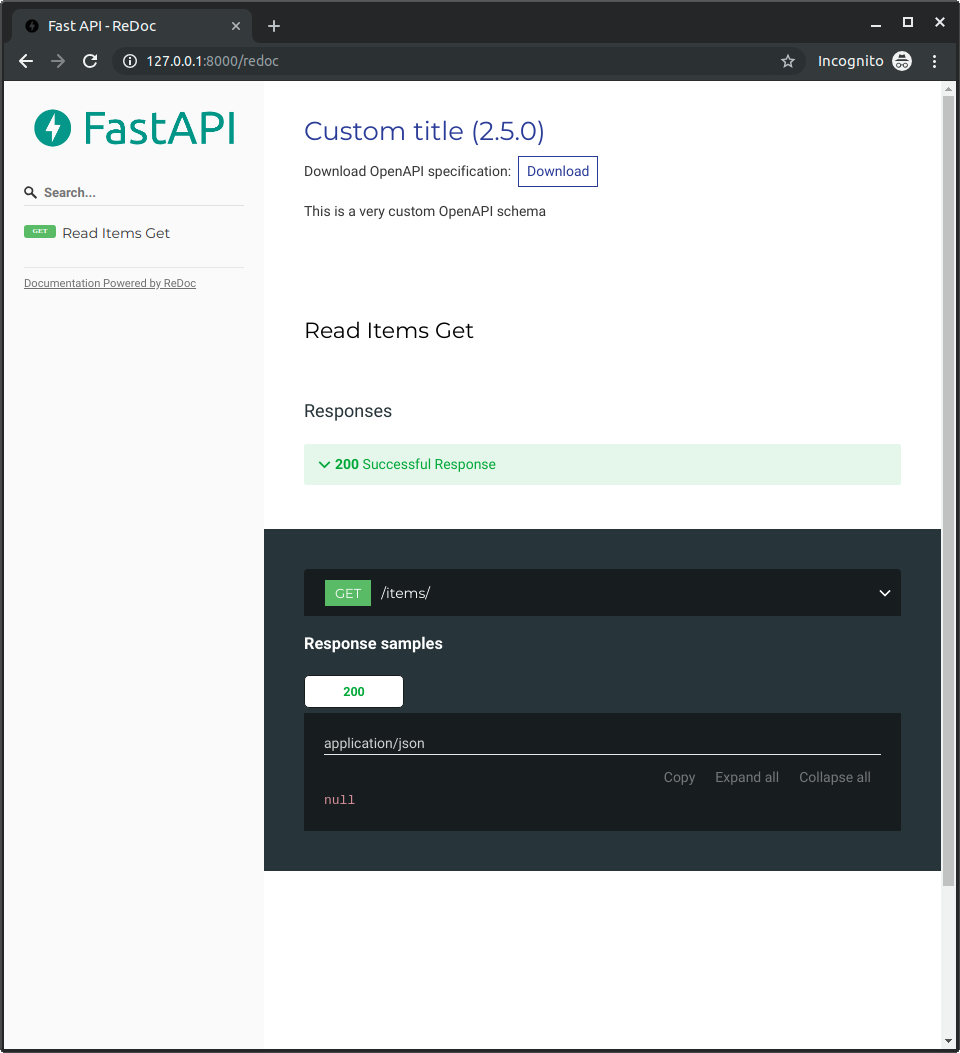
http://127.0.0.1:8000/redoc로 이동하면 커스텀 로고(이 예시에서는 FastAPI 로고)를 사용하는 것을 확인할 수 있습니다: