自訂回應——HTML、串流、檔案與其他
預設情況下,FastAPI 會回傳 JSON 回應。
你可以像在直接回傳 Response中所示,直接回傳一個 Response 來覆寫它。
但如果你直接回傳一個 Response(或其子類別,例如 JSONResponse),資料將不會被自動轉換(即使你宣告了 response_model),而且文件也不會自動產生(例如,在產生的 OpenAPI 中包含 HTTP 標頭 Content-Type 的特定「media type」)。
你也可以在「路徑操作裝飾器」中使用 response_class 參數,宣告要使用的 Response(例如任意 Response 子類別)。
你從「路徑操作函式」回傳的內容,會被放進該 Response 中。
Note
若你使用的回應類別沒有 media type,FastAPI 會假設你的回應沒有內容,因此不會在產生的 OpenAPI 文件中記錄回應格式。
JSON 回應
FastAPI 預設回傳 JSON 回應。
如果你宣告了回應模型,FastAPI 會使用 Pydantic 將資料序列化為 JSON。
如果你沒有宣告回應模型,FastAPI 會使用在JSON 相容編碼器中解釋的 jsonable_encoder,並將結果放進 JSONResponse。
如果你宣告的 response_class 具有 JSON 的 media type(application/json),像 JSONResponse,你回傳的資料會自動以你在「路徑操作裝飾器」中宣告的任何 Pydantic response_model 進行轉換(與過濾)。但資料不會由 Pydantic 直接序列化成 JSON 位元組;取而代之,會先經由 jsonable_encoder 轉換,然後交給 JSONResponse 類別,該類別會使用 Python 標準的 JSON 函式庫將其序列化為位元組。
JSON 效能
簡而言之,若你想要最佳效能,請使用回應模型,並且不要在「路徑操作裝飾器」中宣告 response_class。
# Code above omitted 👆

@app.post("/items/")
async def create_item(item: Item) -> Item:
    return item

# Code below omitted 👇
👀 Full file preview
from fastapi import FastAPI
from pydantic import BaseModel

app = FastAPI()


class Item(BaseModel):
    name: str
    description: str | None = None
    price: float
    tax: float | None = None
    tags: list[str] = []


@app.post("/items/")
async def create_item(item: Item) -> Item:
    return item


@app.get("/items/")
async def read_items() -> list[Item]:
    return [
        Item(name="Portal Gun", price=42.0),
        Item(name="Plumbus", price=32.0),
    ]
HTML 回應
要直接從 FastAPI 回傳 HTML,使用 HTMLResponse。
- 匯入
HTMLResponse。 - 在「路徑操作裝飾器」中,將
HTMLResponse傳給response_class參數。
from fastapi import FastAPI
from fastapi.responses import HTMLResponse

app = FastAPI()


@app.get("/items/", response_class=HTMLResponse)
async def read_items():
    return """
    <html>
        <head>
            <title>Some HTML in here</title>
        </head>
        <body>
            <h1>Look ma! HTML!</h1>
        </body>
    </html>
    """
Note
參數 response_class 也會用來定義回應的「media type」。
在此情況下,HTTP 標頭 Content-Type 會被設為 text/html。
而且它會以此形式被記錄到 OpenAPI 中。
回傳 Response
如直接回傳 Response所示,你也可以在「路徑操作」中直接回傳以覆寫回應。
上面的相同範例,回傳 HTMLResponse,可以像這樣:
from fastapi import FastAPI
from fastapi.responses import HTMLResponse

app = FastAPI()


@app.get("/items/")
async def read_items():
    html_content = """
    <html>
        <head>
            <title>Some HTML in here</title>
        </head>
        <body>
            <h1>Look ma! HTML!</h1>
        </body>
    </html>
    """
    return HTMLResponse(content=html_content, status_code=200)
Warning
由你的「路徑操作函式」直接回傳的 Response 不會被記錄進 OpenAPI(例如不會記錄 Content-Type),也不會出現在自動產生的互動式文件中。
Note
當然,實際的 Content-Type 標頭、狀態碼等,會來自你回傳的 Response 物件。
在 OpenAPI 中文件化並覆寫 Response
如果你想在函式內覆寫回應,同時又要在 OpenAPI 中記錄「media type」,你可以同時使用 response_class 參數並回傳一個 Response 物件。
此時,response_class 只會用於記錄該 OpenAPI「路徑操作」,而你回傳的 Response 將會如實使用。
直接回傳 HTMLResponse
例如,可能會像這樣:
from fastapi import FastAPI
from fastapi.responses import HTMLResponse

app = FastAPI()


def generate_html_response():
    html_content = """
    <html>
        <head>
            <title>Some HTML in here</title>
        </head>
        <body>
            <h1>Look ma! HTML!</h1>
        </body>
    </html>
    """
    return HTMLResponse(content=html_content, status_code=200)


@app.get("/items/", response_class=HTMLResponse)
async def read_items():
    return generate_html_response()
在這個例子中,函式 generate_html_response() 已經產生並回傳了一個 Response,而不是把 HTML 當作 str 回傳。
透過回傳 generate_html_response() 的結果,你其實已經回傳了一個 Response,這會覆寫 FastAPI 的預設行為。
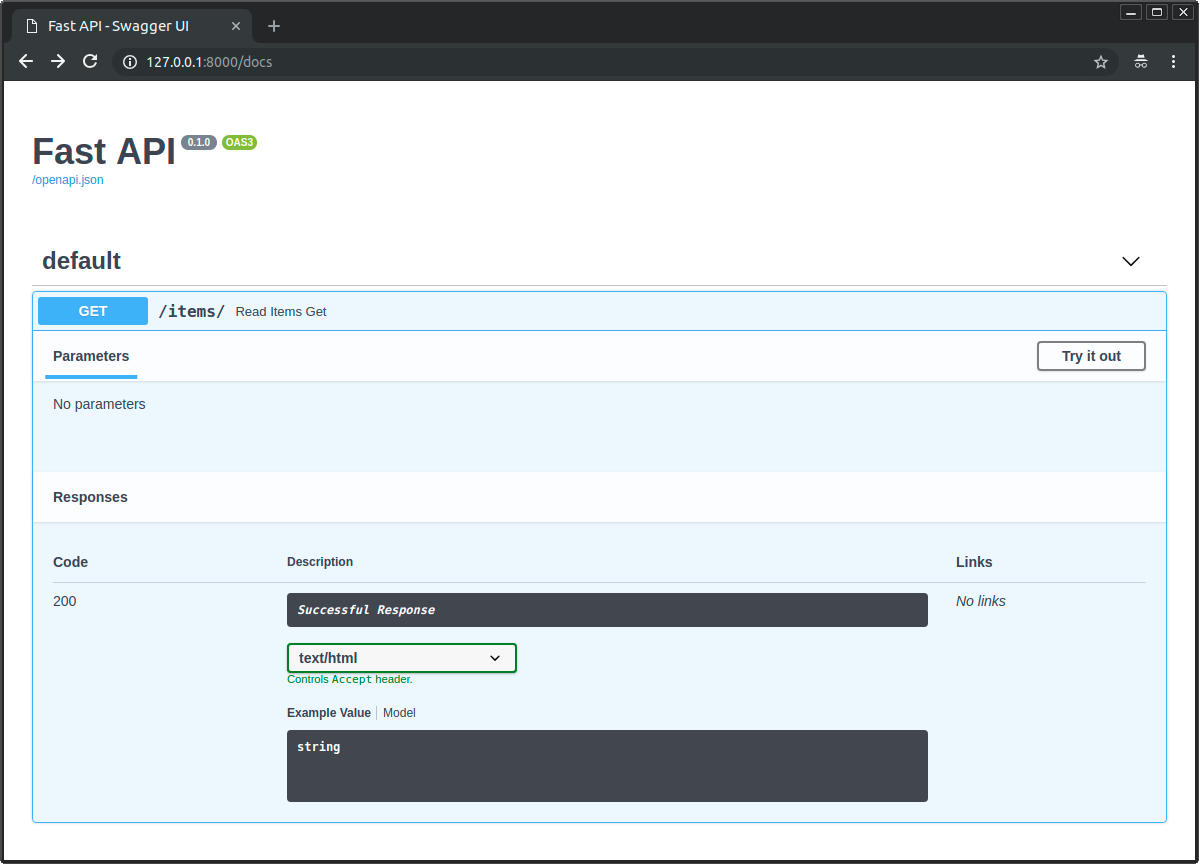
但因為你同時也在 response_class 中傳入了 HTMLResponse,FastAPI 便能在 OpenAPI 與互動式文件中,將其以 text/html 的 HTML 形式記錄:
可用的回應
以下是一些可用的回應類別。
記得你可以用 Response 回傳其他任何東西,甚至建立自訂的子類別。
技術細節
你也可以使用 from starlette.responses import HTMLResponse。
FastAPI 將 starlette.responses 以 fastapi.responses 提供給你(開發者)做為方便之用。但大多數可用的回應其實直接來自 Starlette。
Response
主要的 Response 類別,其他回應皆繼承自它。
你也可以直接回傳它。
它接受以下參數:
content-str或bytes。status_code-int類型的 HTTP 狀態碼。headers- 由字串組成的dict。media_type- 描述 media type 的str。例如"text/html"。
FastAPI(實際上是 Starlette)會自動包含 Content-Length 標頭。也會根據 media_type(並為文字型別附加 charset)包含 Content-Type 標頭。
from fastapi import FastAPI, Response

app = FastAPI()


@app.get("/legacy/")
def get_legacy_data():
    data = """<?xml version="1.0"?>
    <shampoo>
    <Header>
        Apply shampoo here.
    </Header>
    <Body>
        You'll have to use soap here.
    </Body>
    </shampoo>
    """
    return Response(content=data, media_type="application/xml")
HTMLResponse
接收文字或位元組並回傳 HTML 回應,如上所述。
PlainTextResponse
接收文字或位元組並回傳純文字回應。
from fastapi import FastAPI
from fastapi.responses import PlainTextResponse

app = FastAPI()


@app.get("/", response_class=PlainTextResponse)
async def main():
    return "Hello World"
JSONResponse
接收資料並回傳 application/json 編碼的回應。
這是 FastAPI 的預設回應,如上所述。
技術細節
但如果你宣告了回應模型或回傳型別,將會直接用它來把資料序列化為 JSON,並直接回傳具有正確 JSON media type 的回應,而不會使用 JSONResponse 類別。
這是取得最佳效能的理想方式。
RedirectResponse
回傳一個 HTTP 重新導向。預設使用 307 狀態碼(Temporary Redirect)。
你可以直接回傳 RedirectResponse:
from fastapi import FastAPI
from fastapi.responses import RedirectResponse

app = FastAPI()


@app.get("/typer")
async def redirect_typer():
    return RedirectResponse("https://typer.tiangolo.com")
或者你可以在 response_class 參數中使用它:
from fastapi import FastAPI
from fastapi.responses import RedirectResponse

app = FastAPI()


@app.get("/fastapi", response_class=RedirectResponse)
async def redirect_fastapi():
    return "https://fastapi.tiangolo.com"
若這麼做,你就可以在「路徑操作函式」中直接回傳 URL。
在此情況下,所使用的 status_code 會是 RedirectResponse 的預設值 307。
你也可以同時搭配 status_code 與 response_class 參數:
from fastapi import FastAPI
from fastapi.responses import RedirectResponse

app = FastAPI()


@app.get("/pydantic", response_class=RedirectResponse, status_code=302)
async def redirect_pydantic():
    return "https://docs.pydantic.dev/"
StreamingResponse
接收一個 async 產生器或一般的產生器/疊代器(帶有 yield 的函式),並以串流方式傳送回應本文。
import anyio
from fastapi import FastAPI
from fastapi.responses import StreamingResponse

app = FastAPI()


async def fake_video_streamer():
    for i in range(10):
        yield b"some fake video bytes"
        await anyio.sleep(0)


@app.get("/")
async def main():
    return StreamingResponse(fake_video_streamer())
技術細節
一個 async 任務只能在抵達某個 await 時才能被取消。如果沒有 await,該產生器(帶有 yield 的函式)將無法被正確取消,甚至在請求取消後仍可能持續執行。
因為這個小範例不需要任何 await 陳述式,我們加入 await anyio.sleep(0),讓事件迴圈有機會處理取消。
對於大型或無限的串流來說,這點更為重要。
Tip
與其直接回傳 StreamingResponse,你大概會想遵循資料串流中的作法,這樣更方便,並且會在底層幫你處理取消。
如果你要串流 JSON Lines,請參考教學:串流 JSON Lines。
FileResponse
以非同步串流方式將檔案作為回應。
它在初始化時所需的參數與其他回應型別不同:
path- 要串流的檔案路徑。headers- 要包含的自訂標頭,字典形式。media_type- 描述 media type 的字串。若未設定,將根據檔名或路徑推斷 media type。filename- 若設定,會包含在回應的Content-Disposition中。
檔案回應會包含適當的 Content-Length、Last-Modified 與 ETag 標頭。
from fastapi import FastAPI
from fastapi.responses import FileResponse

some_file_path = "large-video-file.mp4"
app = FastAPI()


@app.get("/")
async def main():
    return FileResponse(some_file_path)
你也可以使用 response_class 參數:
from fastapi import FastAPI
from fastapi.responses import FileResponse

some_file_path = "large-video-file.mp4"
app = FastAPI()


@app.get("/", response_class=FileResponse)
async def main():
    return some_file_path
在此情況下,你可以在「路徑操作函式」中直接回傳檔案路徑。
自訂回應類別
你可以建立自己的自訂回應類別,繼承自 Response 並加以使用。
例如,假設你要使用 orjson 並套用一些設定。
假設你想回傳縮排且格式化的 JSON,因此要使用 orjson 選項 orjson.OPT_INDENT_2。
你可以建立 CustomORJSONResponse。你主要需要做的是建立一個 Response.render(content) 方法,將內容以 bytes 回傳:
from typing import Any

import orjson
from fastapi import FastAPI, Response

app = FastAPI()


class CustomORJSONResponse(Response):
    media_type = "application/json"

    def render(self, content: Any) -> bytes:
        assert orjson is not None, "orjson must be installed"
        return orjson.dumps(content, option=orjson.OPT_INDENT_2)


@app.get("/", response_class=CustomORJSONResponse)
async def main():
    return {"message": "Hello World"}
現在,不再是回傳:
{"message": "Hello World"}
...這個回應會回傳:
{
  "message": "Hello World"
}
當然,你大概能找到比格式化 JSON 更好的方式來利用這個能力。😉
orjson 或回應模型
如果你追求效能,使用回應模型 大概會比使用 orjson 回應更好。
有了回應模型,FastAPI 會使用 Pydantic 直接將資料序列化為 JSON,而不需要像其他情況那樣先經過 jsonable_encoder 之類的中介步驟。
而且在底層,Pydantic 用來序列化為 JSON 的 Rust 機制和 orjson 相同,因此用回應模型已經能獲得最佳效能。
預設回應類別
在建立 FastAPI 類別實例或 APIRouter 時,你可以指定預設要使用哪個回應類別。
用來設定的是 default_response_class 參數。
在下面的例子中,FastAPI 會在所有「路徑操作」中預設使用 HTMLResponse,而不是 JSON。
from fastapi import FastAPI
from fastapi.responses import HTMLResponse

app = FastAPI(default_response_class=HTMLResponse)


@app.get("/items/")
async def read_items():
    return "<h1>Items</h1><p>This is a list of items.</p>"
Tip
你仍然可以在「路徑操作」中像以前一樣覆寫 response_class。
其他文件化選項
你也可以在 OpenAPI 中使用 responses 宣告 media type 與其他許多細節:在 OpenAPI 中的額外回應。