OpenAPI 콜백
🌐 AI와 사람이 함께한 번역
이 번역은 사람의 안내를 받아 AI가 만들었습니다. 🤝
원문의 의미를 오해하거나 부자연스러워 보이는 등 오류가 있을 수 있습니다. 🤖
다른 사람이 만든 external API(아마도 여러분의 API를 사용할 동일한 개발자)가 요청을 트리거하도록 만드는 경로 처리를 가진 API를 만들 수 있습니다.
여러분의 API 앱이 external API를 호출할 때 일어나는 과정을 "callback"이라고 합니다. 외부 개발자가 작성한 소프트웨어가 여러분의 API로 요청을 보낸 다음, 여러분의 API가 다시 external API로 요청을 보내 되돌려 호출하기 때문입니다(아마도 같은 개발자가 만든 API일 것입니다).
이 경우, 그 external API가 어떤 형태여야 하는지 문서화하고 싶을 수 있습니다. 어떤 경로 처리를 가져야 하는지, 어떤 body를 기대하는지, 어떤 응답을 반환해야 하는지 등입니다.
콜백이 있는 앱
예시로 확인해 보겠습니다.
청구서를 생성할 수 있는 앱을 개발한다고 가정해 보세요.
이 청구서는 id, title(선택 사항), customer, total을 갖습니다.
여러분의 API 사용자(외부 개발자)는 POST 요청으로 여러분의 API에서 청구서를 생성합니다.
그 다음 여러분의 API는(가정해 보면):
- 청구서를 외부 개발자의 고객에게 전송합니다.
- 돈을 수금합니다.
- API 사용자(외부 개발자)의 API로 다시 알림을 보냅니다.
- 이는 (여러분의 API에서) 그 외부 개발자가 제공하는 어떤 external API로 POST 요청을 보내는 방식으로 수행됩니다(이것이 "callback"입니다).
일반적인 FastAPI 앱
먼저 콜백을 추가하기 전, 일반적인 API 앱이 어떻게 생겼는지 보겠습니다.
Invoice body를 받는 경로 처리와, 콜백을 위한 URL을 담는 쿼리 파라미터 callback_url이 있을 것입니다.
이 부분은 꽤 일반적이며, 대부분의 코드는 이미 익숙할 것입니다:
from fastapi import APIRouter, FastAPI
from pydantic import BaseModel, HttpUrl

app = FastAPI()


class Invoice(BaseModel):
    id: str
    title: str | None = None
    customer: str
    total: float


class InvoiceEvent(BaseModel):
    description: str
    paid: bool


class InvoiceEventReceived(BaseModel):
    ok: bool


invoices_callback_router = APIRouter()


@invoices_callback_router.post(
    "{$callback_url}/invoices/{$request.body.id}", response_model=InvoiceEventReceived
)
def invoice_notification(body: InvoiceEvent):
    pass


@app.post("/invoices/", callbacks=invoices_callback_router.routes)
def create_invoice(invoice: Invoice, callback_url: HttpUrl | None = None):
    """
    Create an invoice.

    This will (let's imagine) let the API user (some external developer) create an
    invoice.

    And this path operation will:

    * Send the invoice to the client.
    * Collect the money from the client.
    * Send a notification back to the API user (the external developer), as a callback.
        * At this point is that the API will somehow send a POST request to the
            external API with the notification of the invoice event
            (e.g. "payment successful").
    """
    # Send the invoice, collect the money, send the notification (the callback)
    return {"msg": "Invoice received"}
팁
callback_url 쿼리 파라미터는 Pydantic의 Url 타입을 사용합니다.
유일하게 새로운 것은 경로 처리 데코레이터의 인자로 callbacks=invoices_callback_router.routes가 들어간다는 점입니다. 이것이 무엇인지 다음에서 보겠습니다.
콜백 문서화하기
실제 콜백 코드는 여러분의 API 앱에 크게 의존합니다.
그리고 앱마다 많이 달라질 수 있습니다.
다음처럼 한두 줄의 코드일 수도 있습니다:
callback_url = "https://example.com/api/v1/invoices/events/"
httpx.post(callback_url, json={"description": "Invoice paid", "paid": True})
하지만 콜백에서 가장 중요한 부분은, 여러분의 API 사용자(외부 개발자)가 콜백 요청 body로 여러분의 API가 보낼 데이터 등에 맞춰 external API를 올바르게 구현하도록 보장하는 것입니다.
그래서 다음으로 할 일은, 여러분의 API에서 보내는 콜백을 받기 위해 그 external API가 어떤 형태여야 하는지 문서화하는 코드를 추가하는 것입니다.
그 문서는 여러분의 API에서 /docs의 Swagger UI에 표시되며, 외부 개발자들이 external API를 어떻게 만들어야 하는지 알 수 있게 해줍니다.
이 예시는 콜백 자체(한 줄 코드로도 될 수 있음)를 구현하지 않고, 문서화 부분만 구현합니다.
콜백 문서화 코드 작성하기
이 코드는 앱에서 실행되지 않습니다. 그 external API가 어떤 형태여야 하는지 문서화하는 데만 필요합니다.
하지만 FastAPI로 API의 자동 문서를 쉽게 생성하는 방법은 이미 알고 있습니다.
따라서 그와 같은 지식을 사용해 external API가 어떻게 생겨야 하는지 문서화할 것입니다... 즉 외부 API가 구현해야 하는 경로 처리(들)(여러분의 API가 호출할 것들)을 만들어서 말입니다.
팁
콜백을 문서화하는 코드를 작성할 때는, 자신이 그 외부 개발자라고 상상하는 것이 유용할 수 있습니다. 그리고 지금은 여러분의 API가 아니라 external API를 구현하고 있다고 생각해 보세요.
이 관점(외부 개발자의 관점)을 잠시 채택하면, 그 external API를 위해 파라미터, body용 Pydantic 모델, 응답 등을 어디에 두어야 하는지가 더 명확하게 느껴질 수 있습니다.
콜백 APIRouter 생성하기
먼저 하나 이상의 콜백을 담을 새 APIRouter를 만듭니다.
from fastapi import APIRouter, FastAPI
from pydantic import BaseModel, HttpUrl

app = FastAPI()


class Invoice(BaseModel):
    id: str
    title: str | None = None
    customer: str
    total: float


class InvoiceEvent(BaseModel):
    description: str
    paid: bool


class InvoiceEventReceived(BaseModel):
    ok: bool


invoices_callback_router = APIRouter()


@invoices_callback_router.post(
    "{$callback_url}/invoices/{$request.body.id}", response_model=InvoiceEventReceived
)
def invoice_notification(body: InvoiceEvent):
    pass


@app.post("/invoices/", callbacks=invoices_callback_router.routes)
def create_invoice(invoice: Invoice, callback_url: HttpUrl | None = None):
    """
    Create an invoice.

    This will (let's imagine) let the API user (some external developer) create an
    invoice.

    And this path operation will:

    * Send the invoice to the client.
    * Collect the money from the client.
    * Send a notification back to the API user (the external developer), as a callback.
        * At this point is that the API will somehow send a POST request to the
            external API with the notification of the invoice event
            (e.g. "payment successful").
    """
    # Send the invoice, collect the money, send the notification (the callback)
    return {"msg": "Invoice received"}
콜백 경로 처리 생성하기
콜백 경로 처리를 만들려면 위에서 만든 동일한 APIRouter를 사용합니다.
일반적인 FastAPI 경로 처리처럼 보일 것입니다:
- 아마도 받아야 할 body 선언이 있을 것입니다(예:
body: InvoiceEvent). - 그리고 반환해야 할 응답 선언도 있을 수 있습니다(예:
response_model=InvoiceEventReceived).
from fastapi import APIRouter, FastAPI
from pydantic import BaseModel, HttpUrl

app = FastAPI()


class Invoice(BaseModel):
    id: str
    title: str | None = None
    customer: str
    total: float


class InvoiceEvent(BaseModel):
    description: str
    paid: bool


class InvoiceEventReceived(BaseModel):
    ok: bool


invoices_callback_router = APIRouter()


@invoices_callback_router.post(
    "{$callback_url}/invoices/{$request.body.id}", response_model=InvoiceEventReceived
)
def invoice_notification(body: InvoiceEvent):
    pass


@app.post("/invoices/", callbacks=invoices_callback_router.routes)
def create_invoice(invoice: Invoice, callback_url: HttpUrl | None = None):
    """
    Create an invoice.

    This will (let's imagine) let the API user (some external developer) create an
    invoice.

    And this path operation will:

    * Send the invoice to the client.
    * Collect the money from the client.
    * Send a notification back to the API user (the external developer), as a callback.
        * At this point is that the API will somehow send a POST request to the
            external API with the notification of the invoice event
            (e.g. "payment successful").
    """
    # Send the invoice, collect the money, send the notification (the callback)
    return {"msg": "Invoice received"}
일반적인 경로 처리와의 주요 차이점은 2가지입니다:
- 실제 코드를 가질 필요가 없습니다. 여러분의 앱은 이 코드를 절대 호출하지 않기 때문입니다. 이는 external API를 문서화하는 데만 사용됩니다. 따라서 함수는 그냥
pass만 있어도 됩니다. - path에는 OpenAPI 3 표현식(자세한 내용은 아래 참고)이 포함될 수 있으며, 이를 통해 여러분의 API로 보내진 원래 요청의 파라미터와 일부 값을 변수로 사용할 수 있습니다.
콜백 경로 표현식
콜백 path는 여러분의 API로 보내진 원래 요청의 일부를 포함할 수 있는 OpenAPI 3 표현식을 가질 수 있습니다.
이 경우, 다음 str입니다:
"{$callback_url}/invoices/{$request.body.id}"
따라서 여러분의 API 사용자(외부 개발자)가 여러분의 API로 다음 요청을 보내고:
https://yourapi.com/invoices/?callback_url=https://www.external.org/events
JSON body가 다음과 같다면:
{
    "id": "2expen51ve",
    "customer": "Mr. Richie Rich",
    "total": "9999"
}
그러면 여러분의 API는 청구서를 처리하고, 나중에 어느 시점에서 callback_url(즉 external API)로 콜백 요청을 보냅니다:
https://www.external.org/events/invoices/2expen51ve
그리고 다음과 같은 JSON body를 포함할 것입니다:
{
    "description": "Payment celebration",
    "paid": true
}
또한 그 external API로부터 다음과 같은 JSON body 응답을 기대합니다:
{
    "ok": true
}
팁
콜백 URL에는 callback_url 쿼리 파라미터로 받은 URL(https://www.external.org/events)뿐 아니라, JSON body 안의 청구서 id(2expen51ve)도 함께 사용된다는 점에 주목하세요.
콜백 라우터 추가하기
이 시점에서, 위에서 만든 콜백 라우터 안에 콜백 경로 처리(들)(즉 외부 개발자가 external API에 구현해야 하는 것들)을 준비했습니다.
이제 여러분의 API 경로 처리 데코레이터에서 callbacks 파라미터를 사용해, 그 콜백 라우터의 .routes 속성을 전달합니다:
from fastapi import APIRouter, FastAPI
from pydantic import BaseModel, HttpUrl

app = FastAPI()


class Invoice(BaseModel):
    id: str
    title: str | None = None
    customer: str
    total: float


class InvoiceEvent(BaseModel):
    description: str
    paid: bool


class InvoiceEventReceived(BaseModel):
    ok: bool


invoices_callback_router = APIRouter()


@invoices_callback_router.post(
    "{$callback_url}/invoices/{$request.body.id}", response_model=InvoiceEventReceived
)
def invoice_notification(body: InvoiceEvent):
    pass


@app.post("/invoices/", callbacks=invoices_callback_router.routes)
def create_invoice(invoice: Invoice, callback_url: HttpUrl | None = None):
    """
    Create an invoice.

    This will (let's imagine) let the API user (some external developer) create an
    invoice.

    And this path operation will:

    * Send the invoice to the client.
    * Collect the money from the client.
    * Send a notification back to the API user (the external developer), as a callback.
        * At this point is that the API will somehow send a POST request to the
            external API with the notification of the invoice event
            (e.g. "payment successful").
    """
    # Send the invoice, collect the money, send the notification (the callback)
    return {"msg": "Invoice received"}
팁
callbacks=에 라우터 자체(invoices_callback_router)를 넘기는 것이 아니라, invoices_callback_router.routes처럼 .routes 속성을 넘긴다는 점에 주목하세요. FastAPI는 이 라우트들을 사용하여 콜백 OpenAPI 문서를 생성합니다.
문서 확인하기
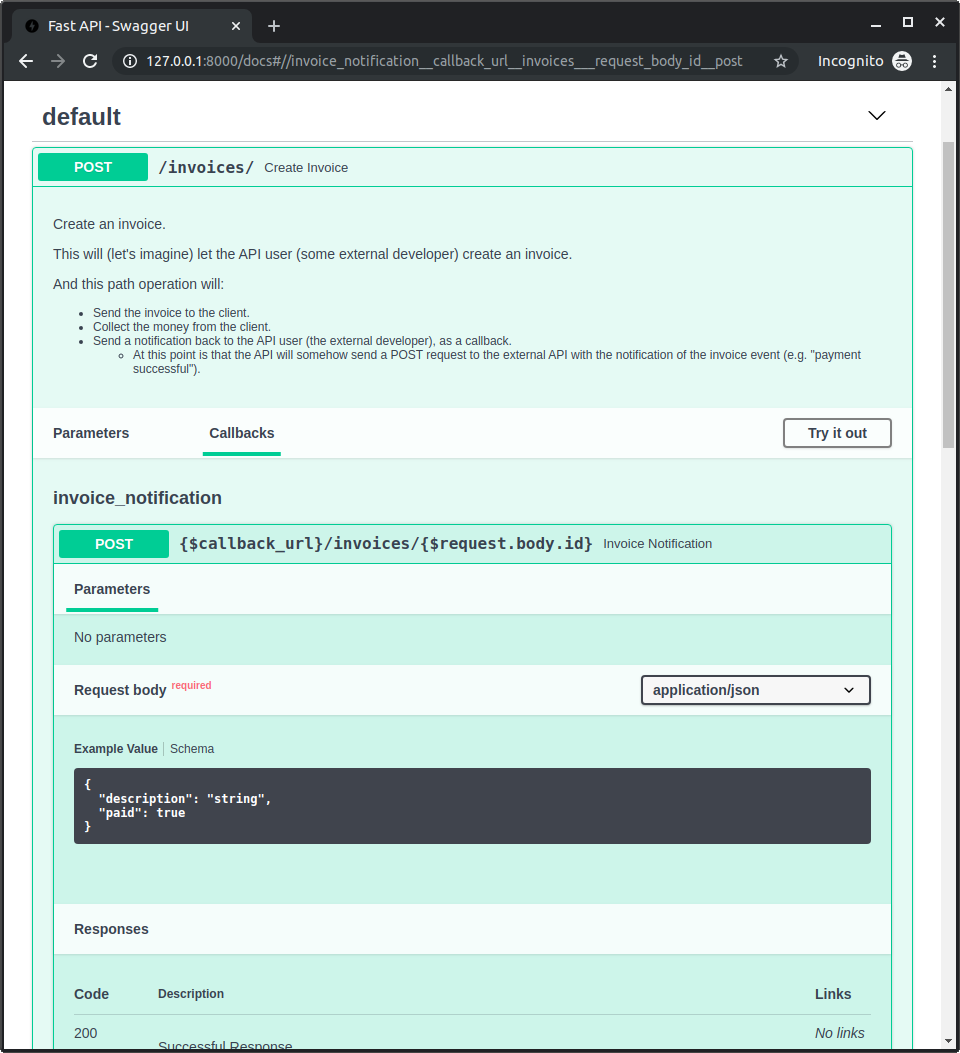
이제 앱을 실행하고 http://127.0.0.1:8000/docs로 이동하세요.
경로 처리에 대해 "Callbacks" 섹션을 포함한 문서가 표시되며, external API가 어떤 형태여야 하는지 확인할 수 있습니다: