OpenAPI の追加レスポンス
🌐 AI と人間による翻訳
この翻訳は、人間のガイドに基づいて AI によって作成されました。🤝
原文の意図を取り違えていたり、不自然な表現になっている可能性があります。🤖
AI LLM をより適切に誘導するのを手伝う ことで、この翻訳を改善できます。
注意
これは比較的高度なトピックです。
FastAPI を使い始めたばかりであれば、これは不要かもしれません。
追加のステータスコード、メディアタイプ、説明などを伴う追加レスポンスを宣言できます。
それらの追加レスポンスは OpenAPI スキーマに含まれ、API ドキュメントにも表示されます。
ただし、それらの追加レスポンスについては、ステータスコードとコンテンツを指定して JSONResponse などの Response を直接返す必要があります。
model を使った追加レスポンス
path operation デコレータに responses パラメータを渡せます。
これは dict を受け取り、キーは各レスポンスのステータスコード(例: 200)、値は各レスポンスの情報を含む別の dict です。
それぞれのレスポンス dict には、response_model と同様に Pydantic モデルを格納する model キーを含められます。
FastAPI はそのモデルから JSON Schema を生成し、OpenAPI の適切な場所に含めます。
例えば、ステータスコード 404 と Pydantic モデル Message を持つ別のレスポンスを宣言するには、次のように書けます:
from fastapi import FastAPI
from fastapi.responses import JSONResponse
from pydantic import BaseModel


class Item(BaseModel):
    id: str
    value: str


class Message(BaseModel):
    message: str


app = FastAPI()


@app.get("/items/{item_id}", response_model=Item, responses={404: {"model": Message}})
async def read_item(item_id: str):
    if item_id == "foo":
        return {"id": "foo", "value": "there goes my hero"}
    return JSONResponse(status_code=404, content={"message": "Item not found"})
備考
JSONResponse を直接返す必要がある点に注意してください。
情報
model キーは OpenAPI の一部ではありません。
FastAPI はそこから Pydantic モデルを取得して JSON Schema を生成し、適切な場所に配置します。
適切な場所は次のとおりです:
contentキーの中。これは値として別の JSON オブジェクト(dict)を持ち、その中に次が含まれます:- メディアタイプ(例:
application/json)をキーとし、値としてさらに別の JSON オブジェクトを持ち、その中に次が含まれます:schemaキー。値としてモデル由来の JSON Schema を持ち、ここが正しい配置場所です。- FastAPI はここに、スキーマを直接埋め込む代わりに OpenAPI 内のグローバルな JSON Schema への参照を追加します。これにより、他のアプリケーションやクライアントがそれらの JSON Schema を直接利用し、より良いコード生成ツール等を提供できます。
- メディアタイプ(例:
この path operation のために OpenAPI に生成されるレスポンスは次のとおりです:
{
    "responses": {
        "404": {
            "description": "Additional Response",
            "content": {
                "application/json": {
                    "schema": {
                        "$ref": "#/components/schemas/Message"
                    }
                }
            }
        },
        "200": {
            "description": "Successful Response",
            "content": {
                "application/json": {
                    "schema": {
                        "$ref": "#/components/schemas/Item"
                    }
                }
            }
        },
        "422": {
            "description": "Validation Error",
            "content": {
                "application/json": {
                    "schema": {
                        "$ref": "#/components/schemas/HTTPValidationError"
                    }
                }
            }
        }
    }
}
スキーマは OpenAPI スキーマ内の別の場所への参照になります:
{
    "components": {
        "schemas": {
            "Message": {
                "title": "Message",
                "required": [
                    "message"
                ],
                "type": "object",
                "properties": {
                    "message": {
                        "title": "Message",
                        "type": "string"
                    }
                }
            },
            "Item": {
                "title": "Item",
                "required": [
                    "id",
                    "value"
                ],
                "type": "object",
                "properties": {
                    "id": {
                        "title": "Id",
                        "type": "string"
                    },
                    "value": {
                        "title": "Value",
                        "type": "string"
                    }
                }
            },
            "ValidationError": {
                "title": "ValidationError",
                "required": [
                    "loc",
                    "msg",
                    "type"
                ],
                "type": "object",
                "properties": {
                    "loc": {
                        "title": "Location",
                        "type": "array",
                        "items": {
                            "type": "string"
                        }
                    },
                    "msg": {
                        "title": "Message",
                        "type": "string"
                    },
                    "type": {
                        "title": "Error Type",
                        "type": "string"
                    }
                }
            },
            "HTTPValidationError": {
                "title": "HTTPValidationError",
                "type": "object",
                "properties": {
                    "detail": {
                        "title": "Detail",
                        "type": "array",
                        "items": {
                            "$ref": "#/components/schemas/ValidationError"
                        }
                    }
                }
            }
        }
    }
}
メインのレスポンスに追加のメディアタイプ
同じ responses パラメータを使って、同一のメインレスポンスに別のメディアタイプを追加できます。
例えば、image/png の追加メディアタイプを加え、あなたの path operation が JSON オブジェクト(メディアタイプ application/json)または PNG 画像を返せることを宣言できます:
from fastapi import FastAPI
from fastapi.responses import FileResponse
from pydantic import BaseModel


class Item(BaseModel):
    id: str
    value: str


app = FastAPI()


@app.get(
    "/items/{item_id}",
    response_model=Item,
    responses={
        200: {
            "content": {"image/png": {}},
            "description": "Return the JSON item or an image.",
        }
    },
)
async def read_item(item_id: str, img: bool | None = None):
    if img:
        return FileResponse("image.png", media_type="image/png")
    else:
        return {"id": "foo", "value": "there goes my hero"}
備考
画像は FileResponse を使って直接返す必要がある点に注意してください。
情報
responses パラメータで明示的に別のメディアタイプを指定しない限り、FastAPI はレスポンスがメインのレスポンスクラスと同じメディアタイプ(デフォルトは application/json)であるとみなします。
ただし、メディアタイプが None のカスタムレスポンスクラスを指定している場合、モデルが関連付けられた追加レスポンスには FastAPI は application/json を使用します。
情報の結合
response_model、status_code、responses パラメータなど、複数の場所からのレスポンス情報を組み合わせることもできます。
response_model を宣言し、デフォルトのステータスコード 200(必要なら任意のコード)を使い、その同じレスポンスに対する追加情報を responses で OpenAPI スキーマに直接記述できます。
FastAPI は responses にある追加情報を保持し、モデルの JSON Schema と結合します。
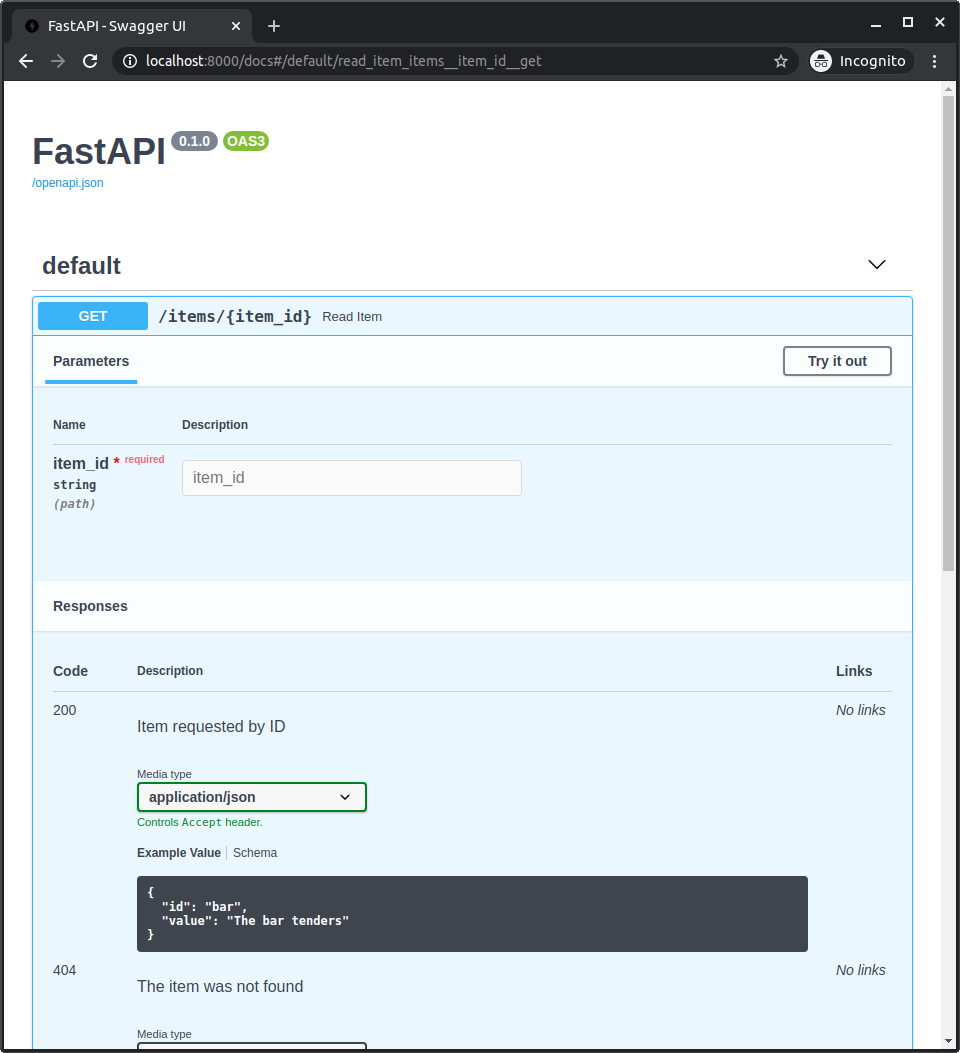
例えば、Pydantic モデルを用い、独自の description を持つステータスコード 404 のレスポンスを宣言できます。
さらに、response_model を使うステータスコード 200 のレスポンスに独自の example を含めることもできます:
from fastapi import FastAPI
from fastapi.responses import JSONResponse
from pydantic import BaseModel


class Item(BaseModel):
    id: str
    value: str


class Message(BaseModel):
    message: str


app = FastAPI()


@app.get(
    "/items/{item_id}",
    response_model=Item,
    responses={
        404: {"model": Message, "description": "The item was not found"},
        200: {
            "description": "Item requested by ID",
            "content": {
                "application/json": {
                    "example": {"id": "bar", "value": "The bar tenders"}
                }
            },
        },
    },
)
async def read_item(item_id: str):
    if item_id == "foo":
        return {"id": "foo", "value": "there goes my hero"}
    else:
        return JSONResponse(status_code=404, content={"message": "Item not found"})
これらはすべて結合されて OpenAPI に含まれ、API ドキュメントに表示されます:
事前定義レスポンスとカスタムの組み合わせ
多くの path operations に適用できる事前定義のレスポンスを用意しつつ、各 path operation ごとに必要なカスタムレスポンスと組み合わせたい場合があります。
そのような場合、Python の **dict_to_unpack による dict の「アンパック」テクニックを使えます:
old_dict = {
    "old key": "old value",
    "second old key": "second old value",
}
new_dict = {**old_dict, "new key": "new value"}
ここでは、new_dict には old_dict のすべてのキーと値に加え、新しいキーと値が含まれます:
{
    "old key": "old value",
    "second old key": "second old value",
    "new key": "new value",
}
このテクニックを使うと、path operations で事前定義レスポンスを再利用し、さらにカスタムのレスポンスを組み合わせられます。
例えば:
from fastapi import FastAPI
from fastapi.responses import FileResponse
from pydantic import BaseModel


class Item(BaseModel):
    id: str
    value: str


responses = {
    404: {"description": "Item not found"},
    302: {"description": "The item was moved"},
    403: {"description": "Not enough privileges"},
}


app = FastAPI()


@app.get(
    "/items/{item_id}",
    response_model=Item,
    responses={**responses, 200: {"content": {"image/png": {}}}},
)
async def read_item(item_id: str, img: bool | None = None):
    if img:
        return FileResponse("image.png", media_type="image/png")
    else:
        return {"id": "foo", "value": "there goes my hero"}
OpenAPI レスポンスの詳細
レスポンスに正確に何を含められるかは、OpenAPI 仕様の次のセクションを参照してください:
- OpenAPI の Responses Object、ここには
Response Objectが含まれます。 - OpenAPI の Response Object、
responsesパラメータ内の各レスポンスに、ここで定義されている要素を直接含められます。description、headers、content(ここで異なるメディアタイプや JSON Schema を宣言します)、linksなど。