Configurer Swagger UI
🌐 Traduction par IA et humains
Cette traduction a été réalisée par une IA guidée par des humains. 🤝
Elle peut contenir des erreurs d'interprétation du sens original, ou paraître peu naturelle, etc. 🤖
Vous pouvez améliorer cette traduction en nous aidant à mieux guider le LLM d'IA.
Vous pouvez configurer des paramètres supplémentaires de Swagger UI.
Pour les configurer, passez l'argument swagger_ui_parameters lors de la création de l'objet d'application FastAPI() ou à la fonction get_swagger_ui_html().
swagger_ui_parameters reçoit un dictionnaire avec les configurations passées directement à Swagger UI.
FastAPI convertit les configurations en JSON pour les rendre compatibles avec JavaScript, car c'est ce dont Swagger UI a besoin.
Désactiver la coloration syntaxique
Par exemple, vous pourriez désactiver la coloration syntaxique dans Swagger UI.
Sans modifier les paramètres, la coloration syntaxique est activée par défaut :
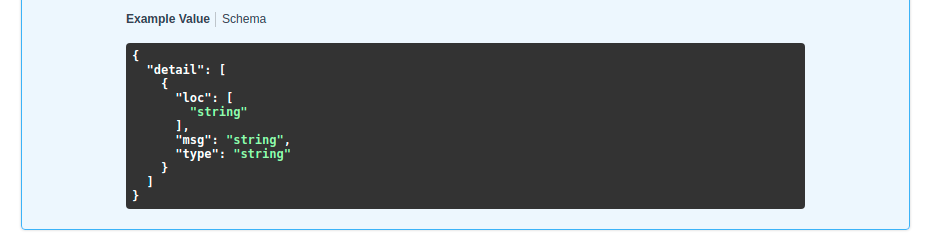
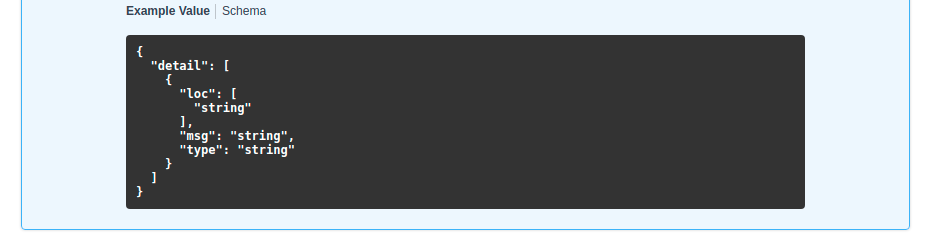
Mais vous pouvez la désactiver en définissant syntaxHighlight à False :
from fastapi import FastAPI

app = FastAPI(swagger_ui_parameters={"syntaxHighlight": False})


@app.get("/users/{username}")
async def read_user(username: str):
    return {"message": f"Hello {username}"}
... et ensuite Swagger UI n'affichera plus la coloration syntaxique :
Modifier le thème
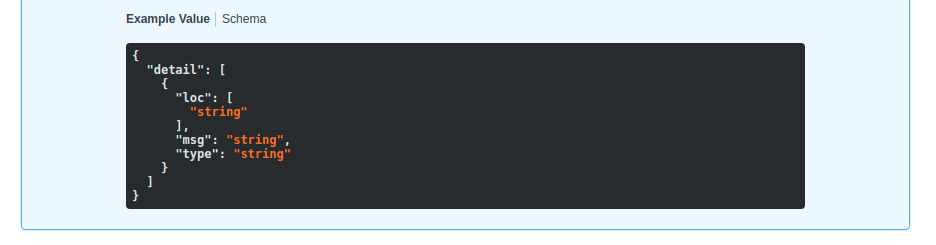
De la même manière, vous pouvez définir le thème de la coloration syntaxique avec la clé « syntaxHighlight.theme » (remarquez le point au milieu) :
from fastapi import FastAPI

app = FastAPI(swagger_ui_parameters={"syntaxHighlight": {"theme": "obsidian"}})


@app.get("/users/{username}")
async def read_user(username: str):
    return {"message": f"Hello {username}"}
Cette configuration modifierait le thème de couleurs de la coloration syntaxique :
Modifier les paramètres Swagger UI par défaut
FastAPI inclut des paramètres de configuration par défaut adaptés à la plupart des cas d'utilisation.
Il inclut ces configurations par défaut :
# Code above omitted 👆

def _html_safe_json(value: Any) -> str:
    """Serialize a value to JSON with HTML special characters escaped.

    This prevents injection when the JSON is embedded inside a <script> tag.
    """
    return (
        json.dumps(value)
        .replace("<", "\\u003c")
        .replace(">", "\\u003e")
        .replace("&", "\\u0026")
    )


swagger_ui_default_parameters: Annotated[
    dict[str, Any],
    Doc(

# Code below omitted 👇
👀 Full file preview
import json
from typing import Annotated, Any

from annotated_doc import Doc
from fastapi.encoders import jsonable_encoder
from starlette.responses import HTMLResponse


def _html_safe_json(value: Any) -> str:
    """Serialize a value to JSON with HTML special characters escaped.

    This prevents injection when the JSON is embedded inside a <script> tag.
    """
    return (
        json.dumps(value)
        .replace("<", "\\u003c")
        .replace(">", "\\u003e")
        .replace("&", "\\u0026")
    )


swagger_ui_default_parameters: Annotated[
    dict[str, Any],
    Doc(
        """
        Default configurations for Swagger UI.

        You can use it as a template to add any other configurations needed.
        """
    ),
] = {
    "dom_id": "#swagger-ui",
    "layout": "BaseLayout",
    "deepLinking": True,
    "showExtensions": True,
    "showCommonExtensions": True,
}


def get_swagger_ui_html(
    *,
    openapi_url: Annotated[
        str,
        Doc(
            """
            The OpenAPI URL that Swagger UI should load and use.

            This is normally done automatically by FastAPI using the default URL
            `/openapi.json`.

            Read more about it in the
            [FastAPI docs for Conditional OpenAPI](https://fastapi.tiangolo.com/how-to/conditional-openapi/#conditional-openapi-from-settings-and-env-vars)
            """
        ),
    ],
    title: Annotated[
        str,
        Doc(
            """
            The HTML `<title>` content, normally shown in the browser tab.

            Read more about it in the
            [FastAPI docs for Custom Docs UI Static Assets](https://fastapi.tiangolo.com/how-to/custom-docs-ui-assets/)
            """
        ),
    ],
    swagger_js_url: Annotated[
        str,
        Doc(
            """
            The URL to use to load the Swagger UI JavaScript.

            It is normally set to a CDN URL.

            Read more about it in the
            [FastAPI docs for Custom Docs UI Static Assets](https://fastapi.tiangolo.com/how-to/custom-docs-ui-assets/)
            """
        ),
    ] = "https://cdn.jsdelivr.net/npm/swagger-ui-dist@5/swagger-ui-bundle.js",
    swagger_css_url: Annotated[
        str,
        Doc(
            """
            The URL to use to load the Swagger UI CSS.

            It is normally set to a CDN URL.

            Read more about it in the
            [FastAPI docs for Custom Docs UI Static Assets](https://fastapi.tiangolo.com/how-to/custom-docs-ui-assets/)
            """
        ),
    ] = "https://cdn.jsdelivr.net/npm/swagger-ui-dist@5/swagger-ui.css",
    swagger_favicon_url: Annotated[
        str,
        Doc(
            """
            The URL of the favicon to use. It is normally shown in the browser tab.
            """
        ),
    ] = "https://fastapi.tiangolo.com/img/favicon.png",
    oauth2_redirect_url: Annotated[
        str | None,
        Doc(
            """
            The OAuth2 redirect URL, it is normally automatically handled by FastAPI.

            Read more about it in the
            [FastAPI docs for Custom Docs UI Static Assets](https://fastapi.tiangolo.com/how-to/custom-docs-ui-assets/)
            """
        ),
    ] = None,
    init_oauth: Annotated[
        dict[str, Any] | None,
        Doc(
            """
            A dictionary with Swagger UI OAuth2 initialization configurations.

            Read more about the available configuration options in the
            [Swagger UI docs](https://swagger.io/docs/open-source-tools/swagger-ui/usage/oauth2/).
            """
        ),
    ] = None,
    swagger_ui_parameters: Annotated[
        dict[str, Any] | None,
        Doc(
            """
            Configuration parameters for Swagger UI.

            It defaults to [swagger_ui_default_parameters][fastapi.openapi.docs.swagger_ui_default_parameters].

            Read more about it in the
            [FastAPI docs about how to Configure Swagger UI](https://fastapi.tiangolo.com/how-to/configure-swagger-ui/).
            """
        ),
    ] = None,
) -> HTMLResponse:
    """
    Generate and return the HTML  that loads Swagger UI for the interactive
    API docs (normally served at `/docs`).

    You would only call this function yourself if you needed to override some parts,
    for example the URLs to use to load Swagger UI's JavaScript and CSS.

    Read more about it in the
    [FastAPI docs for Configure Swagger UI](https://fastapi.tiangolo.com/how-to/configure-swagger-ui/)
    and the [FastAPI docs for Custom Docs UI Static Assets (Self-Hosting)](https://fastapi.tiangolo.com/how-to/custom-docs-ui-assets/).
    """
    current_swagger_ui_parameters = swagger_ui_default_parameters.copy()
    if swagger_ui_parameters:
        current_swagger_ui_parameters.update(swagger_ui_parameters)

    html = f"""
    <!DOCTYPE html>
    <html>
    <head>
    <meta name="viewport" content="width=device-width, initial-scale=1.0">
    <link type="text/css" rel="stylesheet" href="{swagger_css_url}">
    <link rel="shortcut icon" href="{swagger_favicon_url}">
    <title>{title}</title>
    </head>
    <body>
    <div id="swagger-ui">
    </div>
    <script src="{swagger_js_url}"></script>
    <!-- `SwaggerUIBundle` is now available on the page -->
    <script>
    const ui = SwaggerUIBundle({{
        url: '{openapi_url}',
    """

    for key, value in current_swagger_ui_parameters.items():
        html += f"{_html_safe_json(key)}: {_html_safe_json(jsonable_encoder(value))},\n"

    if oauth2_redirect_url:
        html += f"oauth2RedirectUrl: window.location.origin + '{oauth2_redirect_url}',"

    html += """
    presets: [
        SwaggerUIBundle.presets.apis,
        SwaggerUIBundle.SwaggerUIStandalonePreset
        ],
    })"""

    if init_oauth:
        html += f"""
        ui.initOAuth({_html_safe_json(jsonable_encoder(init_oauth))})
        """

    html += """
    </script>
    </body>
    </html>
    """
    return HTMLResponse(html)


def get_redoc_html(
    *,
    openapi_url: Annotated[
        str,
        Doc(
            """
            The OpenAPI URL that ReDoc should load and use.

            This is normally done automatically by FastAPI using the default URL
            `/openapi.json`.

            Read more about it in the
            [FastAPI docs for Conditional OpenAPI](https://fastapi.tiangolo.com/how-to/conditional-openapi/#conditional-openapi-from-settings-and-env-vars)
            """
        ),
    ],
    title: Annotated[
        str,
        Doc(
            """
            The HTML `<title>` content, normally shown in the browser tab.

            Read more about it in the
            [FastAPI docs for Custom Docs UI Static Assets](https://fastapi.tiangolo.com/how-to/custom-docs-ui-assets/)
            """
        ),
    ],
    redoc_js_url: Annotated[
        str,
        Doc(
            """
            The URL to use to load the ReDoc JavaScript.

            It is normally set to a CDN URL.

            Read more about it in the
            [FastAPI docs for Custom Docs UI Static Assets](https://fastapi.tiangolo.com/how-to/custom-docs-ui-assets/)
            """
        ),
    ] = "https://cdn.jsdelivr.net/npm/redoc@2/bundles/redoc.standalone.js",
    redoc_favicon_url: Annotated[
        str,
        Doc(
            """
            The URL of the favicon to use. It is normally shown in the browser tab.
            """
        ),
    ] = "https://fastapi.tiangolo.com/img/favicon.png",
    with_google_fonts: Annotated[
        bool,
        Doc(
            """
            Load and use Google Fonts.
            """
        ),
    ] = True,
) -> HTMLResponse:
    """
    Generate and return the HTML response that loads ReDoc for the alternative
    API docs (normally served at `/redoc`).

    You would only call this function yourself if you needed to override some parts,
    for example the URLs to use to load ReDoc's JavaScript and CSS.

    Read more about it in the
    [FastAPI docs for Custom Docs UI Static Assets (Self-Hosting)](https://fastapi.tiangolo.com/how-to/custom-docs-ui-assets/).
    """
    html = f"""
    <!DOCTYPE html>
    <html>
    <head>
    <title>{title}</title>
    <!-- needed for adaptive design -->
    <meta charset="utf-8"/>
    <meta name="viewport" content="width=device-width, initial-scale=1">
    """
    if with_google_fonts:
        html += """
    <link href="https://fonts.googleapis.com/css?family=Montserrat:300,400,700|Roboto:300,400,700" rel="stylesheet">
    """
    html += f"""
    <link rel="shortcut icon" href="{redoc_favicon_url}">
    <!--
    ReDoc doesn't change outer page styles
    -->
    <style>
      body {{
        margin: 0;
        padding: 0;
      }}
    </style>
    </head>
    <body>
    <noscript>
        ReDoc requires Javascript to function. Please enable it to browse the documentation.
    </noscript>
    <redoc spec-url="{openapi_url}"></redoc>
    <script src="{redoc_js_url}"> </script>
    </body>
    </html>
    """
    return HTMLResponse(html)


def get_swagger_ui_oauth2_redirect_html() -> HTMLResponse:
    """
    Generate the HTML response with the OAuth2 redirection for Swagger UI.

    You normally don't need to use or change this.
    """
    # copied from https://github.com/swagger-api/swagger-ui/blob/v4.14.0/dist/oauth2-redirect.html
    html = """
    <!doctype html>
    <html lang="en-US">
    <head>
        <title>Swagger UI: OAuth2 Redirect</title>
    </head>
    <body>
    <script>
        'use strict';
        function run () {
            var oauth2 = window.opener.swaggerUIRedirectOauth2;
            var sentState = oauth2.state;
            var redirectUrl = oauth2.redirectUrl;
            var isValid, qp, arr;

            if (/code|token|error/.test(window.location.hash)) {
                qp = window.location.hash.substring(1).replace('?', '&');
            } else {
                qp = location.search.substring(1);
            }

            arr = qp.split("&");
            arr.forEach(function (v,i,_arr) { _arr[i] = '"' + v.replace('=', '":"') + '"';});
            qp = qp ? JSON.parse('{' + arr.join() + '}',
                    function (key, value) {
                        return key === "" ? value : decodeURIComponent(value);
                    }
            ) : {};

            isValid = qp.state === sentState;

            if ((
              oauth2.auth.schema.get("flow") === "accessCode" ||
              oauth2.auth.schema.get("flow") === "authorizationCode" ||
              oauth2.auth.schema.get("flow") === "authorization_code"
            ) && !oauth2.auth.code) {
                if (!isValid) {
                    oauth2.errCb({
                        authId: oauth2.auth.name,
                        source: "auth",
                        level: "warning",
                        message: "Authorization may be unsafe, passed state was changed in server. The passed state wasn't returned from auth server."
                    });
                }

                if (qp.code) {
                    delete oauth2.state;
                    oauth2.auth.code = qp.code;
                    oauth2.callback({auth: oauth2.auth, redirectUrl: redirectUrl});
                } else {
                    let oauthErrorMsg;
                    if (qp.error) {
                        oauthErrorMsg = "["+qp.error+"]: " +
                            (qp.error_description ? qp.error_description+ ". " : "no accessCode received from the server. ") +
                            (qp.error_uri ? "More info: "+qp.error_uri : "");
                    }

                    oauth2.errCb({
                        authId: oauth2.auth.name,
                        source: "auth",
                        level: "error",
                        message: oauthErrorMsg || "[Authorization failed]: no accessCode received from the server."
                    });
                }
            } else {
                oauth2.callback({auth: oauth2.auth, token: qp, isValid: isValid, redirectUrl: redirectUrl});
            }
            window.close();
        }

        if (document.readyState !== 'loading') {
            run();
        } else {
            document.addEventListener('DOMContentLoaded', function () {
                run();
            });
        }
    </script>
    </body>
    </html>
        """
    return HTMLResponse(content=html)
Vous pouvez remplacer n'importe lequel d'entre eux en définissant une valeur différente dans l'argument swagger_ui_parameters.
Par exemple, pour désactiver deepLinking, vous pourriez passer ces paramètres à swagger_ui_parameters :
from fastapi import FastAPI

app = FastAPI(swagger_ui_parameters={"deepLinking": False})


@app.get("/users/{username}")
async def read_user(username: str):
    return {"message": f"Hello {username}"}
Autres paramètres de Swagger UI
Pour voir toutes les autres configurations possibles que vous pouvez utiliser, lisez les documents officiels pour les paramètres de Swagger UI.
Paramètres JavaScript uniquement
Swagger UI permet également d'autres configurations qui sont des objets réservés à JavaScript (par exemple, des fonctions JavaScript).
FastAPI inclut aussi ces paramètres presets réservés à JavaScript :
presets: [
    SwaggerUIBundle.presets.apis,
    SwaggerUIBundle.SwaggerUIStandalonePreset
]
Ce sont des objets JavaScript, pas des chaînes, vous ne pouvez donc pas les passer directement depuis du code Python.
Si vous devez utiliser des configurations réservées à JavaScript comme celles-ci, vous pouvez utiliser l'une des méthodes ci-dessus. Surchargez entièrement le chemin d'accès Swagger UI et écrivez manuellement tout JavaScript nécessaire.