Password और Bearer के साथ सरल OAuth2
🌐 एआई और मनुष्यों द्वारा किया गया अनुवाद
यह अनुवाद मनुष्यों के मार्गदर्शन में एआई द्वारा किया गया है। 🤝
इसमें मूल अर्थ को गलत समझने या अप्राकृतिक लगने आदि जैसी गलतियाँ हो सकती हैं। 🤖
आप हमें एआई LLM को बेहतर मार्गदर्शन करने में मदद करके इस अनुवाद को बेहतर बना सकते हैं।
अब पिछले अध्याय से आगे बढ़ते हैं और एक पूरा security flow बनाने के लिए छूटे हुए हिस्से जोड़ते हैं।
username और password प्राप्त करें
हम username और password प्राप्त करने के लिए FastAPI security utilities का उपयोग करने वाले हैं।
OAuth2 निर्दिष्ट करता है कि "password flow" (जिसका हम उपयोग कर रहे हैं) का उपयोग करते समय client/user को username और password fields को form data के रूप में भेजना होगा।
और spec कहता है कि fields के नाम ऐसे ही होने चाहिए। इसलिए user-name या email काम नहीं करेगा।
लेकिन चिंता न करें, frontend में आप इसे अपने अंतिम users को जैसे चाहें दिखा सकते हैं।
और आपके database models कोई भी दूसरे नाम उपयोग कर सकते हैं जो आप चाहें।
लेकिन login path operation के लिए, हमें spec के साथ compatible होने के लिए इन नामों का उपयोग करना होगा (और उदाहरण के लिए, integrated API documentation system का उपयोग कर पाने के लिए)।
Spec यह भी बताता है कि username और password को form data के रूप में भेजा जाना चाहिए (इसलिए, यहाँ कोई JSON नहीं)।
scope
Spec यह भी कहता है कि client एक और form field "scope" भेज सकता है।
form field का नाम scope है (singular में), लेकिन यह वास्तव में spaces से अलग किए गए "scopes" वाली एक लंबी string होती है।
हर "scope" बस एक string है (बिना spaces के)।
इनका सामान्यतः विशिष्ट security permissions घोषित करने के लिए उपयोग किया जाता है, उदाहरण के लिए:
users:readयाusers:writeआम उदाहरण हैं।instagram_basicFacebook / Instagram द्वारा उपयोग किया जाता है।https://www.googleapis.com/auth/driveGoogle द्वारा उपयोग किया जाता है।
नोट
OAuth2 में "scope" बस एक string है जो किसी विशिष्ट required permission को घोषित करती है।
इससे फर्क नहीं पड़ता कि उसमें : जैसे अन्य characters हैं या वह URL है।
वे details implementation specific हैं।
OAuth2 के लिए वे बस strings हैं।
username और password प्राप्त करने का Code
अब इसे संभालने के लिए FastAPI द्वारा प्रदान की गई utilities का उपयोग करते हैं।
OAuth2PasswordRequestForm
पहले, OAuth2PasswordRequestForm import करें, और /token के path operation में Depends के साथ इसे dependency के रूप में उपयोग करें:
from typing import Annotated

from fastapi import Depends, FastAPI, HTTPException, status
from fastapi.security import OAuth2PasswordBearer, OAuth2PasswordRequestForm
from pydantic import BaseModel

fake_users_db = {
    "johndoe": {
        "username": "johndoe",
        "full_name": "John Doe",
        "email": "johndoe@example.com",
        "hashed_password": "fakehashedsecret",
        "disabled": False,
    },
    "alice": {
        "username": "alice",
        "full_name": "Alice Wonderson",
        "email": "alice@example.com",
        "hashed_password": "fakehashedsecret2",
        "disabled": True,
    },
}

app = FastAPI()


def fake_hash_password(password: str):
    return "fakehashed" + password


oauth2_scheme = OAuth2PasswordBearer(tokenUrl="token")


class User(BaseModel):
    username: str
    email: str | None = None
    full_name: str | None = None
    disabled: bool | None = None


class UserInDB(User):
    hashed_password: str


def get_user(db, username: str):
    if username in db:
        user_dict = db[username]
        return UserInDB(**user_dict)


def fake_decode_token(token):
    # This doesn't provide any security at all
    # Check the next version
    user = get_user(fake_users_db, token)
    return user


async def get_current_user(token: Annotated[str, Depends(oauth2_scheme)]):
    user = fake_decode_token(token)
    if not user:
        raise HTTPException(
            status_code=status.HTTP_401_UNAUTHORIZED,
            detail="Not authenticated",
            headers={"WWW-Authenticate": "Bearer"},
        )
    return user


async def get_current_active_user(
    current_user: Annotated[User, Depends(get_current_user)],
):
    if current_user.disabled:
        raise HTTPException(status_code=400, detail="Inactive user")
    return current_user


@app.post("/token")
async def login(form_data: Annotated[OAuth2PasswordRequestForm, Depends()]):
    user_dict = fake_users_db.get(form_data.username)
    if not user_dict:
        raise HTTPException(status_code=400, detail="Incorrect username or password")
    user = UserInDB(**user_dict)
    hashed_password = fake_hash_password(form_data.password)
    if not hashed_password == user.hashed_password:
        raise HTTPException(status_code=400, detail="Incorrect username or password")

    return {"access_token": user.username, "token_type": "bearer"}


@app.get("/users/me")
async def read_users_me(
    current_user: Annotated[User, Depends(get_current_active_user)],
):
    return current_user
🤓 Other versions and variants
Tip
Prefer to use the Annotated version if possible.
from fastapi import Depends, FastAPI, HTTPException, status
from fastapi.security import OAuth2PasswordBearer, OAuth2PasswordRequestForm
from pydantic import BaseModel

fake_users_db = {
    "johndoe": {
        "username": "johndoe",
        "full_name": "John Doe",
        "email": "johndoe@example.com",
        "hashed_password": "fakehashedsecret",
        "disabled": False,
    },
    "alice": {
        "username": "alice",
        "full_name": "Alice Wonderson",
        "email": "alice@example.com",
        "hashed_password": "fakehashedsecret2",
        "disabled": True,
    },
}

app = FastAPI()


def fake_hash_password(password: str):
    return "fakehashed" + password


oauth2_scheme = OAuth2PasswordBearer(tokenUrl="token")


class User(BaseModel):
    username: str
    email: str | None = None
    full_name: str | None = None
    disabled: bool | None = None


class UserInDB(User):
    hashed_password: str


def get_user(db, username: str):
    if username in db:
        user_dict = db[username]
        return UserInDB(**user_dict)


def fake_decode_token(token):
    # This doesn't provide any security at all
    # Check the next version
    user = get_user(fake_users_db, token)
    return user


async def get_current_user(token: str = Depends(oauth2_scheme)):
    user = fake_decode_token(token)
    if not user:
        raise HTTPException(
            status_code=status.HTTP_401_UNAUTHORIZED,
            detail="Not authenticated",
            headers={"WWW-Authenticate": "Bearer"},
        )
    return user


async def get_current_active_user(current_user: User = Depends(get_current_user)):
    if current_user.disabled:
        raise HTTPException(status_code=400, detail="Inactive user")
    return current_user


@app.post("/token")
async def login(form_data: OAuth2PasswordRequestForm = Depends()):
    user_dict = fake_users_db.get(form_data.username)
    if not user_dict:
        raise HTTPException(status_code=400, detail="Incorrect username or password")
    user = UserInDB(**user_dict)
    hashed_password = fake_hash_password(form_data.password)
    if not hashed_password == user.hashed_password:
        raise HTTPException(status_code=400, detail="Incorrect username or password")

    return {"access_token": user.username, "token_type": "bearer"}


@app.get("/users/me")
async def read_users_me(current_user: User = Depends(get_current_active_user)):
    return current_user
OAuth2PasswordRequestForm एक class dependency है जो एक form body घोषित करती है जिसमें:
username।password।- एक वैकल्पिक
scopefield, एक बड़ी string के रूप में, जो spaces से अलग की गई strings से बनी होती है। - एक वैकल्पिक
grant_type।
टिप
OAuth2 spec वास्तव में fixed value password के साथ एक field grant_type required करता है, लेकिन OAuth2PasswordRequestForm इसे enforce नहीं करता।
अगर आपको इसे enforce करना है, तो OAuth2PasswordRequestForm की जगह OAuth2PasswordRequestFormStrict का उपयोग करें।
- एक वैकल्पिक
client_id(हमारे उदाहरण के लिए हमें इसकी आवश्यकता नहीं है)। - एक वैकल्पिक
client_secret(हमारे उदाहरण के लिए हमें इसकी आवश्यकता नहीं है)।
नोट
OAuth2PasswordRequestForm, FastAPI के लिए कोई विशेष class नहीं है जैसे OAuth2PasswordBearer है।
OAuth2PasswordBearer FastAPI को बताता है कि यह एक security scheme है। इसलिए इसे OpenAPI में इस तरह जोड़ा जाता है।
लेकिन OAuth2PasswordRequestForm बस एक class dependency है जिसे आप खुद भी लिख सकते थे, या आप सीधे Form parameters घोषित कर सकते थे।
लेकिन क्योंकि यह एक सामान्य use case है, इसे आसान बनाने के लिए FastAPI द्वारा सीधे प्रदान किया गया है।
form data का उपयोग करें
टिप
dependency class OAuth2PasswordRequestForm के instance में spaces से अलग की गई लंबी string वाला attribute scope नहीं होगा, इसके बजाय, इसमें भेजे गए प्रत्येक scope के लिए actual strings की list वाला scopes attribute होगा।
हम इस उदाहरण में scopes का उपयोग नहीं कर रहे हैं, लेकिन यदि आपको इसकी आवश्यकता हो तो functionality उपलब्ध है।
अब, form field से username का उपयोग करके (fake) database से user data प्राप्त करें।
यदि ऐसा कोई user नहीं है, तो हम "Incorrect username or password" कहते हुए error लौटाते हैं।
Error के लिए, हम exception HTTPException का उपयोग करते हैं:
from typing import Annotated

from fastapi import Depends, FastAPI, HTTPException, status
from fastapi.security import OAuth2PasswordBearer, OAuth2PasswordRequestForm
from pydantic import BaseModel

fake_users_db = {
    "johndoe": {
        "username": "johndoe",
        "full_name": "John Doe",
        "email": "johndoe@example.com",
        "hashed_password": "fakehashedsecret",
        "disabled": False,
    },
    "alice": {
        "username": "alice",
        "full_name": "Alice Wonderson",
        "email": "alice@example.com",
        "hashed_password": "fakehashedsecret2",
        "disabled": True,
    },
}

app = FastAPI()


def fake_hash_password(password: str):
    return "fakehashed" + password


oauth2_scheme = OAuth2PasswordBearer(tokenUrl="token")


class User(BaseModel):
    username: str
    email: str | None = None
    full_name: str | None = None
    disabled: bool | None = None


class UserInDB(User):
    hashed_password: str


def get_user(db, username: str):
    if username in db:
        user_dict = db[username]
        return UserInDB(**user_dict)


def fake_decode_token(token):
    # This doesn't provide any security at all
    # Check the next version
    user = get_user(fake_users_db, token)
    return user


async def get_current_user(token: Annotated[str, Depends(oauth2_scheme)]):
    user = fake_decode_token(token)
    if not user:
        raise HTTPException(
            status_code=status.HTTP_401_UNAUTHORIZED,
            detail="Not authenticated",
            headers={"WWW-Authenticate": "Bearer"},
        )
    return user


async def get_current_active_user(
    current_user: Annotated[User, Depends(get_current_user)],
):
    if current_user.disabled:
        raise HTTPException(status_code=400, detail="Inactive user")
    return current_user


@app.post("/token")
async def login(form_data: Annotated[OAuth2PasswordRequestForm, Depends()]):
    user_dict = fake_users_db.get(form_data.username)
    if not user_dict:
        raise HTTPException(status_code=400, detail="Incorrect username or password")
    user = UserInDB(**user_dict)
    hashed_password = fake_hash_password(form_data.password)
    if not hashed_password == user.hashed_password:
        raise HTTPException(status_code=400, detail="Incorrect username or password")

    return {"access_token": user.username, "token_type": "bearer"}


@app.get("/users/me")
async def read_users_me(
    current_user: Annotated[User, Depends(get_current_active_user)],
):
    return current_user
🤓 Other versions and variants
Tip
Prefer to use the Annotated version if possible.
from fastapi import Depends, FastAPI, HTTPException, status
from fastapi.security import OAuth2PasswordBearer, OAuth2PasswordRequestForm
from pydantic import BaseModel

fake_users_db = {
    "johndoe": {
        "username": "johndoe",
        "full_name": "John Doe",
        "email": "johndoe@example.com",
        "hashed_password": "fakehashedsecret",
        "disabled": False,
    },
    "alice": {
        "username": "alice",
        "full_name": "Alice Wonderson",
        "email": "alice@example.com",
        "hashed_password": "fakehashedsecret2",
        "disabled": True,
    },
}

app = FastAPI()


def fake_hash_password(password: str):
    return "fakehashed" + password


oauth2_scheme = OAuth2PasswordBearer(tokenUrl="token")


class User(BaseModel):
    username: str
    email: str | None = None
    full_name: str | None = None
    disabled: bool | None = None


class UserInDB(User):
    hashed_password: str


def get_user(db, username: str):
    if username in db:
        user_dict = db[username]
        return UserInDB(**user_dict)


def fake_decode_token(token):
    # This doesn't provide any security at all
    # Check the next version
    user = get_user(fake_users_db, token)
    return user


async def get_current_user(token: str = Depends(oauth2_scheme)):
    user = fake_decode_token(token)
    if not user:
        raise HTTPException(
            status_code=status.HTTP_401_UNAUTHORIZED,
            detail="Not authenticated",
            headers={"WWW-Authenticate": "Bearer"},
        )
    return user


async def get_current_active_user(current_user: User = Depends(get_current_user)):
    if current_user.disabled:
        raise HTTPException(status_code=400, detail="Inactive user")
    return current_user


@app.post("/token")
async def login(form_data: OAuth2PasswordRequestForm = Depends()):
    user_dict = fake_users_db.get(form_data.username)
    if not user_dict:
        raise HTTPException(status_code=400, detail="Incorrect username or password")
    user = UserInDB(**user_dict)
    hashed_password = fake_hash_password(form_data.password)
    if not hashed_password == user.hashed_password:
        raise HTTPException(status_code=400, detail="Incorrect username or password")

    return {"access_token": user.username, "token_type": "bearer"}


@app.get("/users/me")
async def read_users_me(current_user: User = Depends(get_current_active_user)):
    return current_user
password जाँचें
इस समय हमारे पास database से user data है, लेकिन हमने password नहीं जाँचा है।
पहले उस data को Pydantic UserInDB model में डालते हैं।
आपको कभी भी plaintext passwords save नहीं करने चाहिए, इसलिए, हम (fake) password hashing system का उपयोग करेंगे।
यदि passwords match नहीं करते, तो हम वही error लौटाते हैं।
Password hashing
"Hashing" का मतलब है: कुछ content (इस मामले में password) को bytes की sequence (बस एक string) में convert करना जो बेतरतीब दिखती है।
जब भी आप बिल्कुल वही content (बिल्कुल वही password) पास करते हैं, तो आपको बिल्कुल वही बेतरतीब string मिलती है।
लेकिन आप उस बेतरतीब string से वापस password में convert नहीं कर सकते।
Password hashing का उपयोग क्यों करें
अगर आपका database चोरी हो जाता है, तो चोर के पास आपके users के plaintext passwords नहीं होंगे, केवल hashes होंगे।
इसलिए, चोर उन same passwords को किसी दूसरे system में उपयोग करने की कोशिश नहीं कर पाएगा (क्योंकि कई users हर जगह वही password उपयोग करते हैं, यह खतरनाक होगा)।
from typing import Annotated

from fastapi import Depends, FastAPI, HTTPException, status
from fastapi.security import OAuth2PasswordBearer, OAuth2PasswordRequestForm
from pydantic import BaseModel

fake_users_db = {
    "johndoe": {
        "username": "johndoe",
        "full_name": "John Doe",
        "email": "johndoe@example.com",
        "hashed_password": "fakehashedsecret",
        "disabled": False,
    },
    "alice": {
        "username": "alice",
        "full_name": "Alice Wonderson",
        "email": "alice@example.com",
        "hashed_password": "fakehashedsecret2",
        "disabled": True,
    },
}

app = FastAPI()


def fake_hash_password(password: str):
    return "fakehashed" + password


oauth2_scheme = OAuth2PasswordBearer(tokenUrl="token")


class User(BaseModel):
    username: str
    email: str | None = None
    full_name: str | None = None
    disabled: bool | None = None


class UserInDB(User):
    hashed_password: str


def get_user(db, username: str):
    if username in db:
        user_dict = db[username]
        return UserInDB(**user_dict)


def fake_decode_token(token):
    # This doesn't provide any security at all
    # Check the next version
    user = get_user(fake_users_db, token)
    return user


async def get_current_user(token: Annotated[str, Depends(oauth2_scheme)]):
    user = fake_decode_token(token)
    if not user:
        raise HTTPException(
            status_code=status.HTTP_401_UNAUTHORIZED,
            detail="Not authenticated",
            headers={"WWW-Authenticate": "Bearer"},
        )
    return user


async def get_current_active_user(
    current_user: Annotated[User, Depends(get_current_user)],
):
    if current_user.disabled:
        raise HTTPException(status_code=400, detail="Inactive user")
    return current_user


@app.post("/token")
async def login(form_data: Annotated[OAuth2PasswordRequestForm, Depends()]):
    user_dict = fake_users_db.get(form_data.username)
    if not user_dict:
        raise HTTPException(status_code=400, detail="Incorrect username or password")
    user = UserInDB(**user_dict)
    hashed_password = fake_hash_password(form_data.password)
    if not hashed_password == user.hashed_password:
        raise HTTPException(status_code=400, detail="Incorrect username or password")

    return {"access_token": user.username, "token_type": "bearer"}


@app.get("/users/me")
async def read_users_me(
    current_user: Annotated[User, Depends(get_current_active_user)],
):
    return current_user
🤓 Other versions and variants
Tip
Prefer to use the Annotated version if possible.
from fastapi import Depends, FastAPI, HTTPException, status
from fastapi.security import OAuth2PasswordBearer, OAuth2PasswordRequestForm
from pydantic import BaseModel

fake_users_db = {
    "johndoe": {
        "username": "johndoe",
        "full_name": "John Doe",
        "email": "johndoe@example.com",
        "hashed_password": "fakehashedsecret",
        "disabled": False,
    },
    "alice": {
        "username": "alice",
        "full_name": "Alice Wonderson",
        "email": "alice@example.com",
        "hashed_password": "fakehashedsecret2",
        "disabled": True,
    },
}

app = FastAPI()


def fake_hash_password(password: str):
    return "fakehashed" + password


oauth2_scheme = OAuth2PasswordBearer(tokenUrl="token")


class User(BaseModel):
    username: str
    email: str | None = None
    full_name: str | None = None
    disabled: bool | None = None


class UserInDB(User):
    hashed_password: str


def get_user(db, username: str):
    if username in db:
        user_dict = db[username]
        return UserInDB(**user_dict)


def fake_decode_token(token):
    # This doesn't provide any security at all
    # Check the next version
    user = get_user(fake_users_db, token)
    return user


async def get_current_user(token: str = Depends(oauth2_scheme)):
    user = fake_decode_token(token)
    if not user:
        raise HTTPException(
            status_code=status.HTTP_401_UNAUTHORIZED,
            detail="Not authenticated",
            headers={"WWW-Authenticate": "Bearer"},
        )
    return user


async def get_current_active_user(current_user: User = Depends(get_current_user)):
    if current_user.disabled:
        raise HTTPException(status_code=400, detail="Inactive user")
    return current_user


@app.post("/token")
async def login(form_data: OAuth2PasswordRequestForm = Depends()):
    user_dict = fake_users_db.get(form_data.username)
    if not user_dict:
        raise HTTPException(status_code=400, detail="Incorrect username or password")
    user = UserInDB(**user_dict)
    hashed_password = fake_hash_password(form_data.password)
    if not hashed_password == user.hashed_password:
        raise HTTPException(status_code=400, detail="Incorrect username or password")

    return {"access_token": user.username, "token_type": "bearer"}


@app.get("/users/me")
async def read_users_me(current_user: User = Depends(get_current_active_user)):
    return current_user
**user_dict के बारे में
UserInDB(**user_dict) का मतलब है:
user_dict की keys और values को सीधे key-value arguments के रूप में पास करें, इसके बराबर:
UserInDB(
    username = user_dict["username"],
    email = user_dict["email"],
    full_name = user_dict["full_name"],
    disabled = user_dict["disabled"],
    hashed_password = user_dict["hashed_password"],
)
नोट
**user_dict की अधिक पूरी explanation के लिए Extra Models के documentation में वापस देखें।
token लौटाएँ
token endpoint का response एक JSON object होना चाहिए।
इसमें token_type होना चाहिए। हमारे मामले में, क्योंकि हम "Bearer" tokens का उपयोग कर रहे हैं, token type "bearer" होना चाहिए।
और इसमें access_token होना चाहिए, जिसमें हमारे access token वाली एक string हो।
इस सरल उदाहरण के लिए, हम बस पूरी तरह insecure रहेंगे और token के रूप में वही username लौटाएँगे।
टिप
अगले अध्याय में, आप password hashing और JWT tokens के साथ एक वास्तविक secure implementation देखेंगे।
लेकिन अभी के लिए, आइए उन specific details पर ध्यान दें जिनकी हमें आवश्यकता है।
from typing import Annotated

from fastapi import Depends, FastAPI, HTTPException, status
from fastapi.security import OAuth2PasswordBearer, OAuth2PasswordRequestForm
from pydantic import BaseModel

fake_users_db = {
    "johndoe": {
        "username": "johndoe",
        "full_name": "John Doe",
        "email": "johndoe@example.com",
        "hashed_password": "fakehashedsecret",
        "disabled": False,
    },
    "alice": {
        "username": "alice",
        "full_name": "Alice Wonderson",
        "email": "alice@example.com",
        "hashed_password": "fakehashedsecret2",
        "disabled": True,
    },
}

app = FastAPI()


def fake_hash_password(password: str):
    return "fakehashed" + password


oauth2_scheme = OAuth2PasswordBearer(tokenUrl="token")


class User(BaseModel):
    username: str
    email: str | None = None
    full_name: str | None = None
    disabled: bool | None = None


class UserInDB(User):
    hashed_password: str


def get_user(db, username: str):
    if username in db:
        user_dict = db[username]
        return UserInDB(**user_dict)


def fake_decode_token(token):
    # This doesn't provide any security at all
    # Check the next version
    user = get_user(fake_users_db, token)
    return user


async def get_current_user(token: Annotated[str, Depends(oauth2_scheme)]):
    user = fake_decode_token(token)
    if not user:
        raise HTTPException(
            status_code=status.HTTP_401_UNAUTHORIZED,
            detail="Not authenticated",
            headers={"WWW-Authenticate": "Bearer"},
        )
    return user


async def get_current_active_user(
    current_user: Annotated[User, Depends(get_current_user)],
):
    if current_user.disabled:
        raise HTTPException(status_code=400, detail="Inactive user")
    return current_user


@app.post("/token")
async def login(form_data: Annotated[OAuth2PasswordRequestForm, Depends()]):
    user_dict = fake_users_db.get(form_data.username)
    if not user_dict:
        raise HTTPException(status_code=400, detail="Incorrect username or password")
    user = UserInDB(**user_dict)
    hashed_password = fake_hash_password(form_data.password)
    if not hashed_password == user.hashed_password:
        raise HTTPException(status_code=400, detail="Incorrect username or password")

    return {"access_token": user.username, "token_type": "bearer"}


@app.get("/users/me")
async def read_users_me(
    current_user: Annotated[User, Depends(get_current_active_user)],
):
    return current_user
🤓 Other versions and variants
Tip
Prefer to use the Annotated version if possible.
from fastapi import Depends, FastAPI, HTTPException, status
from fastapi.security import OAuth2PasswordBearer, OAuth2PasswordRequestForm
from pydantic import BaseModel

fake_users_db = {
    "johndoe": {
        "username": "johndoe",
        "full_name": "John Doe",
        "email": "johndoe@example.com",
        "hashed_password": "fakehashedsecret",
        "disabled": False,
    },
    "alice": {
        "username": "alice",
        "full_name": "Alice Wonderson",
        "email": "alice@example.com",
        "hashed_password": "fakehashedsecret2",
        "disabled": True,
    },
}

app = FastAPI()


def fake_hash_password(password: str):
    return "fakehashed" + password


oauth2_scheme = OAuth2PasswordBearer(tokenUrl="token")


class User(BaseModel):
    username: str
    email: str | None = None
    full_name: str | None = None
    disabled: bool | None = None


class UserInDB(User):
    hashed_password: str


def get_user(db, username: str):
    if username in db:
        user_dict = db[username]
        return UserInDB(**user_dict)


def fake_decode_token(token):
    # This doesn't provide any security at all
    # Check the next version
    user = get_user(fake_users_db, token)
    return user


async def get_current_user(token: str = Depends(oauth2_scheme)):
    user = fake_decode_token(token)
    if not user:
        raise HTTPException(
            status_code=status.HTTP_401_UNAUTHORIZED,
            detail="Not authenticated",
            headers={"WWW-Authenticate": "Bearer"},
        )
    return user


async def get_current_active_user(current_user: User = Depends(get_current_user)):
    if current_user.disabled:
        raise HTTPException(status_code=400, detail="Inactive user")
    return current_user


@app.post("/token")
async def login(form_data: OAuth2PasswordRequestForm = Depends()):
    user_dict = fake_users_db.get(form_data.username)
    if not user_dict:
        raise HTTPException(status_code=400, detail="Incorrect username or password")
    user = UserInDB(**user_dict)
    hashed_password = fake_hash_password(form_data.password)
    if not hashed_password == user.hashed_password:
        raise HTTPException(status_code=400, detail="Incorrect username or password")

    return {"access_token": user.username, "token_type": "bearer"}


@app.get("/users/me")
async def read_users_me(current_user: User = Depends(get_current_active_user)):
    return current_user
टिप
Spec के अनुसार, आपको access_token और token_type के साथ एक JSON लौटाना चाहिए, बिल्कुल इस उदाहरण की तरह।
यह कुछ ऐसा है जो आपको अपने code में स्वयं करना होगा, और सुनिश्चित करना होगा कि आप उन JSON keys का उपयोग करें।
Specifications के compliant होने के लिए, यह लगभग एकमात्र चीज है जिसे आपको सही तरीके से खुद करना याद रखना होगा।
बाकी सब FastAPI आपके लिए संभालता है।
dependencies अपडेट करें
अब हम अपनी dependencies अपडेट करने वाले हैं।
हम current_user को केवल तब प्राप्त करना चाहते हैं जब यह user active हो।
इसलिए, हम एक अतिरिक्त dependency get_current_active_user बनाते हैं जो बदले में get_current_user को dependency के रूप में उपयोग करती है।
ये दोनों dependencies बस एक HTTP error लौटाएँगी यदि user मौजूद नहीं है, या inactive है।
इसलिए, हमारे endpoint में, हमें user केवल तभी मिलेगा जब user मौजूद हो, सही तरीके से authenticated हो, और active हो:
from typing import Annotated

from fastapi import Depends, FastAPI, HTTPException, status
from fastapi.security import OAuth2PasswordBearer, OAuth2PasswordRequestForm
from pydantic import BaseModel

fake_users_db = {
    "johndoe": {
        "username": "johndoe",
        "full_name": "John Doe",
        "email": "johndoe@example.com",
        "hashed_password": "fakehashedsecret",
        "disabled": False,
    },
    "alice": {
        "username": "alice",
        "full_name": "Alice Wonderson",
        "email": "alice@example.com",
        "hashed_password": "fakehashedsecret2",
        "disabled": True,
    },
}

app = FastAPI()


def fake_hash_password(password: str):
    return "fakehashed" + password


oauth2_scheme = OAuth2PasswordBearer(tokenUrl="token")


class User(BaseModel):
    username: str
    email: str | None = None
    full_name: str | None = None
    disabled: bool | None = None


class UserInDB(User):
    hashed_password: str


def get_user(db, username: str):
    if username in db:
        user_dict = db[username]
        return UserInDB(**user_dict)


def fake_decode_token(token):
    # This doesn't provide any security at all
    # Check the next version
    user = get_user(fake_users_db, token)
    return user


async def get_current_user(token: Annotated[str, Depends(oauth2_scheme)]):
    user = fake_decode_token(token)
    if not user:
        raise HTTPException(
            status_code=status.HTTP_401_UNAUTHORIZED,
            detail="Not authenticated",
            headers={"WWW-Authenticate": "Bearer"},
        )
    return user


async def get_current_active_user(
    current_user: Annotated[User, Depends(get_current_user)],
):
    if current_user.disabled:
        raise HTTPException(status_code=400, detail="Inactive user")
    return current_user


@app.post("/token")
async def login(form_data: Annotated[OAuth2PasswordRequestForm, Depends()]):
    user_dict = fake_users_db.get(form_data.username)
    if not user_dict:
        raise HTTPException(status_code=400, detail="Incorrect username or password")
    user = UserInDB(**user_dict)
    hashed_password = fake_hash_password(form_data.password)
    if not hashed_password == user.hashed_password:
        raise HTTPException(status_code=400, detail="Incorrect username or password")

    return {"access_token": user.username, "token_type": "bearer"}


@app.get("/users/me")
async def read_users_me(
    current_user: Annotated[User, Depends(get_current_active_user)],
):
    return current_user
🤓 Other versions and variants
Tip
Prefer to use the Annotated version if possible.
from fastapi import Depends, FastAPI, HTTPException, status
from fastapi.security import OAuth2PasswordBearer, OAuth2PasswordRequestForm
from pydantic import BaseModel

fake_users_db = {
    "johndoe": {
        "username": "johndoe",
        "full_name": "John Doe",
        "email": "johndoe@example.com",
        "hashed_password": "fakehashedsecret",
        "disabled": False,
    },
    "alice": {
        "username": "alice",
        "full_name": "Alice Wonderson",
        "email": "alice@example.com",
        "hashed_password": "fakehashedsecret2",
        "disabled": True,
    },
}

app = FastAPI()


def fake_hash_password(password: str):
    return "fakehashed" + password


oauth2_scheme = OAuth2PasswordBearer(tokenUrl="token")


class User(BaseModel):
    username: str
    email: str | None = None
    full_name: str | None = None
    disabled: bool | None = None


class UserInDB(User):
    hashed_password: str


def get_user(db, username: str):
    if username in db:
        user_dict = db[username]
        return UserInDB(**user_dict)


def fake_decode_token(token):
    # This doesn't provide any security at all
    # Check the next version
    user = get_user(fake_users_db, token)
    return user


async def get_current_user(token: str = Depends(oauth2_scheme)):
    user = fake_decode_token(token)
    if not user:
        raise HTTPException(
            status_code=status.HTTP_401_UNAUTHORIZED,
            detail="Not authenticated",
            headers={"WWW-Authenticate": "Bearer"},
        )
    return user


async def get_current_active_user(current_user: User = Depends(get_current_user)):
    if current_user.disabled:
        raise HTTPException(status_code=400, detail="Inactive user")
    return current_user


@app.post("/token")
async def login(form_data: OAuth2PasswordRequestForm = Depends()):
    user_dict = fake_users_db.get(form_data.username)
    if not user_dict:
        raise HTTPException(status_code=400, detail="Incorrect username or password")
    user = UserInDB(**user_dict)
    hashed_password = fake_hash_password(form_data.password)
    if not hashed_password == user.hashed_password:
        raise HTTPException(status_code=400, detail="Incorrect username or password")

    return {"access_token": user.username, "token_type": "bearer"}


@app.get("/users/me")
async def read_users_me(current_user: User = Depends(get_current_active_user)):
    return current_user
नोट
Value Bearer के साथ अतिरिक्त header WWW-Authenticate, जिसे हम यहाँ लौटा रहे हैं, spec का भी हिस्सा है।
किसी भी HTTP (error) status code 401 "UNAUTHORIZED" को WWW-Authenticate header भी लौटाना चाहिए।
Bearer tokens (हमारे मामले) में, उस header की value Bearer होनी चाहिए।
आप वास्तव में उस अतिरिक्त header को छोड़ सकते हैं और फिर भी यह काम करेगा।
लेकिन specifications के compliant होने के लिए इसे यहाँ प्रदान किया गया है।
साथ ही, ऐसे tools हो सकते हैं जो इसकी अपेक्षा करते हैं और इसका उपयोग करते हैं (अभी या भविष्य में) और यह आपके या आपके users के लिए उपयोगी हो सकता है, अभी या भविष्य में।
यही standards का लाभ है...
इसे काम करते देखें
Interactive docs खोलें: http://127.0.0.1:8000/docs।
Authenticate करें
"Authorize" button पर click करें।
Credentials का उपयोग करें:
User: johndoe
Password: secret
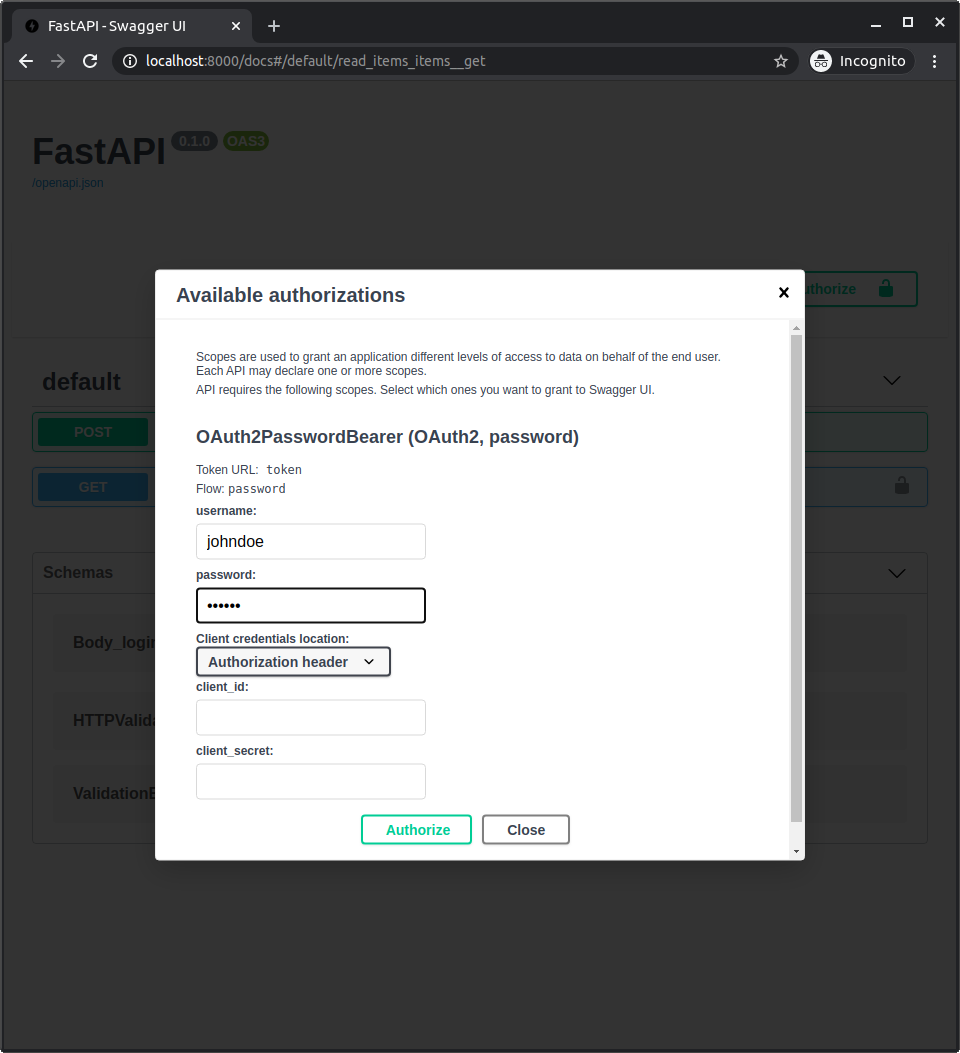
System में authenticate होने के बाद, आप इसे ऐसे देखेंगे:
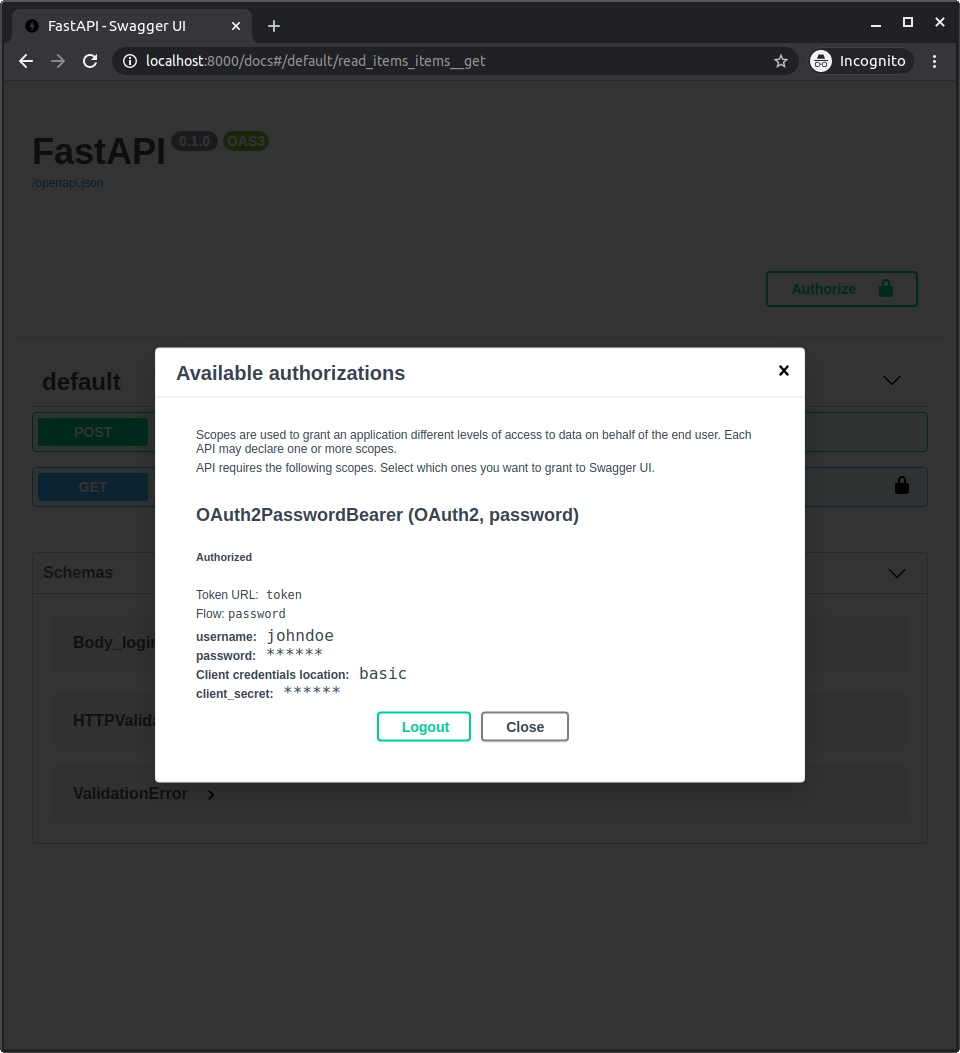
अपना user data प्राप्त करें
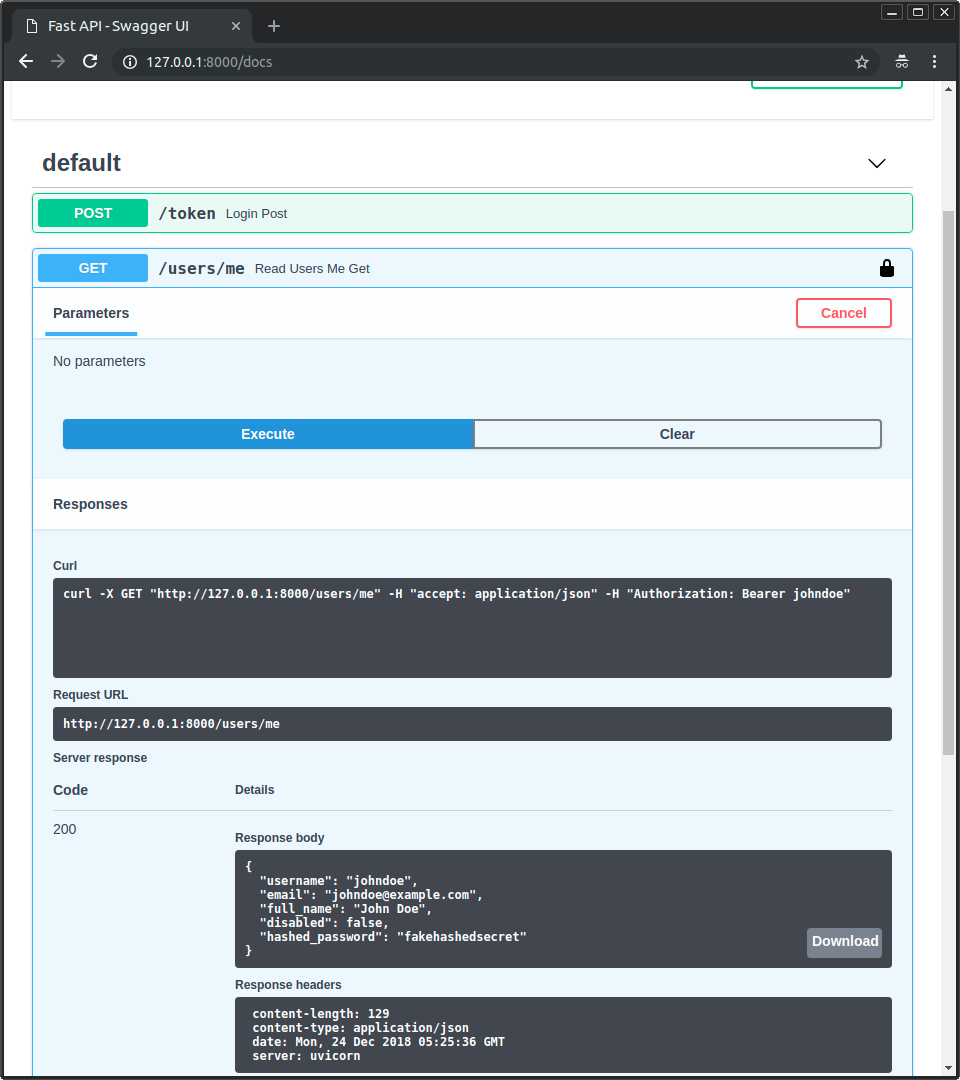
अब path /users/me के साथ operation GET का उपयोग करें।
आपको अपने user का data मिलेगा, जैसे:
{
  "username": "johndoe",
  "email": "johndoe@example.com",
  "full_name": "John Doe",
  "disabled": false,
  "hashed_password": "fakehashedsecret"
}
यदि आप lock icon पर click करके logout करते हैं, और फिर वही operation दोबारा आज़माते हैं, तो आपको HTTP 401 error मिलेगा:
{
  "detail": "Not authenticated"
}
Inactive user
अब एक inactive user के साथ प्रयास करें, इनके साथ authenticate करें:
User: alice
Password: secret2
और path /users/me के साथ operation GET का उपयोग करने का प्रयास करें।
आपको "Inactive user" error मिलेगा, जैसे:
{
  "detail": "Inactive user"
}
Recap
अब आपके पास अपनी API के लिए username और password पर आधारित एक पूरा security system implement करने के tools हैं।
इन tools का उपयोग करके, आप security system को किसी भी database और किसी भी user या data model के साथ compatible बना सकते हैं।
एकमात्र detail जो missing है वह यह है कि यह अभी वास्तव में "secure" नहीं है।
अगले अध्याय में आप देखेंगे कि secure password hashing library और JWT tokens का उपयोग कैसे करें।