SDKs जेनरेट करना
🌐 एआई और मनुष्यों द्वारा किया गया अनुवाद
यह अनुवाद मनुष्यों के मार्गदर्शन में एआई द्वारा किया गया है। 🤝
इसमें मूल अर्थ को गलत समझने या अप्राकृतिक लगने आदि जैसी गलतियाँ हो सकती हैं। 🤖
आप हमें एआई LLM को बेहतर मार्गदर्शन करने में मदद करके इस अनुवाद को बेहतर बना सकते हैं।
क्योंकि FastAPI OpenAPI specification पर आधारित है, इसकी APIs को एक standard format में वर्णित किया जा सकता है जिसे कई tools समझते हैं।
इससे up-to-date documentation, कई भाषाओं में client libraries (SDKs), और testing या automation workflows जेनरेट करना आसान हो जाता है, जो आपके code के साथ sync में रहते हैं।
इस guide में, आप सीखेंगे कि अपने FastAPI backend के लिए TypeScript SDK कैसे जेनरेट करें।
Open Source SDK Generators
एक versatile विकल्प OpenAPI Generator है, जो कई programming languages को support करता है और आपकी OpenAPI specification से SDKs जेनरेट कर सकता है।
TypeScript clients के लिए, Hey API एक purpose-built solution है, जो TypeScript ecosystem के लिए optimized experience प्रदान करता है।
आप OpenAPI.Tools पर और SDK generators खोज सकते हैं।
सुझाव
FastAPI अपने-आप OpenAPI 3.1 specifications जेनरेट करता है, इसलिए आपके द्वारा उपयोग किया जाने वाला कोई भी tool इस version को support करना चाहिए।
TypeScript SDK बनाएँ
आइए एक सरल FastAPI application से शुरू करें:
from fastapi import FastAPI
from pydantic import BaseModel

app = FastAPI()


class Item(BaseModel):
    name: str
    price: float


class ResponseMessage(BaseModel):
    message: str


@app.post("/items/", response_model=ResponseMessage)
async def create_item(item: Item):
    return {"message": "item received"}


@app.get("/items/", response_model=list[Item])
async def get_items():
    return [
        {"name": "Plumbus", "price": 3},
        {"name": "Portal Gun", "price": 9001},
    ]
ध्यान दें कि path operations उन models को define करते हैं जिनका उपयोग वे request payload और response payload के लिए करते हैं, Item और ResponseMessage models का उपयोग करके।
API Docs
यदि आप /docs पर जाते हैं, तो आप देखेंगे कि इसमें requests में भेजे जाने और responses में प्राप्त होने वाले data के लिए schemas हैं:
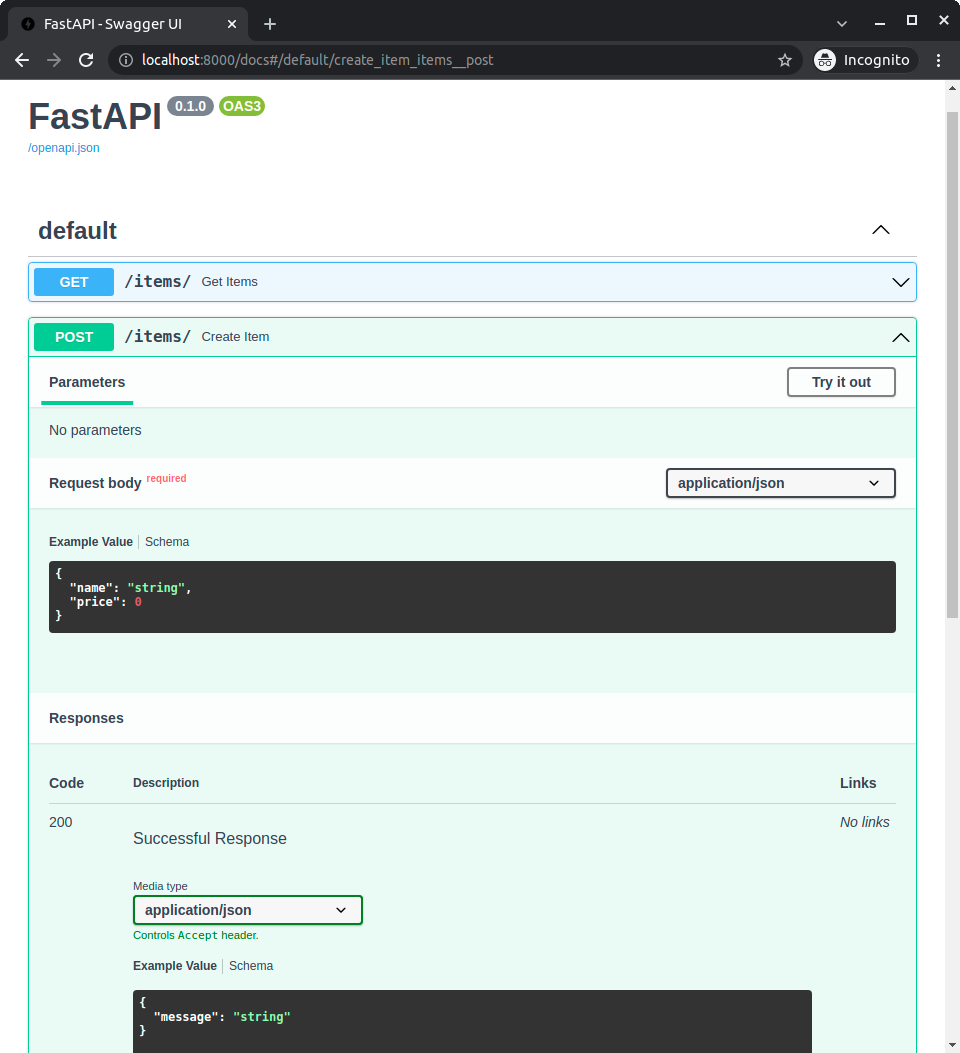
आप वे schemas देख सकते हैं क्योंकि उन्हें app में models के साथ declare किया गया था।
वह जानकारी app के OpenAPI schema में उपलब्ध होती है, और फिर API docs में दिखाई जाती है।
Models से वही जानकारी जो OpenAPI में शामिल होती है, client code जेनरेट करने के लिए उपयोग की जा सकती है।
Hey API
जब हमारे पास models के साथ एक FastAPI app हो, तो हम Hey API का उपयोग करके TypeScript client जेनरेट कर सकते हैं। ऐसा करने का सबसे तेज़ तरीका npx के माध्यम से है।
npx @hey-api/openapi-ts -i http://localhost:8000/openapi.json -o src/client
यह ./src/client में TypeScript SDK जेनरेट करेगा।
आप उनकी website पर @hey-api/openapi-ts install करना सीख सकते हैं और generated output के बारे में पढ़ सकते हैं।
SDK का उपयोग करना
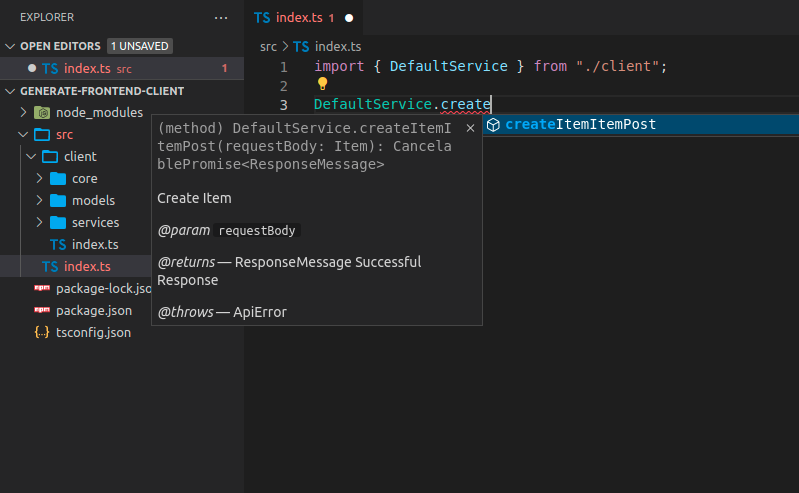
अब आप client code को import करके उपयोग कर सकते हैं। यह कुछ ऐसा दिख सकता है, ध्यान दें कि आपको methods के लिए autocompletion मिलता है:
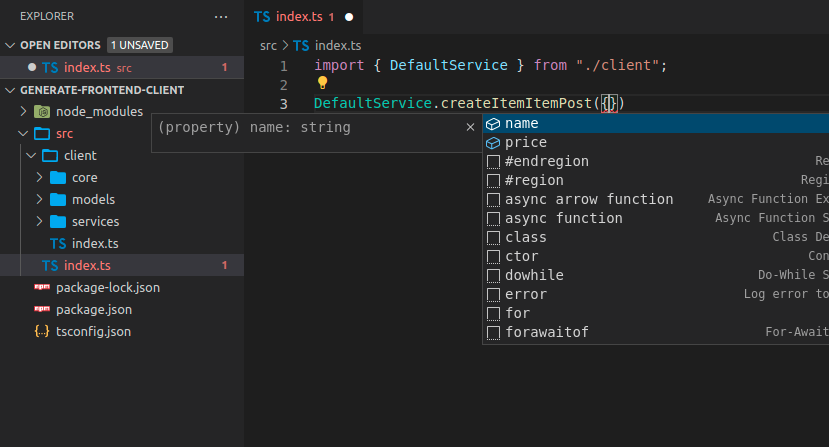
आपको भेजने के लिए payload के लिए भी autocompletion मिलेगा:
सुझाव
name और price के लिए autocompletion पर ध्यान दें, जिसे FastAPI application में, Item model में define किया गया था।
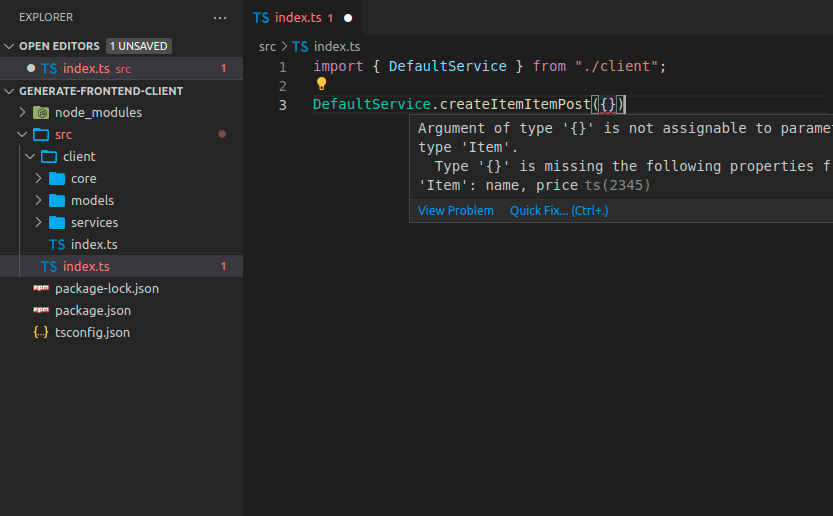
आपके द्वारा भेजे जाने वाले data के लिए inline errors होंगे:
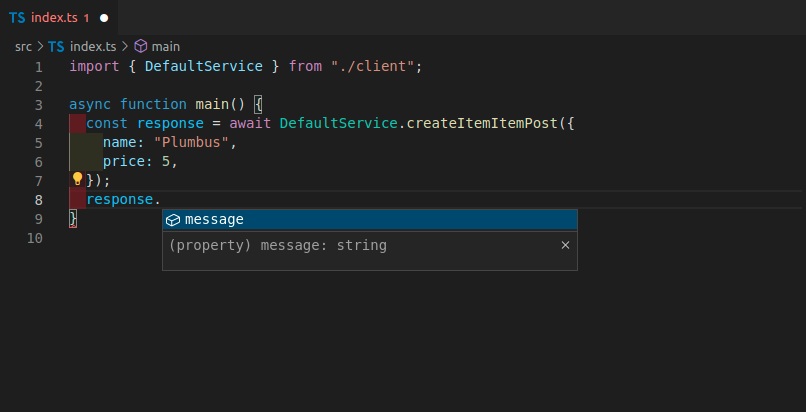
Response object में भी autocompletion होगा:
Tags के साथ FastAPI App
कई मामलों में, आपका FastAPI app बड़ा होगा, और आप शायद path operations के अलग-अलग groups को separate करने के लिए tags का उपयोग करेंगे।
उदाहरण के लिए, आपके पास items के लिए एक section और users के लिए दूसरा section हो सकता है, और उन्हें tags द्वारा separate किया जा सकता है:
from fastapi import FastAPI
from pydantic import BaseModel

app = FastAPI()


class Item(BaseModel):
    name: str
    price: float


class ResponseMessage(BaseModel):
    message: str


class User(BaseModel):
    username: str
    email: str


@app.post("/items/", response_model=ResponseMessage, tags=["items"])
async def create_item(item: Item):
    return {"message": "Item received"}


@app.get("/items/", response_model=list[Item], tags=["items"])
async def get_items():
    return [
        {"name": "Plumbus", "price": 3},
        {"name": "Portal Gun", "price": 9001},
    ]


@app.post("/users/", response_model=ResponseMessage, tags=["users"])
async def create_user(user: User):
    return {"message": "User received"}
Tags के साथ TypeScript Client जेनरेट करें
यदि आप tags का उपयोग करने वाले FastAPI app के लिए client जेनरेट करते हैं, तो यह सामान्यतः client code को भी tags के आधार पर separate करेगा।
इस तरह, आप client code के लिए चीज़ों को सही तरह से ordered और grouped रख पाएँगे:
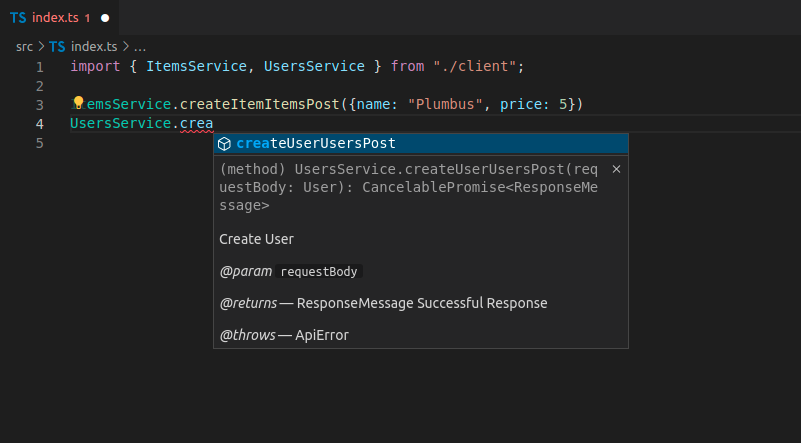
इस मामले में, आपके पास हैं:
ItemsServiceUsersService
Client Method Names
अभी, जेनरेट किए गए method names जैसे createItemItemsPost बहुत साफ़ नहीं दिखते:
ItemsService.createItemItemsPost({name: "Plumbus", price: 5})
...ऐसा इसलिए है क्योंकि client generator प्रत्येक path operation के लिए OpenAPI internal operation ID का उपयोग करता है।
OpenAPI required करता है कि प्रत्येक operation ID सभी path operations में unique हो, इसलिए FastAPI उस operation ID को जेनरेट करने के लिए function name, path, और HTTP method/operation का उपयोग करता है, क्योंकि इस तरह यह सुनिश्चित कर सकता है कि operation IDs unique हैं।
लेकिन मैं आगे आपको दिखाऊँगा कि इसे कैसे बेहतर बनाया जाए। 🤓
Custom Operation IDs और बेहतर Method Names
आप इन operation IDs को जेनरेट करने के तरीके को modify कर सकते हैं ताकि वे clients में सरल हों और सरल method names हों।
इस मामले में, आपको किसी दूसरे तरीके से सुनिश्चित करना होगा कि प्रत्येक operation ID unique हो।
उदाहरण के लिए, आप सुनिश्चित कर सकते हैं कि प्रत्येक path operation में एक tag हो, और फिर tag और path operation name (function name) के आधार पर operation ID जेनरेट करें।
Custom Generate Unique ID Function
FastAPI प्रत्येक path operation के लिए एक unique ID का उपयोग करता है, जिसका उपयोग operation ID के लिए और requests या responses के लिए आवश्यक किसी भी custom models के names के लिए भी किया जाता है।
आप उस function को customize कर सकते हैं। यह एक APIRoute लेता है और एक string output करता है।
उदाहरण के लिए, यहाँ यह पहले tag (आपके पास शायद केवल एक tag होगा) और path operation name (function name) का उपयोग कर रहा है।
फिर आप उस custom function को generate_unique_id_function parameter के रूप में FastAPI को pass कर सकते हैं:
from fastapi import FastAPI
from fastapi.routing import APIRoute
from pydantic import BaseModel


def custom_generate_unique_id(route: APIRoute):
    return f"{route.tags[0]}-{route.name}"


app = FastAPI(generate_unique_id_function=custom_generate_unique_id)


class Item(BaseModel):
    name: str
    price: float


class ResponseMessage(BaseModel):
    message: str


class User(BaseModel):
    username: str
    email: str


@app.post("/items/", response_model=ResponseMessage, tags=["items"])
async def create_item(item: Item):
    return {"message": "Item received"}


@app.get("/items/", response_model=list[Item], tags=["items"])
async def get_items():
    return [
        {"name": "Plumbus", "price": 3},
        {"name": "Portal Gun", "price": 9001},
    ]


@app.post("/users/", response_model=ResponseMessage, tags=["users"])
async def create_user(user: User):
    return {"message": "User received"}
Custom Operation IDs के साथ TypeScript Client जेनरेट करें
अब, यदि आप client को फिर से जेनरेट करते हैं, तो आप देखेंगे कि इसमें बेहतर method names हैं:
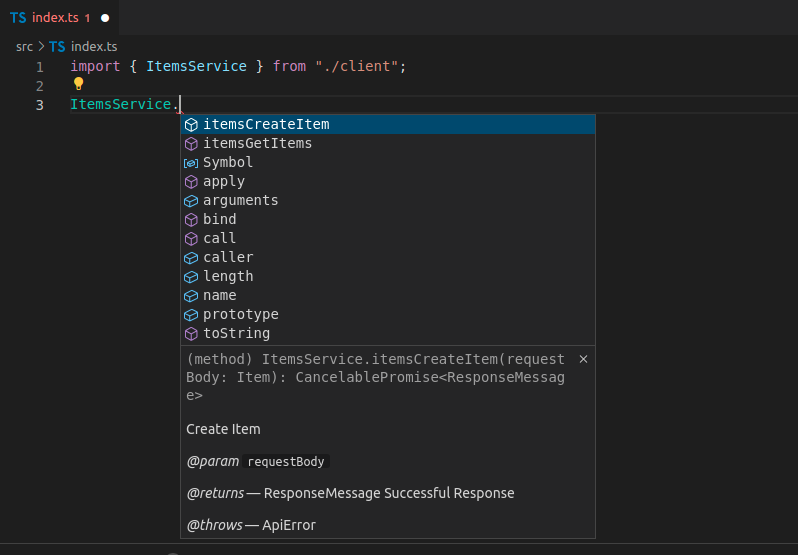
जैसा कि आप देखते हैं, method names में अब tag और फिर function name है, अब वे URL path और HTTP operation की जानकारी शामिल नहीं करते।
Client Generator के लिए OpenAPI Specification को Preprocess करें
जेनरेट किए गए code में अभी भी कुछ duplicated information है।
हम पहले से जानते हैं कि यह method items से संबंधित है क्योंकि वह शब्द ItemsService (tag से लिया गया) में है, लेकिन method name में भी tag name prefixed है। 😕
हम शायद इसे सामान्य रूप से OpenAPI के लिए रखना चाहेंगे, क्योंकि यह सुनिश्चित करेगा कि operation IDs unique हैं।
लेकिन generated client के लिए, हम clients जेनरेट करने से ठीक पहले OpenAPI operation IDs को modify कर सकते हैं, ताकि उन method names को अधिक अच्छे और cleaner बनाया जा सके।
हम OpenAPI JSON को openapi.json file में download कर सकते हैं और फिर इस तरह के script से उस prefixed tag को remove कर सकते हैं:
import json
from pathlib import Path

file_path = Path("./openapi.json")
openapi_content = json.loads(file_path.read_text())

for path_data in openapi_content["paths"].values():
    for operation in path_data.values():
        tag = operation["tags"][0]
        operation_id = operation["operationId"]
        to_remove = f"{tag}-"
        new_operation_id = operation_id[len(to_remove) :]
        operation["operationId"] = new_operation_id

file_path.write_text(json.dumps(openapi_content))
import * as fs from 'fs'

async function modifyOpenAPIFile(filePath) {
  try {
    const data = await fs.promises.readFile(filePath)
    const openapiContent = JSON.parse(data)

    const paths = openapiContent.paths
    for (const pathKey of Object.keys(paths)) {
      const pathData = paths[pathKey]
      for (const method of Object.keys(pathData)) {
        const operation = pathData[method]
        if (operation.tags && operation.tags.length > 0) {
          const tag = operation.tags[0]
          const operationId = operation.operationId
          const toRemove = `${tag}-`
          if (operationId.startsWith(toRemove)) {
            const newOperationId = operationId.substring(toRemove.length)
            operation.operationId = newOperationId
          }
        }
      }
    }

    await fs.promises.writeFile(
      filePath,
      JSON.stringify(openapiContent, null, 2),
    )
    console.log('File successfully modified')
  } catch (err) {
    console.error('Error:', err)
  }
}

const filePath = './openapi.json'
modifyOpenAPIFile(filePath)
इसके साथ, operation IDs को items-get_items जैसी चीज़ों से बदलकर सिर्फ़ get_items कर दिया जाएगा, इस तरह client generator सरल method names जेनरेट कर सकता है।
Preprocessed OpenAPI के साथ TypeScript Client जेनरेट करें
क्योंकि अंतिम परिणाम अब openapi.json file में है, आपको अपनी input location update करनी होगी:
npx @hey-api/openapi-ts -i ./openapi.json -o src/client
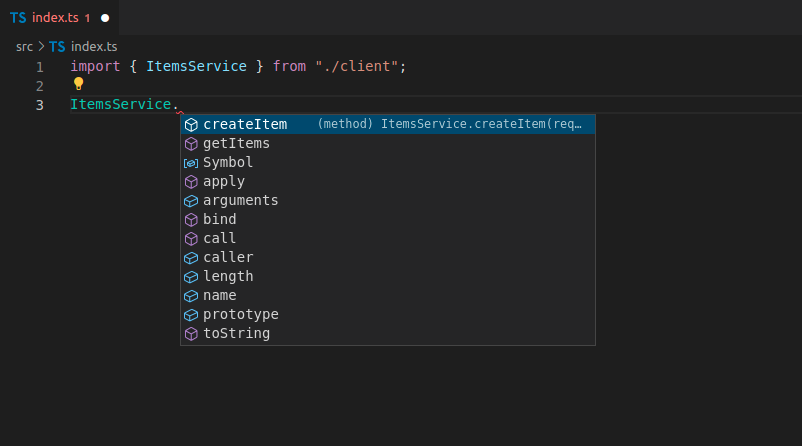
नया client जेनरेट करने के बाद, अब आपके पास clean method names होंगे, सभी autocompletion, inline errors, आदि के साथ:
लाभ
Automatically generated clients का उपयोग करते समय, आपको इन चीज़ों के लिए autocompletion मिलेगा:
- Methods.
- body में request payloads, query parameters, आदि।
- Response payloads.
आपके पास हर चीज़ के लिए inline errors भी होंगे।
और जब भी आप backend code update करते हैं, और frontend को regenerate करते हैं, तो इसमें methods के रूप में कोई भी नए path operations उपलब्ध होंगे, पुराने remove हो जाएँगे, और कोई भी अन्य change generated code में reflect होगा। 🤓
इसका मतलब यह भी है कि यदि कुछ बदलता है, तो वह client code में अपने-आप reflect होगा। और यदि आप client को build करते हैं, तो यदि उपयोग किए गए data में कोई mismatch है, तो यह error देगा।
इसलिए, आप development cycle में बहुत जल्दी कई errors detect कर लेंगे, बजाय इसके कि errors के production में आपके अंतिम users को दिखने का इंतज़ार करना पड़े और फिर यह debug करने की कोशिश करनी पड़े कि समस्या कहाँ है। ✨