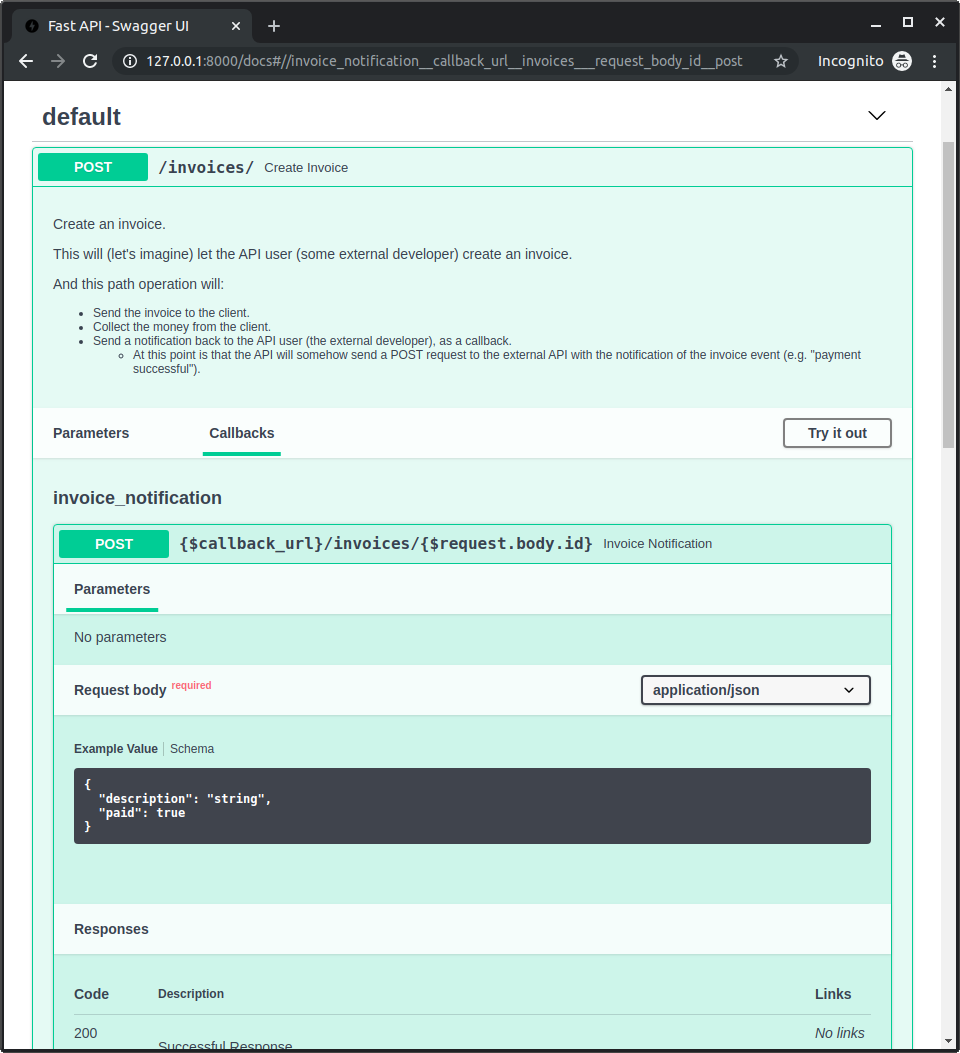
OpenAPI Callbacks
🌐 एआई और मनुष्यों द्वारा किया गया अनुवाद
यह अनुवाद मनुष्यों के मार्गदर्शन में एआई द्वारा किया गया है। 🤝
इसमें मूल अर्थ को गलत समझने या अप्राकृतिक लगने आदि जैसी गलतियाँ हो सकती हैं। 🤖
आप हमें एआई LLM को बेहतर मार्गदर्शन करने में मदद करके इस अनुवाद को बेहतर बना सकते हैं।
आप एक ऐसी API बना सकते हैं जिसमें एक path operation हो जो किसी और के द्वारा बनाई गई external API को request trigger कर सके (शायद वही developer जो आपकी API का उपयोग करेगा)।
जब आपकी API app external API को call करती है, उस प्रक्रिया को "callback" कहा जाता है। क्योंकि external developer द्वारा लिखा गया software आपकी API को request भेजता है और फिर आपकी API call back करती है, यानी किसी external API को request भेजती है (जो शायद उसी developer द्वारा बनाई गई थी)।
इस स्थिति में, आप यह document करना चाह सकते हैं कि वह external API कैसी होनी चाहिए। उसमें कौन-सा path operation होना चाहिए, उसे कौन-सा body expect करना चाहिए, उसे कौन-सा response लौटाना चाहिए, आदि।
Callbacks वाली एक app
आइए इसे एक उदाहरण के साथ देखते हैं।
कल्पना करें कि आप एक ऐसी app develop करते हैं जो invoices बनाने देती है।
इन invoices में एक id, title (optional), customer, और total होगा।
आपकी API का user (एक external developer) आपकी API में POST request के साथ एक invoice बनाएगा।
फिर आपकी API (कल्पना करें):
- invoice को external developer के किसी customer को भेजेगी।
- पैसे collect करेगी।
- API user (external developer) को वापस एक notification भेजेगी।
- यह (आपकी API से) उस external developer द्वारा दी गई किसी external API को POST request भेजकर किया जाएगा (यही "callback" है)।
सामान्य FastAPI app
Callback जोड़ने से पहले, पहले देखते हैं कि सामान्य API app कैसी दिखेगी।
इसमें एक path operation होगा जो एक Invoice body receive करेगा, और एक query parameter callback_url होगा जिसमें callback के लिए URL होगा।
यह हिस्सा काफ़ी सामान्य है, अधिकतर code शायद आपको पहले से परिचित होगा:
from fastapi import APIRouter, FastAPI
from pydantic import BaseModel, HttpUrl

app = FastAPI()


class Invoice(BaseModel):
    id: str
    title: str | None = None
    customer: str
    total: float


class InvoiceEvent(BaseModel):
    description: str
    paid: bool


class InvoiceEventReceived(BaseModel):
    ok: bool


invoices_callback_router = APIRouter()


@invoices_callback_router.post(
    "{$callback_url}/invoices/{$request.body.id}", response_model=InvoiceEventReceived
)
def invoice_notification(body: InvoiceEvent):
    pass


@app.post("/invoices/", callbacks=invoices_callback_router.routes)
def create_invoice(invoice: Invoice, callback_url: HttpUrl | None = None):
    """
    Create an invoice.

    This will (let's imagine) let the API user (some external developer) create an
    invoice.

    And this path operation will:

    * Send the invoice to the client.
    * Collect the money from the client.
    * Send a notification back to the API user (the external developer), as a callback.
        * At this point is that the API will somehow send a POST request to the
            external API with the notification of the invoice event
            (e.g. "payment successful").
    """
    # Send the invoice, collect the money, send the notification (the callback)
    return {"msg": "Invoice received"}
सुझाव
callback_url query parameter एक Pydantic Url type का उपयोग करता है।
केवल नई चीज़ है path operation decorator के argument के रूप में callbacks=invoices_callback_router.routes। आगे हम देखेंगे कि यह क्या है।
Callback को document करना
वास्तविक callback code आपकी अपनी API app पर बहुत अधिक निर्भर करेगा।
और यह एक app से दूसरी app में काफ़ी अलग हो सकता है।
यह code की सिर्फ़ एक या दो lines भी हो सकती हैं, जैसे:
callback_url = "https://example.com/api/v1/invoices/events/"
httpx.post(callback_url, json={"description": "Invoice paid", "paid": True})
लेकिन संभवतः callback का सबसे महत्वपूर्ण हिस्सा यह सुनिश्चित करना है कि आपका API user (external developer) external API को सही तरह से implement करे, उस data के अनुसार जिसे आपकी API callback के request body में भेजने वाली है, आदि।
तो, अब हम वह code जोड़ेंगे जो document करेगा कि आपकी API से callback receive करने के लिए वह external API कैसी दिखनी चाहिए।
यह documentation आपकी API में /docs पर Swagger UI में दिखाई देगी, और यह external developers को बताएगी कि external API कैसे बनानी है।
यह उदाहरण callback को स्वयं implement नहीं करता (वह केवल code की एक line हो सकती है), केवल documentation वाला हिस्सा करता है।
सुझाव
वास्तविक callback सिर्फ़ एक HTTP request है।
Callback को स्वयं implement करते समय, आप HTTPX या Requests जैसी किसी चीज़ का उपयोग कर सकते हैं।
Callback documentation code लिखें
यह code आपकी app में execute नहीं होगा, हमें इसकी आवश्यकता केवल यह document करने के लिए है कि वह external API कैसी दिखनी चाहिए।
लेकिन, आप पहले से जानते हैं कि FastAPI के साथ किसी API के लिए automatic documentation आसानी से कैसे बनाई जाती है।
इसलिए हम उसी ज्ञान का उपयोग करके document करेंगे कि external API कैसी दिखनी चाहिए... उन path operation(s) को बनाकर जिन्हें external API को implement करना चाहिए (जिन्हें आपकी API call करेगी)।
सुझाव
Callback को document करने के लिए code लिखते समय, यह कल्पना करना उपयोगी हो सकता है कि आप वही external developer हैं। और इस समय आप external API implement कर रहे हैं, अपनी API नहीं।
इस दृष्टिकोण को अस्थायी रूप से अपनाना (external developer का) आपको यह अधिक स्पष्ट महसूस कराने में मदद कर सकता है कि उस external API के लिए parameters, body के लिए Pydantic model, response के लिए model, आदि कहाँ रखने हैं।
Callback APIRouter बनाएँ
पहले एक नया APIRouter बनाएँ जिसमें एक या अधिक callbacks होंगे।
from fastapi import APIRouter, FastAPI
from pydantic import BaseModel, HttpUrl

app = FastAPI()


class Invoice(BaseModel):
    id: str
    title: str | None = None
    customer: str
    total: float


class InvoiceEvent(BaseModel):
    description: str
    paid: bool


class InvoiceEventReceived(BaseModel):
    ok: bool


invoices_callback_router = APIRouter()


@invoices_callback_router.post(
    "{$callback_url}/invoices/{$request.body.id}", response_model=InvoiceEventReceived
)
def invoice_notification(body: InvoiceEvent):
    pass


@app.post("/invoices/", callbacks=invoices_callback_router.routes)
def create_invoice(invoice: Invoice, callback_url: HttpUrl | None = None):
    """
    Create an invoice.

    This will (let's imagine) let the API user (some external developer) create an
    invoice.

    And this path operation will:

    * Send the invoice to the client.
    * Collect the money from the client.
    * Send a notification back to the API user (the external developer), as a callback.
        * At this point is that the API will somehow send a POST request to the
            external API with the notification of the invoice event
            (e.g. "payment successful").
    """
    # Send the invoice, collect the money, send the notification (the callback)
    return {"msg": "Invoice received"}
Callback path operation बनाएँ
Callback path operation बनाने के लिए वही APIRouter उपयोग करें जो आपने ऊपर बनाया था।
यह बिल्कुल सामान्य FastAPI path operation जैसा दिखना चाहिए:
- इसमें शायद उस body की declaration होनी चाहिए जिसे इसे receive करना है, जैसे
body: InvoiceEvent। - और इसमें उस response की declaration भी हो सकती है जिसे इसे लौटाना चाहिए, जैसे
response_model=InvoiceEventReceived।
from fastapi import APIRouter, FastAPI
from pydantic import BaseModel, HttpUrl

app = FastAPI()


class Invoice(BaseModel):
    id: str
    title: str | None = None
    customer: str
    total: float


class InvoiceEvent(BaseModel):
    description: str
    paid: bool


class InvoiceEventReceived(BaseModel):
    ok: bool


invoices_callback_router = APIRouter()


@invoices_callback_router.post(
    "{$callback_url}/invoices/{$request.body.id}", response_model=InvoiceEventReceived
)
def invoice_notification(body: InvoiceEvent):
    pass


@app.post("/invoices/", callbacks=invoices_callback_router.routes)
def create_invoice(invoice: Invoice, callback_url: HttpUrl | None = None):
    """
    Create an invoice.

    This will (let's imagine) let the API user (some external developer) create an
    invoice.

    And this path operation will:

    * Send the invoice to the client.
    * Collect the money from the client.
    * Send a notification back to the API user (the external developer), as a callback.
        * At this point is that the API will somehow send a POST request to the
            external API with the notification of the invoice event
            (e.g. "payment successful").
    """
    # Send the invoice, collect the money, send the notification (the callback)
    return {"msg": "Invoice received"}
सामान्य path operation से 2 मुख्य अंतर हैं:
- इसमें कोई वास्तविक code होना required नहीं है, क्योंकि आपकी app इस code को कभी call नहीं करेगी। इसका उपयोग केवल external API को document करने के लिए किया जाता है। इसलिए, function में केवल
passहो सकता है। - path में एक OpenAPI 3 expression (नीचे और देखें) हो सकता है, जहाँ यह आपकी API को भेजी गई original request के parameters और parts के साथ variables का उपयोग कर सकता है।
Callback path expression
Callback path में एक OpenAPI 3 expression हो सकता है जो आपकी API को भेजी गई original request के parts शामिल कर सकता है।
इस case में, यह str है:
"{$callback_url}/invoices/{$request.body.id}"
तो, यदि आपका API user (external developer) आपकी API को request भेजता है:
https://yourapi.com/invoices/?callback_url=https://www.external.org/events
इस JSON body के साथ:
{
    "id": "2expen51ve",
    "customer": "Mr. Richie Rich",
    "total": "9999"
}
तो आपकी API invoice को process करेगी, और बाद में किसी समय, callback_url (external API) को callback request भेजेगी:
https://www.external.org/events/invoices/2expen51ve
ऐसे JSON body के साथ जिसमें कुछ इस तरह होगा:
{
    "description": "Payment celebration",
    "paid": true
}
और यह उस external API से इस तरह के JSON body वाले response की अपेक्षा करेगी:
{
    "ok": true
}
सुझाव
ध्यान दें कि उपयोग किए गए callback URL में callback_url (https://www.external.org/events) में query parameter के रूप में प्राप्त URL और JSON body के अंदर से invoice id (2expen51ve) दोनों शामिल हैं।
Callback router जोड़ें
इस समय आपके पास ऊपर बनाए गए callback router में required callback path operation(s) हैं (वे operation जिन्हें external developer को external API में implement करना चाहिए)।
अब आपकी API के path operation decorator में parameter callbacks का उपयोग करके उस callback router से attribute .routes pass करें:
from fastapi import APIRouter, FastAPI
from pydantic import BaseModel, HttpUrl

app = FastAPI()


class Invoice(BaseModel):
    id: str
    title: str | None = None
    customer: str
    total: float


class InvoiceEvent(BaseModel):
    description: str
    paid: bool


class InvoiceEventReceived(BaseModel):
    ok: bool


invoices_callback_router = APIRouter()


@invoices_callback_router.post(
    "{$callback_url}/invoices/{$request.body.id}", response_model=InvoiceEventReceived
)
def invoice_notification(body: InvoiceEvent):
    pass


@app.post("/invoices/", callbacks=invoices_callback_router.routes)
def create_invoice(invoice: Invoice, callback_url: HttpUrl | None = None):
    """
    Create an invoice.

    This will (let's imagine) let the API user (some external developer) create an
    invoice.

    And this path operation will:

    * Send the invoice to the client.
    * Collect the money from the client.
    * Send a notification back to the API user (the external developer), as a callback.
        * At this point is that the API will somehow send a POST request to the
            external API with the notification of the invoice event
            (e.g. "payment successful").
    """
    # Send the invoice, collect the money, send the notification (the callback)
    return {"msg": "Invoice received"}
सुझाव
ध्यान दें कि आप router स्वयं (invoices_callback_router) को callbacks= में pass नहीं कर रहे हैं, बल्कि उसकी .routes को pass कर रहे हैं, जैसे invoices_callback_router.routes। FastAPI उन routes का उपयोग callback OpenAPI documentation generate करने के लिए करेगा।
Docs देखें
अब आप अपनी app start कर सकते हैं और http://127.0.0.1:8000/docs पर जा सकते हैं।
आपको अपनी docs में अपने path operation के लिए एक "Callbacks" section दिखेगा, जो दिखाता है कि external API कैसी दिखनी चाहिए: