Path Operation Configuration
🌐 एआई और मनुष्यों द्वारा किया गया अनुवाद
यह अनुवाद मनुष्यों के मार्गदर्शन में एआई द्वारा किया गया है। 🤝
इसमें मूल अर्थ को गलत समझने या अप्राकृतिक लगने आदि जैसी गलतियाँ हो सकती हैं। 🤖
आप हमें एआई LLM को बेहतर मार्गदर्शन करने में मदद करके इस अनुवाद को बेहतर बना सकते हैं।
कई parameters हैं जिन्हें आप अपने path operation decorator को configure करने के लिए pass कर सकते हैं।
चेतावनी
ध्यान दें कि ये parameters सीधे path operation decorator को pass किए जाते हैं, आपके path operation function को नहीं।
Response Status Code
आप अपनी path operation की response में उपयोग किए जाने वाला (HTTP) status_code define कर सकते हैं।
आप सीधे int code pass कर सकते हैं, जैसे 404।
लेकिन अगर आपको याद नहीं है कि हर number code किसके लिए है, तो आप status में shortcut constants का उपयोग कर सकते हैं:
from fastapi import FastAPI, status
from pydantic import BaseModel

app = FastAPI()


class Item(BaseModel):
    name: str
    description: str | None = None
    price: float
    tax: float | None = None
    tags: set[str] = set()


@app.post("/items/", status_code=status.HTTP_201_CREATED)
async def create_item(item: Item) -> Item:
    return item
वह status code response में उपयोग किया जाएगा और OpenAPI schema में जोड़ा जाएगा।
तकनीकी विवरण
आप from starlette import status भी उपयोग कर सकते हैं।
FastAPI आपकी सुविधा के लिए, developer के रूप में, वही starlette.status fastapi.status के रूप में प्रदान करता है। लेकिन यह सीधे Starlette से आता है।
Tags
आप अपनी path operation में tags जोड़ सकते हैं, parameter tags को str की list के साथ pass करें (आम तौर पर सिर्फ एक str):
from fastapi import FastAPI
from pydantic import BaseModel

app = FastAPI()


class Item(BaseModel):
    name: str
    description: str | None = None
    price: float
    tax: float | None = None
    tags: set[str] = set()


@app.post("/items/", tags=["items"])
async def create_item(item: Item) -> Item:
    return item


@app.get("/items/", tags=["items"])
async def read_items():
    return [{"name": "Foo", "price": 42}]


@app.get("/users/", tags=["users"])
async def read_users():
    return [{"username": "johndoe"}]
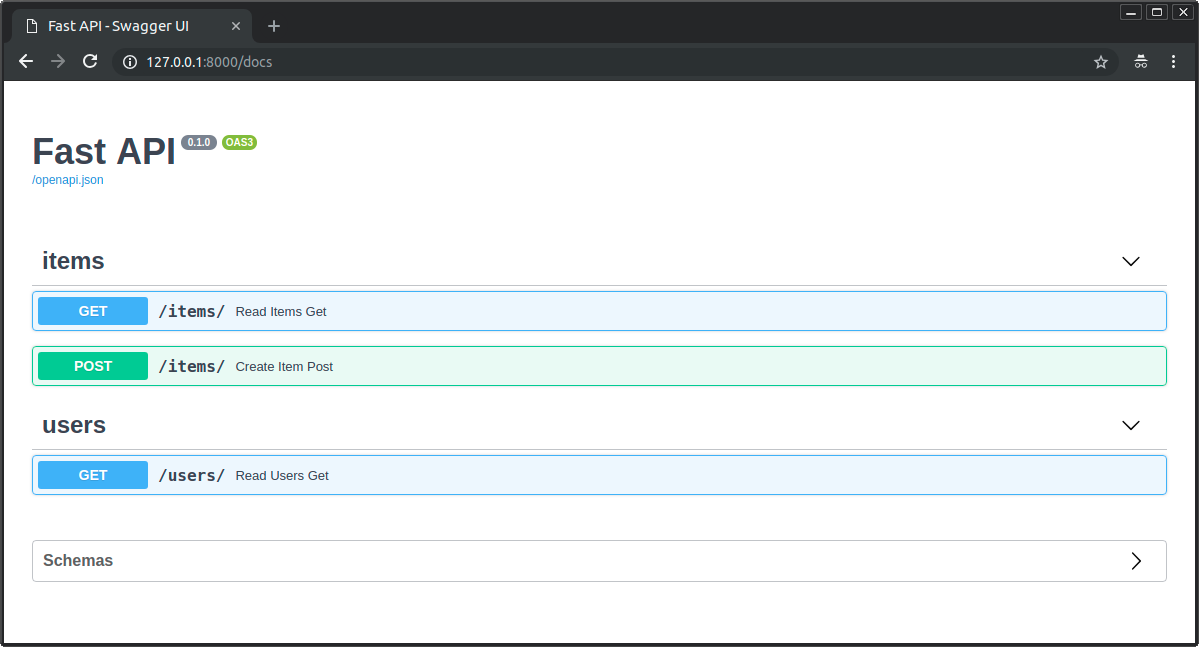
वे OpenAPI schema में जोड़े जाएंगे और automatic documentation interfaces द्वारा उपयोग किए जाएंगे:
Enums के साथ Tags
अगर आपके पास एक बड़ी application है, तो आप अंत में कई tags जमा कर सकते हैं, और आप यह सुनिश्चित करना चाहेंगे कि related path operations के लिए आप हमेशा एक ही tag का उपयोग करें।
इन मामलों में, tags को एक Enum में store करना समझदारी हो सकती है।
FastAPI इसे plain strings की तरह ही support करता है:
from enum import Enum

from fastapi import FastAPI

app = FastAPI()


class Tags(Enum):
    items = "items"
    users = "users"


@app.get("/items/", tags=[Tags.items])
async def get_items():
    return ["Portal gun", "Plumbus"]


@app.get("/users/", tags=[Tags.users])
async def read_users():
    return ["Rick", "Morty"]
Summary और description
आप summary और description जोड़ सकते हैं:
from fastapi import FastAPI
from pydantic import BaseModel

app = FastAPI()


class Item(BaseModel):
    name: str
    description: str | None = None
    price: float
    tax: float | None = None
    tags: set[str] = set()


@app.post(
    "/items/",
    summary="Create an item",
    description="Create an item with all the information, name, description, price, tax and a set of unique tags",
)
async def create_item(item: Item) -> Item:
    return item
Docstring से description
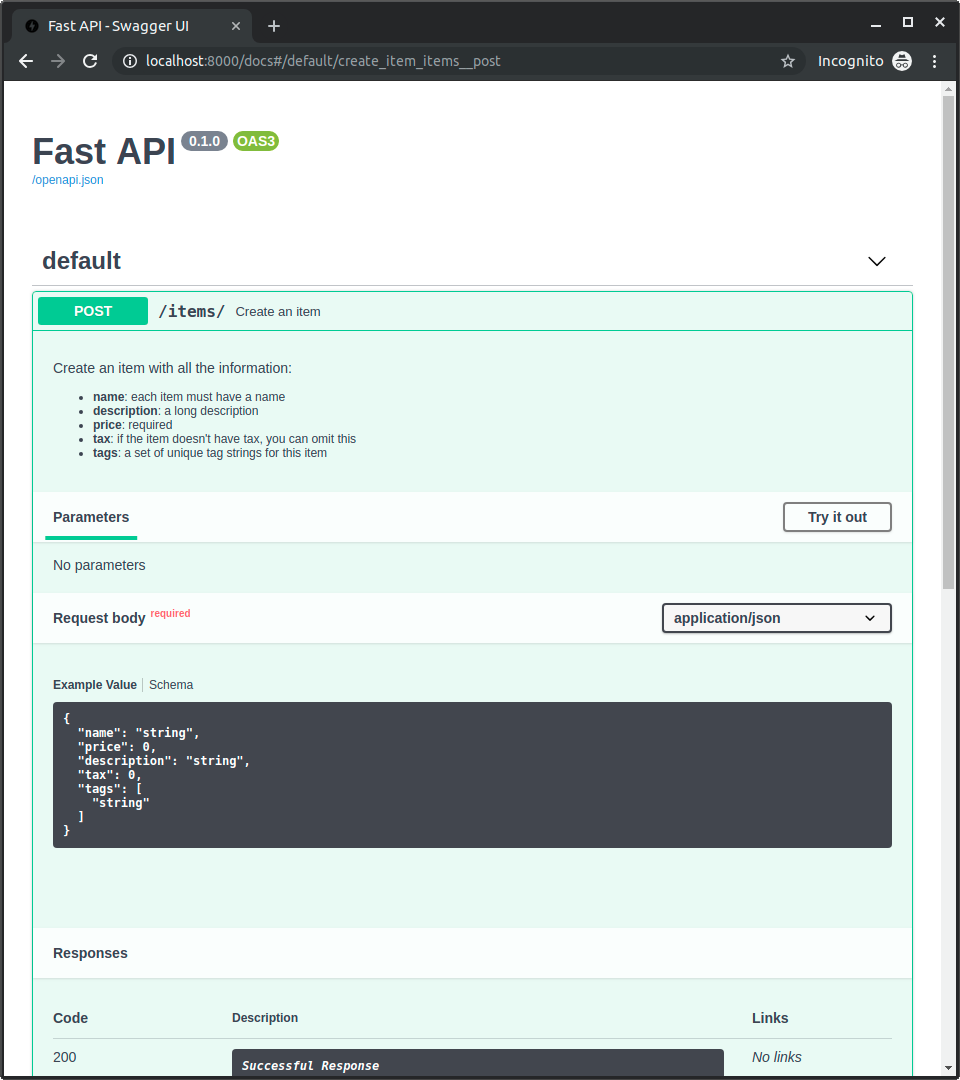
क्योंकि descriptions आम तौर पर लंबी होती हैं और कई lines में फैलती हैं, आप path operation की description को function docstring में declare कर सकते हैं और FastAPI उसे वहीं से पढ़ेगा।
आप docstring में Markdown लिख सकते हैं, इसे सही तरीके से interpret और display किया जाएगा (docstring indentation को ध्यान में रखते हुए)।
from fastapi import FastAPI
from pydantic import BaseModel

app = FastAPI()


class Item(BaseModel):
    name: str
    description: str | None = None
    price: float
    tax: float | None = None
    tags: set[str] = set()


@app.post("/items/", summary="Create an item")
async def create_item(item: Item) -> Item:
    """
    Create an item with all the information:

    - **name**: each item must have a name
    - **description**: a long description
    - **price**: required
    - **tax**: if the item doesn't have tax, you can omit this
    - **tags**: a set of unique tag strings for this item
    """
    return item
इसे interactive docs में उपयोग किया जाएगा:
Response description
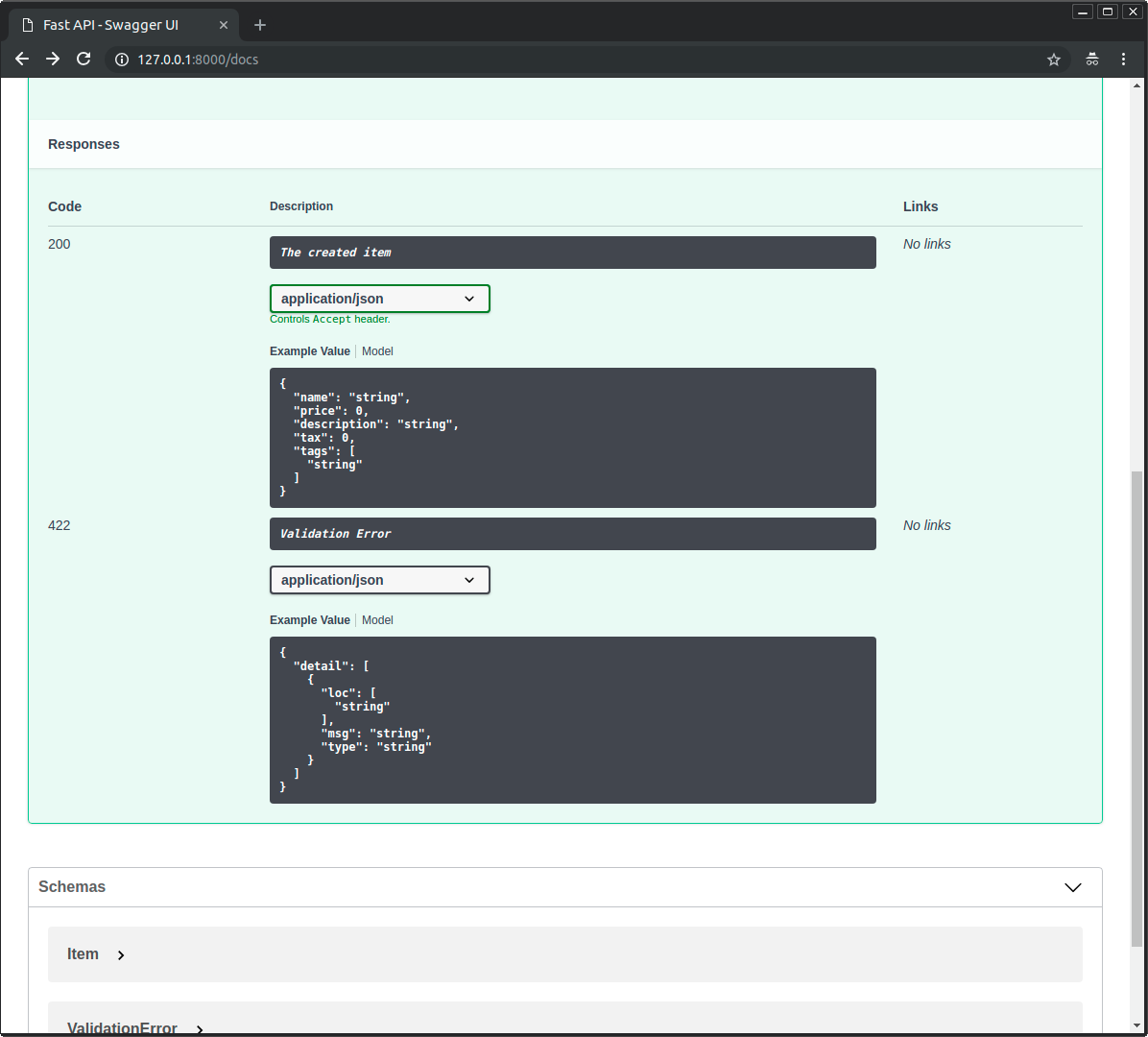
आप parameter response_description के साथ response description specify कर सकते हैं:
from fastapi import FastAPI
from pydantic import BaseModel

app = FastAPI()


class Item(BaseModel):
    name: str
    description: str | None = None
    price: float
    tax: float | None = None
    tags: set[str] = set()


@app.post(
    "/items/",
    summary="Create an item",
    response_description="The created item",
)
async def create_item(item: Item) -> Item:
    """
    Create an item with all the information:

    - **name**: each item must have a name
    - **description**: a long description
    - **price**: required
    - **tax**: if the item doesn't have tax, you can omit this
    - **tags**: a set of unique tag strings for this item
    """
    return item
नोट
ध्यान दें कि response_description विशेष रूप से response को refer करता है, जबकि description सामान्य रूप से path operation को refer करता है।
सुझाव
OpenAPI specify करता है कि प्रत्येक path operation को response description required होती है।
इसलिए, अगर आप कोई provide नहीं करते, तो FastAPI अपने आप "Successful response" generate कर देगा।
एक path operation को Deprecated करें
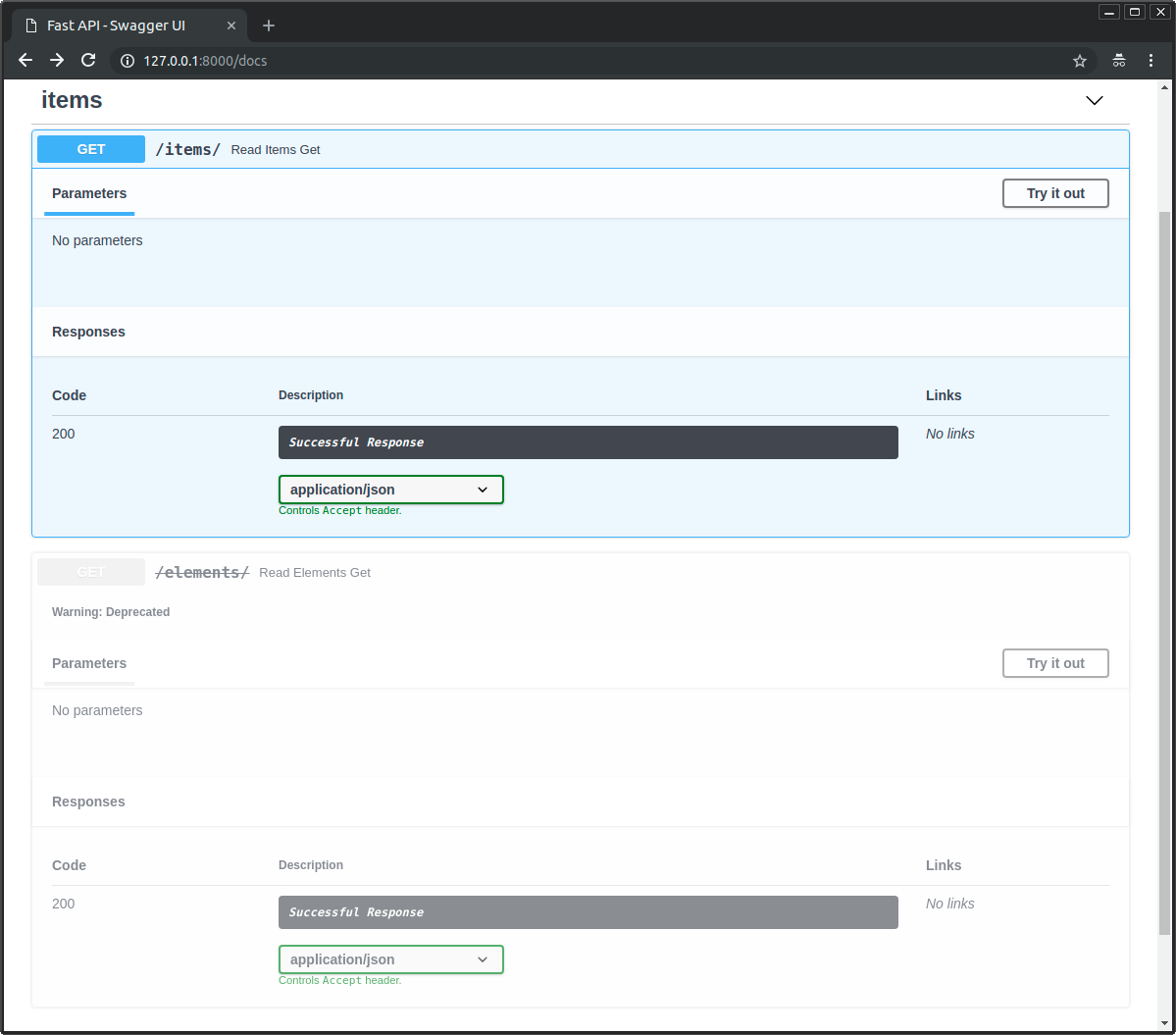
अगर आपको किसी path operation को deprecated के रूप में mark करना है, लेकिन उसे हटाना नहीं है, तो parameter deprecated pass करें:
from fastapi import FastAPI

app = FastAPI()


@app.get("/items/", tags=["items"])
async def read_items():
    return [{"name": "Foo", "price": 42}]


@app.get("/users/", tags=["users"])
async def read_users():
    return [{"username": "johndoe"}]


@app.get("/elements/", tags=["items"], deprecated=True)
async def read_elements():
    return [{"item_id": "Foo"}]
इसे interactive docs में स्पष्ट रूप से deprecated के रूप में mark किया जाएगा:
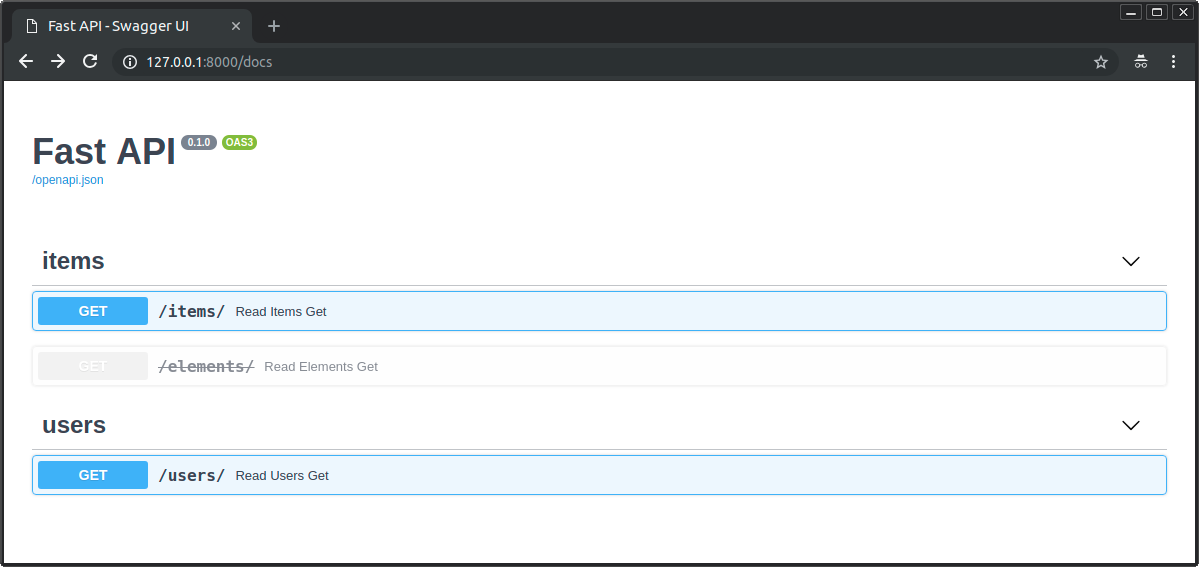
देखें कि deprecated और non-deprecated path operations कैसे दिखते हैं:
Recap
आप path operation decorators को parameters pass करके अपनी path operations के लिए metadata आसानी से configure और add कर सकते हैं।