Path Parameters
🌐 एआई और मनुष्यों द्वारा किया गया अनुवाद
यह अनुवाद मनुष्यों के मार्गदर्शन में एआई द्वारा किया गया है। 🤝
इसमें मूल अर्थ को गलत समझने या अप्राकृतिक लगने आदि जैसी गलतियाँ हो सकती हैं। 🤖
आप हमें एआई LLM को बेहतर मार्गदर्शन करने में मदद करके इस अनुवाद को बेहतर बना सकते हैं।
आप Python format strings द्वारा इस्तेमाल किए जाने वाले समान syntax के साथ path "parameters" या "variables" declare कर सकते हैं:
from fastapi import FastAPI

app = FastAPI()


@app.get("/items/{item_id}")
async def read_item(item_id):
    return {"item_id": item_id}
path parameter item_id की value आपके function को argument item_id के रूप में pass की जाएगी।
इसलिए, अगर आप यह example run करते हैं और http://127.0.0.1:8000/items/foo पर जाते हैं, तो आपको ऐसा response दिखाई देगा:
{"item_id":"foo"}
Types के साथ Path parameters
आप standard Python type annotations का उपयोग करके function में किसी path parameter का type declare कर सकते हैं:
from fastapi import FastAPI

app = FastAPI()


@app.get("/items/{item_id}")
async def read_item(item_id: int):
    return {"item_id": item_id}
इस मामले में, item_id को int declare किया गया है।
सुझाव
इससे आपको अपने function के अंदर editor support मिलेगा, जिसमें error checks, completion आदि शामिल हैं।
Data conversion
अगर आप यह example run करते हैं और अपने browser में http://127.0.0.1:8000/items/3 खोलते हैं, तो आपको ऐसा response दिखाई देगा:
{"item_id":3}
सुझाव
ध्यान दें कि आपके function ने जो value प्राप्त की (और return की) वह 3 है, Python int के रूप में, न कि string "3"।
तो, उस type declaration के साथ, FastAPI आपको automatic request "parsing" देता है।
Data validation
लेकिन अगर आप browser में http://127.0.0.1:8000/items/foo पर जाते हैं, तो आपको ऐसा अच्छा HTTP error दिखाई देगा:
{
  "detail": [
    {
      "type": "int_parsing",
      "loc": [
        "path",
        "item_id"
      ],
      "msg": "Input should be a valid integer, unable to parse string as an integer",
      "input": "foo"
    }
  ]
}
क्योंकि path parameter item_id की value "foo" थी, जो कि int नहीं है।
अगर आपने int के बजाय float दिया, तो भी वही error दिखाई देगा, जैसे: http://127.0.0.1:8000/items/4.2
सुझाव
तो, उसी Python type declaration के साथ, FastAPI आपको data validation देता है।
ध्यान दें कि error यह भी स्पष्ट रूप से बताता है कि validation किस जगह pass नहीं हुआ।
यह आपके API के साथ interact करने वाले code को develop और debug करते समय बेहद मददगार होता है।
Documentation
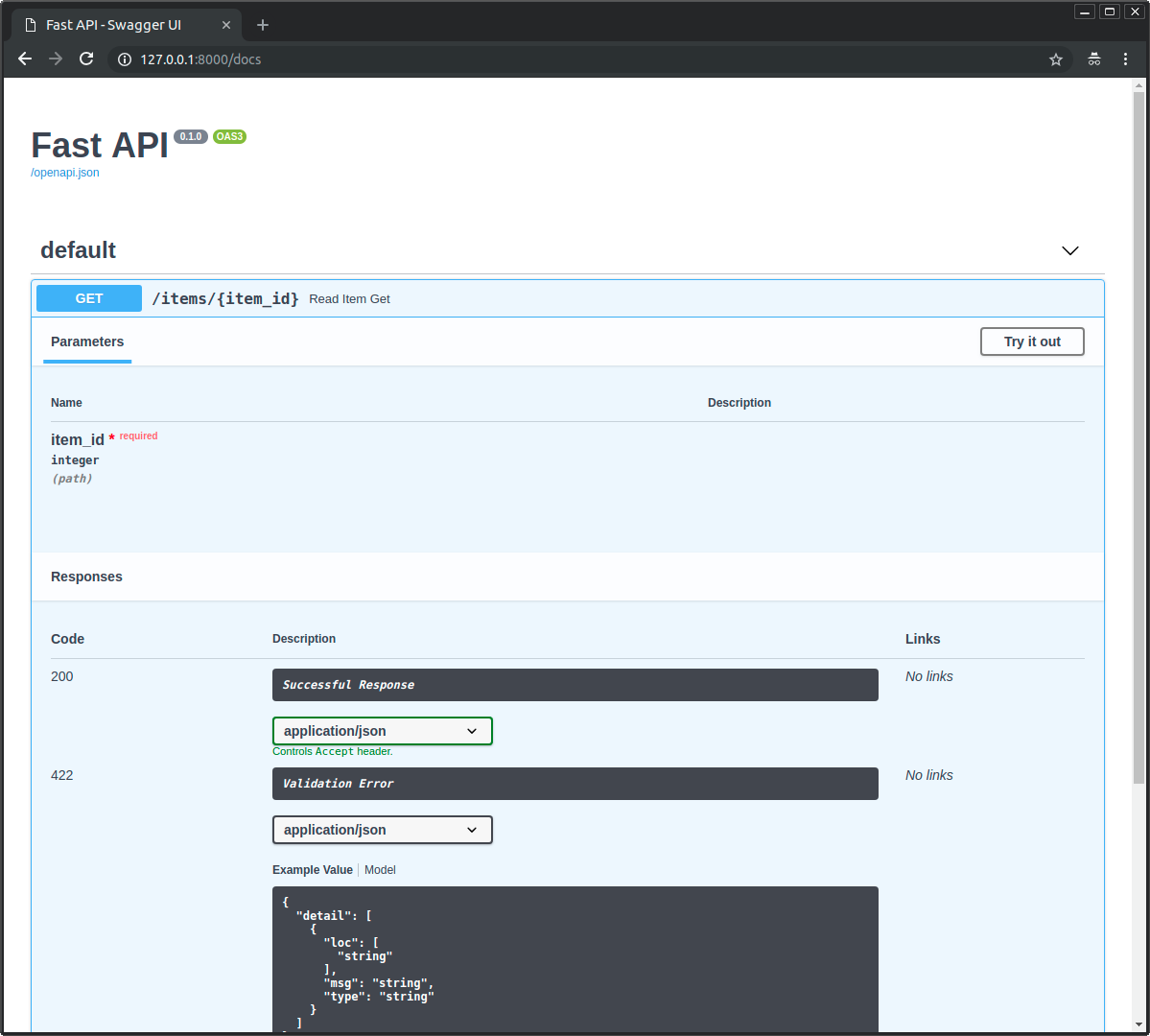
और जब आप अपने browser में http://127.0.0.1:8000/docs खोलते हैं, तो आपको ऐसा automatic, interactive, API documentation दिखाई देगा:
सुझाव
फिर से, बस उसी Python type declaration के साथ, FastAPI आपको automatic, interactive documentation देता है (Swagger UI को integrate करते हुए)।
ध्यान दें कि path parameter को integer के रूप में declare किया गया है।
Standard-आधारित लाभ, वैकल्पिक documentation
और क्योंकि generate किया गया schema OpenAPI standard से है, इसलिए कई compatible tools हैं।
इसी वजह से, FastAPI स्वयं एक वैकल्पिक API documentation प्रदान करता है (ReDoc का उपयोग करते हुए), जिसे आप http://127.0.0.1:8000/redoc पर access कर सकते हैं:
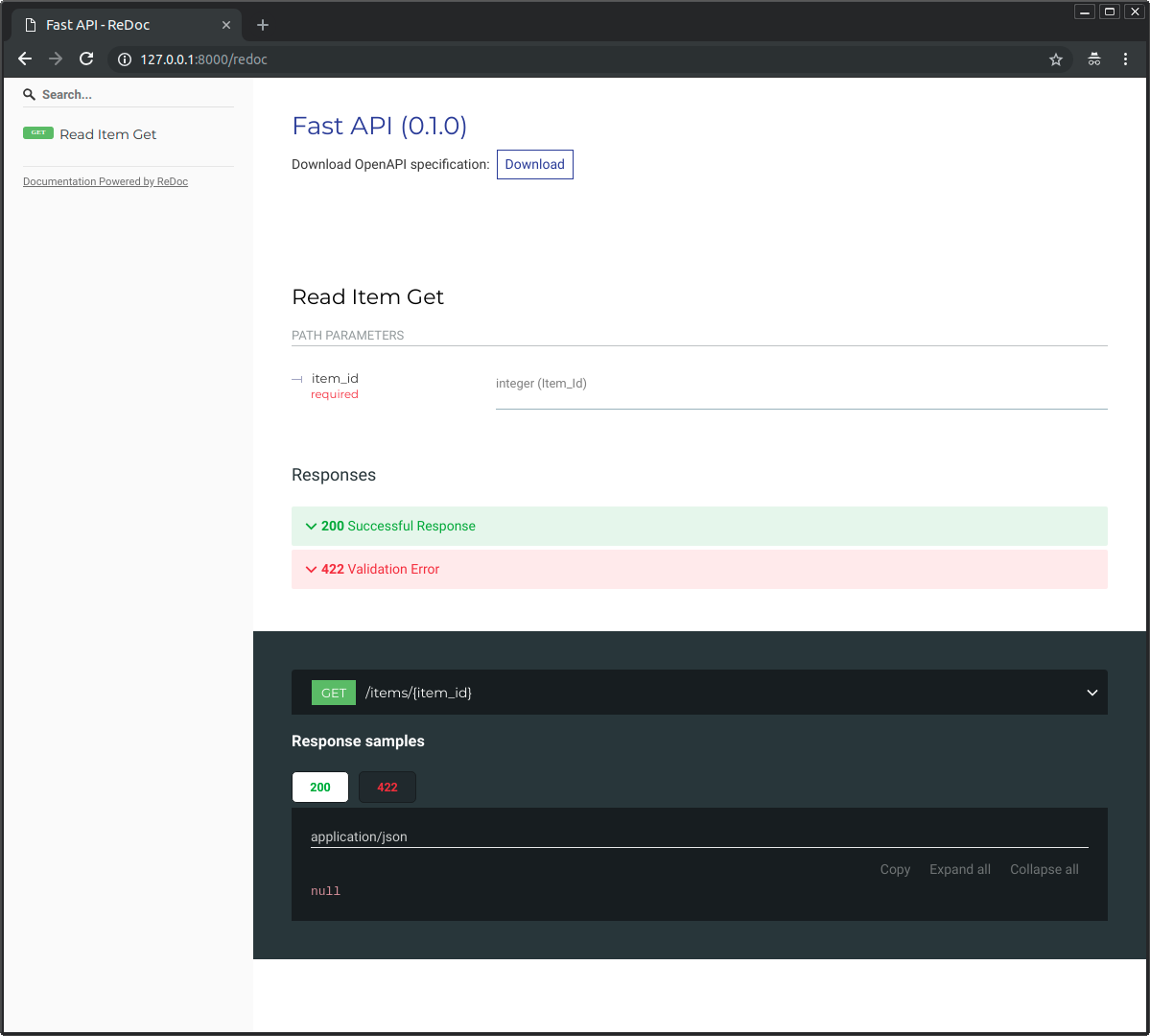
इसी तरह, कई compatible tools हैं। इनमें कई भाषाओं के लिए code generation tools भी शामिल हैं।
Pydantic
सारा data validation अंदरूनी तौर पर Pydantic द्वारा किया जाता है, इसलिए आपको इसके सभी लाभ मिलते हैं। और आप जानते हैं कि आप अच्छे हाथों में हैं।
आप str, float, bool और कई अन्य जटिल data types के साथ वही type declarations इस्तेमाल कर सकते हैं।
इनमें से कई को tutorial के अगले chapters में explore किया गया है।
क्रम मायने रखता है
path operations बनाते समय, आपको ऐसी स्थितियाँ मिल सकती हैं जहाँ आपके पास एक fixed path हो।
जैसे /users/me, मान लें कि यह current user के बारे में data प्राप्त करने के लिए है।
और फिर आपके पास /users/{user_id} path भी हो सकता है, किसी specific user के बारे में किसी user ID से data प्राप्त करने के लिए।
क्योंकि path operations का evaluation क्रम में किया जाता है, आपको यह सुनिश्चित करना होगा कि /users/me के लिए path, /users/{user_id} वाले path से पहले declare किया गया हो:
from fastapi import FastAPI

app = FastAPI()


@app.get("/users/me")
async def read_user_me():
    return {"user_id": "the current user"}


@app.get("/users/{user_id}")
async def read_user(user_id: str):
    return {"user_id": user_id}
अन्यथा, /users/{user_id} के लिए path /users/me से भी match करेगा, यह "सोचते हुए" कि उसे user_id parameter मिल रहा है जिसकी value "me" है।
इसी तरह, आप किसी path operation को फिर से define नहीं कर सकते:
from fastapi import FastAPI

app = FastAPI()


@app.get("/users")
async def read_users():
    return ["Rick", "Morty"]


@app.get("/users")
async def read_users2():
    return ["Bean", "Elfo"]
पहला वाला हमेशा इस्तेमाल किया जाएगा क्योंकि path पहले match करता है।
पहले से तय values
अगर आपके पास ऐसा path operation है जो एक path parameter प्राप्त करता है, लेकिन आप चाहते हैं कि संभव valid path parameter values पहले से तय हों, तो आप standard Python Enum का उपयोग कर सकते हैं।
एक Enum class बनाएं
Enum import करें और एक sub-class बनाएं जो str और Enum से inherit करती हो।
str से inherit करने पर API docs यह जान पाएंगे कि values का type string होना चाहिए और उन्हें सही तरह से render कर पाएंगे।
फिर fixed values के साथ class attributes बनाएं, जो उपलब्ध valid values होंगी:
from enum import Enum

from fastapi import FastAPI


class ModelName(str, Enum):
    alexnet = "alexnet"
    resnet = "resnet"
    lenet = "lenet"


app = FastAPI()


@app.get("/models/{model_name}")
async def get_model(model_name: ModelName):
    if model_name is ModelName.alexnet:
        return {"model_name": model_name, "message": "Deep Learning FTW!"}

    if model_name.value == "lenet":
        return {"model_name": model_name, "message": "LeCNN all the images"}

    return {"model_name": model_name, "message": "Have some residuals"}
सुझाव
अगर आप सोच रहे हैं, "AlexNet", "ResNet", और "LeNet" बस Machine Learning models के नाम हैं।
एक path parameter declare करें
फिर आपके द्वारा बनाई गई enum class (ModelName) का उपयोग करके type annotation के साथ एक path parameter बनाएं:
from enum import Enum

from fastapi import FastAPI


class ModelName(str, Enum):
    alexnet = "alexnet"
    resnet = "resnet"
    lenet = "lenet"


app = FastAPI()


@app.get("/models/{model_name}")
async def get_model(model_name: ModelName):
    if model_name is ModelName.alexnet:
        return {"model_name": model_name, "message": "Deep Learning FTW!"}

    if model_name.value == "lenet":
        return {"model_name": model_name, "message": "LeCNN all the images"}

    return {"model_name": model_name, "message": "Have some residuals"}
Docs देखें
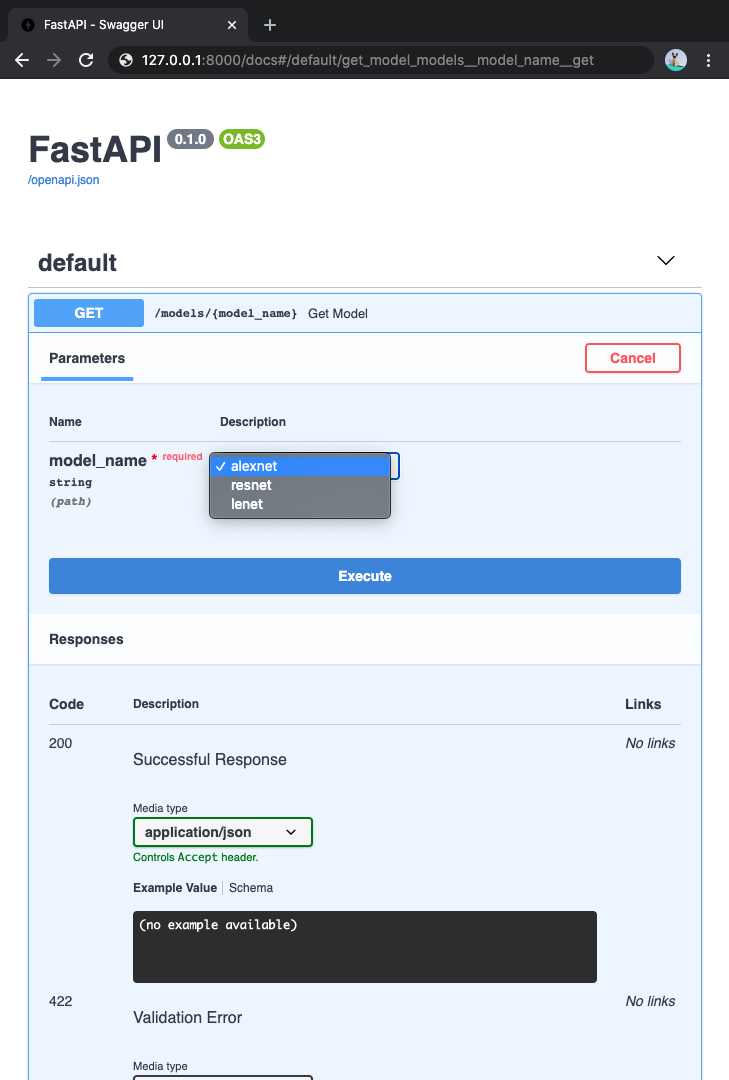
क्योंकि path parameter के लिए उपलब्ध values पहले से तय हैं, interactive docs उन्हें अच्छे से दिखा सकते हैं:
Python enumerations के साथ काम करना
path parameter की value एक enumeration member होगी।
Enumeration members की तुलना करें
आप इसकी तुलना अपने बनाए हुए enum ModelName में मौजूद enumeration member से कर सकते हैं:
from enum import Enum

from fastapi import FastAPI


class ModelName(str, Enum):
    alexnet = "alexnet"
    resnet = "resnet"
    lenet = "lenet"


app = FastAPI()


@app.get("/models/{model_name}")
async def get_model(model_name: ModelName):
    if model_name is ModelName.alexnet:
        return {"model_name": model_name, "message": "Deep Learning FTW!"}

    if model_name.value == "lenet":
        return {"model_name": model_name, "message": "LeCNN all the images"}

    return {"model_name": model_name, "message": "Have some residuals"}
Enumeration value प्राप्त करें
आप model_name.value का उपयोग करके actual value (इस मामले में एक str) प्राप्त कर सकते हैं, या सामान्य रूप से, your_enum_member.value:
from enum import Enum

from fastapi import FastAPI


class ModelName(str, Enum):
    alexnet = "alexnet"
    resnet = "resnet"
    lenet = "lenet"


app = FastAPI()


@app.get("/models/{model_name}")
async def get_model(model_name: ModelName):
    if model_name is ModelName.alexnet:
        return {"model_name": model_name, "message": "Deep Learning FTW!"}

    if model_name.value == "lenet":
        return {"model_name": model_name, "message": "LeCNN all the images"}

    return {"model_name": model_name, "message": "Have some residuals"}
सुझाव
आप ModelName.lenet.value के साथ value "lenet" भी access कर सकते हैं।
Enumeration members return करें
आप अपने path operation से enum members return कर सकते हैं, यहाँ तक कि JSON body में nested भी (जैसे एक dict)।
Client को return करने से पहले उन्हें उनकी संबंधित values (इस मामले में strings) में convert कर दिया जाएगा:
from enum import Enum

from fastapi import FastAPI


class ModelName(str, Enum):
    alexnet = "alexnet"
    resnet = "resnet"
    lenet = "lenet"


app = FastAPI()


@app.get("/models/{model_name}")
async def get_model(model_name: ModelName):
    if model_name is ModelName.alexnet:
        return {"model_name": model_name, "message": "Deep Learning FTW!"}

    if model_name.value == "lenet":
        return {"model_name": model_name, "message": "LeCNN all the images"}

    return {"model_name": model_name, "message": "Have some residuals"}
अपने client में आपको ऐसा JSON response मिलेगा:
{
  "model_name": "alexnet",
  "message": "Deep Learning FTW!"
}
Paths रखने वाले Path parameters
मान लें आपके पास path /files/{file_path} के साथ एक path operation है।
लेकिन आपको file_path में स्वयं एक path रखना है, जैसे home/johndoe/myfile.txt।
तो, उस file के लिए URL कुछ ऐसा होगा: /files/home/johndoe/myfile.txt।
OpenAPI support
OpenAPI किसी path parameter को उसके अंदर एक path रखने के लिए declare करने का तरीका support नहीं करता, क्योंकि इससे ऐसे scenarios बन सकते हैं जिन्हें test और define करना कठिन हो।
फिर भी, आप FastAPI में Starlette के internal tools में से एक का उपयोग करके यह कर सकते हैं।
और docs फिर भी काम करेंगे, हालांकि ऐसा कोई documentation नहीं जोड़ेंगे जो बताए कि parameter में path होना चाहिए।
Path convertor
Starlette से सीधे एक option का उपयोग करके, आप इस तरह के URL का उपयोग करते हुए एक path रखने वाला path parameter declare कर सकते हैं:
/files/{file_path:path}
इस मामले में, parameter का नाम file_path है, और आखिरी हिस्सा, :path, इसे बताता है कि parameter किसी भी path से match करना चाहिए।
तो, आप इसे इसके साथ इस्तेमाल कर सकते हैं:
from fastapi import FastAPI

app = FastAPI()


@app.get("/files/{file_path:path}")
async def read_file(file_path: str):
    return {"file_path": file_path}
सुझाव
आपको parameter में /home/johndoe/myfile.txt रखना पड़ सकता है, leading slash (/) के साथ।
उस मामले में, URL होगा: /files//home/johndoe/myfile.txt, files और home के बीच double slash (//) के साथ।
Recap
FastAPI के साथ, छोटे, सहज और standard Python type declarations का उपयोग करके, आपको मिलता है:
- Editor support: error checks, autocompletion आदि।
- Data "parsing"
- Data validation
- API annotation और automatic documentation
और आपको इन्हें केवल एक बार declare करना होता है।
वैकल्पिक frameworks की तुलना में FastAPI का शायद यही मुख्य दिखने वाला लाभ है (raw performance के अलावा)।