Path Operation की उन्नत Configuration
🌐 एआई और मनुष्यों द्वारा किया गया अनुवाद
यह अनुवाद मनुष्यों के मार्गदर्शन में एआई द्वारा किया गया है। 🤝
इसमें मूल अर्थ को गलत समझने या अप्राकृतिक लगने आदि जैसी गलतियाँ हो सकती हैं। 🤖
आप हमें एआई LLM को बेहतर मार्गदर्शन करने में मदद करके इस अनुवाद को बेहतर बना सकते हैं।
OpenAPI operationId
चेतावनी
अगर आप OpenAPI में "expert" नहीं हैं, तो शायद आपको इसकी ज़रूरत नहीं है।
आप अपने path operation में उपयोग किए जाने वाले OpenAPI operationId को parameter operation_id के साथ सेट कर सकते हैं।
आपको यह सुनिश्चित करना होगा कि यह प्रत्येक operation के लिए unique हो।
from fastapi import FastAPI

app = FastAPI()


@app.get("/items/", operation_id="some_specific_id_you_define")
async def read_items():
    return [{"item_id": "Foo"}]
path operation function के नाम को operationId के रूप में उपयोग करना
अगर आप अपने APIs के function नामों को operationIds के रूप में उपयोग करना चाहते हैं, तो आप FastAPI को एक custom generate_unique_id_function पास कर सकते हैं।
यह function प्रत्येक APIRoute प्राप्त करता है और उस path operation के लिए उपयोग करने वाला operationId return करता है।
from fastapi import FastAPI
from fastapi.routing import APIRoute


def custom_generate_unique_id(route: APIRoute) -> str:
    return route.name


app = FastAPI(generate_unique_id_function=custom_generate_unique_id)


@app.get("/items/")
async def read_items():
    return [{"item_id": "Foo"}]
चेतावनी
अगर आप ऐसा करते हैं, तो आपको यह सुनिश्चित करना होगा कि आपके प्रत्येक path operation functions का नाम unique हो।
भले ही वे अलग-अलग modules (Python files) में हों।
OpenAPI से बाहर रखना
किसी path operation को generated OpenAPI schema से बाहर रखने के लिए (और इस प्रकार, automatic documentation systems से भी), parameter include_in_schema का उपयोग करें और इसे False पर सेट करें:
from fastapi import FastAPI

app = FastAPI()


@app.get("/items/", include_in_schema=False)
async def read_items():
    return [{"item_id": "Foo"}]
Docstring से उन्नत description
आप OpenAPI के लिए किसी path operation function की docstring से उपयोग की जाने वाली lines को सीमित कर सकते हैं।
एक \f (एक escaped "form feed" character) जोड़ने से FastAPI इस बिंदु पर OpenAPI के लिए उपयोग किए जाने वाले output को truncate कर देता है।
यह documentation में नहीं दिखेगा, लेकिन अन्य tools (जैसे Sphinx) बाकी हिस्से का उपयोग कर सकेंगे।
from fastapi import FastAPI
from pydantic import BaseModel

app = FastAPI()


class Item(BaseModel):
    name: str
    description: str | None = None
    price: float
    tax: float | None = None
    tags: set[str] = set()


@app.post("/items/", summary="Create an item")
async def create_item(item: Item) -> Item:
    """
    Create an item with all the information:

    - **name**: each item must have a name
    - **description**: a long description
    - **price**: required
    - **tax**: if the item doesn't have tax, you can omit this
    - **tags**: a set of unique tag strings for this item
    \f
    :param item: User input.
    """
    return item
अतिरिक्त Responses
आपने शायद देखा होगा कि किसी path operation के लिए response_model और status_code कैसे declare किए जाते हैं।
यह किसी path operation के मुख्य response के बारे में metadata define करता है।
आप उनके models, status codes आदि के साथ अतिरिक्त responses भी declare कर सकते हैं।
इसके बारे में documentation में यहाँ एक पूरा chapter है, आप इसे OpenAPI में अतिरिक्त Responses पर पढ़ सकते हैं।
OpenAPI Extra
जब आप अपने application में कोई path operation declare करते हैं, तो FastAPI उस path operation के बारे में relevant metadata को automatically generate करता है, जिसे OpenAPI schema में शामिल किया जाता है।
तकनीकी विवरण
OpenAPI specification में इसे Operation Object कहा जाता है।
इसमें path operation के बारे में सारी जानकारी होती है और इसका उपयोग automatic documentation generate करने के लिए किया जाता है।
इसमें tags, parameters, requestBody, responses आदि शामिल होते हैं।
यह path operation-specific OpenAPI schema सामान्यतः FastAPI द्वारा automatically generate किया जाता है, लेकिन आप इसे extend भी कर सकते हैं।
सुझाव
यह एक low level extension point है।
अगर आपको केवल अतिरिक्त responses declare करने की ज़रूरत है, तो ऐसा करने का एक अधिक सुविधाजनक तरीका OpenAPI में अतिरिक्त Responses के साथ है।
आप parameter openapi_extra का उपयोग करके किसी path operation के लिए OpenAPI schema को extend कर सकते हैं।
OpenAPI Extensions
यह openapi_extra उपयोगी हो सकता है, उदाहरण के लिए, OpenAPI Extensions declare करने के लिए:
from fastapi import FastAPI

app = FastAPI()


@app.get("/items/", openapi_extra={"x-aperture-labs-portal": "blue"})
async def read_items():
    return [{"item_id": "portal-gun"}]
अगर आप automatic API docs खोलते हैं, तो आपका extension specific path operation के नीचे दिखाई देगा।
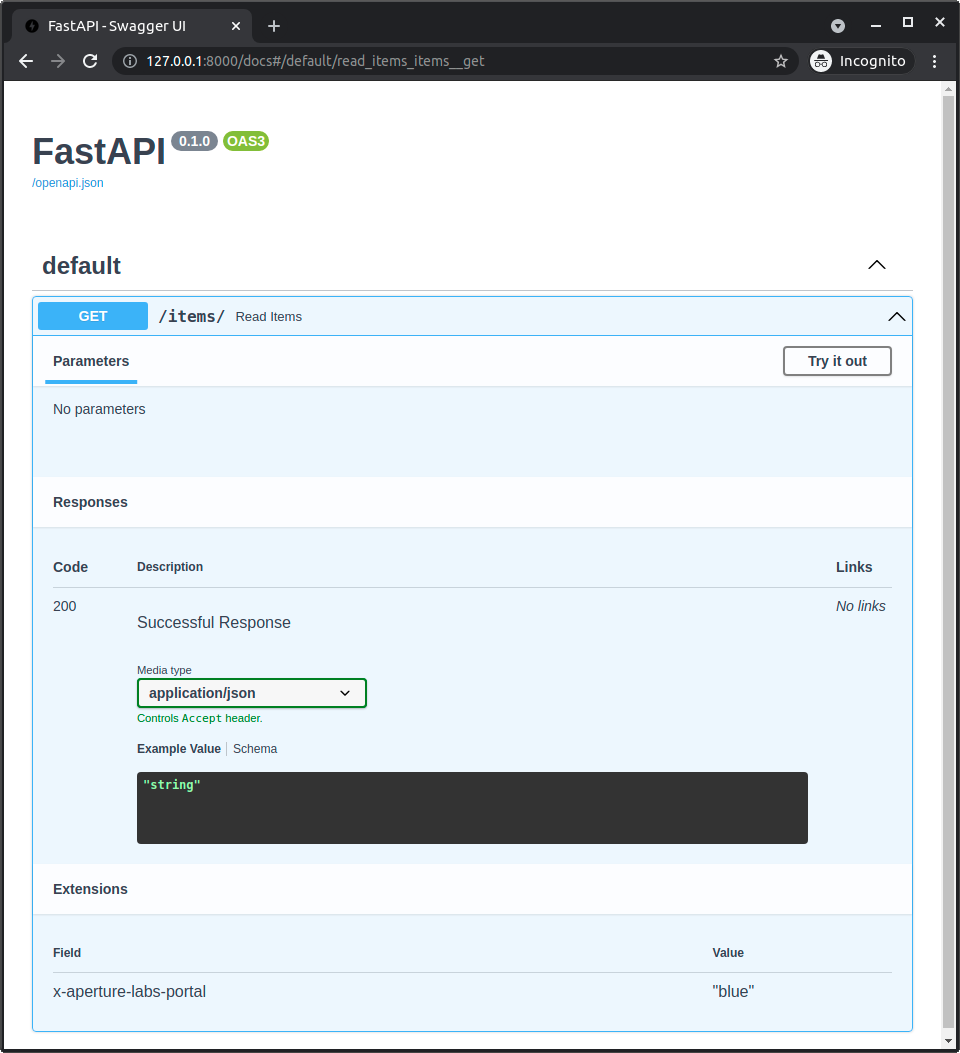
और अगर आप resulting OpenAPI (आपकी API में /openapi.json पर) देखते हैं, तो आपको अपना extension specific path operation के हिस्से के रूप में भी दिखाई देगा:
{
    "openapi": "3.1.0",
    "info": {
        "title": "FastAPI",
        "version": "0.1.0"
    },
    "paths": {
        "/items/": {
            "get": {
                "summary": "Read Items",
                "operationId": "read_items_items__get",
                "responses": {
                    "200": {
                        "description": "Successful Response",
                        "content": {
                            "application/json": {
                                "schema": {}
                            }
                        }
                    }
                },
                "x-aperture-labs-portal": "blue"
            }
        }
    }
}
Custom OpenAPI path operation schema
openapi_extra में मौजूद dictionary को path operation के लिए automatically generated OpenAPI schema के साथ deeply merge किया जाएगा।
तो, आप automatically generated schema में अतिरिक्त data जोड़ सकते हैं।
उदाहरण के लिए, आप FastAPI की Pydantic के साथ automatic features का उपयोग किए बिना, अपने code से request को read और validate करने का निर्णय ले सकते हैं, लेकिन फिर भी आप OpenAPI schema में request को define करना चाह सकते हैं।
आप यह openapi_extra के साथ कर सकते हैं:
from fastapi import FastAPI, Request

app = FastAPI()


def magic_data_reader(raw_body: bytes):
    return {
        "size": len(raw_body),
        "content": {
            "name": "Maaaagic",
            "price": 42,
            "description": "Just kiddin', no magic here. ✨",
        },
    }


@app.post(
    "/items/",
    openapi_extra={
        "requestBody": {
            "content": {
                "application/json": {
                    "schema": {
                        "required": ["name", "price"],
                        "type": "object",
                        "properties": {
                            "name": {"type": "string"},
                            "price": {"type": "number"},
                            "description": {"type": "string"},
                        },
                    }
                }
            },
            "required": True,
        },
    },
)
async def create_item(request: Request):
    raw_body = await request.body()
    data = magic_data_reader(raw_body)
    return data
इस उदाहरण में, हमने कोई Pydantic model declare नहीं किया। वास्तव में, request body को JSON के रूप में parsed भी नहीं किया गया है, इसे सीधे bytes के रूप में read किया गया है, और function magic_data_reader() किसी तरीके से इसे parse करने का ज़िम्मेदार होगा।
फिर भी, हम request body के लिए expected schema declare कर सकते हैं।
Custom OpenAPI content type
इसी trick का उपयोग करके, आप JSON Schema define करने के लिए Pydantic model का उपयोग कर सकते हैं, जिसे फिर path operation के लिए custom OpenAPI schema section में शामिल किया जाता है।
और आप ऐसा तब भी कर सकते हैं जब request में data type JSON न हो।
उदाहरण के लिए, इस application में हम Pydantic models से JSON Schema निकालने के लिए FastAPI की integrated functionality या JSON के लिए automatic validation का उपयोग नहीं करते हैं। वास्तव में, हम request content type को JSON नहीं, बल्कि YAML के रूप में declare कर रहे हैं:
import yaml
from fastapi import FastAPI, HTTPException, Request
from pydantic import BaseModel, ValidationError

app = FastAPI()


class Item(BaseModel):
    name: str
    tags: list[str]


@app.post(
    "/items/",
    openapi_extra={
        "requestBody": {
            "content": {"application/x-yaml": {"schema": Item.model_json_schema()}},
            "required": True,
        },
    },
)
async def create_item(request: Request):
    raw_body = await request.body()
    try:
        data = yaml.safe_load(raw_body)
    except yaml.YAMLError:
        raise HTTPException(status_code=422, detail="Invalid YAML")
    try:
        item = Item.model_validate(data)
    except ValidationError as e:
        raise HTTPException(status_code=422, detail=e.errors(include_url=False))
    return item
फिर भी, हालांकि हम default integrated functionality का उपयोग नहीं कर रहे हैं, हम अभी भी उस data के लिए JSON Schema manually generate करने के लिए Pydantic model का उपयोग कर रहे हैं जिसे हम YAML में receive करना चाहते हैं।
फिर हम request को सीधे उपयोग करते हैं, और body को bytes के रूप में extract करते हैं। इसका मतलब है कि FastAPI request payload को JSON के रूप में parse करने की कोशिश भी नहीं करेगा।
और फिर अपने code में, हम उस YAML content को सीधे parse करते हैं, और फिर हम YAML content को validate करने के लिए फिर से उसी Pydantic model का उपयोग कर रहे हैं:
import yaml
from fastapi import FastAPI, HTTPException, Request
from pydantic import BaseModel, ValidationError

app = FastAPI()


class Item(BaseModel):
    name: str
    tags: list[str]


@app.post(
    "/items/",
    openapi_extra={
        "requestBody": {
            "content": {"application/x-yaml": {"schema": Item.model_json_schema()}},
            "required": True,
        },
    },
)
async def create_item(request: Request):
    raw_body = await request.body()
    try:
        data = yaml.safe_load(raw_body)
    except yaml.YAMLError:
        raise HTTPException(status_code=422, detail="Invalid YAML")
    try:
        item = Item.model_validate(data)
    except ValidationError as e:
        raise HTTPException(status_code=422, detail=e.errors(include_url=False))
    return item
सुझाव
यहाँ हम उसी Pydantic model को reuse करते हैं।
लेकिन इसी तरह, हम इसे किसी और तरीके से भी validate कर सकते थे।