कस्टम Response - HTML, Stream, File, अन्य
🌐 एआई और मनुष्यों द्वारा किया गया अनुवाद
यह अनुवाद मनुष्यों के मार्गदर्शन में एआई द्वारा किया गया है। 🤝
इसमें मूल अर्थ को गलत समझने या अप्राकृतिक लगने आदि जैसी गलतियाँ हो सकती हैं। 🤖
आप हमें एआई LLM को बेहतर मार्गदर्शन करने में मदद करके इस अनुवाद को बेहतर बना सकते हैं।
Default रूप से, FastAPI JSON responses लौटाएगा।
आप सीधे Response लौटाएँ में दिखाए गए अनुसार सीधे Response लौटाकर इसे override कर सकते हैं।
लेकिन अगर आप सीधे Response लौटाते हैं (या कोई subclass, जैसे JSONResponse), तो data अपने आप convert नहीं होगा (भले ही आप response_model declare करें), और documentation अपने आप generate नहीं होगी (उदाहरण के लिए, generated OpenAPI के हिस्से के रूप में HTTP header Content-Type में specific "media type" शामिल करना)।
लेकिन आप path operation decorator में response_class parameter का उपयोग करके वह Response भी declare कर सकते हैं जिसे आप उपयोग करना चाहते हैं (जैसे कोई भी Response subclass)।
आप अपनी path operation function से जो contents लौटाते हैं, उन्हें उस Response के अंदर रख दिया जाएगा।
नोट
यदि आप बिना media type वाली response class का उपयोग करते हैं, तो FastAPI अपेक्षा करेगा कि आपके response में कोई content न हो, इसलिए यह अपने generated OpenAPI docs में response format को document नहीं करेगा।
JSON Responses
Default रूप से FastAPI JSON responses लौटाता है।
यदि आप Response Model declare करते हैं तो FastAPI Pydantic का उपयोग करके data को JSON में serialize करने के लिए उसका उपयोग करेगा।
यदि आप response model declare नहीं करते हैं, तो FastAPI JSON Compatible Encoder में समझाए गए jsonable_encoder का उपयोग करेगा और उसे JSONResponse में रखेगा।
यदि आप JSON media type (application/json) के साथ response_class declare करते हैं, जैसा कि JSONResponse के साथ होता है, तो आपके द्वारा लौटाया गया data आपकी path operation decorator में declare किए गए किसी भी Pydantic response_model के साथ अपने आप convert (और filter) हो जाएगा। लेकिन data Pydantic के साथ JSON bytes में serialize नहीं होगा, इसके बजाय इसे jsonable_encoder के साथ convert किया जाएगा और फिर JSONResponse class को pass किया जाएगा, जो Python की standard JSON library का उपयोग करके इसे bytes में serialize करेगी।
JSON Performance
संक्षेप में, यदि आप maximum performance चाहते हैं, तो Response Model का उपयोग करें और path operation decorator में response_class declare न करें।
# Code above omitted 👆

@app.post("/items/")
async def create_item(item: Item) -> Item:
    return item

# Code below omitted 👇
👀 Full file preview
from fastapi import FastAPI
from pydantic import BaseModel

app = FastAPI()


class Item(BaseModel):
    name: str
    description: str | None = None
    price: float
    tax: float | None = None
    tags: list[str] = []


@app.post("/items/")
async def create_item(item: Item) -> Item:
    return item


@app.get("/items/")
async def read_items() -> list[Item]:
    return [
        Item(name="Portal Gun", price=42.0),
        Item(name="Plumbus", price=32.0),
    ]
HTML Response
FastAPI से सीधे HTML के साथ response लौटाने के लिए, HTMLResponse का उपयोग करें।
HTMLResponseimport करें।- अपने path operation decorator के parameter
response_classके रूप मेंHTMLResponsepass करें।
from fastapi import FastAPI
from fastapi.responses import HTMLResponse

app = FastAPI()


@app.get("/items/", response_class=HTMLResponse)
async def read_items():
    return """
    <html>
        <head>
            <title>Some HTML in here</title>
        </head>
        <body>
            <h1>Look ma! HTML!</h1>
        </body>
    </html>
    """
नोट
Parameter response_class का उपयोग response के "media type" को define करने के लिए भी किया जाएगा।
इस मामले में, HTTP header Content-Type को text/html पर set किया जाएगा।
और इसे OpenAPI में इसी तरह document किया जाएगा।
Response लौटाएँ
जैसा कि सीधे Response लौटाएँ में देखा गया है, आप अपनी path operation में response को सीधे लौटाकर भी override कर सकते हैं।
ऊपर वाला वही उदाहरण, जो HTMLResponse लौटाता है, इस तरह दिख सकता है:
from fastapi import FastAPI
from fastapi.responses import HTMLResponse

app = FastAPI()


@app.get("/items/")
async def read_items():
    html_content = """
    <html>
        <head>
            <title>Some HTML in here</title>
        </head>
        <body>
            <h1>Look ma! HTML!</h1>
        </body>
    </html>
    """
    return HTMLResponse(content=html_content, status_code=200)
चेतावनी
आपकी path operation function द्वारा सीधे लौटाया गया Response OpenAPI में document नहीं होगा (उदाहरण के लिए, Content-Type document नहीं होगा) और automatic interactive docs में visible नहीं होगा।
नोट
बेशक, वास्तविक Content-Type header, status code, आदि, आपके द्वारा लौटाए गए Response object से आएँगे।
OpenAPI में document करें और Response override करें
यदि आप function के अंदर से response को override करना चाहते हैं लेकिन साथ ही OpenAPI में "media type" document करना चाहते हैं, तो आप response_class parameter का उपयोग कर सकते हैं और Response object भी लौटा सकते हैं।
तब response_class का उपयोग केवल OpenAPI path operation को document करने के लिए किया जाएगा, लेकिन आपका Response जैसा है वैसा ही उपयोग किया जाएगा।
सीधे HTMLResponse लौटाएँ
उदाहरण के लिए, यह कुछ ऐसा हो सकता है:
from fastapi import FastAPI
from fastapi.responses import HTMLResponse

app = FastAPI()


def generate_html_response():
    html_content = """
    <html>
        <head>
            <title>Some HTML in here</title>
        </head>
        <body>
            <h1>Look ma! HTML!</h1>
        </body>
    </html>
    """
    return HTMLResponse(content=html_content, status_code=200)


@app.get("/items/", response_class=HTMLResponse)
async def read_items():
    return generate_html_response()
इस उदाहरण में, function generate_html_response() पहले से ही HTML को str में लौटाने के बजाय Response generate करके लौटाता है।
generate_html_response() को call करने का result लौटाकर, आप पहले से ही एक Response लौटा रहे हैं जो default FastAPI behavior को override करेगा।
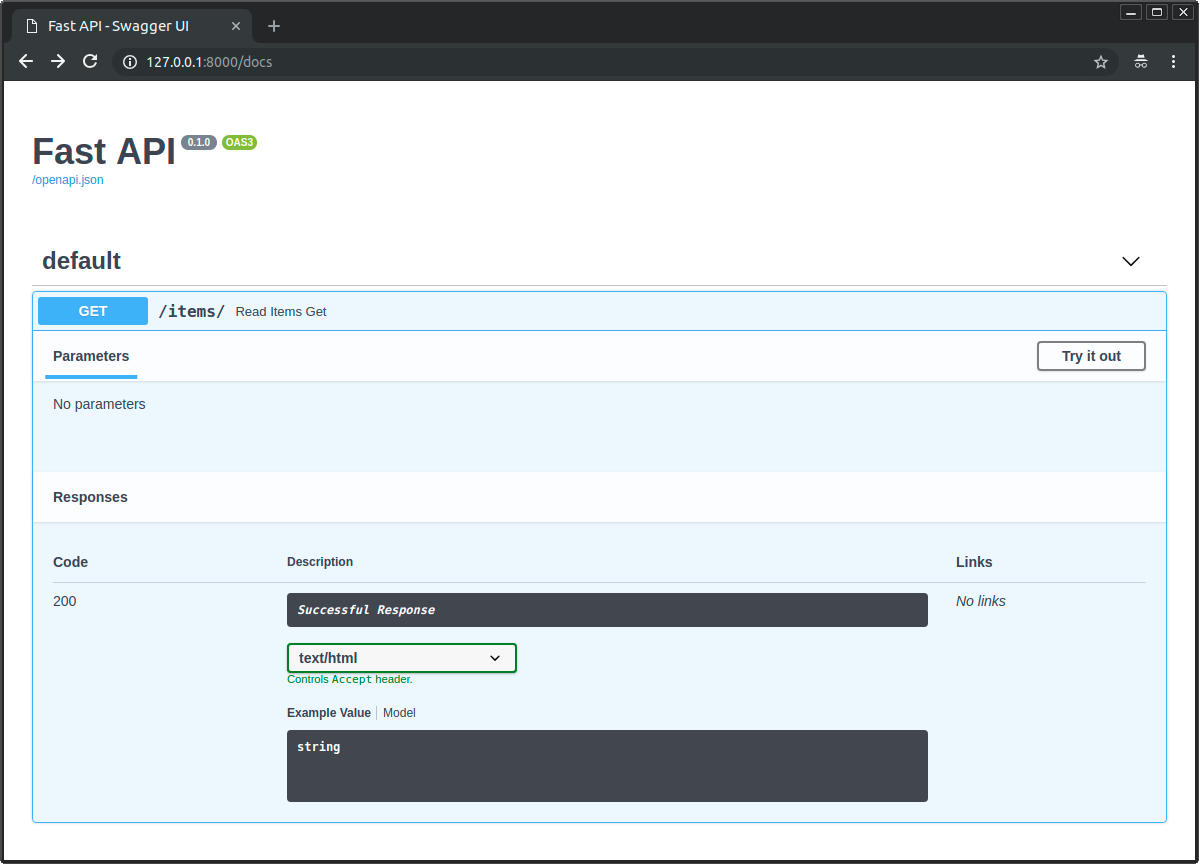
लेकिन क्योंकि आपने response_class में भी HTMLResponse pass किया है, FastAPI को पता होगा कि इसे OpenAPI और interactive docs में text/html के साथ HTML के रूप में कैसे document करना है:
उपलब्ध responses
यहाँ कुछ उपलब्ध responses दिए गए हैं।
ध्यान रखें कि आप कुछ और लौटाने के लिए Response का उपयोग कर सकते हैं, या custom sub-class भी बना सकते हैं।
तकनीकी विवरण
आप from starlette.responses import HTMLResponse भी उपयोग कर सकते हैं।
FastAPI आपकी सुविधा के लिए, developer के रूप में, वही starlette.responses fastapi.responses के रूप में प्रदान करता है। लेकिन अधिकांश उपलब्ध responses सीधे Starlette से आते हैं।
Response
मुख्य Response class, बाकी सभी responses इससे inherit करते हैं।
आप इसे सीधे लौटा सकते हैं।
यह निम्नलिखित parameters accept करता है:
content- एकstrयाbytes।status_code- एकintHTTP status code।headers- strings का एकdict।media_type- media type बताने वाला एकstr। उदाहरण के लिए"text/html"।
FastAPI (असल में Starlette) अपने आप एक Content-Length header शामिल करेगा। यह media_type के आधार पर Content-Type header भी शामिल करेगा और text types के लिए charset append करेगा।
from fastapi import FastAPI, Response

app = FastAPI()


@app.get("/legacy/")
def get_legacy_data():
    data = """<?xml version="1.0"?>
    <shampoo>
    <Header>
        Apply shampoo here.
    </Header>
    <Body>
        You'll have to use soap here.
    </Body>
    </shampoo>
    """
    return Response(content=data, media_type="application/xml")
HTMLResponse
कुछ text या bytes लेता है और HTML response लौटाता है, जैसा आपने ऊपर पढ़ा।
PlainTextResponse
कुछ text या bytes लेता है और plain text response लौटाता है।
from fastapi import FastAPI
from fastapi.responses import PlainTextResponse

app = FastAPI()


@app.get("/", response_class=PlainTextResponse)
async def main():
    return "Hello World"
JSONResponse
कुछ data लेता है और application/json encoded response लौटाता है।
जैसा आपने ऊपर पढ़ा, यह FastAPI में उपयोग किया जाने वाला default response है।
तकनीकी विवरण
लेकिन यदि आप response model या return type declare करते हैं, तो उसका उपयोग सीधे data को JSON में serialize करने के लिए किया जाएगा, और JSON के लिए सही media type वाला response सीधे लौटाया जाएगा, JSONResponse class का उपयोग किए बिना।
यह best performance पाने का ideal तरीका है।
RedirectResponse
HTTP redirect लौटाता है। Default रूप से 307 status code (Temporary Redirect) का उपयोग करता है।
आप सीधे RedirectResponse लौटा सकते हैं:
from fastapi import FastAPI
from fastapi.responses import RedirectResponse

app = FastAPI()


@app.get("/typer")
async def redirect_typer():
    return RedirectResponse("https://typer.tiangolo.com")
या आप इसे response_class parameter में उपयोग कर सकते हैं:
from fastapi import FastAPI
from fastapi.responses import RedirectResponse

app = FastAPI()


@app.get("/fastapi", response_class=RedirectResponse)
async def redirect_fastapi():
    return "https://fastapi.tiangolo.com"
यदि आप ऐसा करते हैं, तो आप अपनी path operation function से URL सीधे लौटा सकते हैं।
इस मामले में, उपयोग किया गया status_code RedirectResponse के लिए default वाला होगा, जो 307 है।
आप status_code parameter को response_class parameter के साथ combine करके भी उपयोग कर सकते हैं:
from fastapi import FastAPI
from fastapi.responses import RedirectResponse

app = FastAPI()


@app.get("/pydantic", response_class=RedirectResponse, status_code=302)
async def redirect_pydantic():
    return "https://docs.pydantic.dev/"
StreamingResponse
एक async generator या सामान्य generator/iterator (yield वाली function) लेता है और response body को stream करता है।
import anyio
from fastapi import FastAPI
from fastapi.responses import StreamingResponse

app = FastAPI()


async def fake_video_streamer():
    for i in range(10):
        yield b"some fake video bytes"
        await anyio.sleep(0)


@app.get("/")
async def main():
    return StreamingResponse(fake_video_streamer())
तकनीकी विवरण
एक async task केवल तब cancel किया जा सकता है जब वह किसी await तक पहुँचता है। यदि कोई await नहीं है, तो generator (yield वाली function) ठीक से cancel नहीं हो सकता और cancellation request किए जाने के बाद भी चलना जारी रख सकता है।
चूँकि इस छोटे उदाहरण को किसी await statement की आवश्यकता नहीं है, हम event loop को cancellation handle करने का अवसर देने के लिए await anyio.sleep(0) जोड़ते हैं।
यह बड़े या infinite streams के साथ और भी अधिक महत्वपूर्ण होगा।
टिप
सीधे StreamingResponse लौटाने के बजाय, आपको शायद Stream Data में दिए गए style का पालन करना चाहिए, यह कहीं अधिक सुविधाजनक है और आपके लिए पर्दे के पीछे cancellation handle करता है।
यदि आप JSON Lines stream कर रहे हैं, तो Stream JSON Lines tutorial का पालन करें।
FileResponse
एक file को response के रूप में asynchronously stream करता है।
Instantiate करने के लिए अन्य response types की तुलना में अलग set of arguments लेता है:
path- stream की जाने वाली file का file path।headers- dictionary के रूप में शामिल किए जाने वाले कोई भी custom headers।media_type- media type बताने वाली string। यदि unset है, तो media type infer करने के लिए filename या path का उपयोग किया जाएगा।filename- यदि set है, तो इसे responseContent-Dispositionमें शामिल किया जाएगा।
File responses में उपयुक्त Content-Length, Last-Modified और ETag headers शामिल होंगे।
from fastapi import FastAPI
from fastapi.responses import FileResponse

some_file_path = "large-video-file.mp4"
app = FastAPI()


@app.get("/")
async def main():
    return FileResponse(some_file_path)
आप response_class parameter का उपयोग भी कर सकते हैं:
from fastapi import FastAPI
from fastapi.responses import FileResponse

some_file_path = "large-video-file.mp4"
app = FastAPI()


@app.get("/", response_class=FileResponse)
async def main():
    return some_file_path
इस मामले में, आप अपनी path operation function से file path सीधे लौटा सकते हैं।
Custom response class
आप Response से inherit करके और उसका उपयोग करके अपनी खुद की custom response class बना सकते हैं।
उदाहरण के लिए, मान लें कि आप कुछ settings के साथ orjson का उपयोग करना चाहते हैं।
मान लें आप चाहते हैं कि यह indented और formatted JSON लौटाए, इसलिए आप orjson option orjson.OPT_INDENT_2 का उपयोग करना चाहते हैं।
आप CustomORJSONResponse बना सकते हैं। आपको मुख्य रूप से Response.render(content) method बनाना है जो content को bytes के रूप में लौटाता है:
from typing import Any

import orjson
from fastapi import FastAPI, Response

app = FastAPI()


class CustomORJSONResponse(Response):
    media_type = "application/json"

    def render(self, content: Any) -> bytes:
        assert orjson is not None, "orjson must be installed"
        return orjson.dumps(content, option=orjson.OPT_INDENT_2)


@app.get("/", response_class=CustomORJSONResponse)
async def main():
    return {"message": "Hello World"}
अब यह लौटाने के बजाय:
{"message": "Hello World"}
...यह response लौटाएगा:
{
  "message": "Hello World"
}
बेशक, JSON formatting की तुलना में इसका लाभ उठाने के लिए आपको शायद कहीं बेहतर तरीके मिलेंगे। 😉
orjson या Response Model
यदि आप performance खोज रहे हैं, तो शायद orjson response की तुलना में Response Model का उपयोग करना आपके लिए बेहतर होगा।
Response model के साथ, FastAPI data को JSON में serialize करने के लिए Pydantic का उपयोग करेगा, intermediate steps के बिना, जैसे jsonable_encoder के साथ convert करना, जो किसी भी अन्य मामले में होता।
और अंदर से, Pydantic JSON में serialize करने के लिए orjson जैसे ही underlying Rust mechanisms का उपयोग करता है, इसलिए response model के साथ आपको पहले से ही best performance मिल जाएगी।
Default response class
FastAPI class instance या APIRouter बनाते समय आप specify कर सकते हैं कि default रूप से कौन-सी response class उपयोग करनी है।
इसे define करने वाला parameter default_response_class है।
नीचे दिए गए उदाहरण में, FastAPI सभी path operations में JSON के बजाय default रूप से HTMLResponse का उपयोग करेगा।
from fastapi import FastAPI
from fastapi.responses import HTMLResponse

app = FastAPI(default_response_class=HTMLResponse)


@app.get("/items/")
async def read_items():
    return "<h1>Items</h1><p>This is a list of items.</p>"
टिप
आप पहले की तरह path operations में अब भी response_class override कर सकते हैं।
अतिरिक्त documentation
आप responses का उपयोग करके OpenAPI में media type और कई अन्य details भी declare कर सकते हैं: OpenAPI में अतिरिक्त Responses।