OpenAPI में अतिरिक्त Responses
🌐 एआई और मनुष्यों द्वारा किया गया अनुवाद
यह अनुवाद मनुष्यों के मार्गदर्शन में एआई द्वारा किया गया है। 🤝
इसमें मूल अर्थ को गलत समझने या अप्राकृतिक लगने आदि जैसी गलतियाँ हो सकती हैं। 🤖
आप हमें एआई LLM को बेहतर मार्गदर्शन करने में मदद करके इस अनुवाद को बेहतर बना सकते हैं।
चेतावनी
यह एक काफ़ी advanced विषय है।
अगर आप FastAPI के साथ शुरुआत कर रहे हैं, तो शायद आपको इसकी ज़रूरत न पड़े।
आप अतिरिक्त status codes, media types, descriptions आदि के साथ अतिरिक्त responses घोषित कर सकते हैं।
ये अतिरिक्त responses OpenAPI schema में शामिल किए जाएँगे, इसलिए वे API docs में भी दिखाई देंगे।
लेकिन उन अतिरिक्त responses के लिए आपको यह सुनिश्चित करना होगा कि आप अपने status code और content के साथ सीधे JSONResponse जैसा कोई Response return करें।
model के साथ अतिरिक्त Response
आप अपने path operation decorators को responses parameter दे सकते हैं।
यह एक dict प्राप्त करता है: keys प्रत्येक response के status codes होते हैं (जैसे 200), और values अन्य dicts होते हैं जिनमें उनमें से प्रत्येक की जानकारी होती है।
इनमें से प्रत्येक response dict में model key हो सकती है, जिसमें response_model की तरह एक Pydantic model होता है।
FastAPI उस model को लेगा, उसका JSON Schema generate करेगा और उसे OpenAPI में सही जगह शामिल करेगा।
उदाहरण के लिए, status code 404 और Pydantic model Message के साथ एक और response घोषित करने के लिए, आप लिख सकते हैं:
from fastapi import FastAPI
from fastapi.responses import JSONResponse
from pydantic import BaseModel


class Item(BaseModel):
    id: str
    value: str


class Message(BaseModel):
    message: str


app = FastAPI()


@app.get("/items/{item_id}", response_model=Item, responses={404: {"model": Message}})
async def read_item(item_id: str):
    if item_id == "foo":
        return {"id": "foo", "value": "there goes my hero"}
    return JSONResponse(status_code=404, content={"message": "Item not found"})
नोट
ध्यान रखें कि आपको सीधे JSONResponse return करना होगा।
नोट
model key OpenAPI का हिस्सा नहीं है।
FastAPI वहाँ से Pydantic model लेगा, JSON Schema generate करेगा, और उसे सही जगह रखेगा।
सही जगह है:
contentkey में, जिसकी value एक और JSON object (dict) होती है जिसमें शामिल है:- media type वाली एक key, जैसे
application/json, जिसकी value एक और JSON object होती है, जिसमें शामिल है:- एक key
schema, जिसकी value model से JSON Schema होती है, यही सही जगह है।- FastAPI इसे सीधे शामिल करने के बजाय आपके OpenAPI में किसी अन्य जगह मौजूद global JSON Schemas का reference यहाँ जोड़ता है। इस तरह, अन्य applications और clients उन JSON Schemas को सीधे उपयोग कर सकते हैं, बेहतर code generation tools प्रदान कर सकते हैं, आदि।
- एक key
- media type वाली एक key, जैसे
इस path operation के लिए OpenAPI में generate किए गए responses होंगे:
{
    "responses": {
        "404": {
            "description": "Additional Response",
            "content": {
                "application/json": {
                    "schema": {
                        "$ref": "#/components/schemas/Message"
                    }
                }
            }
        },
        "200": {
            "description": "Successful Response",
            "content": {
                "application/json": {
                    "schema": {
                        "$ref": "#/components/schemas/Item"
                    }
                }
            }
        },
        "422": {
            "description": "Validation Error",
            "content": {
                "application/json": {
                    "schema": {
                        "$ref": "#/components/schemas/HTTPValidationError"
                    }
                }
            }
        }
    }
}
Schemas को OpenAPI schema के अंदर किसी दूसरी जगह reference किया गया है:
{
    "components": {
        "schemas": {
            "Message": {
                "title": "Message",
                "required": [
                    "message"
                ],
                "type": "object",
                "properties": {
                    "message": {
                        "title": "Message",
                        "type": "string"
                    }
                }
            },
            "Item": {
                "title": "Item",
                "required": [
                    "id",
                    "value"
                ],
                "type": "object",
                "properties": {
                    "id": {
                        "title": "Id",
                        "type": "string"
                    },
                    "value": {
                        "title": "Value",
                        "type": "string"
                    }
                }
            },
            "ValidationError": {
                "title": "ValidationError",
                "required": [
                    "loc",
                    "msg",
                    "type"
                ],
                "type": "object",
                "properties": {
                    "loc": {
                        "title": "Location",
                        "type": "array",
                        "items": {
                            "type": "string"
                        }
                    },
                    "msg": {
                        "title": "Message",
                        "type": "string"
                    },
                    "type": {
                        "title": "Error Type",
                        "type": "string"
                    }
                }
            },
            "HTTPValidationError": {
                "title": "HTTPValidationError",
                "type": "object",
                "properties": {
                    "detail": {
                        "title": "Detail",
                        "type": "array",
                        "items": {
                            "$ref": "#/components/schemas/ValidationError"
                        }
                    }
                }
            }
        }
    }
}
मुख्य response के लिए अतिरिक्त media types
आप इसी responses parameter का उपयोग करके उसी मुख्य response के लिए अलग-अलग media types जोड़ सकते हैं।
उदाहरण के लिए, आप image/png का एक अतिरिक्त media type जोड़ सकते हैं, यह घोषित करते हुए कि आपका path operation एक JSON object (media type application/json के साथ) या एक PNG image return कर सकता है:
from fastapi import FastAPI
from fastapi.responses import FileResponse
from pydantic import BaseModel


class Item(BaseModel):
    id: str
    value: str


app = FastAPI()


@app.get(
    "/items/{item_id}",
    response_model=Item,
    responses={
        200: {
            "content": {"image/png": {}},
            "description": "Return the JSON item or an image.",
        }
    },
)
async def read_item(item_id: str, img: bool | None = None):
    if img:
        return FileResponse("image.png", media_type="image/png")
    else:
        return {"id": "foo", "value": "there goes my hero"}
नोट
ध्यान दें कि आपको image को सीधे FileResponse का उपयोग करके return करना होगा।
नोट
जब तक आप अपने responses parameter में स्पष्ट रूप से कोई अलग media type specify नहीं करते, FastAPI मान लेगा कि response का media type मुख्य response class (default application/json) जैसा ही है।
लेकिन अगर आपने custom response class specify की है जिसका media type None है, तो FastAPI किसी भी ऐसे अतिरिक्त response के लिए application/json का उपयोग करेगा जिसके साथ कोई associated model है।
जानकारी को मिलाना
आप कई जगहों से response जानकारी को भी मिला सकते हैं, जिसमें response_model, status_code, और responses parameters शामिल हैं।
आप default status code 200 (या ज़रूरत पड़ने पर custom code) का उपयोग करके response_model घोषित कर सकते हैं, और फिर उसी response के लिए अतिरिक्त जानकारी सीधे OpenAPI schema में responses के अंदर घोषित कर सकते हैं।
FastAPI responses से अतिरिक्त जानकारी बनाए रखेगा, और उसे आपके model से JSON Schema के साथ मिला देगा।
उदाहरण के लिए, आप status code 404 वाला एक response घोषित कर सकते हैं जो Pydantic model का उपयोग करता है और जिसमें custom description है।
और status code 200 वाला एक response, जो आपके response_model का उपयोग करता है, लेकिन जिसमें custom example शामिल है:
from fastapi import FastAPI
from fastapi.responses import JSONResponse
from pydantic import BaseModel


class Item(BaseModel):
    id: str
    value: str


class Message(BaseModel):
    message: str


app = FastAPI()


@app.get(
    "/items/{item_id}",
    response_model=Item,
    responses={
        404: {"model": Message, "description": "The item was not found"},
        200: {
            "description": "Item requested by ID",
            "content": {
                "application/json": {
                    "example": {"id": "bar", "value": "The bar tenders"}
                }
            },
        },
    },
)
async def read_item(item_id: str):
    if item_id == "foo":
        return {"id": "foo", "value": "there goes my hero"}
    else:
        return JSONResponse(status_code=404, content={"message": "Item not found"})
यह सब मिलाकर आपके OpenAPI में शामिल किया जाएगा, और API docs में दिखाया जाएगा:
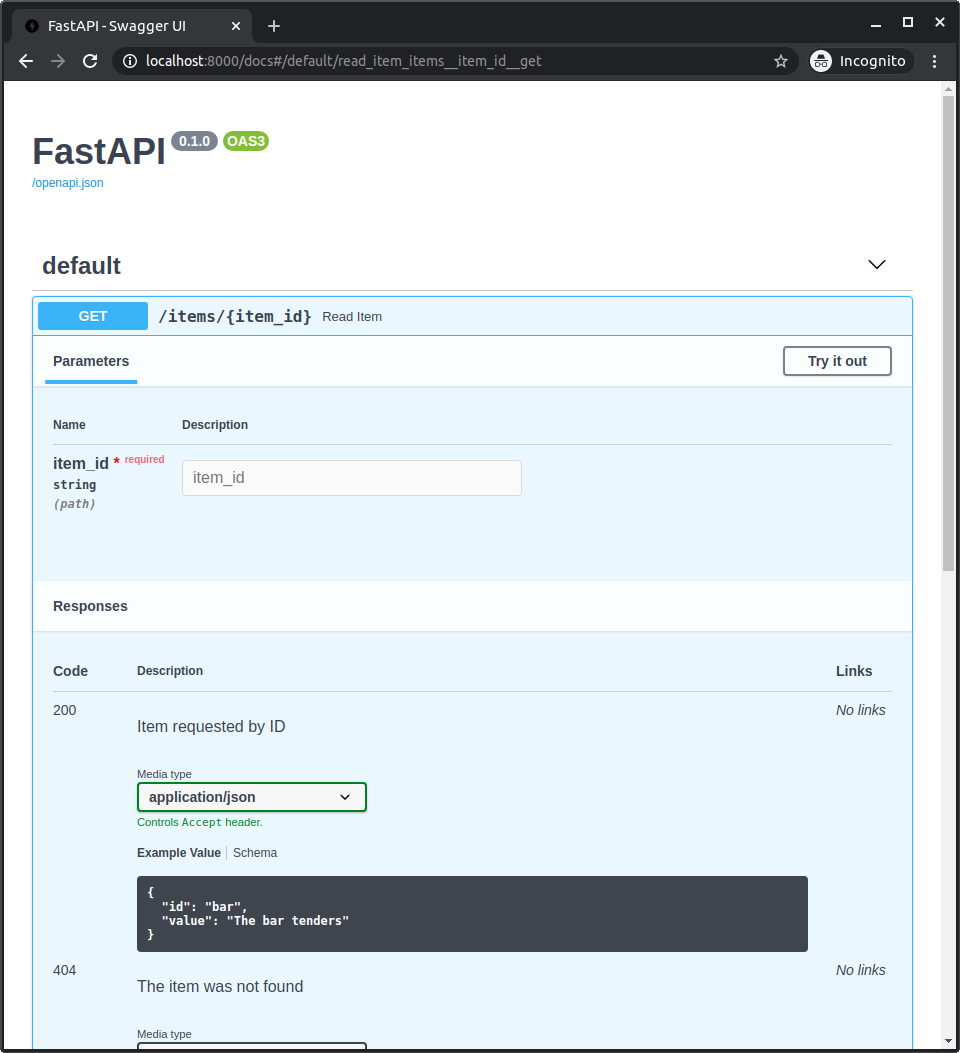
पहले से परिभाषित responses और custom responses को मिलाएँ
आप कुछ पहले से परिभाषित responses रखना चाह सकते हैं जो कई path operations पर लागू होते हैं, लेकिन आप उन्हें प्रत्येक path operation के लिए ज़रूरी custom responses के साथ मिलाना चाहते हैं।
ऐसे मामलों के लिए, आप **dict_to_unpack के साथ dict को "unpacking" करने की Python technique का उपयोग कर सकते हैं:
old_dict = {
    "old key": "old value",
    "second old key": "second old value",
}
new_dict = {**old_dict, "new key": "new value"}
यहाँ, new_dict में old_dict के सभी key-value pairs के साथ नया key-value pair भी होगा:
{
    "old key": "old value",
    "second old key": "second old value",
    "new key": "new value",
}
आप इस technique का उपयोग अपने path operations में कुछ पहले से परिभाषित responses को reuse करने और उन्हें अतिरिक्त custom responses के साथ मिलाने के लिए कर सकते हैं।
उदाहरण के लिए:
from fastapi import FastAPI
from fastapi.responses import FileResponse
from pydantic import BaseModel


class Item(BaseModel):
    id: str
    value: str


responses = {
    404: {"description": "Item not found"},
    302: {"description": "The item was moved"},
    403: {"description": "Not enough privileges"},
}


app = FastAPI()


@app.get(
    "/items/{item_id}",
    response_model=Item,
    responses={**responses, 200: {"content": {"image/png": {}}}},
)
async def read_item(item_id: str, img: bool | None = None):
    if img:
        return FileResponse("image.png", media_type="image/png")
    else:
        return {"id": "foo", "value": "there goes my hero"}
OpenAPI responses के बारे में अधिक जानकारी
Responses में आप ठीक-ठीक क्या शामिल कर सकते हैं, यह देखने के लिए आप OpenAPI specification में ये sections देख सकते हैं:
- OpenAPI Responses Object, इसमें
Response Objectशामिल है। - OpenAPI Response Object, आप इसमें से कुछ भी सीधे अपने
responsesparameter के अंदर प्रत्येक response में शामिल कर सकते हैं। जिसमेंdescription,headers,content(इसी के अंदर आप अलग-अलग media types और JSON Schemas घोषित करते हैं), औरlinksशामिल हैं।