Body - Nested Models
🌐 एआई और मनुष्यों द्वारा किया गया अनुवाद
यह अनुवाद मनुष्यों के मार्गदर्शन में एआई द्वारा किया गया है। 🤝
इसमें मूल अर्थ को गलत समझने या अप्राकृतिक लगने आदि जैसी गलतियाँ हो सकती हैं। 🤖
आप हमें एआई LLM को बेहतर मार्गदर्शन करने में मदद करके इस अनुवाद को बेहतर बना सकते हैं।
FastAPI के साथ, आप arbitrarily deeply nested models को define, validate, document, और use कर सकते हैं (Pydantic की बदौलत)।
List fields
आप किसी attribute को subtype के रूप में define कर सकते हैं। उदाहरण के लिए, एक Python list:
from fastapi import FastAPI
from pydantic import BaseModel

app = FastAPI()


class Item(BaseModel):
    name: str
    description: str | None = None
    price: float
    tax: float | None = None
    tags: list = []


@app.put("/items/{item_id}")
async def update_item(item_id: int, item: Item):
    results = {"item_id": item_id, "item": item}
    return results
यह tags को एक list बना देगा, हालांकि यह list के elements का type declare नहीं करता।
Type parameter के साथ List fields
लेकिन Python में internal types, या "type parameters" के साथ lists declare करने का एक खास तरीका है:
Type parameter के साथ list declare करें
ऐसे types declare करने के लिए जिनमें type parameters (internal types) होते हैं, जैसे list, dict, tuple,
internal type(s) को square brackets: [ और ] का उपयोग करके "type parameters" के रूप में pass करें
my_list: list[str]
Type declarations के लिए यह सब standard Python syntax है।
Internal types वाले model attributes के लिए भी वही standard syntax उपयोग करें।
तो, हमारे उदाहरण में, हम tags को खास तौर पर "strings की list" बना सकते हैं:
from fastapi import FastAPI
from pydantic import BaseModel

app = FastAPI()


class Item(BaseModel):
    name: str
    description: str | None = None
    price: float
    tax: float | None = None
    tags: list[str] = []


@app.put("/items/{item_id}")
async def update_item(item_id: int, item: Item):
    results = {"item_id": item_id, "item": item}
    return results
Set types
लेकिन फिर हम इस पर सोचते हैं, और समझते हैं कि tags repeat नहीं होने चाहिए, वे शायद unique strings होंगे।
और Python में unique items के sets के लिए एक खास data type है, set।
फिर हम tags को strings के set के रूप में declare कर सकते हैं:
from fastapi import FastAPI
from pydantic import BaseModel

app = FastAPI()


class Item(BaseModel):
    name: str
    description: str | None = None
    price: float
    tax: float | None = None
    tags: set[str] = set()


@app.put("/items/{item_id}")
async def update_item(item_id: int, item: Item):
    results = {"item_id": item_id, "item": item}
    return results
इसके साथ, भले ही आपको duplicate data वाला request मिले, वह unique items के set में convert हो जाएगा।
और जब भी आप उस data को output करेंगे, भले ही source में duplicates हों, वह unique items के set के रूप में output होगा।
और इसे उसी अनुसार annotate / document भी किया जाएगा।
Nested Models
Pydantic model के हर attribute का एक type होता है।
लेकिन वह type खुद भी कोई दूसरा Pydantic model हो सकता है।
इसलिए, आप खास attribute names, types और validations के साथ deeply nested JSON "objects" declare कर सकते हैं।
यह सब, मनचाही गहराई तक nested हो सकता है।
Submodel define करें
उदाहरण के लिए, हम एक Image model define कर सकते हैं:
from fastapi import FastAPI
from pydantic import BaseModel

app = FastAPI()


class Image(BaseModel):
    url: str
    name: str


class Item(BaseModel):
    name: str
    description: str | None = None
    price: float
    tax: float | None = None
    tags: set[str] = set()
    image: Image | None = None


@app.put("/items/{item_id}")
async def update_item(item_id: int, item: Item):
    results = {"item_id": item_id, "item": item}
    return results
Submodel को type के रूप में उपयोग करें
और फिर हम इसे किसी attribute के type के रूप में उपयोग कर सकते हैं:
from fastapi import FastAPI
from pydantic import BaseModel

app = FastAPI()


class Image(BaseModel):
    url: str
    name: str


class Item(BaseModel):
    name: str
    description: str | None = None
    price: float
    tax: float | None = None
    tags: set[str] = set()
    image: Image | None = None


@app.put("/items/{item_id}")
async def update_item(item_id: int, item: Item):
    results = {"item_id": item_id, "item": item}
    return results
इसका मतलब होगा कि FastAPI कुछ इस तरह के body की अपेक्षा करेगा:
{
    "name": "Foo",
    "description": "The pretender",
    "price": 42.0,
    "tax": 3.2,
    "tags": ["rock", "metal", "bar"],
    "image": {
        "url": "http://example.com/baz.jpg",
        "name": "The Foo live"
    }
}
फिर से, सिर्फ वह declaration करने से, FastAPI के साथ आपको मिलता है:
- Editor support (completion, आदि), nested models के लिए भी
- Data conversion
- Data validation
- Automatic documentation
Special types और validation
str, int, float, आदि जैसे सामान्य singular types के अलावा, आप अधिक complex singular types उपयोग कर सकते हैं जो str से inherit करते हैं।
आपके पास मौजूद सभी options देखने के लिए, Pydantic का Type Overview देखें। अगले chapter में आपको कुछ उदाहरण दिखेंगे।
उदाहरण के लिए, जैसा कि Image model में हमारे पास एक url field है, हम इसे str के बजाय Pydantic के HttpUrl का instance declare कर सकते हैं:
from fastapi import FastAPI
from pydantic import BaseModel, HttpUrl

app = FastAPI()


class Image(BaseModel):
    url: HttpUrl
    name: str


class Item(BaseModel):
    name: str
    description: str | None = None
    price: float
    tax: float | None = None
    tags: set[str] = set()
    image: Image | None = None


@app.put("/items/{item_id}")
async def update_item(item_id: int, item: Item):
    results = {"item_id": item_id, "item": item}
    return results
String को valid URL होने के लिए check किया जाएगा, और JSON Schema / OpenAPI में उसी तरह document किया जाएगा।
Submodels की lists वाले attributes
आप Pydantic models को list, set, आदि के subtypes के रूप में भी उपयोग कर सकते हैं:
from fastapi import FastAPI
from pydantic import BaseModel, HttpUrl

app = FastAPI()


class Image(BaseModel):
    url: HttpUrl
    name: str


class Item(BaseModel):
    name: str
    description: str | None = None
    price: float
    tax: float | None = None
    tags: set[str] = set()
    images: list[Image] | None = None


@app.put("/items/{item_id}")
async def update_item(item_id: int, item: Item):
    results = {"item_id": item_id, "item": item}
    return results
यह इस तरह के JSON body की अपेक्षा करेगा (convert, validate, document, आदि):
{
    "name": "Foo",
    "description": "The pretender",
    "price": 42.0,
    "tax": 3.2,
    "tags": [
        "rock",
        "metal",
        "bar"
    ],
    "images": [
        {
            "url": "http://example.com/baz.jpg",
            "name": "The Foo live"
        },
        {
            "url": "http://example.com/dave.jpg",
            "name": "The Baz"
        }
    ]
}
नोट
ध्यान दें कि images key में अब image objects की एक list है।
Deeply nested models
आप arbitrarily deeply nested models define कर सकते हैं:
from fastapi import FastAPI
from pydantic import BaseModel, HttpUrl

app = FastAPI()


class Image(BaseModel):
    url: HttpUrl
    name: str


class Item(BaseModel):
    name: str
    description: str | None = None
    price: float
    tax: float | None = None
    tags: set[str] = set()
    images: list[Image] | None = None


class Offer(BaseModel):
    name: str
    description: str | None = None
    price: float
    items: list[Item]


@app.post("/offers/")
async def create_offer(offer: Offer):
    return offer
नोट
ध्यान दें कि Offer में Items की एक list है, जिनमें आगे Images की एक optional list है
Pure lists के bodies
अगर जिस JSON body की आप अपेक्षा करते हैं उसका top level value एक JSON array (एक Python list) है, तो आप function के parameter में type declare कर सकते हैं, बिल्कुल Pydantic models की तरह:
images: list[Image]
जैसे कि:
from fastapi import FastAPI
from pydantic import BaseModel, HttpUrl

app = FastAPI()


class Image(BaseModel):
    url: HttpUrl
    name: str


@app.post("/images/multiple/")
async def create_multiple_images(images: list[Image]):
    return images
हर जगह editor support
और आपको हर जगह editor support मिलता है।
Lists के अंदर के items के लिए भी:
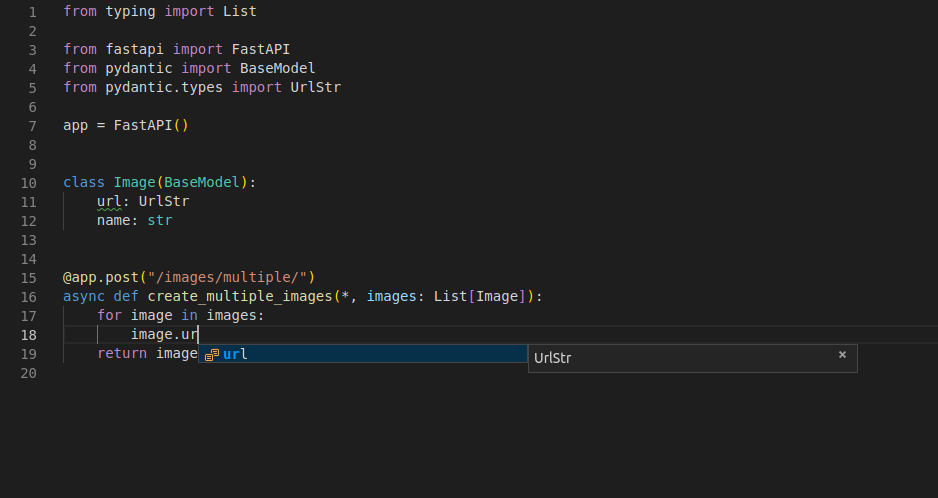
अगर आप Pydantic models के बजाय सीधे dict के साथ काम कर रहे होते, तो आपको इस तरह का editor support नहीं मिल सकता था।
लेकिन आपको उनकी चिंता भी करने की ज़रूरत नहीं है, आने वाले dicts अपने आप convert हो जाते हैं और आपका output भी अपने आप JSON में convert हो जाता है।
Arbitrary dicts के bodies
आप body को एक dict के रूप में भी declare कर सकते हैं, जिसकी keys किसी type की हों और values किसी दूसरे type की।
इस तरह, आपको पहले से यह जानने की ज़रूरत नहीं होती कि valid field/attribute names क्या हैं (जैसा कि Pydantic models के साथ होता)।
यह तब उपयोगी होगा जब आप ऐसी keys receive करना चाहते हैं जिन्हें आप पहले से नहीं जानते।
एक और उपयोगी case वह है जब आप किसी दूसरे type (जैसे, int) की keys रखना चाहते हैं।
यही हम यहाँ देखने जा रहे हैं।
इस case में, आप कोई भी dict accept करेंगे, जब तक कि उसमें float values वाली int keys हों:
from fastapi import FastAPI

app = FastAPI()


@app.post("/index-weights/")
async def create_index_weights(weights: dict[int, float]):
    return weights
टिप
ध्यान रखें कि JSON केवल str को keys के रूप में support करता है।
लेकिन Pydantic में automatic data conversion है।
इसका मतलब है कि, भले ही आपके API clients केवल strings को keys के रूप में भेज सकते हैं, जब तक उन strings में pure integers हैं, Pydantic उन्हें convert और validate कर देगा।
और weights के रूप में आपको जो dict receive होगा, उसमें वास्तव में int keys और float values होंगी।
Recap
FastAPI के साथ आपके पास Pydantic models द्वारा दी गई अधिकतम flexibility होती है, जबकि आपका code simple, short और elegant बना रहता है।
लेकिन सभी benefits के साथ:
- Editor support (हर जगह completion!)
- Data conversion (a.k.a. parsing / serialization)
- Data validation
- Schema documentation
- Automatic docs