बड़े Applications - Multiple Files
🌐 एआई और मनुष्यों द्वारा किया गया अनुवाद
यह अनुवाद मनुष्यों के मार्गदर्शन में एआई द्वारा किया गया है। 🤝
इसमें मूल अर्थ को गलत समझने या अप्राकृतिक लगने आदि जैसी गलतियाँ हो सकती हैं। 🤖
आप हमें एआई LLM को बेहतर मार्गदर्शन करने में मदद करके इस अनुवाद को बेहतर बना सकते हैं।
अगर आप कोई application या web API बना रहे हैं, तो ऐसा कम ही होता है कि आप सब कुछ एक ही file में रख सकें।
FastAPI आपके application को structure करने के लिए एक सुविधाजनक tool देता है, और साथ ही पूरी flexibility भी बनाए रखता है।
नोट
अगर आप Flask से आए हैं, तो यह Flask के Blueprints के बराबर होगा।
एक उदाहरण file structure
मान लीजिए आपके पास ऐसा file structure है:
.
├── app
│   ├── __init__.py
│   ├── main.py
│   ├── dependencies.py
│   └── routers
│   │   ├── __init__.py
│   │   ├── items.py
│   │   └── users.py
│   └── internal
│       ├── __init__.py
│       └── admin.py
टिप
कई __init__.py files हैं: हर directory या subdirectory में एक।
यही एक file से दूसरी file में code import करने की अनुमति देता है।
उदाहरण के लिए, app/main.py में आपके पास ऐसी line हो सकती है:
from app.routers import items
appdirectory में सब कुछ है। और इसमें एक खाली fileapp/__init__.pyहै, इसलिए यह एक "Python package" है ("Python modules" का संग्रह):app.- इसमें एक
app/main.pyfile है। क्योंकि यह एक Python package (एक ऐसी directory जिसमें__init__.pyfile है) के अंदर है, यह उस package का एक "module" है:app.main. - एक
app/dependencies.pyfile भी है,app/main.pyकी तरह, यह एक "module" है:app.dependencies. - एक subdirectory
app/routers/है जिसमें एक और file__init__.pyहै, इसलिए यह एक "Python subpackage" है:app.routers. - file
app/routers/items.pyएक package,app/routers/, के अंदर है, इसलिए यह एक submodule है:app.routers.items. app/routers/users.pyके साथ भी वही है, यह एक और submodule है:app.routers.users.- एक subdirectory
app/internal/भी है जिसमें एक और file__init__.pyहै, इसलिए यह एक और "Python subpackage" है:app.internal. - और file
app/internal/admin.pyएक और submodule है:app.internal.admin.

वही file structure comments के साथ:
.
├── app                  # "app" एक Python package है
│   ├── __init__.py      # यह file "app" को "Python package" बनाती है
│   ├── main.py          # "main" module, जैसे import app.main
│   ├── dependencies.py  # "dependencies" module, जैसे import app.dependencies
│   └── routers          # "routers" एक "Python subpackage" है
│   │   ├── __init__.py  # "routers" को "Python subpackage" बनाता है
│   │   ├── items.py     # "items" submodule, जैसे import app.routers.items
│   │   └── users.py     # "users" submodule, जैसे import app.routers.users
│   └── internal         # "internal" एक "Python subpackage" है
│       ├── __init__.py  # "internal" को "Python subpackage" बनाता है
│       └── admin.py     # "admin" submodule, जैसे import app.internal.admin
APIRouter
मान लीजिए सिर्फ users को handle करने के लिए dedicated file /app/routers/users.py पर submodule है।
आप अपने users से संबंधित path operations को बाकी code से अलग रखना चाहते हैं, ताकि यह व्यवस्थित रहे।
लेकिन यह अभी भी उसी FastAPI application/web API का हिस्सा है (यह उसी "Python Package" का हिस्सा है)।
आप उस module के लिए path operations APIRouter का उपयोग करके बना सकते हैं।
APIRouter import करें
आप इसे import करते हैं और उसी तरह एक "instance" बनाते हैं जैसे आप FastAPI class के साथ करते:
from fastapi import APIRouter

router = APIRouter()


@router.get("/users/", tags=["users"])
async def read_users():
    return [{"username": "Rick"}, {"username": "Morty"}]


@router.get("/users/me", tags=["users"])
async def read_user_me():
    return {"username": "fakecurrentuser"}


@router.get("/users/{username}", tags=["users"])
async def read_user(username: str):
    return {"username": username}
APIRouter के साथ Path operations
और फिर आप इसका उपयोग अपने path operations declare करने के लिए करते हैं।
इसे उसी तरह उपयोग करें जैसे आप FastAPI class का उपयोग करते:
from fastapi import APIRouter

router = APIRouter()


@router.get("/users/", tags=["users"])
async def read_users():
    return [{"username": "Rick"}, {"username": "Morty"}]


@router.get("/users/me", tags=["users"])
async def read_user_me():
    return {"username": "fakecurrentuser"}


@router.get("/users/{username}", tags=["users"])
async def read_user(username: str):
    return {"username": username}
आप APIRouter को एक "mini FastAPI" class की तरह सोच सकते हैं।
सभी वही options समर्थित हैं।
सभी वही parameters, responses, dependencies, tags, आदि।
टिप
इस उदाहरण में, variable को router कहा गया है, लेकिन आप इसे अपनी इच्छा अनुसार कोई भी नाम दे सकते हैं।
हम इस APIRouter को main FastAPI app में शामिल करने जा रहे हैं, लेकिन पहले, dependencies और एक और APIRouter देखें।
Dependencies
हम देखते हैं कि हमें application के कई स्थानों पर उपयोग होने वाली कुछ dependencies की ज़रूरत होगी।
इसलिए हम उन्हें उनके अपने dependencies module (app/dependencies.py) में रखते हैं।
अब हम एक custom X-Token header पढ़ने के लिए एक सरल dependency का उपयोग करेंगे:
from typing import Annotated

from fastapi import Header, HTTPException


async def get_token_header(x_token: Annotated[str, Header()]):
    if x_token != "fake-super-secret-token":
        raise HTTPException(status_code=400, detail="X-Token header invalid")


async def get_query_token(token: str):
    if token != "jessica":
        raise HTTPException(status_code=400, detail="No Jessica token provided")
टिप
हम इस उदाहरण को सरल बनाने के लिए एक काल्पनिक header का उपयोग कर रहे हैं।
लेकिन वास्तविक मामलों में आपको integrated Security utilities का उपयोग करके बेहतर परिणाम मिलेंगे।
APIRouter के साथ एक और module
मान लीजिए आपके application से "items" को handle करने के लिए dedicated endpoints भी app/routers/items.py module में हैं।
आपके पास इनके लिए path operations हैं:
/items//items/{item_id}
यह सब app/routers/users.py जैसी ही structure है।
लेकिन हम थोड़े अधिक smart होना चाहते हैं और code को थोड़ा simplify करना चाहते हैं।
हम जानते हैं कि इस module के सभी path operations में वही हैं:
- Path
prefix:/items. tags: (सिर्फ एक tag:items).- अतिरिक्त
responses. dependencies: उन सभी को वहX-Tokendependency चाहिए जो हमने बनाई है।
इसलिए, यह सब प्रत्येक path operation में जोड़ने के बजाय, हम इसे APIRouter में जोड़ सकते हैं।
from fastapi import APIRouter, Depends, HTTPException

from ..dependencies import get_token_header

router = APIRouter(
    prefix="/items",
    tags=["items"],
    dependencies=[Depends(get_token_header)],
    responses={404: {"description": "Not found"}},
)


fake_items_db = {"plumbus": {"name": "Plumbus"}, "gun": {"name": "Portal Gun"}}


@router.get("/")
async def read_items():
    return fake_items_db


@router.get("/{item_id}")
async def read_item(item_id: str):
    if item_id not in fake_items_db:
        raise HTTPException(status_code=404, detail="Item not found")
    return {"name": fake_items_db[item_id]["name"], "item_id": item_id}


@router.put(
    "/{item_id}",
    tags=["custom"],
    responses={403: {"description": "Operation forbidden"}},
)
async def update_item(item_id: str):
    if item_id != "plumbus":
        raise HTTPException(
            status_code=403, detail="You can only update the item: plumbus"
        )
    return {"item_id": item_id, "name": "The great Plumbus"}
क्योंकि प्रत्येक path operation का path / से शुरू होना चाहिए, जैसे:
@router.get("/{item_id}")
async def read_item(item_id: str):
    ...
...prefix में अंत में / शामिल नहीं होना चाहिए।
इसलिए, इस मामले में prefix /items है।
हम tags की list और अतिरिक्त responses भी जोड़ सकते हैं जो इस router में शामिल सभी path operations पर लागू होंगे।
और हम dependencies की list जोड़ सकते हैं जो router के सभी path operations में जोड़ी जाएगी और उन पर किए गए हर request के लिए execute/solve की जाएगी।
टिप
ध्यान दें कि, path operation decorators में dependencies की तरह ही, आपके path operation function को कोई value pass नहीं की जाएगी।
अंतिम परिणाम यह है कि item paths अब ये हैं:
/items//items/{item_id}
...जैसा हमने चाहा था।
- उन्हें tags की list से mark किया जाएगा जिसमें एक ही string
"items"होगी।- ये "tags" automatic interactive documentation systems (OpenAPI का उपयोग करते हुए) के लिए विशेष रूप से उपयोगी हैं।
- उन सभी में predefined
responsesशामिल होंगे। - इन सभी path operations से पहले
dependenciesकी list evaluate/execute की जाएगी।- अगर आप किसी specific path operation में भी dependencies declare करते हैं, तो वे भी execute होंगी।
- router dependencies पहले execute होती हैं, फिर decorator में
dependencies, और फिर normal parameter dependencies। - आप
Securitydependencies withscopesभी जोड़ सकते हैं।
टिप
APIRouter में dependencies होने का उपयोग, उदाहरण के लिए, path operations के पूरे group के लिए authentication require करने के लिए किया जा सकता है। भले ही dependencies उनमें से हर एक में individually न जोड़ी गई हों।
टिप
prefix, tags, responses, और dependencies parameters (कई अन्य मामलों की तरह) FastAPI की एक feature हैं जो आपको code duplication से बचने में मदद करती है।
dependencies import करें
यह code app.routers.items module, file app/routers/items.py में रहता है।
और हमें dependency function app.dependencies module, file app/dependencies.py से लेनी है।
इसलिए हम dependencies के लिए .. के साथ relative import का उपयोग करते हैं:
from fastapi import APIRouter, Depends, HTTPException

from ..dependencies import get_token_header

router = APIRouter(
    prefix="/items",
    tags=["items"],
    dependencies=[Depends(get_token_header)],
    responses={404: {"description": "Not found"}},
)


fake_items_db = {"plumbus": {"name": "Plumbus"}, "gun": {"name": "Portal Gun"}}


@router.get("/")
async def read_items():
    return fake_items_db


@router.get("/{item_id}")
async def read_item(item_id: str):
    if item_id not in fake_items_db:
        raise HTTPException(status_code=404, detail="Item not found")
    return {"name": fake_items_db[item_id]["name"], "item_id": item_id}


@router.put(
    "/{item_id}",
    tags=["custom"],
    responses={403: {"description": "Operation forbidden"}},
)
async def update_item(item_id: str):
    if item_id != "plumbus":
        raise HTTPException(
            status_code=403, detail="You can only update the item: plumbus"
        )
    return {"item_id": item_id, "name": "The great Plumbus"}
Relative imports कैसे काम करते हैं
टिप
अगर आप पूरी तरह जानते हैं कि imports कैसे काम करते हैं, तो नीचे वाले अगले section पर जाएँ।
एक single dot ., जैसे:
from .dependencies import get_token_header
का मतलब होगा:
- उसी package से शुरू करना जिसमें यह module (file
app/routers/items.py) रहता है (directoryapp/routers/)... - module
dependenciesढूँढना (app/routers/dependencies.pyपर एक काल्पनिक file)... - और उससे, function
get_token_headerimport करना।
लेकिन वह file मौजूद नहीं है, हमारी dependencies app/dependencies.py पर एक file में हैं।
याद रखें कि हमारी app/file structure कैसी दिखती है:
दो dots .., जैसे:
from ..dependencies import get_token_header
का मतलब है:
- उसी package से शुरू करना जिसमें यह module (file
app/routers/items.py) रहता है (directoryapp/routers/)... - parent package (directory
app/) पर जाना... - और वहाँ, module
dependenciesढूँढना (fileapp/dependencies.pyपर)... - और उससे, function
get_token_headerimport करना।
यह सही तरीके से काम करता है! 🎉
उसी तरह, अगर हमने तीन dots ... का उपयोग किया होता, जैसे:
from ...dependencies import get_token_header
तो उसका मतलब होगा:
- उसी package से शुरू करना जिसमें यह module (file
app/routers/items.py) रहता है (directoryapp/routers/)... - parent package (directory
app/) पर जाना... - फिर उस package के parent पर जाना (कोई parent package नहीं है,
apptop level है 😱)... - और वहाँ, module
dependenciesढूँढना (fileapp/dependencies.pyपर)... - और उससे, function
get_token_headerimport करना।
यह app/ के ऊपर किसी package को refer करेगा, जिसकी अपनी file __init__.py आदि होगी। लेकिन हमारे पास वह नहीं है। इसलिए, हमारे उदाहरण में इससे error आएगा। 🚨
लेकिन अब आप जानते हैं कि यह कैसे काम करता है, इसलिए आप अपने apps में relative imports का उपयोग कर सकते हैं, चाहे वे कितने भी complex हों। 🤓
कुछ custom tags, responses, और dependencies जोड़ें
हम प्रत्येक path operation में prefix /items या tags=["items"] नहीं जोड़ रहे हैं क्योंकि हमने उन्हें APIRouter में जोड़ दिया है।
लेकिन हम अभी भी अधिक tags जोड़ सकते हैं जो किसी specific path operation पर लागू होंगे, और उस path operation के लिए specific कुछ अतिरिक्त responses भी:
from fastapi import APIRouter, Depends, HTTPException

from ..dependencies import get_token_header

router = APIRouter(
    prefix="/items",
    tags=["items"],
    dependencies=[Depends(get_token_header)],
    responses={404: {"description": "Not found"}},
)


fake_items_db = {"plumbus": {"name": "Plumbus"}, "gun": {"name": "Portal Gun"}}


@router.get("/")
async def read_items():
    return fake_items_db


@router.get("/{item_id}")
async def read_item(item_id: str):
    if item_id not in fake_items_db:
        raise HTTPException(status_code=404, detail="Item not found")
    return {"name": fake_items_db[item_id]["name"], "item_id": item_id}


@router.put(
    "/{item_id}",
    tags=["custom"],
    responses={403: {"description": "Operation forbidden"}},
)
async def update_item(item_id: str):
    if item_id != "plumbus":
        raise HTTPException(
            status_code=403, detail="You can only update the item: plumbus"
        )
    return {"item_id": item_id, "name": "The great Plumbus"}
टिप
इस आखिरी path operation में tags का combination होगा: ["items", "custom"]।
और documentation में इसके दोनों responses भी होंगे, एक 404 के लिए और एक 403 के लिए।
मुख्य FastAPI
अब, app/main.py पर module देखें।
यहीं आप FastAPI class import और use करते हैं।
यह आपके application की main file होगी जो सब कुछ एक साथ जोड़ती है।
और क्योंकि आपका अधिकतर logic अब अपने-अपने specific module में रहेगा, main file काफी सरल होगी।
FastAPI import करें
आप सामान्य रूप से FastAPI class import और create करते हैं।
और हम global dependencies भी declare कर सकते हैं जिन्हें प्रत्येक APIRouter के लिए dependencies के साथ combine किया जाएगा:
from fastapi import Depends, FastAPI

from .dependencies import get_query_token, get_token_header
from .internal import admin
from .routers import items, users

app = FastAPI(dependencies=[Depends(get_query_token)])


app.include_router(users.router)
app.include_router(items.router)
app.include_router(
    admin.router,
    prefix="/admin",
    tags=["admin"],
    dependencies=[Depends(get_token_header)],
    responses={418: {"description": "I'm a teapot"}},
)


@app.get("/")
async def root():
    return {"message": "Hello Bigger Applications!"}
APIRouter import करें
अब हम उन अन्य submodules को import करते हैं जिनके पास APIRouters हैं:
from fastapi import Depends, FastAPI

from .dependencies import get_query_token, get_token_header
from .internal import admin
from .routers import items, users

app = FastAPI(dependencies=[Depends(get_query_token)])


app.include_router(users.router)
app.include_router(items.router)
app.include_router(
    admin.router,
    prefix="/admin",
    tags=["admin"],
    dependencies=[Depends(get_token_header)],
    responses={418: {"description": "I'm a teapot"}},
)


@app.get("/")
async def root():
    return {"message": "Hello Bigger Applications!"}
क्योंकि files app/routers/users.py और app/routers/items.py ऐसे submodules हैं जो उसी Python package app का हिस्सा हैं, हम "relative imports" का उपयोग करके उन्हें import करने के लिए single dot . का उपयोग कर सकते हैं।
importing कैसे काम करता है
section:
from .routers import items, users
का मतलब है:
- उसी package से शुरू करना जिसमें यह module (file
app/main.py) रहता है (directoryapp/)... - subpackage
routersढूँढना (directoryapp/routers/पर)... - और उससे, submodule
items(fileapp/routers/items.pyपर) औरusers(fileapp/routers/users.pyपर) import करना...
module items में एक variable router (items.router) होगा। यह वही है जो हमने file app/routers/items.py में बनाया था, यह एक APIRouter object है।
और फिर हम module users के लिए भी वही करते हैं।
हम उन्हें इस तरह भी import कर सकते थे:
from app.routers import items, users
नोट
पहला version एक "relative import" है:
from .routers import items, users
दूसरा version एक "absolute import" है:
from app.routers import items, users
Python Packages और Modules के बारे में अधिक जानने के लिए, Modules के बारे में official Python documentation पढ़ें।
नामों के collisions से बचें
हम submodule items को directly import कर रहे हैं, केवल उसके variable router को import करने के बजाय।
ऐसा इसलिए है क्योंकि हमारे पास submodule users में भी router नाम का एक और variable है।
अगर हमने एक के बाद एक import किया होता, जैसे:
from .routers.items import router
from .routers.users import router
तो users का router, items वाले को overwrite कर देता और हम उन्हें एक ही समय में use नहीं कर पाते।
इसलिए, उन्हें एक ही file में दोनों को use करने में सक्षम होने के लिए, हम submodules को directly import करते हैं:
from fastapi import Depends, FastAPI

from .dependencies import get_query_token, get_token_header
from .internal import admin
from .routers import items, users

app = FastAPI(dependencies=[Depends(get_query_token)])


app.include_router(users.router)
app.include_router(items.router)
app.include_router(
    admin.router,
    prefix="/admin",
    tags=["admin"],
    dependencies=[Depends(get_token_header)],
    responses={418: {"description": "I'm a teapot"}},
)


@app.get("/")
async def root():
    return {"message": "Hello Bigger Applications!"}
users और items के लिए APIRouters include करें
अब, submodules users और items से routers include करें:
from fastapi import Depends, FastAPI

from .dependencies import get_query_token, get_token_header
from .internal import admin
from .routers import items, users

app = FastAPI(dependencies=[Depends(get_query_token)])


app.include_router(users.router)
app.include_router(items.router)
app.include_router(
    admin.router,
    prefix="/admin",
    tags=["admin"],
    dependencies=[Depends(get_token_header)],
    responses={418: {"description": "I'm a teapot"}},
)


@app.get("/")
async def root():
    return {"message": "Hello Bigger Applications!"}
नोट
users.router file app/routers/users.py के अंदर मौजूद APIRouter को contain करता है।
और items.router file app/routers/items.py के अंदर मौजूद APIRouter को contain करता है।
app.include_router() के साथ हम प्रत्येक APIRouter को main FastAPI application में जोड़ सकते हैं।
यह उस router के सभी routes को उसका हिस्सा बनाकर include करेगा।
तकनीकी विवरण
FastAPI मूल APIRouter और उसके APIRoutes को active रखता है जब router main application में include किया जाता है।
इसका मतलब है कि custom APIRouter और APIRoute subclasses router include होने के बाद भी participate कर सकते हैं।
टिप
routers include करते समय आपको performance के बारे में चिंता करने की ज़रूरत नहीं है।
इसे lightweight होने और हर request में overhead जोड़ने से बचने के लिए design किया गया है।
इसलिए यह performance को affect नहीं करेगा। ⚡
custom prefix, tags, responses, और dependencies के साथ APIRouter include करें
अब, कल्पना करें कि आपकी organization ने आपको app/internal/admin.py file दी है।
इसमें कुछ admin path operations वाला APIRouter है जिसे आपकी organization कई projects के बीच share करती है।
इस उदाहरण के लिए यह बहुत सरल होगा। लेकिन मान लीजिए कि क्योंकि यह organization में अन्य projects के साथ shared है, हम इसे modify नहीं कर सकते और prefix, dependencies, tags, आदि directly APIRouter में नहीं जोड़ सकते:
from fastapi import APIRouter

router = APIRouter()


@router.post("/")
async def update_admin():
    return {"message": "Admin getting schwifty"}
लेकिन हम फिर भी APIRouter include करते समय एक custom prefix set करना चाहते हैं ताकि इसके सभी path operations /admin से शुरू हों, हम इसे इस project के लिए पहले से मौजूद dependencies के साथ secure करना चाहते हैं, और हम tags और responses include करना चाहते हैं।
हम original APIRouter को modify किए बिना यह सब declare कर सकते हैं, उन parameters को app.include_router() में pass करके:
from fastapi import Depends, FastAPI

from .dependencies import get_query_token, get_token_header
from .internal import admin
from .routers import items, users

app = FastAPI(dependencies=[Depends(get_query_token)])


app.include_router(users.router)
app.include_router(items.router)
app.include_router(
    admin.router,
    prefix="/admin",
    tags=["admin"],
    dependencies=[Depends(get_token_header)],
    responses={418: {"description": "I'm a teapot"}},
)


@app.get("/")
async def root():
    return {"message": "Hello Bigger Applications!"}
इस तरह, original APIRouter unmodified रहेगा, इसलिए हम वही app/internal/admin.py file organization में अन्य projects के साथ अब भी share कर सकते हैं।
परिणाम यह है कि हमारी app में, admin module से प्रत्येक path operation में होगा:
- prefix
/admin. - tag
admin. - dependency
get_token_header. - response
418. 🍵
लेकिन यह केवल हमारी app में उस APIRouter को affect करेगा, उसे use करने वाले किसी अन्य code को नहीं।
इसलिए, उदाहरण के लिए, अन्य projects उसी APIRouter को किसी अलग authentication method के साथ use कर सकते हैं।
एक path operation include करें
हम सीधे FastAPI app में भी path operations जोड़ सकते हैं।
यहाँ हम ऐसा करते हैं... बस यह दिखाने के लिए कि हम कर सकते हैं 🤷:
from fastapi import Depends, FastAPI

from .dependencies import get_query_token, get_token_header
from .internal import admin
from .routers import items, users

app = FastAPI(dependencies=[Depends(get_query_token)])


app.include_router(users.router)
app.include_router(items.router)
app.include_router(
    admin.router,
    prefix="/admin",
    tags=["admin"],
    dependencies=[Depends(get_token_header)],
    responses={418: {"description": "I'm a teapot"}},
)


@app.get("/")
async def root():
    return {"message": "Hello Bigger Applications!"}
और यह app.include_router() के साथ जोड़े गए सभी अन्य path operations के साथ सही तरीके से काम करेगा।
बहुत तकनीकी विवरण
नोट: यह बहुत technical detail है जिसे आप शायद बस skip कर सकते हैं।
APIRouters "mounted" नहीं होते, वे बाकी application से isolated नहीं होते।
ऐसा इसलिए है क्योंकि हम उनके path operations को OpenAPI schema और user interfaces में include करना चाहते हैं।
FastAPI original routers और path operations को active रखता है, और requests handle करते समय और OpenAPI generate करते समय router prefixes, dependencies, tags, responses, और अन्य metadata को combine करता है।
pyproject.toml में entrypoint configure करें
क्योंकि आपका FastAPI app object app/main.py में रहता है, आप अपने pyproject.toml file में entrypoint को इस तरह configure कर सकते हैं:
[tool.fastapi]
entrypoint = "app.main:app"
यह इस तरह import करने के बराबर है:
from app.main import app
इस तरह fastapi command जान जाएगा कि आपकी app कहाँ मिलेगी।
नोट
आप command को path भी pass कर सकते हैं, जैसे:
$ uv run fastapi dev app/main.py
लेकिन हर बार fastapi command call करते समय आपको सही path pass करना याद रखना होगा।
इसके अलावा, अन्य tools शायद इसे ढूँढ न पाएँ, उदाहरण के लिए VS Code Extension या FastAPI Cloud, इसलिए pyproject.toml में entrypoint का उपयोग करने की सलाह दी जाती है।
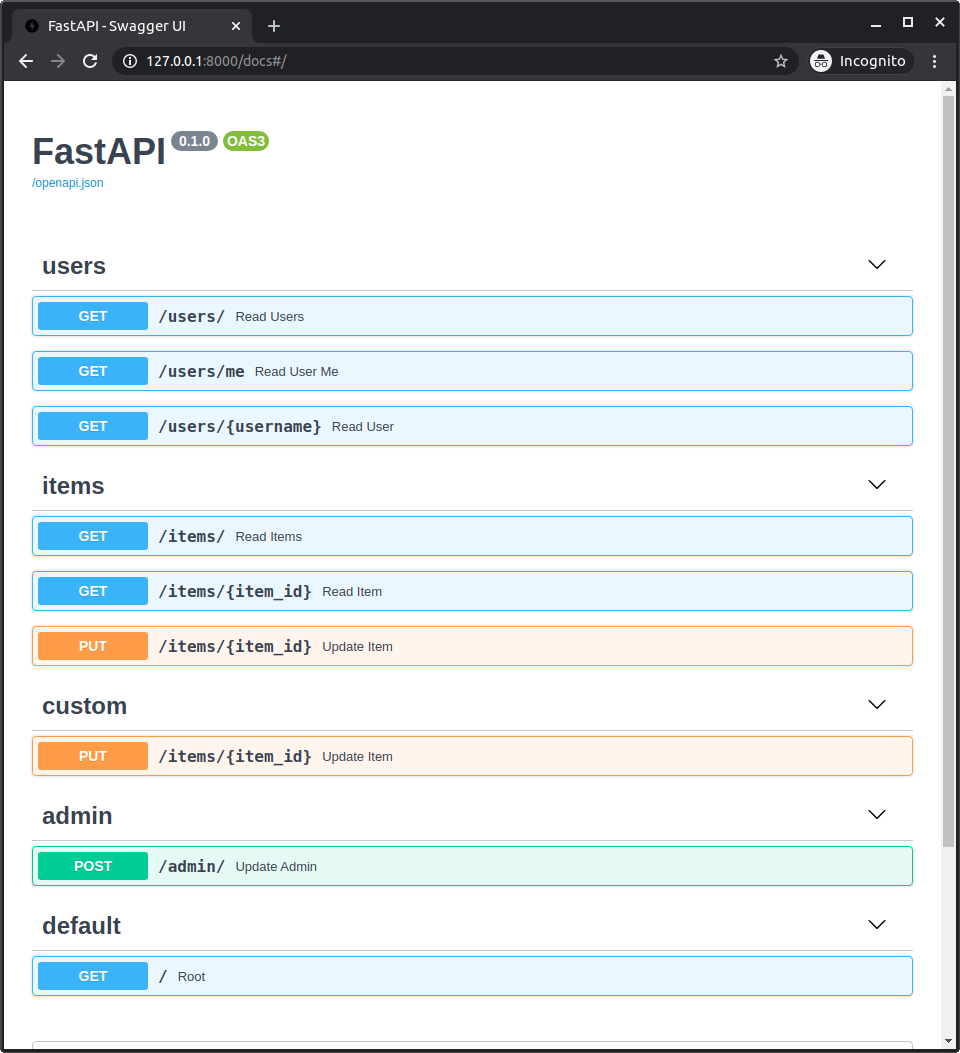
automatic API docs जाँचें
अब, अपनी app चलाएँ:
$ uv run fastapi dev

<span style="color: green;">INFO</span>:     Uvicorn running on http://127.0.0.1:8000 (Press CTRL+C to quit)
और docs को http://127.0.0.1:8000/docs पर खोलें।
आप automatic API docs देखेंगे, जिसमें सभी submodules से paths शामिल होंगे, सही paths (और prefixes) और सही tags का उपयोग करते हुए:
अलग-अलग prefix के साथ उसी router को multiple times include करें
आप अलग-अलग prefixes का उपयोग करके same router के साथ .include_router() को multiple times भी use कर सकते हैं।
यह उपयोगी हो सकता है, उदाहरण के लिए, उसी API को अलग-अलग prefixes के तहत expose करने के लिए, जैसे /api/v1 और /api/latest।
यह एक advanced usage है जिसकी आपको शायद सच में ज़रूरत न हो, लेकिन अगर हो तो यह मौजूद है।
एक APIRouter को दूसरे में include करें
जिस तरह आप FastAPI application में APIRouter include कर सकते हैं, उसी तरह आप एक APIRouter को दूसरे APIRouter में include कर सकते हैं:
router.include_router(other_router)
आप यह FastAPI app में router include करने से पहले या बाद में कर सकते हैं। FastAPI फिर भी other_router से path operations को routing और OpenAPI में include करेगा।
बाद में routers में जोड़े गए path operations पर भी यही लागू होता है। वे पहले वाली inclusion के माध्यम से भी visible होंगे।
तकनीकी विवरण
router include करने के बाद router.routes को directly mutate करने से बचें। FastAPI router inclusion को live मानता है, इसलिए original router और उसके routes routing और OpenAPI generation का हिस्सा बने रहते हैं।
routes और routers जोड़ने के लिए documented APIs जैसे path operation decorators और .include_router() का उपयोग करें।
router.routes को एक lower-level route tree की तरह treat करें जिसमें route definitions और included routers हो सकते हैं, और इस पर final path operations की flat list की तरह rely करने से बचें।