宣告請求範例資料
你可以宣告你的應用程式可接收資料的 examples。
以下有數種方式可達成。
Pydantic 模型中的額外 JSON Schema 資料
你可以為 Pydantic 模型宣告 examples,它們會加入到產生出的 JSON Schema 中。
from fastapi import FastAPI
from pydantic import BaseModel

app = FastAPI()


class Item(BaseModel):
    name: str
    description: str | None = None
    price: float
    tax: float | None = None

    model_config = {
        "json_schema_extra": {
            "examples": [
                {
                    "name": "Foo",
                    "description": "A very nice Item",
                    "price": 35.4,
                    "tax": 3.2,
                }
            ]
        }
    }


@app.put("/items/{item_id}")
async def update_item(item_id: int, item: Item):
    results = {"item_id": item_id, "item": item}
    return results
這些額外資訊會原封不動加入該模型輸出的 JSON Schema,並且會用在 API 文件裡。
你可以使用屬性 model_config(接收一個 dict),詳見 Pydantic 文件:Configuration。
你可以將 "json_schema_extra" 設為一個 dict,其中包含你想在產生的 JSON Schema 中出現的任何額外資料,包括 examples。
Tip
你可以用相同技巧擴充 JSON Schema,加入你自己的自訂額外資訊。
例如,你可以用它為前端使用者介面新增中繼資料等。
Note
OpenAPI 3.1.0(自 FastAPI 0.99.0 起使用)新增了對 examples 的支援,這是 JSON Schema 標準的一部分。
在那之前,只支援使用單一範例的關鍵字 example。OpenAPI 3.1.0 仍然支援 example,但它已被棄用,且不是 JSON Schema 標準的一部分。因此建議你將 example 遷移為 examples。🤓
你可以在本頁結尾閱讀更多。
Field 其他參數
在 Pydantic 模型中使用 Field() 時,你也可以宣告額外的 examples:
from fastapi import FastAPI
from pydantic import BaseModel, Field

app = FastAPI()


class Item(BaseModel):
    name: str = Field(examples=["Foo"])
    description: str | None = Field(default=None, examples=["A very nice Item"])
    price: float = Field(examples=[35.4])
    tax: float | None = Field(default=None, examples=[3.2])


@app.put("/items/{item_id}")
async def update_item(item_id: int, item: Item):
    results = {"item_id": item_id, "item": item}
    return results
JSON Schema 的 examples - OpenAPI
當使用下列任一項:
Path()Query()Header()Cookie()Body()Form()File()
你也可以宣告一組 examples,包含會加入到 OpenAPI 中它們各自 JSON Schemas 的額外資訊。
Body 搭配 examples
這裡我們傳入 examples,其中包含 Body() 預期資料的一個範例:
from typing import Annotated

from fastapi import Body, FastAPI
from pydantic import BaseModel

app = FastAPI()


class Item(BaseModel):
    name: str
    description: str | None = None
    price: float
    tax: float | None = None


@app.put("/items/{item_id}")
async def update_item(
    item_id: int,
    item: Annotated[
        Item,
        Body(
            examples=[
                {
                    "name": "Foo",
                    "description": "A very nice Item",
                    "price": 35.4,
                    "tax": 3.2,
                }
            ],
        ),
    ],
):
    results = {"item_id": item_id, "item": item}
    return results
🤓 Other versions and variants
Tip
Prefer to use the Annotated version if possible.
from fastapi import Body, FastAPI
from pydantic import BaseModel

app = FastAPI()


class Item(BaseModel):
    name: str
    description: str | None = None
    price: float
    tax: float | None = None


@app.put("/items/{item_id}")
async def update_item(
    item_id: int,
    item: Item = Body(
        examples=[
            {
                "name": "Foo",
                "description": "A very nice Item",
                "price": 35.4,
                "tax": 3.2,
            }
        ],
    ),
):
    results = {"item_id": item_id, "item": item}
    return results
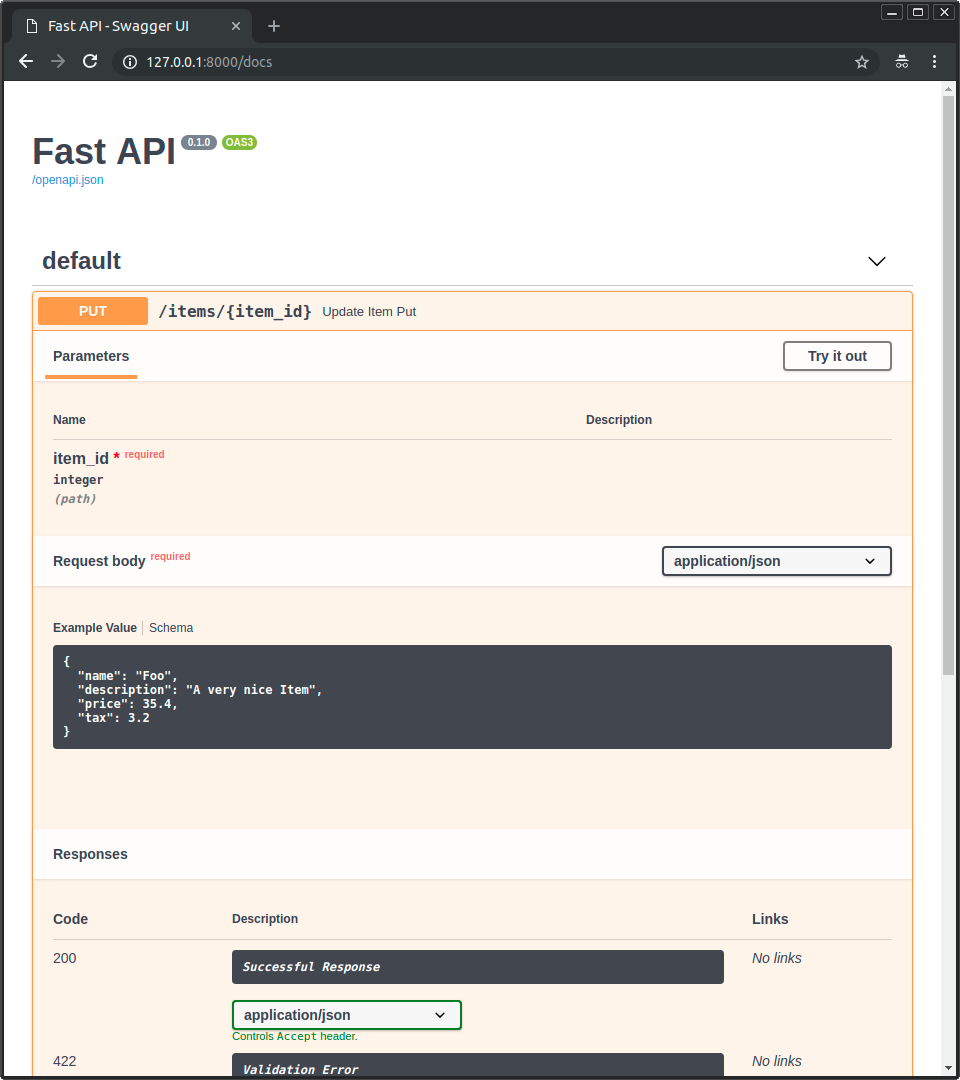
文件 UI 中的範例
使用以上任一方法,在 /docs 中看起來會像這樣:
Body 搭配多個 examples
當然,你也可以傳入多個 examples:
from typing import Annotated

from fastapi import Body, FastAPI
from pydantic import BaseModel

app = FastAPI()


class Item(BaseModel):
    name: str
    description: str | None = None
    price: float
    tax: float | None = None


@app.put("/items/{item_id}")
async def update_item(
    *,
    item_id: int,
    item: Annotated[
        Item,
        Body(
            examples=[
                {
                    "name": "Foo",
                    "description": "A very nice Item",
                    "price": 35.4,
                    "tax": 3.2,
                },
                {
                    "name": "Bar",
                    "price": "35.4",
                },
                {
                    "name": "Baz",
                    "price": "thirty five point four",
                },
            ],
        ),
    ],
):
    results = {"item_id": item_id, "item": item}
    return results
🤓 Other versions and variants
Tip
Prefer to use the Annotated version if possible.
from fastapi import Body, FastAPI
from pydantic import BaseModel

app = FastAPI()


class Item(BaseModel):
    name: str
    description: str | None = None
    price: float
    tax: float | None = None


@app.put("/items/{item_id}")
async def update_item(
    *,
    item_id: int,
    item: Item = Body(
        examples=[
            {
                "name": "Foo",
                "description": "A very nice Item",
                "price": 35.4,
                "tax": 3.2,
            },
            {
                "name": "Bar",
                "price": "35.4",
            },
            {
                "name": "Baz",
                "price": "thirty five point four",
            },
        ],
    ),
):
    results = {"item_id": item_id, "item": item}
    return results
這麼做時,這些範例會成為該 body 資料內部 JSON Schema 的一部分。
然而,撰寫本文時,負責呈現文件 UI 的工具 Swagger UI 並不支援在 JSON Schema 中顯示多個範例。不過請繼續往下閱讀以取得變通方式。
OpenAPI 特定的 examples
在 JSON Schema 支援 examples 之前,OpenAPI 就已支援另一個同名的欄位 examples。
這個「OpenAPI 特定」的 examples 位於 OpenAPI 規範的另一個區塊:在每個「路徑操作」的詳細資訊中,而不是在各個 JSON Schema 內。
而 Swagger UI 早已支援這個欄位,因此你可以用它在文件 UI 中顯示不同的範例。
這個 OpenAPI 特定欄位 examples 的結構是一個包含「多個範例」的 dict(而非 list),每個範例都可包含會一併加入到 OpenAPI 的額外資訊。
它不會出現在 OpenAPI 所含的各個 JSON Schema 內,而是直接放在對應的「路徑操作」上。
使用 openapi_examples 參數
你可以在 FastAPI 中透過參數 openapi_examples 為下列項目宣告 OpenAPI 特定的 examples:
Path()Query()Header()Cookie()Body()Form()File()
該 dict 的鍵用來識別各個範例,而每個值則是另一個 dict。
在 examples 中,每個範例的 dict 可以包含:
summary:範例的簡短描述。description:較長的描述,可包含 Markdown 文字。value:實際顯示的範例,例如一個dict。externalValue:value的替代方案,為指向範例的 URL。儘管這可能不如value被工具廣泛支援。
你可以這樣使用:
from typing import Annotated

from fastapi import Body, FastAPI
from pydantic import BaseModel

app = FastAPI()


class Item(BaseModel):
    name: str
    description: str | None = None
    price: float
    tax: float | None = None


@app.put("/items/{item_id}")
async def update_item(
    *,
    item_id: int,
    item: Annotated[
        Item,
        Body(
            openapi_examples={
                "normal": {
                    "summary": "A normal example",
                    "description": "A **normal** item works correctly.",
                    "value": {
                        "name": "Foo",
                        "description": "A very nice Item",
                        "price": 35.4,
                        "tax": 3.2,
                    },
                },
                "converted": {
                    "summary": "An example with converted data",
                    "description": "FastAPI can convert price `strings` to actual `numbers` automatically",
                    "value": {
                        "name": "Bar",
                        "price": "35.4",
                    },
                },
                "invalid": {
                    "summary": "Invalid data is rejected with an error",
                    "value": {
                        "name": "Baz",
                        "price": "thirty five point four",
                    },
                },
            },
        ),
    ],
):
    results = {"item_id": item_id, "item": item}
    return results
🤓 Other versions and variants
Tip
Prefer to use the Annotated version if possible.
from fastapi import Body, FastAPI
from pydantic import BaseModel

app = FastAPI()


class Item(BaseModel):
    name: str
    description: str | None = None
    price: float
    tax: float | None = None


@app.put("/items/{item_id}")
async def update_item(
    *,
    item_id: int,
    item: Item = Body(
        openapi_examples={
            "normal": {
                "summary": "A normal example",
                "description": "A **normal** item works correctly.",
                "value": {
                    "name": "Foo",
                    "description": "A very nice Item",
                    "price": 35.4,
                    "tax": 3.2,
                },
            },
            "converted": {
                "summary": "An example with converted data",
                "description": "FastAPI can convert price `strings` to actual `numbers` automatically",
                "value": {
                    "name": "Bar",
                    "price": "35.4",
                },
            },
            "invalid": {
                "summary": "Invalid data is rejected with an error",
                "value": {
                    "name": "Baz",
                    "price": "thirty five point four",
                },
            },
        },
    ),
):
    results = {"item_id": item_id, "item": item}
    return results
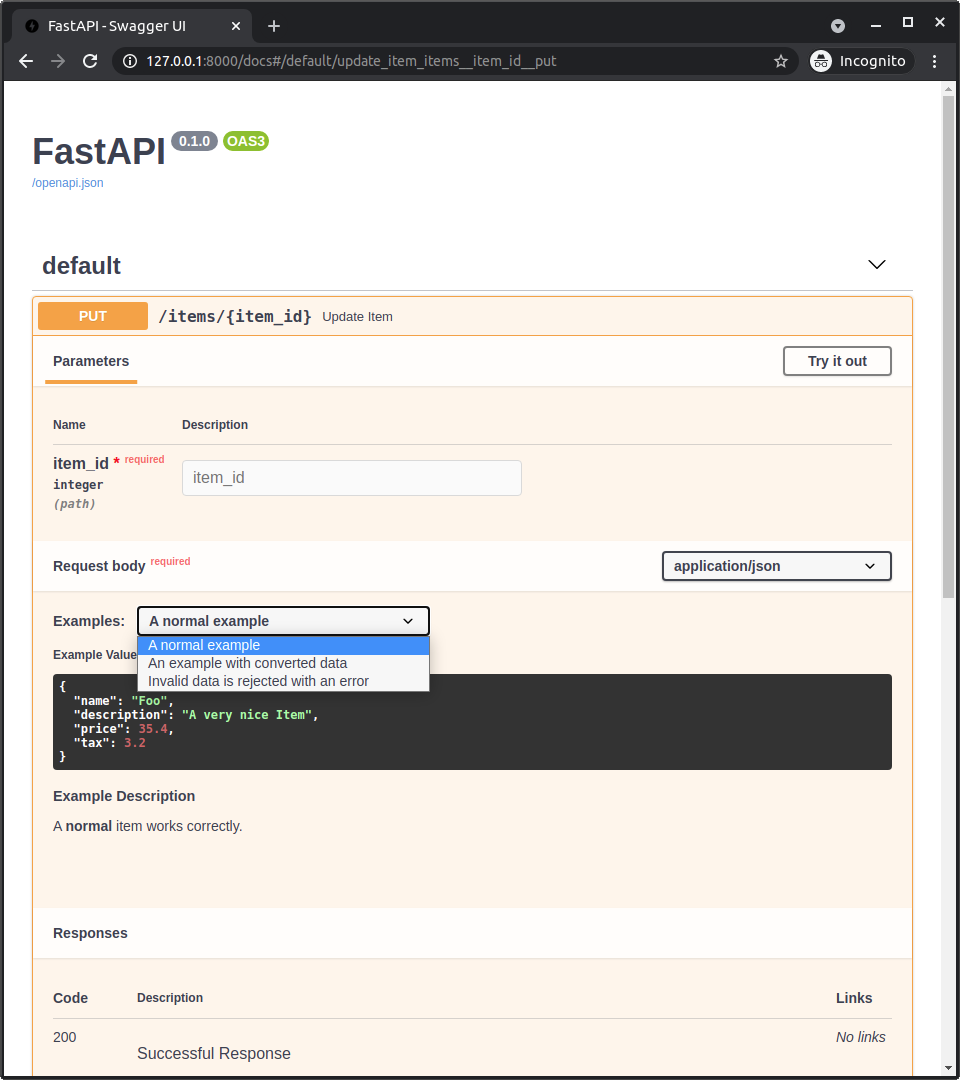
文件 UI 中的 OpenAPI 範例
當在 Body() 加上 openapi_examples,/docs 會顯示為:
技術細節
Tip
如果你已經在使用 FastAPI 0.99.0 或以上的版本,大概可以略過這些細節。
這些內容比較與舊版(在 OpenAPI 3.1.0 可用之前)相關。
你可以把這段當作一小堂 OpenAPI 與 JSON Schema 的歷史課。🤓
Warning
以下是關於 JSON Schema 與 OpenAPI 標準的技術細節。
如果上面的做法對你已經足夠可用,就不需要這些細節,可以直接跳過。
在 OpenAPI 3.1.0 之前,OpenAPI 使用的是較舊且經過修改的 JSON Schema 版本。
當時 JSON Schema 沒有 examples,因此 OpenAPI 在它自訂修改的版本中新增了自己的 example 欄位。
OpenAPI 也在規範的其他部分新增了 example 與 examples 欄位:
Parameter Object(規範),對應到 FastAPI 的:Path()Query()Header()Cookie()
Request Body Object中的content欄位裡的Media Type Object(規範),對應到 FastAPI 的:Body()File()Form()
Note
這個舊的、OpenAPI 特定的 examples 參數,從 FastAPI 0.103.0 起改名為 openapi_examples。
JSON Schema 的 examples 欄位
後來 JSON Schema 在新版本規範中新增了 examples 欄位。
接著新的 OpenAPI 3.1.0 以最新版本(JSON Schema 2020-12)為基礎,該版本就包含這個新的 examples 欄位。
現在這個新的 examples 欄位優先於舊的單一(且客製)example 欄位,後者已被棄用。
JSON Schema 中新的 examples 欄位「就是一個 list」的範例集合,而不是像 OpenAPI 其他地方(如上所述)那樣附帶額外中繼資料的 dict。
Note
即使 OpenAPI 3.1.0 已發佈並與 JSON Schema 有更簡潔的整合,一段時間內提供自動文件的 Swagger UI 並不支援 OpenAPI 3.1.0(自 5.0.0 版起支援 🎉)。
因此,FastAPI 0.99.0 之前的版本仍使用 3.1.0 以下的 OpenAPI 版本。
Pydantic 與 FastAPI 的 examples
當你在 Pydantic 模型中加入 examples,不論是用 schema_extra 或 Field(examples=["something"]),該範例都會被加入該 Pydantic 模型的 JSON Schema。
而該 Pydantic 模型的 JSON Schema 會被包含到你的 API 的 OpenAPI 中,接著用於文件 UI。
在 FastAPI 0.99.0 之前的版本(0.99.0 起使用較新的 OpenAPI 3.1.0)中,當你對其他工具(Query()、Body() 等)使用 example 或 examples 時,這些範例不會被加入描述該資料的 JSON Schema(甚至不會加入到 OpenAPI 自己版本的 JSON Schema 中),而是直接加入到 OpenAPI 中的「路徑操作」宣告(在 OpenAPI 使用 JSON Schema 的那些部分之外)。
但現在 FastAPI 0.99.0 以上使用的 OpenAPI 3.1.0 搭配 JSON Schema 2020-12,以及 Swagger UI 5.0.0 以上版本,整體更加一致,範例會包含在 JSON Schema 中。
Swagger UI 與 OpenAPI 特定的 examples
由於在(2023-08-26 時)Swagger UI 不支援多個 JSON Schema 範例,使用者無法在文件中顯示多個範例。
為了解決此問題,FastAPI 0.103.0 透過新參數 openapi_examples 新增支援 宣告舊的「OpenAPI 特定」examples 欄位。🤓
總結
我以前常說我不太喜歡歷史...結果現在在這裡講「科技史」。😅
簡而言之,升級到 FastAPI 0.99.0 或以上,事情會更簡單、一致又直覺,而且你不需要了解這些歷史細節。😎