回應模型 - 回傳型別
你可以在「路徑操作函式」的回傳型別上加上註解,宣告用於回應的型別。
你可以像在函式「參數」的輸入資料那樣使用型別註解,你可以使用 Pydantic 模型、list、dictionary、整數、布林等純量值。
from fastapi import FastAPI
from pydantic import BaseModel

app = FastAPI()


class Item(BaseModel):
    name: str
    description: str | None = None
    price: float
    tax: float | None = None
    tags: list[str] = []


@app.post("/items/")
async def create_item(item: Item) -> Item:
    return item


@app.get("/items/")
async def read_items() -> list[Item]:
    return [
        Item(name="Portal Gun", price=42.0),
        Item(name="Plumbus", price=32.0),
    ]
FastAPI 會使用這個回傳型別來:
- 驗證回傳的資料。
- 如果資料無效(例如缺少欄位),代表你的應用程式程式碼有問題,沒有回傳應該回傳的內容,FastAPI 會回傳伺服器錯誤,而不是回傳不正確的資料。如此你和你的用戶端都能確定會收到預期的資料與資料結構。
- 在 OpenAPI 的「路徑操作」中為回應新增 JSON Schema。
- 這會被自動文件使用。
- 也會被自動用戶端程式碼產生工具使用。
- 使用 Pydantic 將回傳資料序列化為 JSON,而 Pydantic 是用 Rust 撰寫的,因此會 更快很多。
但更重要的是:
- 它會將輸出資料限制並過濾為回傳型別中定義的內容。
- 這對安全性特別重要,下面會再看到更多細節。
response_model 參數
有些情況下,你需要或想要回傳的資料與你宣告的型別不完全相同。
例如,你可能想要回傳一個 dictionary 或資料庫物件,但把回應宣告為一個 Pydantic 模型。這樣 Pydantic 模型就會替你回傳的物件(例如 dictionary 或資料庫物件)處理所有的資料文件、驗證等。
如果你加了回傳型別註解,工具與編輯器會(正確地)抱怨你的函式回傳的型別(例如 dict)與你宣告的(例如 Pydantic 模型)不同。
在這些情況下,你可以使用「路徑操作裝飾器」參數 response_model,而不是函式的回傳型別。
你可以在任何「路徑操作」上使用 response_model 參數:
@app.get()@app.post()@app.put()@app.delete()- 等等。
from typing import Any

from fastapi import FastAPI
from pydantic import BaseModel

app = FastAPI()


class Item(BaseModel):
    name: str
    description: str | None = None
    price: float
    tax: float | None = None
    tags: list[str] = []


@app.post("/items/", response_model=Item)
async def create_item(item: Item) -> Any:
    return item


@app.get("/items/", response_model=list[Item])
async def read_items() -> Any:
    return [
        {"name": "Portal Gun", "price": 42.0},
        {"name": "Plumbus", "price": 32.0},
    ]
注意
注意 response_model 是「裝飾器」方法(get、post 等)的參數。不是你的「路徑操作函式」的參數(像其他參數與請求主體那樣)。
response_model 接受的型別與你在 Pydantic 模型欄位中宣告的相同,所以它可以是一個 Pydantic 模型,也可以是例如由 Pydantic 模型組成的 list,像是 List[Item]。
FastAPI 會使用這個 response_model 來做所有的資料文件、驗證等,並且也會將輸出資料轉換與過濾為其型別宣告。
提示
如果你在編輯器、mypy 等中有嚴格型別檢查,你可以把函式回傳型別宣告為 Any。
這樣你是在告訴編輯器你是刻意回傳任意型別。但 FastAPI 仍會用 response_model 做資料文件、驗證、過濾等。
response_model 優先權
如果同時宣告了回傳型別與 response_model,response_model 會有優先權並由 FastAPI 使用。
如此一來,即便你回傳的實際型別與回應模型不同,你仍可在函式上加上正確的型別註解,供編輯器與如 mypy 的工具使用。同時仍由 FastAPI 使用 response_model 做資料驗證、文件化等。
你也可以使用 response_model=None 來停用該「路徑操作」的回應模型產生;當你為不是有效 Pydantic 欄位的東西加上型別註解時,可能需要這麼做,你會在下方某節看到範例。
回傳與輸入相同的資料
這裡我們宣告一個 UserIn 模型,其中會包含明文密碼:
from fastapi import FastAPI
from pydantic import BaseModel, EmailStr

app = FastAPI()


class UserIn(BaseModel):
    username: str
    password: str
    email: EmailStr
    full_name: str | None = None


# Don't do this in production!
@app.post("/user/")
async def create_user(user: UserIn) -> UserIn:
    return user
注意
要使用 EmailStr,請先安裝 email-validator。
將它加入你的專案:
$ uv add email-validator
或使用:
$ uv add "pydantic[email]"
而我們使用這個模型同時宣告輸入與輸出:
from fastapi import FastAPI
from pydantic import BaseModel, EmailStr

app = FastAPI()


class UserIn(BaseModel):
    username: str
    password: str
    email: EmailStr
    full_name: str | None = None


# Don't do this in production!
@app.post("/user/")
async def create_user(user: UserIn) -> UserIn:
    return user
現在,當瀏覽器建立一個帶有密碼的使用者時,API 會在回應中回傳相同的密碼。
在這個例子中可能不是問題,因為是同一個使用者送出該密碼。
但如果我們對其他「路徑操作」使用相同的模型,我們可能會把使用者密碼送給所有用戶端。
警告
除非你非常清楚所有影響並確定自己在做什麼,否則永遠不要儲存使用者的明文密碼,也不要像這樣在回應中傳送。
新增一個輸出模型
我們可以改為建立一個包含明文密碼的輸入模型,以及一個不含密碼的輸出模型:
from typing import Any

from fastapi import FastAPI
from pydantic import BaseModel, EmailStr

app = FastAPI()


class UserIn(BaseModel):
    username: str
    password: str
    email: EmailStr
    full_name: str | None = None


class UserOut(BaseModel):
    username: str
    email: EmailStr
    full_name: str | None = None


@app.post("/user/", response_model=UserOut)
async def create_user(user: UserIn) -> Any:
    return user
在這裡,雖然「路徑操作函式」回傳的是同一個包含密碼的輸入使用者:
from typing import Any

from fastapi import FastAPI
from pydantic import BaseModel, EmailStr

app = FastAPI()


class UserIn(BaseModel):
    username: str
    password: str
    email: EmailStr
    full_name: str | None = None


class UserOut(BaseModel):
    username: str
    email: EmailStr
    full_name: str | None = None


@app.post("/user/", response_model=UserOut)
async def create_user(user: UserIn) -> Any:
    return user
...我們把 response_model 宣告為不包含密碼的 UserOut 模型:
from typing import Any

from fastapi import FastAPI
from pydantic import BaseModel, EmailStr

app = FastAPI()


class UserIn(BaseModel):
    username: str
    password: str
    email: EmailStr
    full_name: str | None = None


class UserOut(BaseModel):
    username: str
    email: EmailStr
    full_name: str | None = None


@app.post("/user/", response_model=UserOut)
async def create_user(user: UserIn) -> Any:
    return user
因此,FastAPI 會負責(透過 Pydantic)過濾掉輸出模型中未宣告的所有資料。
response_model 或回傳型別
在這種情況下,因為兩個模型不同,如果我們把函式回傳型別註解為 UserOut,編輯器和工具會抱怨我們回傳了無效的型別,因為它們是不同的類別。
這就是為什麼在這個例子中我們必須在 response_model 參數中宣告它。
...但繼續往下讀看看如何克服這個問題。
回傳型別與資料過濾
讓我們延續前一個範例。我們想要用一種型別來註解函式,但實際上希望能夠從函式回傳包含更多資料的內容。
我們希望 FastAPI 仍然用回應模型來過濾資料。這樣即使函式回傳更多資料,回應中也只會包含回應模型中宣告的欄位。
在前一個例子中,因為類別不同,我們必須使用 response_model 參數。但這也代表我們失去了編輯器與工具對函式回傳型別的檢查支援。
不過在大多數需要這樣做的情況下,我們只是想要像這個例子一樣,讓模型過濾/移除部分資料。
在這些情況下,我們可以利用類別與繼承,搭配函式的型別註解,取得更好的編輯器與工具支援,同時仍能讓 FastAPI 做資料過濾。
from fastapi import FastAPI
from pydantic import BaseModel, EmailStr

app = FastAPI()


class BaseUser(BaseModel):
    username: str
    email: EmailStr
    full_name: str | None = None


class UserIn(BaseUser):
    password: str


@app.post("/user/")
async def create_user(user: UserIn) -> BaseUser:
    return user
這樣我們能得到工具支援,對於編輯器與 mypy 來說,這段程式碼在型別上是正確的,同時我們也能得到 FastAPI 的資料過濾。
這是怎麼運作的?來看一下。🤓
型別註解與工具支援
先看看編輯器、mypy 與其他工具會怎麼看這件事。
BaseUser 有基礎欄位。然後 UserIn 繼承自 BaseUser 並新增 password 欄位,因此它會包含兩個模型的所有欄位。
我們把函式回傳型別註解為 BaseUser,但實際上回傳的是 UserIn 實例。
編輯器、mypy 與其他工具不會抱怨,因為就型別學而言,UserIn 是 BaseUser 的子類別,這代表當預期任何 BaseUser 時,UserIn 是一個有效的型別。
FastAPI 的資料過濾
對 FastAPI 而言,它會查看回傳型別,並確保你回傳的內容只包含該型別中宣告的欄位。
FastAPI 在內部會搭配 Pydantic 做一些事情,來確保不會把類別繼承的那些規則直接用在回傳資料的過濾上,否則你可能會回傳比預期更多的資料。
如此,你就能同時擁有兩種好處:具備工具支援的型別註解,以及資料過濾。
在文件中查看
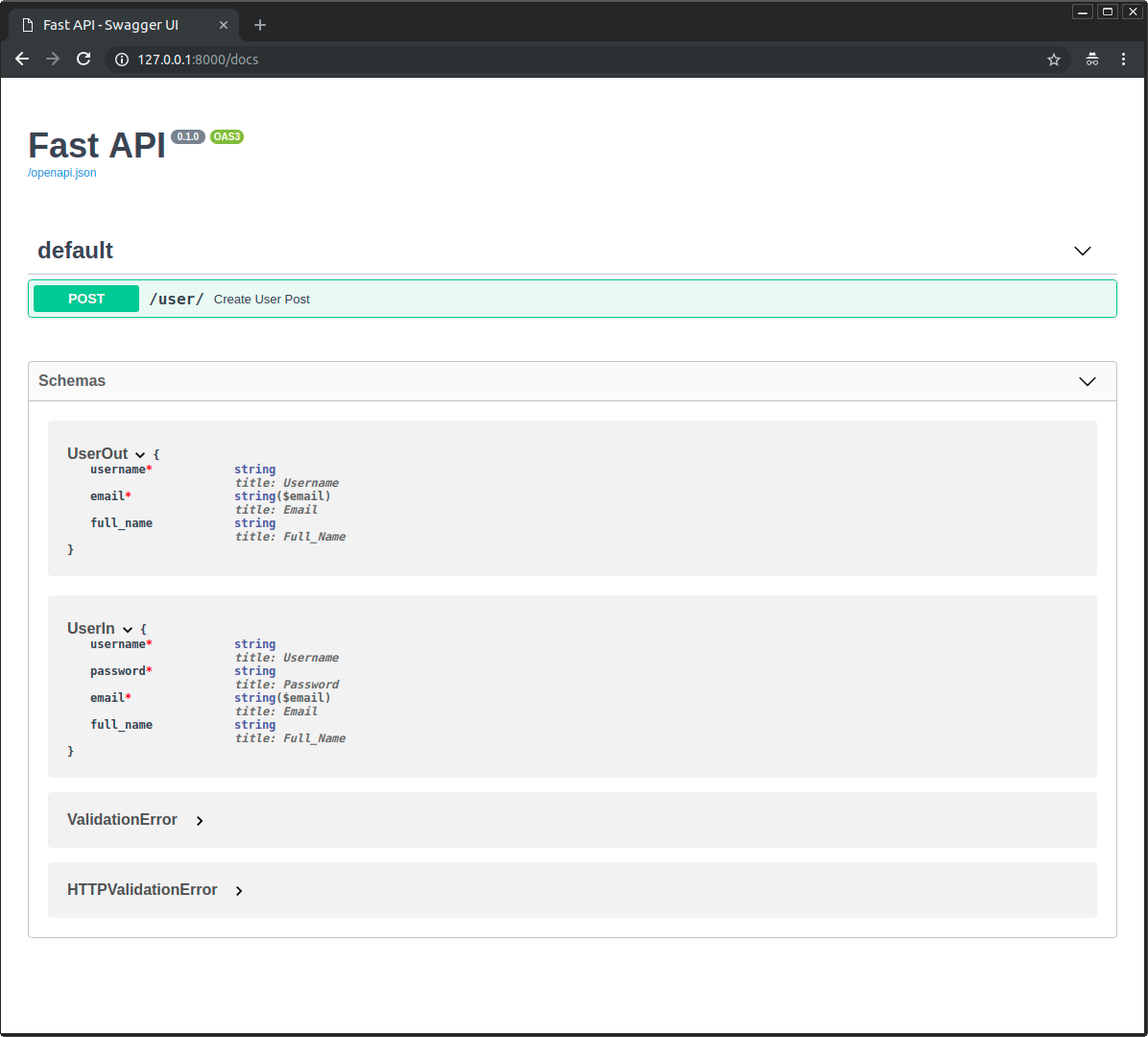
在自動文件中,你可以看到輸入模型與輸出模型各自都有自己的 JSON Schema:
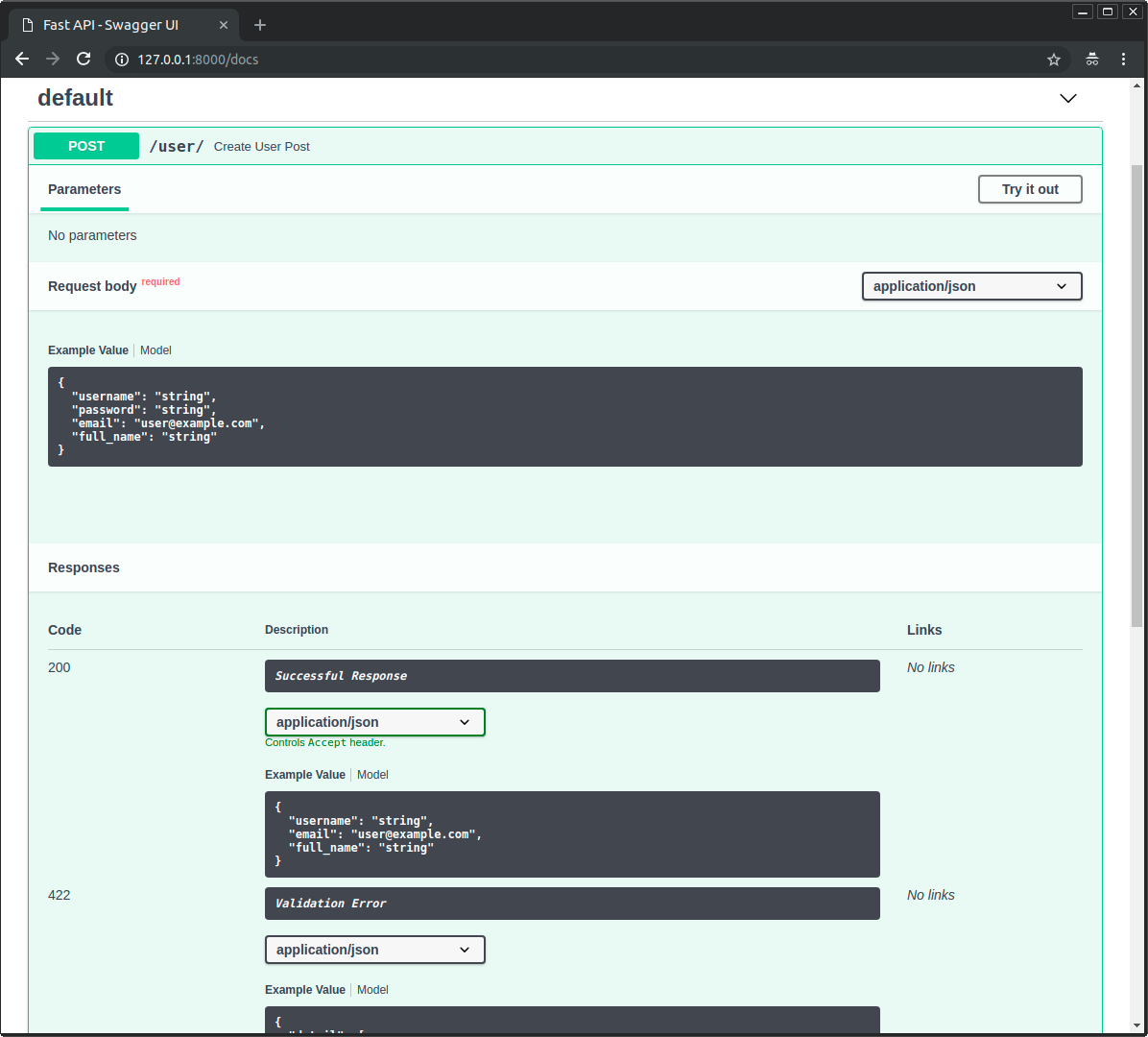
而且兩個模型都會用在互動式 API 文件中:
其他回傳型別註解
有時你回傳的東西不是有效的 Pydantic 欄位,你仍會在函式上加上註解,只為了獲得工具(編輯器、mypy 等)提供的支援。
直接回傳 Response
最常見的情況是直接回傳 Response(在進階文件中稍後會解釋)。
from fastapi import FastAPI, Response
from fastapi.responses import JSONResponse, RedirectResponse

app = FastAPI()


@app.get("/portal")
async def get_portal(teleport: bool = False) -> Response:
    if teleport:
        return RedirectResponse(url="https://www.youtube.com/watch?v=dQw4w9WgXcQ")
    return JSONResponse(content={"message": "Here's your interdimensional portal."})
這個簡單情境會由 FastAPI 自動處理,因為回傳型別註解是 Response 類別(或其子類別)。
而工具也會滿意,因為 RedirectResponse 與 JSONResponse 都是 Response 的子類別,所以型別註解是正確的。
註解為某個 Response 的子類別
你也可以在型別註解中使用 Response 的子類別:
from fastapi import FastAPI
from fastapi.responses import RedirectResponse

app = FastAPI()


@app.get("/teleport")
async def get_teleport() -> RedirectResponse:
    return RedirectResponse(url="https://www.youtube.com/watch?v=dQw4w9WgXcQ")
這同樣可行,因為 RedirectResponse 是 Response 的子類別,而 FastAPI 會自動處理這種簡單情況。
無效的回傳型別註解
但當你回傳其他任意物件(例如資料庫物件),它不是有效的 Pydantic 型別,並且你在函式上也這樣註解時,FastAPI 會嘗試從該型別註解建立一個 Pydantic 回應模型,因而失敗。
如果你有像是多種型別的聯集,其中一個或多個不是有效的 Pydantic 型別,也會發生相同的事情,例如這個就會失敗 💥:
from fastapi import FastAPI, Response
from fastapi.responses import RedirectResponse

app = FastAPI()


@app.get("/portal")
async def get_portal(teleport: bool = False) -> Response | dict:
    if teleport:
        return RedirectResponse(url="https://www.youtube.com/watch?v=dQw4w9WgXcQ")
    return {"message": "Here's your interdimensional portal."}
...這會失敗,因為該型別註解不是 Pydantic 型別,且它也不只是一個單一的 Response 類別或其子類別,而是 Response 與 dict 的聯集(兩者任一)。
停用回應模型
延續上面的例子,你可能不想要 FastAPI 執行預設的資料驗證、文件化、過濾等動作。
但你可能仍想在函式上保留回傳型別註解,以獲得編輯器與型別檢查工具(例如 mypy)的支援。
這種情況下,你可以設定 response_model=None 來停用回應模型的產生:
from fastapi import FastAPI, Response
from fastapi.responses import RedirectResponse

app = FastAPI()


@app.get("/portal", response_model=None)
async def get_portal(teleport: bool = False) -> Response | dict:
    if teleport:
        return RedirectResponse(url="https://www.youtube.com/watch?v=dQw4w9WgXcQ")
    return {"message": "Here's your interdimensional portal."}
這會讓 FastAPI 略過回應模型的產生,如此你就能使用任何你需要的回傳型別註解,而不會影響你的 FastAPI 應用程式。🤓
回應模型編碼參數
你的回應模型可能有預設值,例如:
from fastapi import FastAPI
from pydantic import BaseModel

app = FastAPI()


class Item(BaseModel):
    name: str
    description: str | None = None
    price: float
    tax: float = 10.5
    tags: list[str] = []


items = {
    "foo": {"name": "Foo", "price": 50.2},
    "bar": {"name": "Bar", "description": "The bartenders", "price": 62, "tax": 20.2},
    "baz": {"name": "Baz", "description": None, "price": 50.2, "tax": 10.5, "tags": []},
}


@app.get("/items/{item_id}", response_model=Item, response_model_exclude_unset=True)
async def read_item(item_id: str):
    return items[item_id]
description: Union[str, None] = None(或在 Python 3.10 中的str | None = None)預設為None。tax: float = 10.5預設為10.5。tags: List[str] = []預設為空的 list:[]。
但如果這些值其實沒有被儲存,你可能想要在結果中省略它們。
例如,如果你在 NoSQL 資料庫中有包含許多選擇性屬性的模型,但你不想傳送充滿預設值的冗長 JSON 回應。
使用 response_model_exclude_unset 參數
你可以在「路徑操作裝飾器」上設定 response_model_exclude_unset=True:
from fastapi import FastAPI
from pydantic import BaseModel

app = FastAPI()


class Item(BaseModel):
    name: str
    description: str | None = None
    price: float
    tax: float = 10.5
    tags: list[str] = []


items = {
    "foo": {"name": "Foo", "price": 50.2},
    "bar": {"name": "Bar", "description": "The bartenders", "price": 62, "tax": 20.2},
    "baz": {"name": "Baz", "description": None, "price": 50.2, "tax": 10.5, "tags": []},
}


@app.get("/items/{item_id}", response_model=Item, response_model_exclude_unset=True)
async def read_item(item_id: str):
    return items[item_id]
如此這些預設值就不會被包含在回應中,只有實際被設定的值才會包含。
因此,如果你對該「路徑操作」發送針對 ID 為 foo 的項目的請求,回應(不包含預設值)會是:
{
    "name": "Foo",
    "price": 50.2
}
注意
你也可以使用:
response_model_exclude_defaults=Trueresponse_model_exclude_none=True
如 Pydantic 文件中對 exclude_defaults 與 exclude_none 的說明。
對於有預設值欄位也有實際值的資料
但如果你的資料在模型中對於有預設值的欄位也有實際值,例如 ID 為 bar 的項目:
{
    "name": "Bar",
    "description": "The bartenders",
    "price": 62,
    "tax": 20.2
}
它們會被包含在回應中。
與預設值相同的資料
如果資料的值與預設值相同,例如 ID 為 baz 的項目:
{
    "name": "Baz",
    "description": None,
    "price": 50.2,
    "tax": 10.5,
    "tags": []
}
FastAPI 足夠聰明(其實是 Pydantic 足夠聰明)去判斷,儘管 description、tax 與 tags 的值與預設值相同,但它們是被明確設定的(而不是取自預設值)。
因此,它們會被包含在 JSON 回應中。
提示
注意預設值可以是任何東西,不只有 None。
它們可以是一個 list([])、一個 float 的 10.5,等等。
response_model_include 與 response_model_exclude
你也可以使用「路徑操作裝飾器」參數 response_model_include 與 response_model_exclude。
它們接受一個由屬性名稱字串所組成的 set,分別用來包含(省略其他)或排除(包含其他)屬性。
如果你只有一個 Pydantic 模型並且想從輸出移除部分資料,這可以作為一個快速捷徑。
提示
但仍建議使用上面提到的作法,使用多個類別,而不是這些參數。
因為在你的應用程式 OpenAPI(與文件)中所產生的 JSON Schema 仍會是完整模型的,即便你使用 response_model_include 或 response_model_exclude 省略了一些屬性。
response_model_by_alias 也有類似的情況。
from fastapi import FastAPI
from pydantic import BaseModel

app = FastAPI()


class Item(BaseModel):
    name: str
    description: str | None = None
    price: float
    tax: float = 10.5


items = {
    "foo": {"name": "Foo", "price": 50.2},
    "bar": {"name": "Bar", "description": "The Bar fighters", "price": 62, "tax": 20.2},
    "baz": {
        "name": "Baz",
        "description": "There goes my baz",
        "price": 50.2,
        "tax": 10.5,
    },
}


@app.get(
    "/items/{item_id}/name",
    response_model=Item,
    response_model_include={"name", "description"},
)
async def read_item_name(item_id: str):
    return items[item_id]


@app.get("/items/{item_id}/public", response_model=Item, response_model_exclude={"tax"})
async def read_item_public_data(item_id: str):
    return items[item_id]
提示
語法 {"name", "description"} 會建立一個包含這兩個值的 set。
它等同於 set(["name", "description"])。
使用 list 來代替 set
如果你忘了使用 set 而用了 list 或 tuple,FastAPI 仍會把它轉換成 set,並能正確運作:
from fastapi import FastAPI
from pydantic import BaseModel

app = FastAPI()


class Item(BaseModel):
    name: str
    description: str | None = None
    price: float
    tax: float = 10.5


items = {
    "foo": {"name": "Foo", "price": 50.2},
    "bar": {"name": "Bar", "description": "The Bar fighters", "price": 62, "tax": 20.2},
    "baz": {
        "name": "Baz",
        "description": "There goes my baz",
        "price": 50.2,
        "tax": 10.5,
    },
}


@app.get(
    "/items/{item_id}/name",
    response_model=Item,
    response_model_include=["name", "description"],
)
async def read_item_name(item_id: str):
    return items[item_id]


@app.get("/items/{item_id}/public", response_model=Item, response_model_exclude=["tax"])
async def read_item_public_data(item_id: str):
    return items[item_id]
重點回顧
使用「路徑操作裝飾器」的 response_model 參數來定義回應模型,特別是為了確保私有資料被過濾掉。
使用 response_model_exclude_unset 僅回傳被明確設定的值。