路徑操作設定
你可以在你的「路徑操作裝飾器」中傳入多個參數來進行設定。
警告
請注意,這些參數是直接傳給「路徑操作裝飾器」,而不是傳給你的「路徑操作函式」。
回應狀態碼
你可以為「路徑操作」的回應設定 (HTTP) status_code。
你可以直接傳入整數代碼,例如 404。
如果不記得每個數字代碼代表什麼,你可以使用 status 中的速記常數:
from fastapi import FastAPI, status
from pydantic import BaseModel

app = FastAPI()


class Item(BaseModel):
    name: str
    description: str | None = None
    price: float
    tax: float | None = None
    tags: set[str] = set()


@app.post("/items/", status_code=status.HTTP_201_CREATED)
async def create_item(item: Item) -> Item:
    return item
該狀態碼會用於回應,並被加入至 OpenAPI 結構描述中。
技術細節
你也可以使用 from starlette import status。
FastAPI 提供與 starlette.status 相同的 fastapi.status,僅為了方便你這位開發者,但它其實直接來自 Starlette。
標籤
你可以為「路徑操作」加入標籤,傳入參數 tags,其值為由 str 組成的 list(通常只是一個 str):
from fastapi import FastAPI
from pydantic import BaseModel

app = FastAPI()


class Item(BaseModel):
    name: str
    description: str | None = None
    price: float
    tax: float | None = None
    tags: set[str] = set()


@app.post("/items/", tags=["items"])
async def create_item(item: Item) -> Item:
    return item


@app.get("/items/", tags=["items"])
async def read_items():
    return [{"name": "Foo", "price": 42}]


@app.get("/users/", tags=["users"])
async def read_users():
    return [{"username": "johndoe"}]
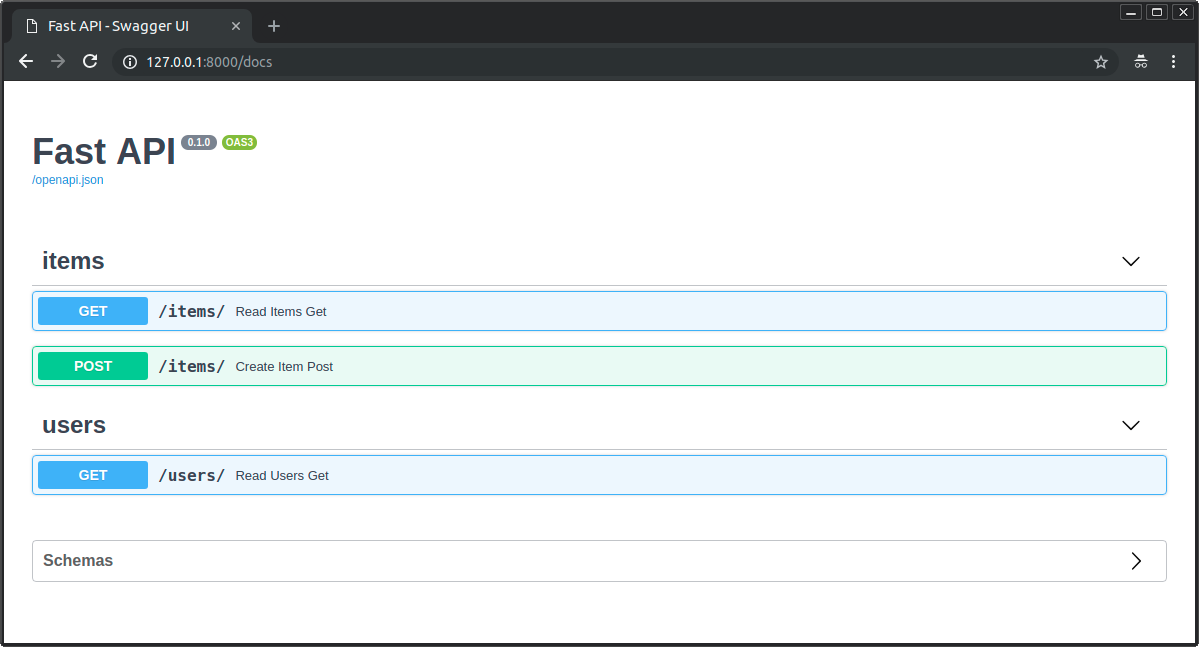
這些標籤會被加入到 OpenAPI 結構描述,並由自動化文件介面使用:
含 Enum 的標籤
如果你的應用很大,可能會累積數個標籤,你會希望對相關的「路徑操作」始終使用相同的標籤。
在這種情況下,可以考慮把標籤存放在 Enum 中。
FastAPI 對此的支援方式與使用普通字串相同:
from enum import Enum

from fastapi import FastAPI

app = FastAPI()


class Tags(Enum):
    items = "items"
    users = "users"


@app.get("/items/", tags=[Tags.items])
async def get_items():
    return ["Portal gun", "Plumbus"]


@app.get("/users/", tags=[Tags.users])
async def read_users():
    return ["Rick", "Morty"]
摘要與描述
你可以加入 summary 與 description:
from fastapi import FastAPI
from pydantic import BaseModel

app = FastAPI()


class Item(BaseModel):
    name: str
    description: str | None = None
    price: float
    tax: float | None = None
    tags: set[str] = set()


@app.post(
    "/items/",
    summary="Create an item",
    description="Create an item with all the information, name, description, price, tax and a set of unique tags",
)
async def create_item(item: Item) -> Item:
    return item
從 docstring 取得描述
由於描述常常較長、跨越多行,你可以在函式的 文件字串(docstring) 中宣告「路徑操作」的描述,FastAPI 會從那裡讀取。
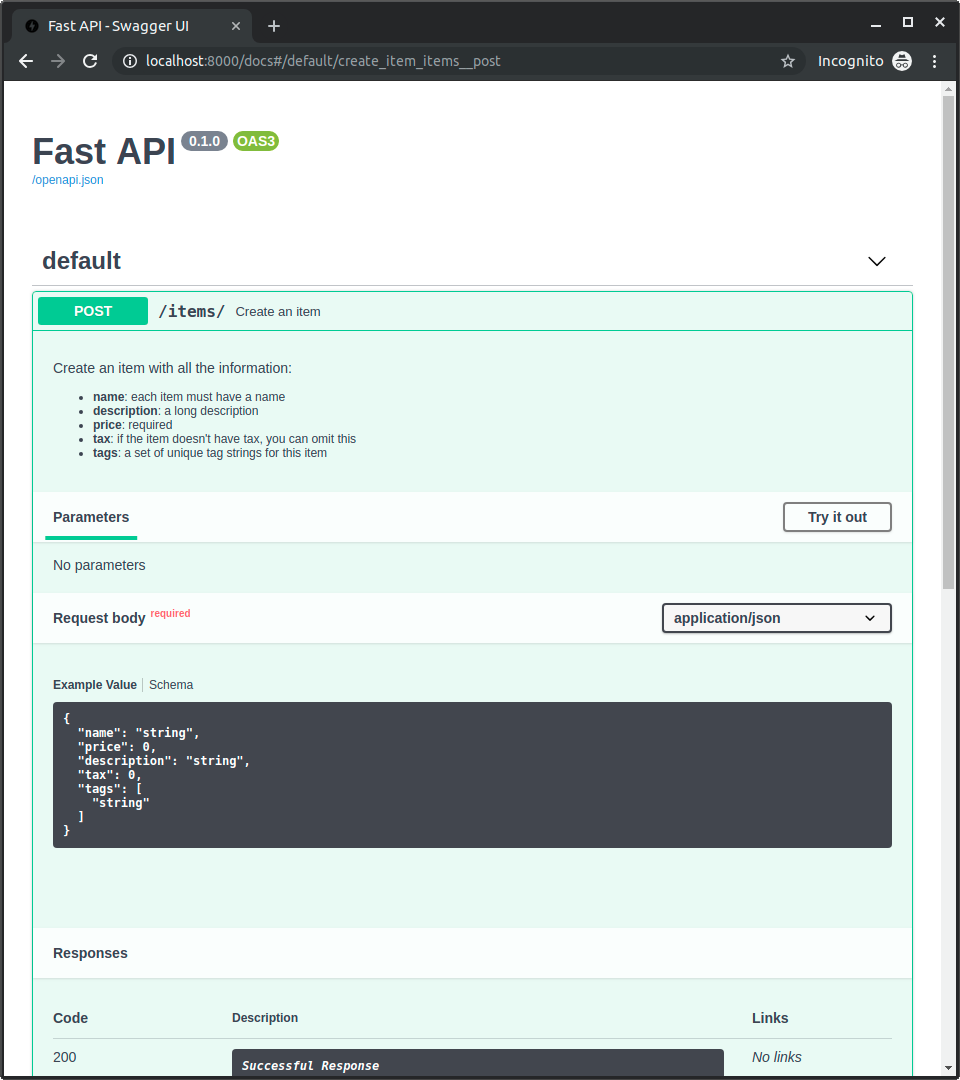
你可以在 docstring 中書寫 Markdown,它會被正確解析並顯示(會考慮 docstring 的縮排)。
from fastapi import FastAPI
from pydantic import BaseModel

app = FastAPI()


class Item(BaseModel):
    name: str
    description: str | None = None
    price: float
    tax: float | None = None
    tags: set[str] = set()


@app.post("/items/", summary="Create an item")
async def create_item(item: Item) -> Item:
    """
    Create an item with all the information:

    - **name**: each item must have a name
    - **description**: a long description
    - **price**: required
    - **tax**: if the item doesn't have tax, you can omit this
    - **tags**: a set of unique tag strings for this item
    """
    return item
這會用於互動式文件:
回應描述
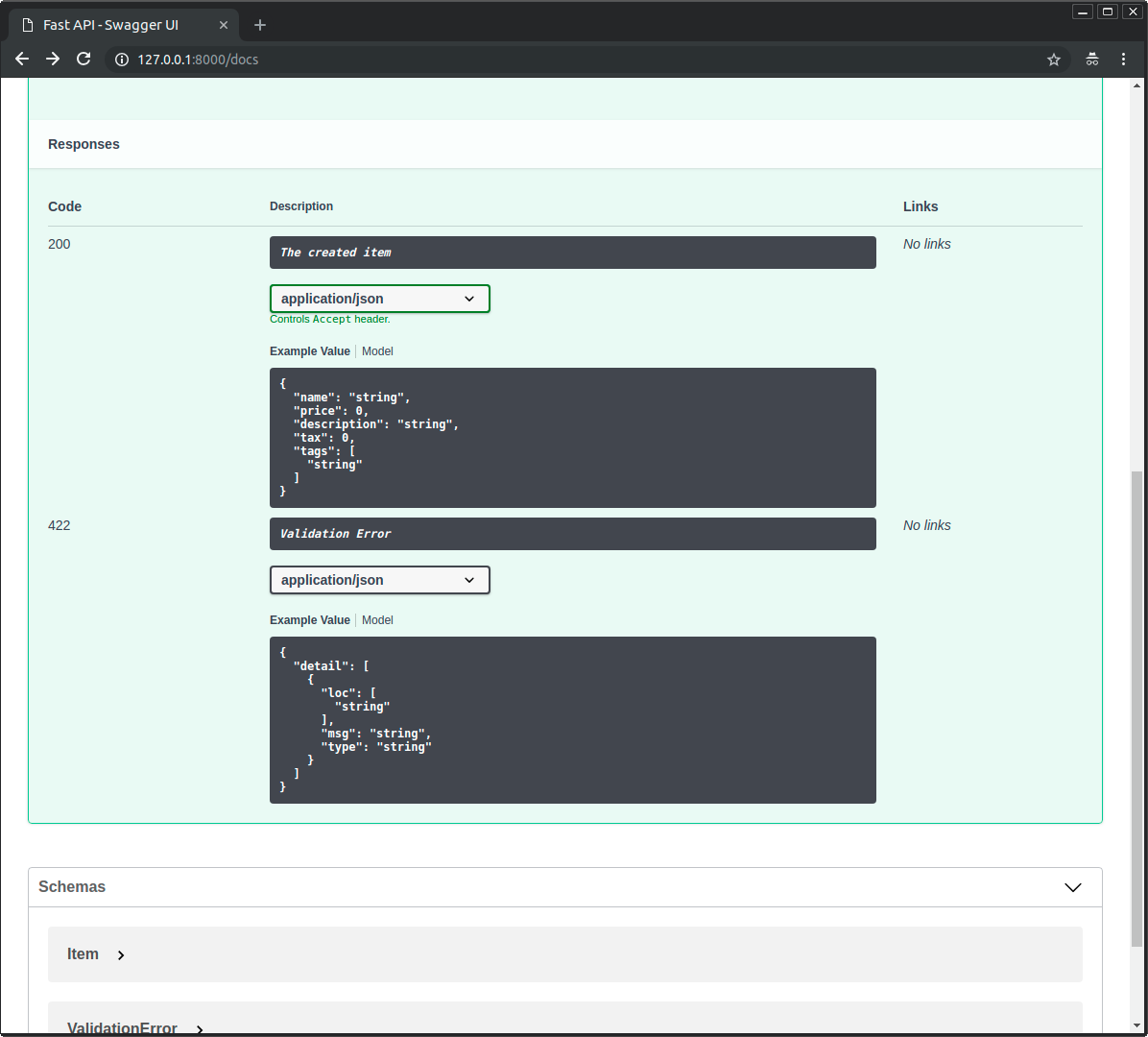
你可以用參數 response_description 指定回應的描述:
from fastapi import FastAPI
from pydantic import BaseModel

app = FastAPI()


class Item(BaseModel):
    name: str
    description: str | None = None
    price: float
    tax: float | None = None
    tags: set[str] = set()


@app.post(
    "/items/",
    summary="Create an item",
    response_description="The created item",
)
async def create_item(item: Item) -> Item:
    """
    Create an item with all the information:

    - **name**: each item must have a name
    - **description**: a long description
    - **price**: required
    - **tax**: if the item doesn't have tax, you can omit this
    - **tags**: a set of unique tag strings for this item
    """
    return item
注意
請注意,response_description 專指回應,而 description 則是針對整個「路徑操作」的一般描述。
Tip
OpenAPI 規範要求每個「路徑操作」都必須有一個回應描述。
因此,如果你未提供,FastAPI 會自動產生 "Successful response"。
將「路徑操作」標記為已棄用
若需要將「路徑操作」標記為 已棄用,但不移除它,請傳入參數 deprecated:
from fastapi import FastAPI

app = FastAPI()


@app.get("/items/", tags=["items"])
async def read_items():
    return [{"name": "Foo", "price": 42}]


@app.get("/users/", tags=["users"])
async def read_users():
    return [{"username": "johndoe"}]


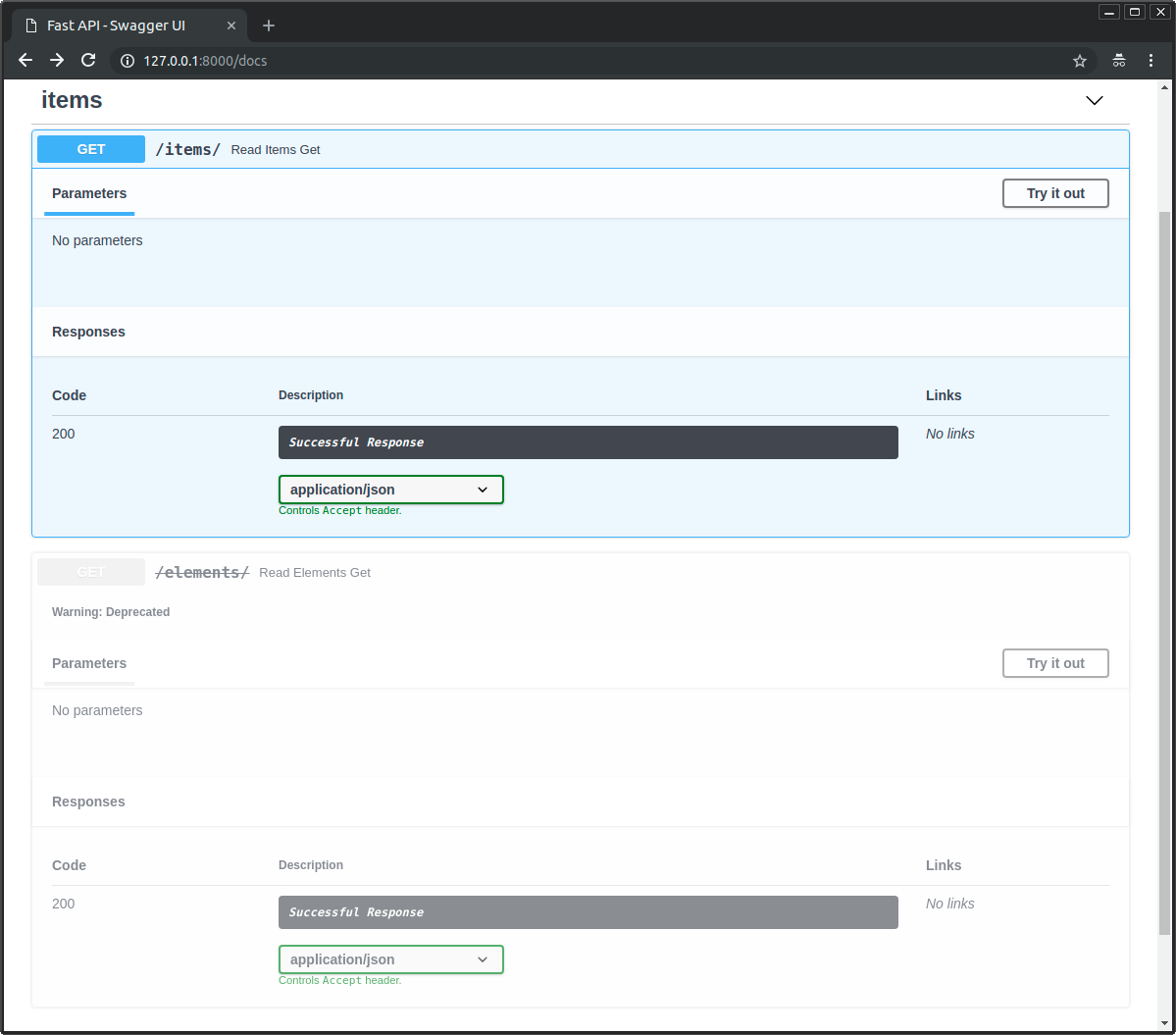
@app.get("/elements/", tags=["items"], deprecated=True)
async def read_elements():
    return [{"item_id": "Foo"}]
在互動式文件中,它會被清楚標示為已棄用:
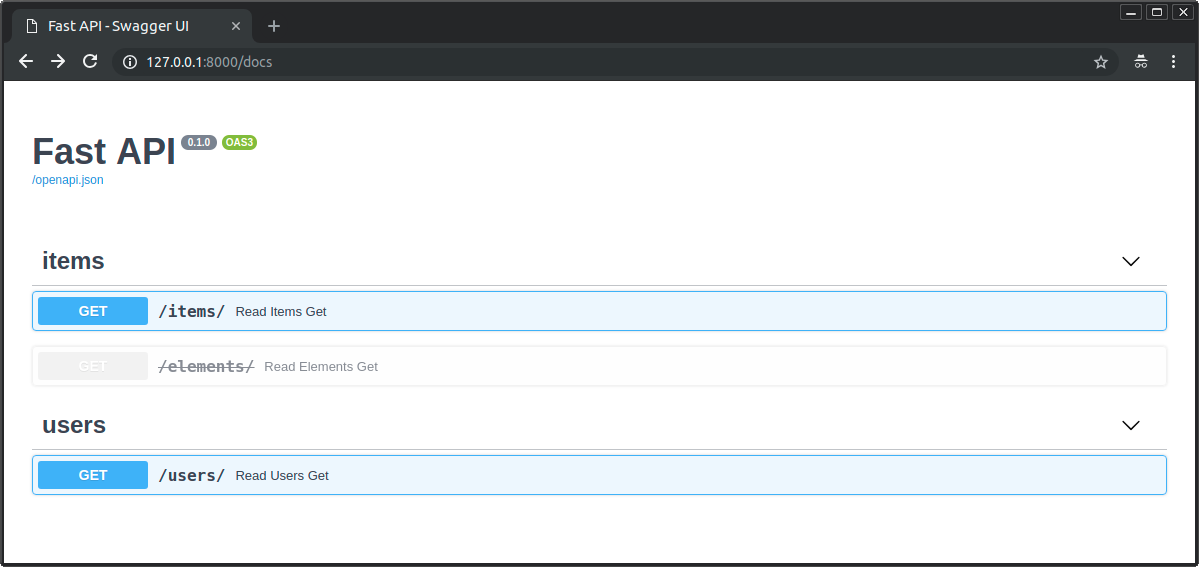
比較已棄用與未棄用的「路徑操作」在文件中的呈現:
總結
你可以透過將參數傳給「路徑操作裝飾器」,輕鬆地設定並為你的「路徑操作」加入中繼資料。