Request Örnek Verilerini Tanımlama
🌐 Yapay Zekâ ve İnsanlar Tarafından Çeviri
Bu çeviri, insanlar tarafından yönlendirilen bir yapay zekâ ile oluşturuldu. 🤝
Orijinal anlamın yanlış anlaşılması ya da kulağa doğal gelmeme gibi hatalar içerebilir. 🤖
Yapay zekâ LLM'ini daha iyi yönlendirmemize yardımcı olarak bu çeviriyi iyileştirebilirsiniz.
Uygulamanızın alabileceği veriler için örnekler (examples) tanımlayabilirsiniz.
Bunu yapmanın birkaç yolu var.
Pydantic modellerinde ek JSON Schema verisi
Oluşturulan JSON Schema’ya eklenecek şekilde bir Pydantic model için examples tanımlayabilirsiniz.
from fastapi import FastAPI
from pydantic import BaseModel

app = FastAPI()


class Item(BaseModel):
    name: str
    description: str | None = None
    price: float
    tax: float | None = None

    model_config = {
        "json_schema_extra": {
            "examples": [
                {
                    "name": "Foo",
                    "description": "A very nice Item",
                    "price": 35.4,
                    "tax": 3.2,
                }
            ]
        }
    }


@app.put("/items/{item_id}")
async def update_item(item_id: int, item: Item):
    results = {"item_id": item_id, "item": item}
    return results
Bu ek bilgi, o modelin çıktı JSON Schema’sına olduğu gibi eklenir ve API dokümanlarında kullanılır.
Pydantic dokümanları: Configuration bölümünde anlatıldığı gibi, bir dict alan model_config niteliğini kullanabilirsiniz.
Üretilen JSON Schema’da görünmesini istediğiniz (ör. examples dahil) her türlü ek veriyi içeren bir dict ile "json_schema_extra" ayarlayabilirsiniz.
İpucu
Aynı tekniği JSON Schema’yı genişletmek ve kendi özel ek bilgilerinizi eklemek için de kullanabilirsiniz.
Örneğin, bir frontend kullanıcı arayüzü için metadata eklemek vb. amaçlarla kullanılabilir.
Not
OpenAPI 3.1.0 (FastAPI 0.99.0’dan beri kullanılıyor), JSON Schema standardının bir parçası olan examples için destek ekledi.
Bundan önce yalnızca tek bir örnek için example anahtar kelimesini destekliyordu. Bu hâlâ OpenAPI 3.1.0 tarafından desteklenir; ancak artık deprecated durumdadır ve JSON Schema standardının parçası değildir. Bu nedenle example kullanımını examples’a taşımanız önerilir. 🤓
Daha fazlasını sayfanın sonunda okuyabilirsiniz.
Field ek argümanları
Pydantic modelleriyle Field() kullanırken ek examples de tanımlayabilirsiniz:
from fastapi import FastAPI
from pydantic import BaseModel, Field

app = FastAPI()


class Item(BaseModel):
    name: str = Field(examples=["Foo"])
    description: str | None = Field(default=None, examples=["A very nice Item"])
    price: float = Field(examples=[35.4])
    tax: float | None = Field(default=None, examples=[3.2])


@app.put("/items/{item_id}")
async def update_item(item_id: int, item: Item):
    results = {"item_id": item_id, "item": item}
    return results
JSON Schema - OpenAPI içinde examples
Aşağıdakilerden herhangi birini kullanırken:
Path()Query()Header()Cookie()Body()Form()File()
OpenAPI içindeki JSON Schema’larına eklenecek ek bilgilerle birlikte bir examples grubu da tanımlayabilirsiniz.
examples ile Body
Burada Body() içinde beklenen veri için tek bir örnek içeren examples geçiriyoruz:
from typing import Annotated

from fastapi import Body, FastAPI
from pydantic import BaseModel

app = FastAPI()


class Item(BaseModel):
    name: str
    description: str | None = None
    price: float
    tax: float | None = None


@app.put("/items/{item_id}")
async def update_item(
    item_id: int,
    item: Annotated[
        Item,
        Body(
            examples=[
                {
                    "name": "Foo",
                    "description": "A very nice Item",
                    "price": 35.4,
                    "tax": 3.2,
                }
            ],
        ),
    ],
):
    results = {"item_id": item_id, "item": item}
    return results
🤓 Other versions and variants
Tip
Prefer to use the Annotated version if possible.
from fastapi import Body, FastAPI
from pydantic import BaseModel

app = FastAPI()


class Item(BaseModel):
    name: str
    description: str | None = None
    price: float
    tax: float | None = None


@app.put("/items/{item_id}")
async def update_item(
    item_id: int,
    item: Item = Body(
        examples=[
            {
                "name": "Foo",
                "description": "A very nice Item",
                "price": 35.4,
                "tax": 3.2,
            }
        ],
    ),
):
    results = {"item_id": item_id, "item": item}
    return results
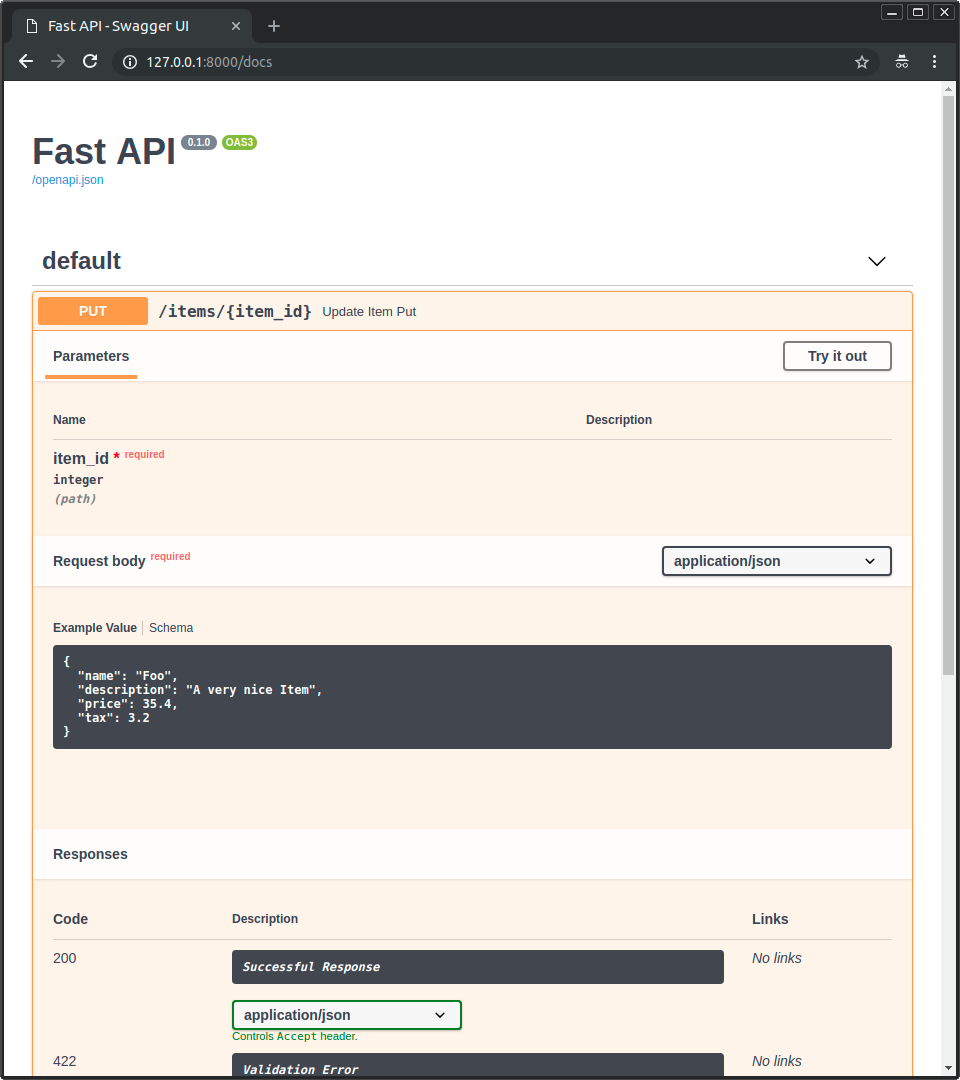
Doküman arayüzünde örnek
Yukarıdaki yöntemlerden herhangi biriyle /docs içinde şöyle görünür:
Birden fazla examples ile Body
Elbette birden fazla examples da geçebilirsiniz:
from typing import Annotated

from fastapi import Body, FastAPI
from pydantic import BaseModel

app = FastAPI()


class Item(BaseModel):
    name: str
    description: str | None = None
    price: float
    tax: float | None = None


@app.put("/items/{item_id}")
async def update_item(
    *,
    item_id: int,
    item: Annotated[
        Item,
        Body(
            examples=[
                {
                    "name": "Foo",
                    "description": "A very nice Item",
                    "price": 35.4,
                    "tax": 3.2,
                },
                {
                    "name": "Bar",
                    "price": "35.4",
                },
                {
                    "name": "Baz",
                    "price": "thirty five point four",
                },
            ],
        ),
    ],
):
    results = {"item_id": item_id, "item": item}
    return results
🤓 Other versions and variants
Tip
Prefer to use the Annotated version if possible.
from fastapi import Body, FastAPI
from pydantic import BaseModel

app = FastAPI()


class Item(BaseModel):
    name: str
    description: str | None = None
    price: float
    tax: float | None = None


@app.put("/items/{item_id}")
async def update_item(
    *,
    item_id: int,
    item: Item = Body(
        examples=[
            {
                "name": "Foo",
                "description": "A very nice Item",
                "price": 35.4,
                "tax": 3.2,
            },
            {
                "name": "Bar",
                "price": "35.4",
            },
            {
                "name": "Baz",
                "price": "thirty five point four",
            },
        ],
    ),
):
    results = {"item_id": item_id, "item": item}
    return results
Bunu yaptığınızda, örnekler bu body verisi için dahili JSON Schema’nın bir parçası olur.
Buna rağmen, bu yazı yazılırken, doküman arayüzünü gösteren araç olan Swagger UI, JSON Schema içindeki veriler için birden fazla örneği göstermeyi desteklemiyor. Ancak aşağıda bir çözüm yolu var.
OpenAPI’ye özel examples
JSON Schema examples’ı desteklemeden önce OpenAPI, yine examples adlı farklı bir alanı destekliyordu.
Bu OpenAPI’ye özel examples, OpenAPI spesifikasyonunda başka bir bölümde yer alır. Her bir JSON Schema’nın içinde değil, her bir path operation detayları içinde bulunur.
Swagger UI da bu özel examples alanını bir süredir destekliyor. Dolayısıyla bunu, doküman arayüzünde farklı örnekleri göstermek için kullanabilirsiniz.
OpenAPI’ye özel bu examples alanının şekli, (bir list yerine) birden fazla örnek içeren bir dict’tir; her örnek ayrıca OpenAPI’ye eklenecek ekstra bilgiler içerir.
Bu, OpenAPI’nin içerdiği JSON Schema’ların içine girmez; bunun yerine doğrudan path operation üzerinde, dışarıda yer alır.
openapi_examples Parametresini Kullanma
FastAPI’de OpenAPI’ye özel examples’ı, şu araçlar için openapi_examples parametresiyle tanımlayabilirsiniz:
Path()Query()Header()Cookie()Body()Form()File()
dict’in anahtarları her bir örneği tanımlar; her bir değer ise başka bir dict’tir.
examples içindeki her bir örnek dict’i şunları içerebilir:
summary: Örnek için kısa açıklama.description: Markdown metni içerebilen uzun açıklama.value: Gösterilecek gerçek örnek (ör. birdict).externalValue:value’a alternatif; örneğe işaret eden bir URL. Ancak bu,valuekadar çok araç tarafından desteklenmiyor olabilir.
Şöyle kullanabilirsiniz:
from typing import Annotated

from fastapi import Body, FastAPI
from pydantic import BaseModel

app = FastAPI()


class Item(BaseModel):
    name: str
    description: str | None = None
    price: float
    tax: float | None = None


@app.put("/items/{item_id}")
async def update_item(
    *,
    item_id: int,
    item: Annotated[
        Item,
        Body(
            openapi_examples={
                "normal": {
                    "summary": "A normal example",
                    "description": "A **normal** item works correctly.",
                    "value": {
                        "name": "Foo",
                        "description": "A very nice Item",
                        "price": 35.4,
                        "tax": 3.2,
                    },
                },
                "converted": {
                    "summary": "An example with converted data",
                    "description": "FastAPI can convert price `strings` to actual `numbers` automatically",
                    "value": {
                        "name": "Bar",
                        "price": "35.4",
                    },
                },
                "invalid": {
                    "summary": "Invalid data is rejected with an error",
                    "value": {
                        "name": "Baz",
                        "price": "thirty five point four",
                    },
                },
            },
        ),
    ],
):
    results = {"item_id": item_id, "item": item}
    return results
🤓 Other versions and variants
Tip
Prefer to use the Annotated version if possible.
from fastapi import Body, FastAPI
from pydantic import BaseModel

app = FastAPI()


class Item(BaseModel):
    name: str
    description: str | None = None
    price: float
    tax: float | None = None


@app.put("/items/{item_id}")
async def update_item(
    *,
    item_id: int,
    item: Item = Body(
        openapi_examples={
            "normal": {
                "summary": "A normal example",
                "description": "A **normal** item works correctly.",
                "value": {
                    "name": "Foo",
                    "description": "A very nice Item",
                    "price": 35.4,
                    "tax": 3.2,
                },
            },
            "converted": {
                "summary": "An example with converted data",
                "description": "FastAPI can convert price `strings` to actual `numbers` automatically",
                "value": {
                    "name": "Bar",
                    "price": "35.4",
                },
            },
            "invalid": {
                "summary": "Invalid data is rejected with an error",
                "value": {
                    "name": "Baz",
                    "price": "thirty five point four",
                },
            },
        },
    ),
):
    results = {"item_id": item_id, "item": item}
    return results
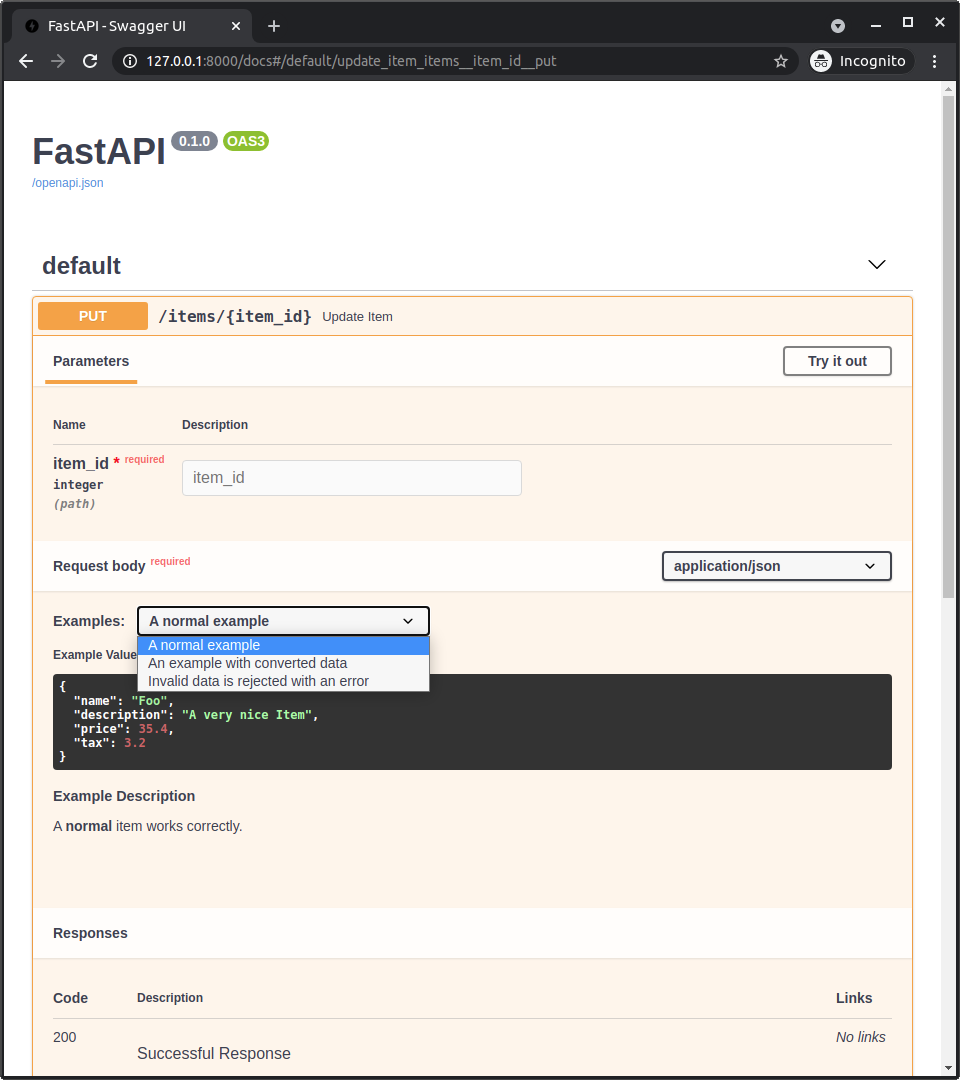
Doküman Arayüzünde OpenAPI Örnekleri
Body()’ye openapi_examples eklendiğinde /docs şöyle görünür:
Teknik Detaylar
İpucu
Zaten FastAPI sürümü 0.99.0 veya üzerini kullanıyorsanız, büyük olasılıkla bu detayları atlayabilirsiniz.
Bunlar daha çok OpenAPI 3.1.0’ın henüz mevcut olmadığı eski sürümler için geçerlidir.
Bunu kısa bir OpenAPI ve JSON Schema tarih dersi gibi düşünebilirsiniz. 🤓
Uyarı
Bunlar JSON Schema ve OpenAPI standartları hakkında oldukça teknik detaylardır.
Yukarıdaki fikirler sizin için zaten çalışıyorsa bu kadarı yeterli olabilir; muhtemelen bu detaylara ihtiyacınız yoktur, gönül rahatlığıyla atlayabilirsiniz.
OpenAPI 3.1.0’dan önce OpenAPI, JSON Schema’nın daha eski ve değiştirilmiş bir sürümünü kullanıyordu.
JSON Schema’da examples yoktu; bu yüzden OpenAPI, değiştirilmiş sürümüne kendi example alanını ekledi.
OpenAPI ayrıca spesifikasyonun diğer bölümlerine de example ve examples alanlarını ekledi:
Parameter Object(spesifikasyonda) — FastAPI’de şunlar tarafından kullanılıyordu:Path()Query()Header()Cookie()
Request Body Object;contentalanında,Media Type Objectüzerinde (spesifikasyonda) — FastAPI’de şunlar tarafından kullanılıyordu:Body()File()Form()
Not
Bu eski OpenAPI’ye özel examples parametresi, FastAPI 0.103.0 sürümünden beri openapi_examples olarak kullanılıyor.
JSON Schema’nın examples alanı
Sonrasında JSON Schema, spesifikasyonun yeni bir sürümüne examples alanını ekledi.
Ardından yeni OpenAPI 3.1.0, bu yeni examples alanını içeren en güncel sürümü (JSON Schema 2020-12) temel aldı.
Ve artık, deprecated olan eski tekil (ve özel) example alanına kıyasla bu yeni examples alanı önceliklidir.
JSON Schema’daki bu yeni examples alanı, OpenAPI’de başka yerlerde kullanılan (yukarıda anlatılan) metadata’lı dict yapısından farklı olarak sadece örneklerden oluşan bir list’tir.
Not
OpenAPI 3.1.0, JSON Schema ile bu yeni ve daha basit entegrasyonla yayımlandıktan sonra bile bir süre, otomatik dokümantasyonu sağlayan araç Swagger UI OpenAPI 3.1.0’ı desteklemiyordu (5.0.0 sürümünden beri destekliyor 🎉).
Bu nedenle, FastAPI’nin 0.99.0 öncesi sürümleri OpenAPI 3.1.0’dan daha düşük sürümleri kullanmaya devam etti.
Pydantic ve FastAPI examples
Bir Pydantic modelinin içine schema_extra ya da Field(examples=["something"]) kullanarak examples eklediğinizde, bu örnek o Pydantic modelinin JSON Schema’sına eklenir.
Ve Pydantic modelinin bu JSON Schema’sı, API’nizin OpenAPI’sine dahil edilir; ardından doküman arayüzünde kullanılır.
FastAPI 0.99.0’dan önceki sürümlerde (0.99.0 ve üzeri daha yeni OpenAPI 3.1.0’ı kullanır) Query(), Body() vb. diğer araçlarla example veya examples kullandığınızda, bu örnekler o veriyi tanımlayan JSON Schema’ya (OpenAPI’nin kendi JSON Schema sürümüne bile) eklenmiyordu; bunun yerine doğrudan OpenAPI’deki path operation tanımına ekleniyordu (JSON Schema kullanan OpenAPI bölümlerinin dışında).
Ancak artık FastAPI 0.99.0 ve üzeri OpenAPI 3.1.0 kullandığı (JSON Schema 2020-12) ve Swagger UI 5.0.0 ve üzeriyle birlikte, her şey daha tutarlı ve örnekler JSON Schema’ya dahil ediliyor.
Swagger UI ve OpenAPI’ye özel examples
Swagger UI (2023-08-26 itibarıyla) birden fazla JSON Schema örneğini desteklemediği için, kullanıcıların dokümanlarda birden fazla örnek göstermesi mümkün değildi.
Bunu çözmek için FastAPI 0.103.0, yeni openapi_examples parametresiyle aynı eski OpenAPI’ye özel examples alanını tanımlamayı desteklemeye başladı. 🤓
Özet
Eskiden tarihten pek hoşlanmadığımı söylerdim... şimdi bakın, "teknoloji tarihi" dersi anlatıyorum. 😅
Kısacası, FastAPI 0.99.0 veya üzerine yükseltin; her şey çok daha basit, tutarlı ve sezgisel olur ve bu tarihsel detayların hiçbirini bilmeniz gerekmez. 😎