경로 처리 설정
🌐 AI와 사람이 함께한 번역
이 번역은 사람의 안내를 받아 AI가 만들었습니다. 🤝
원문의 의미를 오해하거나 부자연스러워 보이는 등 오류가 있을 수 있습니다. 🤖
경로 처리 데코레이터를 설정하기 위해 전달할 수 있는 몇 가지 매개변수가 있습니다.
경고
아래 매개변수들은 경로 처리 함수가 아닌 경로 처리 데코레이터에 직접 전달된다는 사실을 기억하세요.
응답 상태 코드
경로 처리의 응답에 사용될 (HTTP) status_code를 정의할 수 있습니다.
404와 같은 int형 코드를 직접 전달할 수 있습니다.
하지만 각 숫자 코드가 무엇을 의미하는지 기억하지 못한다면, status에 있는 단축 상수들을 사용할 수 있습니다:
from fastapi import FastAPI, status
from pydantic import BaseModel

app = FastAPI()


class Item(BaseModel):
    name: str
    description: str | None = None
    price: float
    tax: float | None = None
    tags: set[str] = set()


@app.post("/items/", status_code=status.HTTP_201_CREATED)
async def create_item(item: Item) -> Item:
    return item
해당 상태 코드는 응답에 사용되며, OpenAPI 스키마에 추가됩니다.
기술 세부사항
다음과 같이 임포트하셔도 좋습니다. from starlette import status.
FastAPI는 개발자 여러분의 편의를 위해 starlette.status와 동일한 fastapi.status를 제공합니다. 하지만 이는 Starlette에서 직접 온 것입니다.
태그
(보통 단일 str인) str로 구성된 list와 함께 매개변수 tags를 전달하여, 경로 처리에 태그를 추가할 수 있습니다:
from fastapi import FastAPI
from pydantic import BaseModel

app = FastAPI()


class Item(BaseModel):
    name: str
    description: str | None = None
    price: float
    tax: float | None = None
    tags: set[str] = set()


@app.post("/items/", tags=["items"])
async def create_item(item: Item) -> Item:
    return item


@app.get("/items/", tags=["items"])
async def read_items():
    return [{"name": "Foo", "price": 42}]


@app.get("/users/", tags=["users"])
async def read_users():
    return [{"username": "johndoe"}]
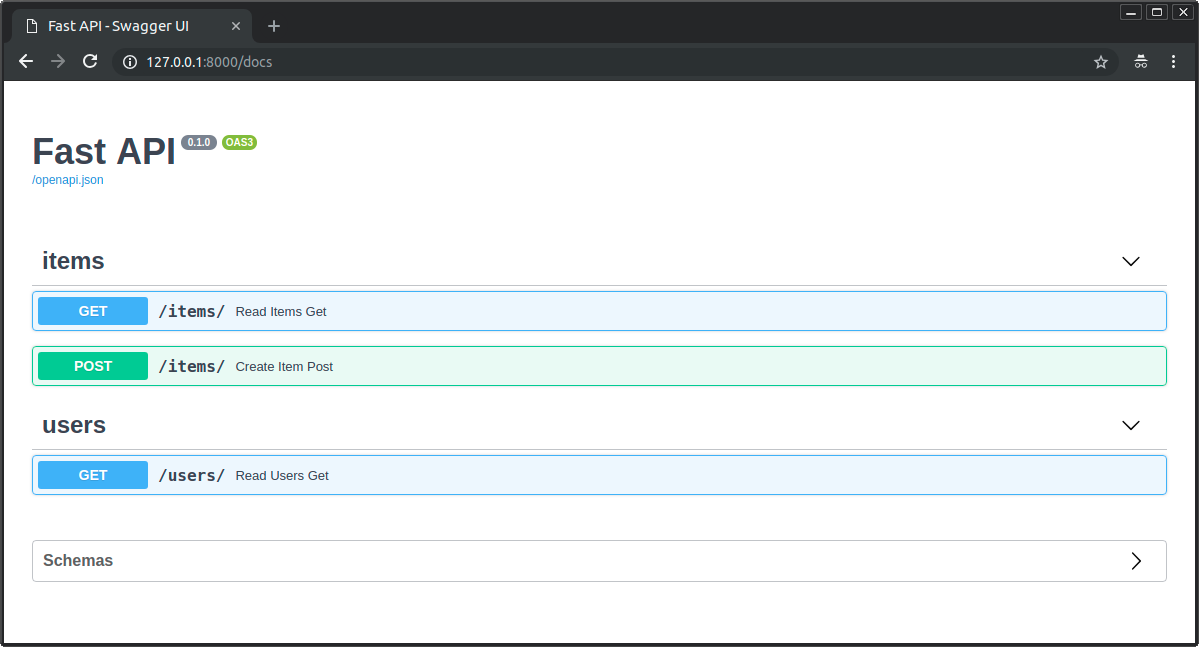
전달된 태그들은 OpenAPI의 스키마에 추가되며, 자동 문서 인터페이스에서 사용됩니다:
Enum을 사용한 태그
큰 애플리케이션이 있다면, 여러 태그가 쌓이게 될 수 있고, 관련된 경로 처리에 항상 같은 태그를 사용하는지 확인하고 싶을 것입니다.
이런 경우에는 태그를 Enum에 저장하는 것이 합리적일 수 있습니다.
FastAPI는 일반 문자열과 동일한 방식으로 이를 지원합니다:
from enum import Enum

from fastapi import FastAPI

app = FastAPI()


class Tags(Enum):
    items = "items"
    users = "users"


@app.get("/items/", tags=[Tags.items])
async def get_items():
    return ["Portal gun", "Plumbus"]


@app.get("/users/", tags=[Tags.users])
async def read_users():
    return ["Rick", "Morty"]
요약과 설명
summary와 description을 추가할 수 있습니다:
from fastapi import FastAPI
from pydantic import BaseModel

app = FastAPI()


class Item(BaseModel):
    name: str
    description: str | None = None
    price: float
    tax: float | None = None
    tags: set[str] = set()


@app.post(
    "/items/",
    summary="Create an item",
    description="Create an item with all the information, name, description, price, tax and a set of unique tags",
)
async def create_item(item: Item) -> Item:
    return item
독스트링으로 만든 설명
설명은 보통 길어지고 여러 줄에 걸쳐있기 때문에, 경로 처리 설명을 함수 독스트링에 선언할 수 있으며, FastAPI는 그곳에서 이를 읽습니다.
독스트링에는 Markdown을 작성할 수 있으며, (독스트링의 들여쓰기를 고려하여) 올바르게 해석되고 표시됩니다.
from fastapi import FastAPI
from pydantic import BaseModel

app = FastAPI()


class Item(BaseModel):
    name: str
    description: str | None = None
    price: float
    tax: float | None = None
    tags: set[str] = set()


@app.post("/items/", summary="Create an item")
async def create_item(item: Item) -> Item:
    """
    Create an item with all the information:

    - **name**: each item must have a name
    - **description**: a long description
    - **price**: required
    - **tax**: if the item doesn't have tax, you can omit this
    - **tags**: a set of unique tag strings for this item
    """
    return item
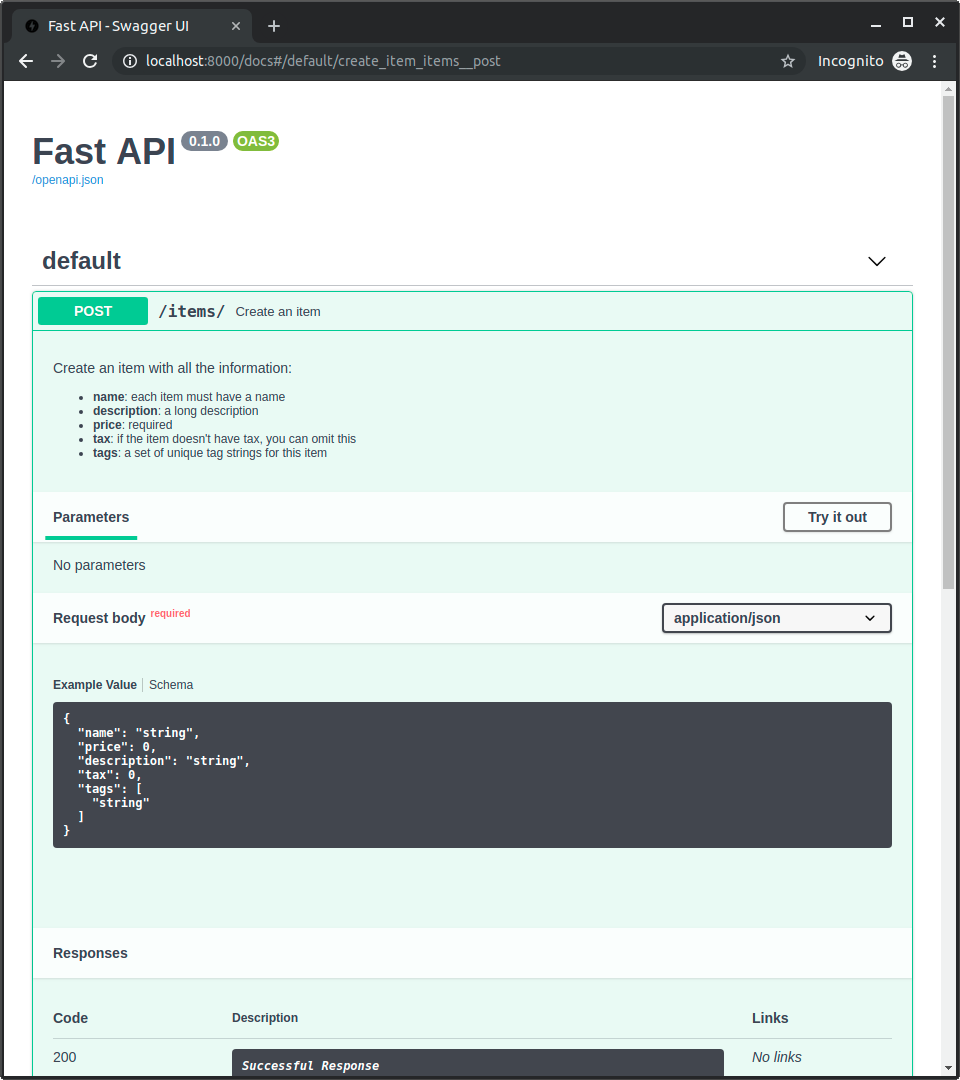
이는 대화형 문서에서 사용됩니다:
응답 설명
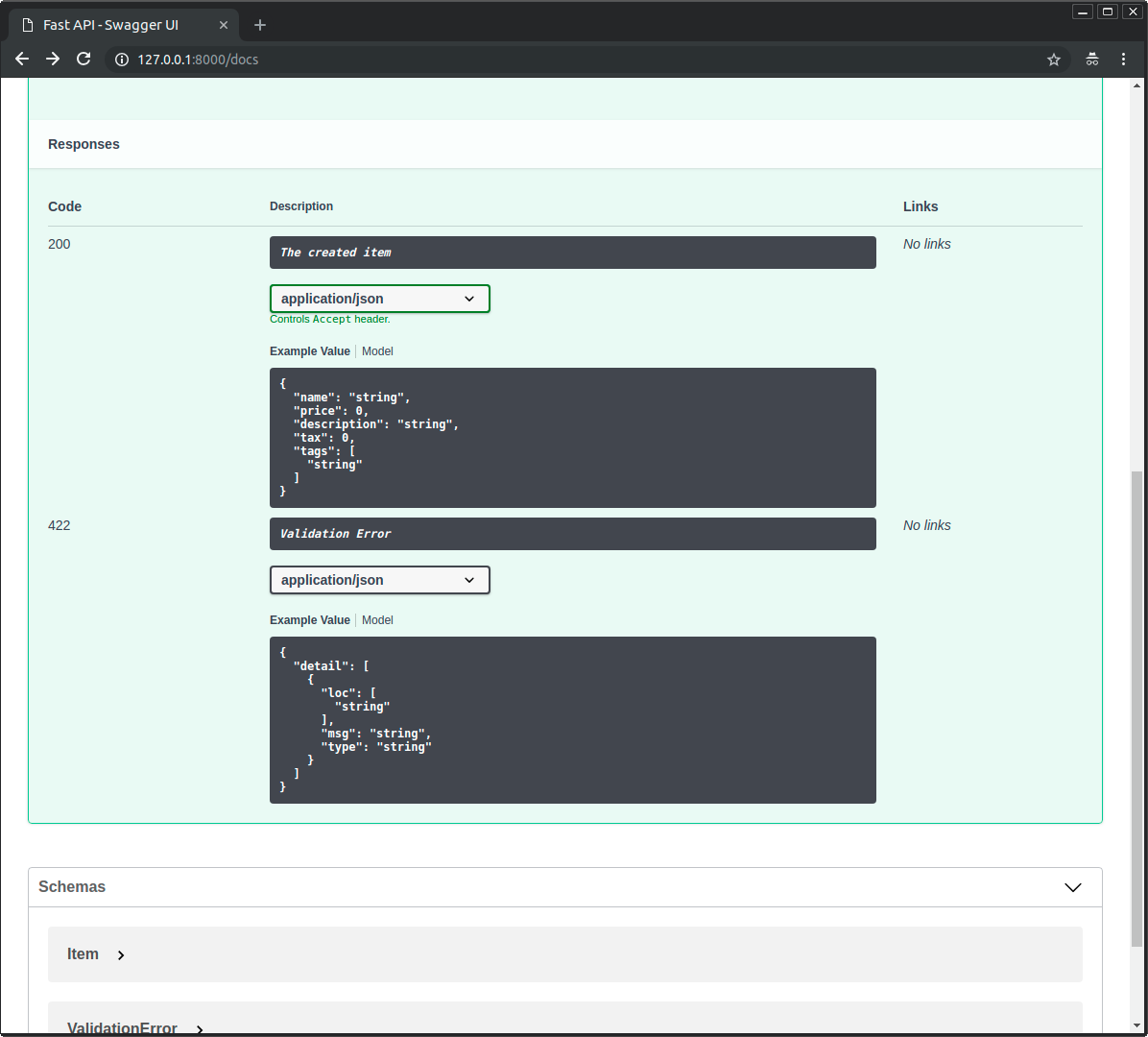
response_description 매개변수로 응답에 관한 설명을 명시할 수 있습니다:
from fastapi import FastAPI
from pydantic import BaseModel

app = FastAPI()


class Item(BaseModel):
    name: str
    description: str | None = None
    price: float
    tax: float | None = None
    tags: set[str] = set()


@app.post(
    "/items/",
    summary="Create an item",
    response_description="The created item",
)
async def create_item(item: Item) -> Item:
    """
    Create an item with all the information:

    - **name**: each item must have a name
    - **description**: a long description
    - **price**: required
    - **tax**: if the item doesn't have tax, you can omit this
    - **tags**: a set of unique tag strings for this item
    """
    return item
참고
response_description은 구체적으로 응답을 지칭하며, description은 일반적인 경로 처리를 지칭합니다.
팁
OpenAPI는 각 경로 처리가 응답에 관한 설명을 요구할 것을 명시합니다.
따라서, 응답에 관한 설명을 제공하지 않으면, FastAPI가 "Successful response" 중 하나를 자동으로 생성합니다.
경로 처리 지원중단하기
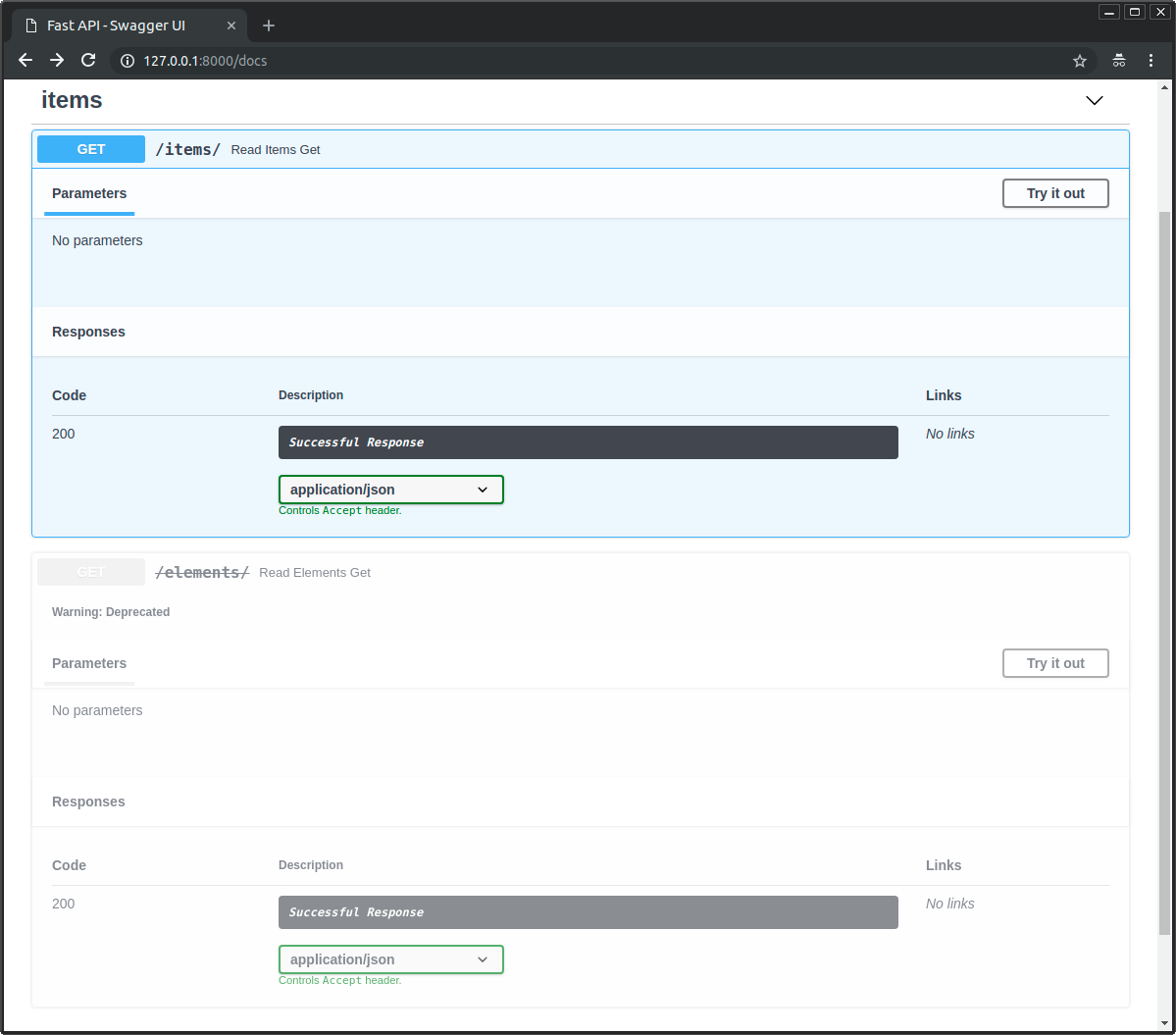
경로 처리를 제거하지 않고 지원중단으로 표시해야 한다면, deprecated 매개변수를 전달하면 됩니다:
from fastapi import FastAPI

app = FastAPI()


@app.get("/items/", tags=["items"])
async def read_items():
    return [{"name": "Foo", "price": 42}]


@app.get("/users/", tags=["users"])
async def read_users():
    return [{"username": "johndoe"}]


@app.get("/elements/", tags=["items"], deprecated=True)
async def read_elements():
    return [{"item_id": "Foo"}]
대화형 문서에서 지원중단으로 명확하게 표시됩니다:
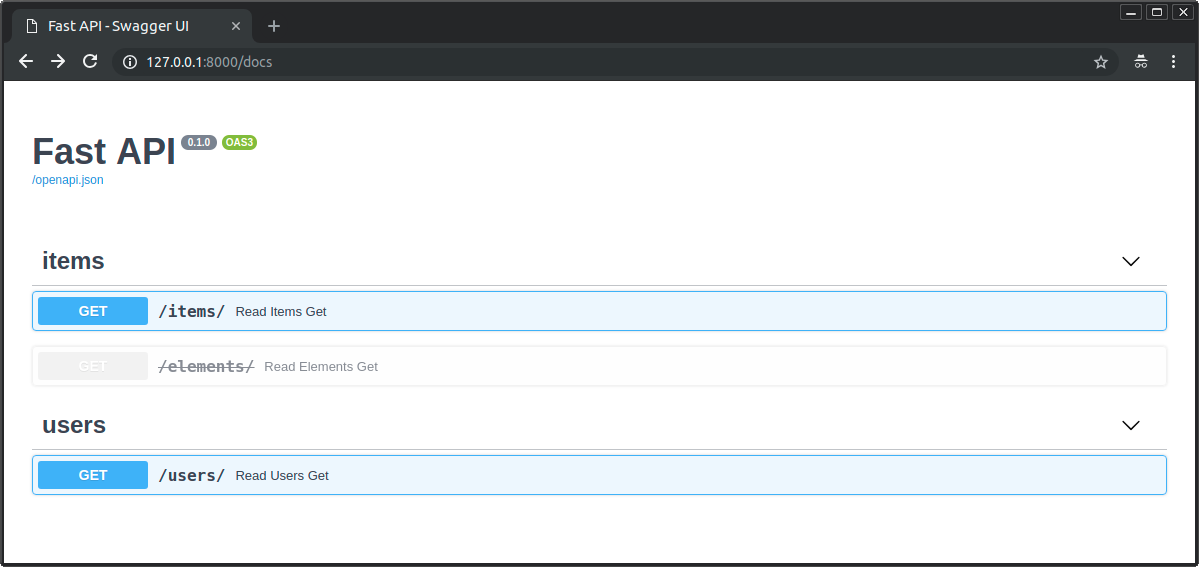
지원중단된 경로 처리와 지원중단되지 않은 경로 처리가 어떻게 보이는지 확인해 보세요:
정리
경로 처리 데코레이터에 매개변수(들)를 전달하여 경로 처리를 설정하고 메타데이터를 쉽게 추가할 수 있습니다.