メタデータとドキュメントのURL
🌐 AI と人間による翻訳
この翻訳は、人間のガイドに基づいて AI によって作成されました。🤝
原文の意図を取り違えていたり、不自然な表現になっている可能性があります。🤖
AI LLM をより適切に誘導するのを手伝う ことで、この翻訳を改善できます。
FastAPI アプリケーションのいくつかのメタデータ設定をカスタマイズできます。
APIのメタデータ
OpenAPI仕様および自動APIドキュメントUIで使用される次のフィールドを設定できます:
| パラメータ | 型 | 説明 | ||||||||||||
|---|---|---|---|---|---|---|---|---|---|---|---|---|---|---|
title |
str |
APIのタイトルです。 | ||||||||||||
summary |
str |
APIの短い要約です。 OpenAPI 3.1.0、FastAPI 0.99.0 以降で利用できます。 | ||||||||||||
description |
str |
APIの短い説明です。Markdownを使用できます。 | ||||||||||||
version |
str |
APIのバージョンです。これはOpenAPIのバージョンではなく、あなた自身のアプリケーションのバージョンです。たとえば 2.5.0 です。 |
||||||||||||
terms_of_service |
str |
APIの利用規約へのURLです。指定する場合、URLである必要があります。 | ||||||||||||
contact |
dict |
公開されるAPIの連絡先情報です。複数のフィールドを含められます。
|
| パラメータ | 型 | 説明 |
|---|---|---|
name | str | 連絡先の個人/組織を識別する名前です。 |
url | str | 連絡先情報を指すURLです。URL形式である必要があります。 |
email | str | 連絡先の個人/組織のメールアドレスです。メールアドレス形式である必要があります。 |
license_infodictlicense_info のフィールド
| パラメータ | 型 | 説明 |
|---|---|---|
name | str | 必須(license_info が設定されている場合)。APIに使用されるライセンス名です。 |
identifier | str | APIの SPDX ライセンス式です。identifier フィールドは url フィールドと同時に指定できません。 OpenAPI 3.1.0、FastAPI 0.99.0 以降で利用できます。 |
url | str | APIに使用されるライセンスへのURLです。URL形式である必要があります。 |
以下のように設定できます:
from fastapi import FastAPI

description = """
ChimichangApp API helps you do awesome stuff. 🚀

## Items

You can **read items**.

## Users

You will be able to:

* **Create users** (_not implemented_).
* **Read users** (_not implemented_).
"""

app = FastAPI(
    title="ChimichangApp",
    description=description,
    summary="Deadpool's favorite app. Nuff said.",
    version="0.0.1",
    terms_of_service="http://example.com/terms/",
    contact={
        "name": "Deadpoolio the Amazing",
        "url": "http://x-force.example.com/contact/",
        "email": "dp@x-force.example.com",
    },
    license_info={
        "name": "Apache 2.0",
        "url": "https://www.apache.org/licenses/LICENSE-2.0.html",
    },
)


@app.get("/items/")
async def read_items():
    return [{"name": "Katana"}]
豆知識
description フィールドにはMarkdownを書けて、出力ではレンダリングされます。
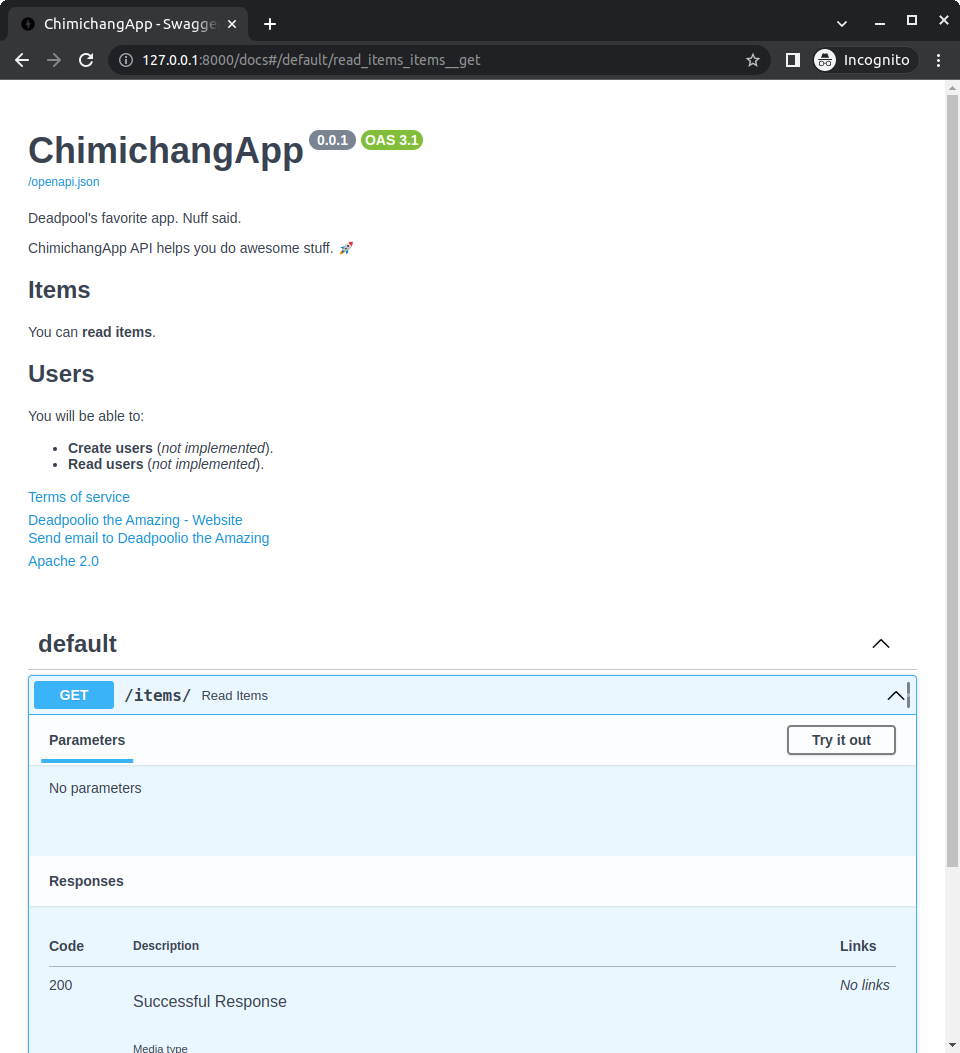
この設定では、自動APIドキュメントは以下のようになります:
ライセンス識別子
OpenAPI 3.1.0 および FastAPI 0.99.0 以降では、license_info を url の代わりに identifier で設定することもできます。
例:
from fastapi import FastAPI

description = """
ChimichangApp API helps you do awesome stuff. 🚀

## Items

You can **read items**.

## Users

You will be able to:

* **Create users** (_not implemented_).
* **Read users** (_not implemented_).
"""

app = FastAPI(
    title="ChimichangApp",
    description=description,
    summary="Deadpool's favorite app. Nuff said.",
    version="0.0.1",
    terms_of_service="http://example.com/terms/",
    contact={
        "name": "Deadpoolio the Amazing",
        "url": "http://x-force.example.com/contact/",
        "email": "dp@x-force.example.com",
    },
    license_info={
        "name": "Apache 2.0",
        "identifier": "Apache-2.0",
    },
)


@app.get("/items/")
async def read_items():
    return [{"name": "Katana"}]
タグのメタデータ
パラメータ openapi_tags を使うと、path operation をグループ分けするために使用する各タグに追加のメタデータを追加できます。
それぞれのタグごとに1つの辞書を含むリストを取ります。
それぞれの辞書は以下を含められます:
name(必須): path operation およびAPIRouterのtagsパラメータで使用するのと同じタグ名のstr。description: タグの短い説明のstr。Markdownを含められ、ドキュメントUIに表示されます。externalDocs: 外部ドキュメントを説明するdict。以下を含みます:description: 外部ドキュメントの短い説明のstr。url(必須): 外部ドキュメントのURLのstr。
タグのメタデータの作成
users と items のタグを使った例で試してみましょう。
タグのメタデータを作成し、それを openapi_tags パラメータに渡します:
from fastapi import FastAPI

tags_metadata = [
    {
        "name": "users",
        "description": "Operations with users. The **login** logic is also here.",
    },
    {
        "name": "items",
        "description": "Manage items. So _fancy_ they have their own docs.",
        "externalDocs": {
            "description": "Items external docs",
            "url": "https://fastapi.tiangolo.com/",
        },
    },
]

app = FastAPI(openapi_tags=tags_metadata)


@app.get("/users/", tags=["users"])
async def get_users():
    return [{"name": "Harry"}, {"name": "Ron"}]


@app.get("/items/", tags=["items"])
async def get_items():
    return [{"name": "wand"}, {"name": "flying broom"}]
説明の中でMarkdownを使用できることに注意してください。たとえば「login」は太字 (login) で表示され、「fancy」は斜体 (fancy) で表示されます。
豆知識
使用するすべてのタグにメタデータを追加する必要はありません。
タグの使用
path operation(および APIRouter)の tags パラメータを使用して、それらを異なるタグに割り当てます:
from fastapi import FastAPI

tags_metadata = [
    {
        "name": "users",
        "description": "Operations with users. The **login** logic is also here.",
    },
    {
        "name": "items",
        "description": "Manage items. So _fancy_ they have their own docs.",
        "externalDocs": {
            "description": "Items external docs",
            "url": "https://fastapi.tiangolo.com/",
        },
    },
]

app = FastAPI(openapi_tags=tags_metadata)


@app.get("/users/", tags=["users"])
async def get_users():
    return [{"name": "Harry"}, {"name": "Ron"}]


@app.get("/items/", tags=["items"])
async def get_items():
    return [{"name": "wand"}, {"name": "flying broom"}]
備考
タグの詳細は Path Operation の設定 を参照してください。
ドキュメントの確認
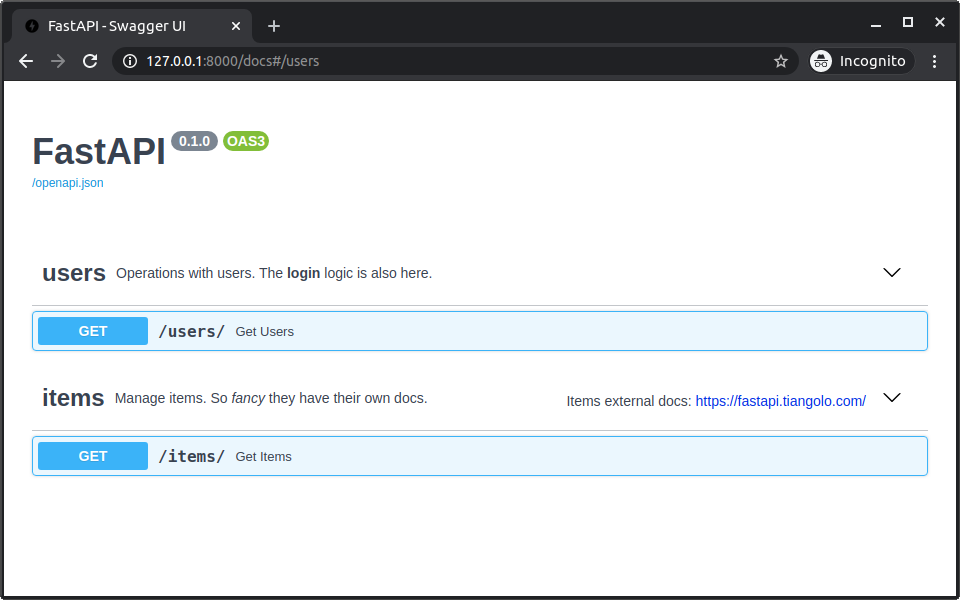
ここでドキュメントを確認すると、追加したメタデータがすべて表示されます:
タグの順番
タグのメタデータ辞書の順序は、ドキュメントUIに表示される順序の定義にもなります。
たとえば、users はアルファベット順では items の後に続きますが、リストの最初の辞書としてメタデータを追加したため、それより前に表示されます。
OpenAPI URL
デフォルトでは、OpenAPIスキーマは /openapi.json で提供されます。
ただし、パラメータ openapi_url を使用して設定を変更できます。
たとえば、/api/v1/openapi.json で提供されるように設定するには:
from fastapi import FastAPI

app = FastAPI(openapi_url="/api/v1/openapi.json")


@app.get("/items/")
async def read_items():
    return [{"name": "Foo"}]
OpenAPIスキーマを完全に無効にする場合は、openapi_url=None を設定できます。これにより、それを使用するドキュメントUIも無効になります。
ドキュメントのURL
含まれている2つのドキュメントUIを設定できます:
- Swagger UI:
/docsで提供されます。- URL はパラメータ
docs_urlで設定できます。 docs_url=Noneを設定することで無効にできます。
- URL はパラメータ
- ReDoc:
/redocで提供されます。- URL はパラメータ
redoc_urlで設定できます。 redoc_url=Noneを設定することで無効にできます。
- URL はパラメータ
たとえば、/documentation でSwagger UIが提供されるように設定し、ReDocを無効にするには:
from fastapi import FastAPI

app = FastAPI(docs_url="/documentation", redoc_url=None)


@app.get("/items/")
async def read_items():
    return [{"name": "Foo"}]