요청 예제 데이터 선언
🌐 AI와 사람이 함께한 번역
이 번역은 사람의 안내를 받아 AI가 만들었습니다. 🤝
원문의 의미를 오해하거나 부자연스러워 보이는 등 오류가 있을 수 있습니다. 🤖
여러분의 애플리케이션이 받을 수 있는 데이터 예제를 선언할 수 있습니다.
여기 이를 위한 몇 가지 방식이 있습니다.
Pydantic 모델 속 추가 JSON 스키마 데이터
생성된 JSON 스키마에 추가될 Pydantic 모델을 위한 examples을 선언할 수 있습니다.
from fastapi import FastAPI
from pydantic import BaseModel

app = FastAPI()


class Item(BaseModel):
    name: str
    description: str | None = None
    price: float
    tax: float | None = None

    model_config = {
        "json_schema_extra": {
            "examples": [
                {
                    "name": "Foo",
                    "description": "A very nice Item",
                    "price": 35.4,
                    "tax": 3.2,
                }
            ]
        }
    }


@app.put("/items/{item_id}")
async def update_item(item_id: int, item: Item):
    results = {"item_id": item_id, "item": item}
    return results
추가 정보는 있는 그대로 해당 모델의 JSON 스키마 결과에 추가되고, API 문서에서 사용합니다.
Pydantic 문서: Configuration에 설명된 것처럼 dict를 받는 model_config 어트리뷰트를 사용할 수 있습니다.
"json_schema_extra"를 생성된 JSON 스키마에서 보여주고 싶은 별도의 데이터와 examples를 포함하는 dict으로 설정할 수 있습니다.
팁
JSON 스키마를 확장하고 여러분의 별도의 자체 데이터를 추가하기 위해 같은 기술을 사용할 수 있습니다.
예를 들면, 프론트엔드 사용자 인터페이스에 메타데이터를 추가하는 등에 사용할 수 있습니다.
참고
(FastAPI 0.99.0부터 쓰이기 시작한) OpenAPI 3.1.0은 JSON 스키마 표준의 일부인 examples에 대한 지원을 추가했습니다.
그 전에는, 하나의 예제만 가능한 example 키워드만 지원했습니다. 이는 아직 OpenAPI 3.1.0에서 지원하지만, 지원이 종료될 것이며 JSON 스키마 표준에 포함되지 않습니다. 그렇기에 example을 examples으로 이전하는 것을 추천합니다. 🤓
이 페이지 끝에서 더 많은 내용을 읽을 수 있습니다.
Field 추가 인자
Pydantic 모델과 같이 Field()를 사용할 때 추가적인 examples를 선언할 수 있습니다:
from fastapi import FastAPI
from pydantic import BaseModel, Field

app = FastAPI()


class Item(BaseModel):
    name: str = Field(examples=["Foo"])
    description: str | None = Field(default=None, examples=["A very nice Item"])
    price: float = Field(examples=[35.4])
    tax: float | None = Field(default=None, examples=[3.2])


@app.put("/items/{item_id}")
async def update_item(item_id: int, item: Item):
    results = {"item_id": item_id, "item": item}
    return results
JSON Schema에서의 examples - OpenAPI
다음 중 하나를 사용할 때:
Path()Query()Header()Cookie()Body()Form()File()
OpenAPI 안의 JSON 스키마에 추가될 부가적인 정보를 포함한 examples 모음을 선언할 수도 있습니다.
examples를 포함한 Body
여기, Body()에 예상되는 예제 데이터 하나를 포함한 examples를 넘겼습니다:
from typing import Annotated

from fastapi import Body, FastAPI
from pydantic import BaseModel

app = FastAPI()


class Item(BaseModel):
    name: str
    description: str | None = None
    price: float
    tax: float | None = None


@app.put("/items/{item_id}")
async def update_item(
    item_id: int,
    item: Annotated[
        Item,
        Body(
            examples=[
                {
                    "name": "Foo",
                    "description": "A very nice Item",
                    "price": 35.4,
                    "tax": 3.2,
                }
            ],
        ),
    ],
):
    results = {"item_id": item_id, "item": item}
    return results
🤓 Other versions and variants
Tip
Prefer to use the Annotated version if possible.
from fastapi import Body, FastAPI
from pydantic import BaseModel

app = FastAPI()


class Item(BaseModel):
    name: str
    description: str | None = None
    price: float
    tax: float | None = None


@app.put("/items/{item_id}")
async def update_item(
    item_id: int,
    item: Item = Body(
        examples=[
            {
                "name": "Foo",
                "description": "A very nice Item",
                "price": 35.4,
                "tax": 3.2,
            }
        ],
    ),
):
    results = {"item_id": item_id, "item": item}
    return results
문서 UI 예시
위의 어느 방법과 함께라면 /docs에서 다음과 같이 보일 것입니다:
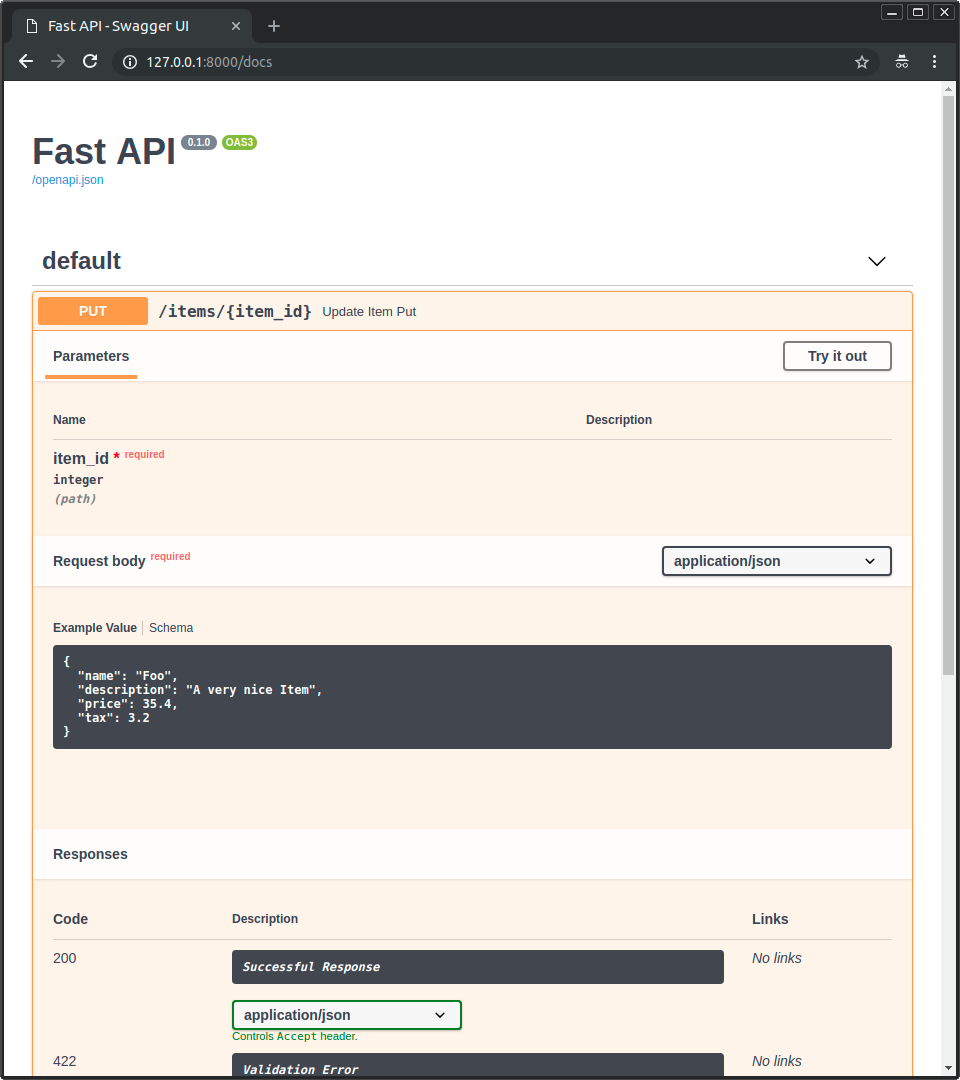
다중 examples를 포함한 Body
물론 여러 examples를 넘길 수 있습니다:
from typing import Annotated

from fastapi import Body, FastAPI
from pydantic import BaseModel

app = FastAPI()


class Item(BaseModel):
    name: str
    description: str | None = None
    price: float
    tax: float | None = None


@app.put("/items/{item_id}")
async def update_item(
    *,
    item_id: int,
    item: Annotated[
        Item,
        Body(
            examples=[
                {
                    "name": "Foo",
                    "description": "A very nice Item",
                    "price": 35.4,
                    "tax": 3.2,
                },
                {
                    "name": "Bar",
                    "price": "35.4",
                },
                {
                    "name": "Baz",
                    "price": "thirty five point four",
                },
            ],
        ),
    ],
):
    results = {"item_id": item_id, "item": item}
    return results
🤓 Other versions and variants
Tip
Prefer to use the Annotated version if possible.
from fastapi import Body, FastAPI
from pydantic import BaseModel

app = FastAPI()


class Item(BaseModel):
    name: str
    description: str | None = None
    price: float
    tax: float | None = None


@app.put("/items/{item_id}")
async def update_item(
    *,
    item_id: int,
    item: Item = Body(
        examples=[
            {
                "name": "Foo",
                "description": "A very nice Item",
                "price": 35.4,
                "tax": 3.2,
            },
            {
                "name": "Bar",
                "price": "35.4",
            },
            {
                "name": "Baz",
                "price": "thirty five point four",
            },
        ],
    ),
):
    results = {"item_id": item_id, "item": item}
    return results
이와 같이 하면 예제들은 그 본문 데이터의 내부 JSON 스키마의 일부가 될 것입니다.
그럼에도 불구하고, 지금 이 문서를 작성하는 시간에, 문서 UI를 보여주는 역할을 맡은 Swagger UI는 JSON 스키마 속 데이터를 위한 여러 예제의 표현을 지원하지 않습니다. 하지만 해결 방안을 밑에서 읽어보세요.
OpenAPI-특화 examples
JSON 스키마가 examples를 지원하기 전부터 OpenAPI는 examples이라 불리는 다른 필드를 지원해 왔습니다.
이 OpenAPI-특화 examples는 OpenAPI 명세서의 다른 구역으로 들어갑니다. 각 JSON 스키마 내부가 아니라 각 경로 처리 세부 정보에 포함됩니다.
그리고 Swagger UI는 이 특정한 examples 필드를 한동안 지원했습니다. 그래서, 이를 다른 문서 UI에 있는 예제를 표시하기 위해 사용할 수 있습니다.
이 OpenAPI-특화 필드인 examples의 형태는 (list 대신에) 다중 예제가 포함된 dict이며, 각각의 별도 정보 또한 OpenAPI에 추가될 것입니다.
이는 OpenAPI에 포함된 각 JSON 스키마 안으로 포함되지 않으며, 경로 처리에 직접적으로 포함됩니다.
openapi_examples 매개변수 사용하기
다음에 대해 FastAPI에서 매개변수 openapi_examples로 OpenAPI-특화 examples를 선언할 수 있습니다:
Path()Query()Header()Cookie()Body()Form()File()
dict의 키는 각 예제를 식별하고, 각 값은 또 다른 dict입니다.
examples 안의 각 특정 예제 dict에는 다음이 포함될 수 있습니다:
summary: 예제에 대한 짧은 설명문.description: 마크다운 텍스트를 포함할 수 있는 긴 설명문.value: 실제로 보여지는 예시, 예를 들면dict.externalValue:value의 대안이며 예제를 가리키는 URL. 비록value처럼 많은 도구를 지원하지 못할 수 있습니다.
이를 다음과 같이 사용할 수 있습니다:
from typing import Annotated

from fastapi import Body, FastAPI
from pydantic import BaseModel

app = FastAPI()


class Item(BaseModel):
    name: str
    description: str | None = None
    price: float
    tax: float | None = None


@app.put("/items/{item_id}")
async def update_item(
    *,
    item_id: int,
    item: Annotated[
        Item,
        Body(
            openapi_examples={
                "normal": {
                    "summary": "A normal example",
                    "description": "A **normal** item works correctly.",
                    "value": {
                        "name": "Foo",
                        "description": "A very nice Item",
                        "price": 35.4,
                        "tax": 3.2,
                    },
                },
                "converted": {
                    "summary": "An example with converted data",
                    "description": "FastAPI can convert price `strings` to actual `numbers` automatically",
                    "value": {
                        "name": "Bar",
                        "price": "35.4",
                    },
                },
                "invalid": {
                    "summary": "Invalid data is rejected with an error",
                    "value": {
                        "name": "Baz",
                        "price": "thirty five point four",
                    },
                },
            },
        ),
    ],
):
    results = {"item_id": item_id, "item": item}
    return results
🤓 Other versions and variants
Tip
Prefer to use the Annotated version if possible.
from fastapi import Body, FastAPI
from pydantic import BaseModel

app = FastAPI()


class Item(BaseModel):
    name: str
    description: str | None = None
    price: float
    tax: float | None = None


@app.put("/items/{item_id}")
async def update_item(
    *,
    item_id: int,
    item: Item = Body(
        openapi_examples={
            "normal": {
                "summary": "A normal example",
                "description": "A **normal** item works correctly.",
                "value": {
                    "name": "Foo",
                    "description": "A very nice Item",
                    "price": 35.4,
                    "tax": 3.2,
                },
            },
            "converted": {
                "summary": "An example with converted data",
                "description": "FastAPI can convert price `strings` to actual `numbers` automatically",
                "value": {
                    "name": "Bar",
                    "price": "35.4",
                },
            },
            "invalid": {
                "summary": "Invalid data is rejected with an error",
                "value": {
                    "name": "Baz",
                    "price": "thirty five point four",
                },
            },
        },
    ),
):
    results = {"item_id": item_id, "item": item}
    return results
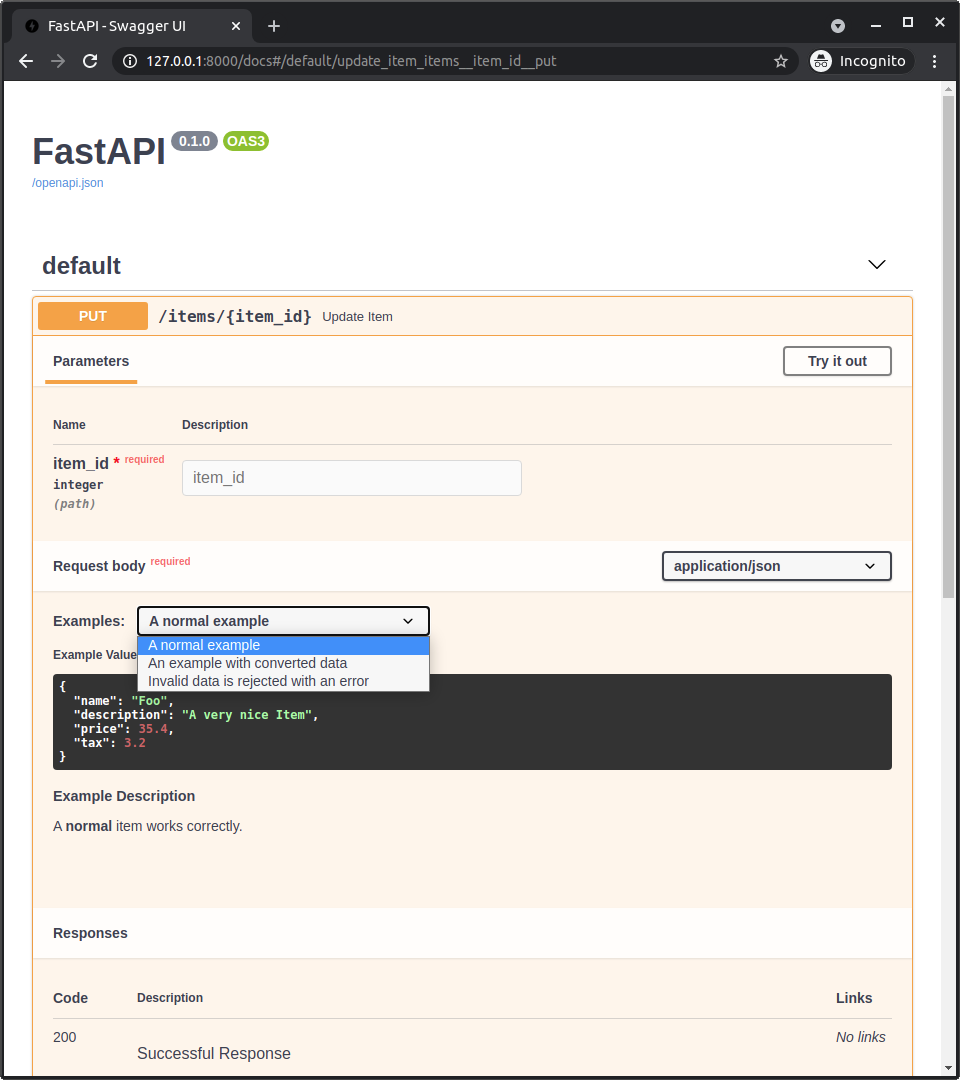
문서 UI에서의 OpenAPI 예시
Body()에 openapi_examples가 추가되면 /docs는 다음과 같이 보일 것입니다:
기술적 세부 사항
팁
이미 FastAPI의 0.99.0 혹은 그 이상 버전을 사용하고 있다면, 이 세부 사항을 스킵해도 상관 없을 것입니다.
세부 사항은 OpenAPI 3.1.0이 사용가능하기 전, 예전 버전과 더 관련있습니다.
간략한 OpenAPI와 JSON 스키마 역사 강의로 생각할 수 있습니다. 🤓
경고
표준 JSON 스키마와 OpenAPI에 대한 아주 기술적인 세부사항입니다.
만약 위의 생각이 작동한다면, 그것으로 충분하며 이 세부 사항은 필요없을 것이니, 마음 편하게 스킵하셔도 됩니다.
OpenAPI 3.1.0 전에 OpenAPI는 오래된 JSON 스키마의 수정된 버전을 사용했습니다.
JSON 스키마는 examples를 가지고 있지 않았고, 따라서 OpenAPI는 그들만의 example 필드를 수정된 버전에 추가했습니다.
OpenAPI는 또한 example과 examples 필드를 명세서의 다른 부분에 추가했습니다:
Parameter Object(명세서에 있는)는 FastAPI의 다음 기능에서 쓰였습니다:Path()Query()Header()Cookie()
Request Body Object,Media Type Object(명세서에 있는)의content필드에 있는는 FastAPI의 다음 기능에서 쓰였습니다:Body()File()Form()
참고
이 예전 OpenAPI-특화 examples 매개변수는 이제 FastAPI 0.103.0부터 openapi_examples입니다.
JSON 스키마의 examples 필드
하지만, 후에 JSON 스키마는 examples 필드를 명세서의 새 버전에 추가했습니다.
그리고 새로운 OpenAPI 3.1.0은 이 새로운 examples 필드가 포함된 최신 버전 (JSON 스키마 2020-12)을 기반으로 했습니다.
그리고 이제 이 새로운 examples 필드는 이제 지원 중단된, 예전의 단일 (그리고 커스텀) example 필드보다 우선됩니다.
JSON 스키마의 새로운 examples 필드는 예제의 단순한 list일 뿐이며, (위에서 상술한 것처럼) OpenAPI의 다른 곳에 존재하는 추가 메타데이터가 있는 dict가 아닙니다.
참고
더 쉽고 새로운 JSON 스키마와의 통합과 함께 OpenAPI 3.1.0가 배포되었지만, 잠시동안 자동 문서 생성을 제공하는 도구인 Swagger UI는 OpenAPI 3.1.0을 지원하지 않았습니다 (5.0.0 버전부터 지원합니다 🎉).
이로인해, FastAPI 0.99.0 이전 버전은 아직 OpenAPI 3.1.0 보다 낮은 버전을 사용했습니다.
Pydantic과 FastAPI examples
Pydantic 모델 안에 examples를 추가할 때, schema_extra 또는 Field(examples=["something"])를 사용하면 그 예제는 해당 Pydantic 모델의 JSON 스키마에 추가됩니다.
그리고 Pydantic 모델의 JSON 스키마는 API의 OpenAPI에 포함되고, 그 후 문서 UI 속에서 사용됩니다.
FastAPI 0.99.0 이전 버전에서 (0.99.0 이상 버전은 새로운 OpenAPI 3.1.0을 사용합니다), 다른 유틸리티(Query(), Body() 등)와 함께 example 또는 examples를 사용했을 때, 그러한 예제는 그 데이터를 설명하는 JSON 스키마에 추가되지 않고 (OpenAPI 자체의 JSON 스키마에도 포함되지 않습니다), OpenAPI의 경로 처리 선언에 직접적으로 추가됩니다 (JSON 스키마를 사용하는 OpenAPI 부분 밖에서).
하지만 이제 FastAPI 0.99.0 및 이후 버전에서는 JSON 스키마 2020-12를 사용하는 OpenAPI 3.1.0과 Swagger UI 5.0.0 및 이후 버전을 사용하기 때문에, 모든 것이 더 일관성을 띄고 예제도 JSON 스키마에 포함됩니다.
Swagger UI와 OpenAPI-특화 examples
Swagger UI는 다중 JSON 스키마 예제를 지원하지 않았기 때문에(2023-08-26 기준), 사용자는 문서에 여러 예제를 표시할 방법이 없었습니다.
이를 해결하기 위해, FastAPI 0.103.0은 새로운 매개변수인 openapi_examples로 동일한 예전 OpenAPI-특화 examples 필드를 선언하는 지원을 추가했습니다. 🤓
요약
저는 역사를 그다지 좋아하는 편이 아니라고 말하고는 했지만... "기술 역사" 강의를 하는 지금의 저를 보세요. 😅
요약하자면 FastAPI 0.99.0 혹은 그 이상의 버전으로 업그레이드하면, 많은 것들이 훨씬 더 단순하고, 일관적이며 직관적이 되며, 여러분은 이 모든 역사적 세부 사항을 알 필요가 없습니다. 😎