폼 모델
AI coding agents
Use the official FastAPI skill for your installed version. Install it from your project directory:
uvx library-skills
See Develop with AI.
🌐 AI와 사람이 함께한 번역
이 번역은 사람의 안내를 받아 AI가 만들었습니다. 🤝
원문의 의미를 오해하거나 부자연스러워 보이는 등 오류가 있을 수 있습니다. 🤖
FastAPI에서 Pydantic 모델을 이용하여 폼 필드를 선언할 수 있습니다.
참고
이 기능은 FastAPI 버전 0.113.0 이후부터 지원됩니다. 🤓
폼을 위한 Pydantic 모델
폼 필드로 받고 싶은 필드를 Pydantic 모델로 선언한 다음, 매개변수를 Form으로 선언하면 됩니다:
from typing import Annotated

from fastapi import FastAPI, Form
from pydantic import BaseModel

app = FastAPI()


class FormData(BaseModel):
    username: str
    password: str


@app.post("/login/")
async def login(data: Annotated[FormData, Form()]):
    return data
🤓 Other versions and variants
Tip
Prefer to use the Annotated version if possible.
from fastapi import FastAPI, Form
from pydantic import BaseModel

app = FastAPI()


class FormData(BaseModel):
    username: str
    password: str


@app.post("/login/")
async def login(data: FormData = Form()):
    return data
FastAPI는 요청에서 받은 폼 데이터에서 각 필드에 대한 데이터를 추출하고 정의한 Pydantic 모델을 줍니다.
HTML 체크박스에는 기본값이 False인 불리언 필드를 선언하세요.
문서 확인하기
문서 UI /docs에서 확인할 수 있습니다:
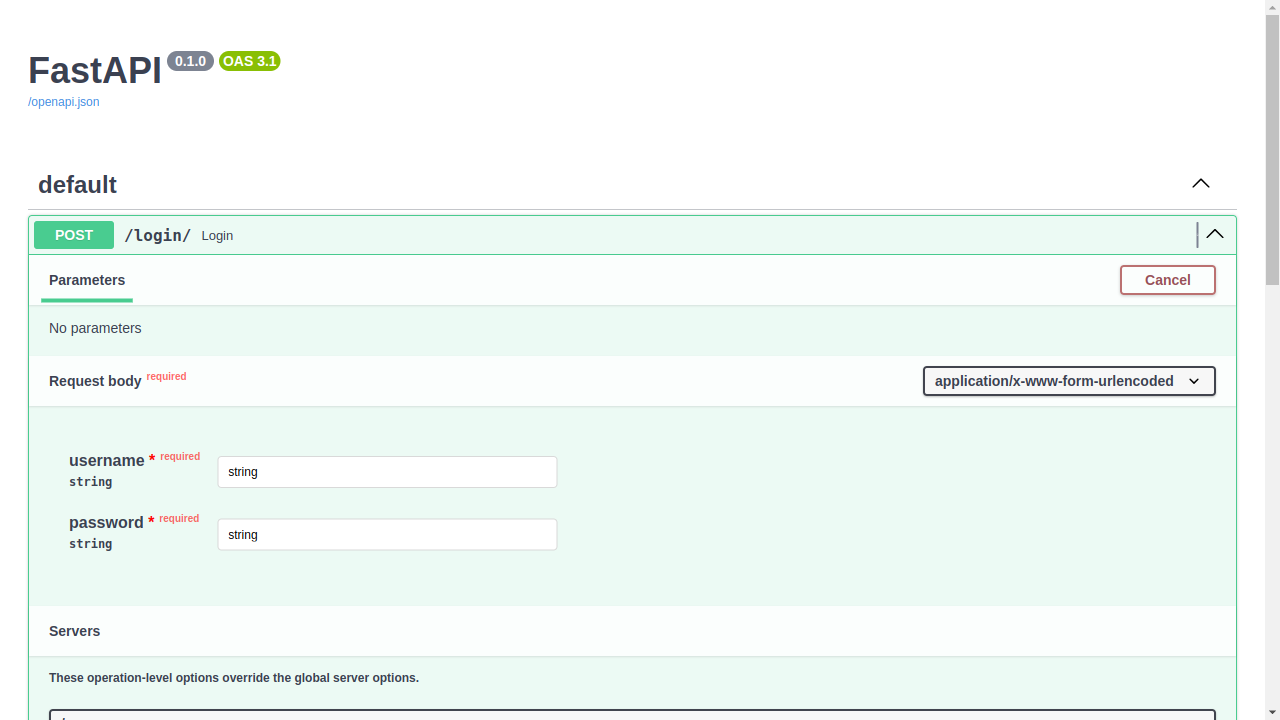
추가 폼 필드 금지하기
일부 특별한 사용 사례(아마도 흔하지는 않겠지만)에서는 Pydantic 모델에서 선언된 폼 필드로만 제한하길 원할 수도 있습니다. 그리고 추가 필드를 금지할 수도 있습니다.
참고
이 기능은 FastAPI 버전 0.114.0 이후부터 지원됩니다. 🤓
Pydantic의 모델 구성을 사용하여 extra 필드를 forbid할 수 있습니다:
from typing import Annotated

from fastapi import FastAPI, Form
from pydantic import BaseModel

app = FastAPI()


class FormData(BaseModel):
    username: str
    password: str
    model_config = {"extra": "forbid"}


@app.post("/login/")
async def login(data: Annotated[FormData, Form()]):
    return data
🤓 Other versions and variants
Tip
Prefer to use the Annotated version if possible.
from fastapi import FastAPI, Form
from pydantic import BaseModel

app = FastAPI()


class FormData(BaseModel):
    username: str
    password: str
    model_config = {"extra": "forbid"}


@app.post("/login/")
async def login(data: FormData = Form()):
    return data
클라이언트가 추가 데이터를 보내려고 하면 오류 응답을 받게 됩니다.
예를 들어, 클라이언트가 폼 필드를 보내려고 하면:
username:Rickpassword:Portal Gunextra:Mr. Poopybutthole
extra 필드가 허용되지 않는다는 오류 응답을 받게 됩니다:
{
    "detail": [
        {
            "type": "extra_forbidden",
            "loc": ["body", "extra"],
            "msg": "Extra inputs are not permitted",
            "input": "Mr. Poopybutthole"
        }
    ]
}
폼 모델 조합하기
여러 폼 모델을 개별 Form 매개변수와 함께 사용할 수 있습니다.
from typing import Annotated

from fastapi import FastAPI, Form
from pydantic import BaseModel

app = FastAPI()


class Profile(BaseModel):
    name: str


class Preferences(BaseModel):
    tags: list[str] = []


@app.post("/profiles/")
async def create_profile(
    profile: Annotated[Profile, Form()],
    preferences: Annotated[Preferences, Form()],
    token: Annotated[str, Form()],
):
    return {"profile": profile, "preferences": preferences, "token": token}
🤓 Other versions and variants
Tip
Prefer to use the Annotated version if possible.
from fastapi import FastAPI, Form
from pydantic import BaseModel

app = FastAPI()


class Profile(BaseModel):
    name: str


class Preferences(BaseModel):
    tags: list[str] = []


@app.post("/profiles/")
async def create_profile(
    profile: Profile = Form(),
    preferences: Preferences = Form(),
    token: str = Form(),
):
    return {"profile": profile, "preferences": preferences, "token": token}
클라이언트는 name, tags, token을 폼 필드로 전송합니다. 각 모델은 폼 필드를 독립적으로 검증합니다.
각 모델의 extra 설정은 다른 매개변수나 의존성에 선언된 필드와 파일을 포함하여 모든 폼 필드에 적용됩니다. extra="forbid"이면 해당 모델에 없는 필드는 모두 거부됩니다. extra="allow"이면 이러한 필드는 모델의 추가 필드로 포함됩니다.
여러 선언이 같은 폼 필드 이름을 사용하면, 각각 해당 필드의 값을 검증합니다. OpenAPI 스키마에서 일관되게 설명할 수 있도록 공유 필드에는 호환되는 타입과 제약 조건을 사용하세요.
선택적 폼 모델
폼 필드 그룹을 선택적으로 만들려면, 모델에 | None을 사용하고 기본값을 None으로 선언하세요.
from typing import Annotated

from fastapi import FastAPI, Form
from pydantic import BaseModel

app = FastAPI()


class Profile(BaseModel):
    name: str
    age: int


@app.post("/profiles/")
async def create_profile(
    token: Annotated[str, Form()],
    profile: Annotated[Profile | None, Form()] = None,
):
    return {"token": token, "profile": profile}
🤓 Other versions and variants
Tip
Prefer to use the Annotated version if possible.
from fastapi import FastAPI, Form
from pydantic import BaseModel

app = FastAPI()


class Profile(BaseModel):
    name: str
    age: int


@app.post("/profiles/")
async def create_profile(
    token: str = Form(),
    profile: Profile | None = Form(default=None),
):
    return {"token": token, "profile": profile}
name과 age가 모두 전송되지 않으면 profile은 None입니다. 둘 중 하나라도 전송되면 FastAPI는 모델을 검증하며 두 필드를 모두 요구합니다. 빈 값을 전송해도 해당 필드를 제공한 것으로 간주됩니다.
기본값 없이 | None만 사용하면 매개변수는 여전히 필수입니다.
추가 필드는 모델의 extra 설정을 따릅니다. 무시되는 추가 필드만으로는 모델이 제공된 것으로 간주하지 않습니다.
선택적 모델에 선택하지 않은 체크박스만 있으면 해당 모델은 생략됩니다. 명시적으로 제공하려면 enabled=false 같은 값을 전송하세요.
폼 모델의 선택적 유니온
모델들의 선택적 유니온을 사용할 수도 있습니다.
from typing import Annotated, Literal

from fastapi import FastAPI, Form
from pydantic import BaseModel

app = FastAPI()


class Person(BaseModel):
    kind: Literal["person"]
    name: str


class Company(BaseModel):
    kind: Literal["company"]
    company_name: str


@app.post("/contacts/")
async def create_contact(
    contact: Annotated[Person | Company | None, Form(discriminator="kind")] = None,
):
    return contact
🤓 Other versions and variants
Tip
Prefer to use the Annotated version if possible.
from typing import Literal

from fastapi import FastAPI, Form
from pydantic import BaseModel

app = FastAPI()


class Person(BaseModel):
    kind: Literal["person"]
    name: str


class Company(BaseModel):
    kind: Literal["company"]
    company_name: str


@app.post("/contacts/")
async def create_contact(
    contact: Person | Company | None = Form(default=None, discriminator="kind"),
):
    return contact
폼 필드가 전송되지 않으면 contact는 None입니다. kind=person과 name을 함께 보내거나, kind=company와 company_name을 함께 보내세요. 판별자(discriminator)가 검증할 모델을 선택합니다.
폼 모델 유니온 조합하기
유니온을 다른 폼 모델, 개별 Form 매개변수, File 매개변수와 함께 사용할 수 있습니다. 각 유니온은 독립적으로 검증됩니다.
from typing import Annotated, Literal

from fastapi import FastAPI, Form
from pydantic import BaseModel

app = FastAPI()


class Person(BaseModel):
    contact_type: Literal["person"]
    name: str


class Company(BaseModel):
    contact_type: Literal["company"]
    company_name: str


class Email(BaseModel):
    notification_type: Literal["email"]
    email: str


class SMS(BaseModel):
    notification_type: Literal["sms"]
    phone: str


@app.post("/contacts/")
async def create_contact(
    contact: Annotated[Person | Company, Form(discriminator="contact_type")],
    token: Annotated[str, Form()],
    notification: Annotated[
        Email | SMS | None, Form(discriminator="notification_type")
    ] = None,
):
    return {"contact": contact, "notification": notification, "token": token}
🤓 Other versions and variants
Tip
Prefer to use the Annotated version if possible.
from typing import Literal

from fastapi import FastAPI, Form
from pydantic import BaseModel

app = FastAPI()


class Person(BaseModel):
    contact_type: Literal["person"]
    name: str


class Company(BaseModel):
    contact_type: Literal["company"]
    company_name: str


class Email(BaseModel):
    notification_type: Literal["email"]
    email: str


class SMS(BaseModel):
    notification_type: Literal["sms"]
    phone: str


@app.post("/contacts/")
async def create_contact(
    contact: Person | Company = Form(discriminator="contact_type"),
    token: str = Form(),
    notification: Email | SMS | None = Form(
        default=None, discriminator="notification_type"
    ),
):
    return {"contact": contact, "notification": notification, "token": token}
모든 필드를 같은 폼에 담아 전송하세요. 예를 들어, contact_type=person, name=Rick, notification_type=email, email=rick@example.com, token=secret을 전송합니다.
notification을 None으로 두려면 알림 관련 필드를 생략하세요.
폼 모델과 파일
폼 모델을 파일 매개변수와 함께 사용할 수도 있습니다.
from typing import Annotated

from fastapi import FastAPI, Form, UploadFile
from pydantic import BaseModel

app = FastAPI()


class Profile(BaseModel):
    name: str


@app.post("/profiles/")
async def create_profile(profile: Annotated[Profile, Form()], avatar: UploadFile):
    return {"profile": profile, "filename": avatar.filename}
🤓 Other versions and variants
Tip
Prefer to use the Annotated version if possible.
from fastapi import FastAPI, File, Form, UploadFile
from pydantic import BaseModel

app = FastAPI()


class Profile(BaseModel):
    name: str


@app.post("/profiles/")
async def create_profile(profile: Profile = Form(), avatar: UploadFile = File()):
    return {"profile": profile, "filename": avatar.filename}
여기서 클라이언트는 multipart/form-data를 사용하여 name 필드와 avatar 파일을 전송합니다.
요약
Pydantic 모델을 사용하여 FastAPI에서 폼 필드를 선언할 수 있습니다. 😎